


HangHanah
Youtube Master Race
- 23/4/19
- 43
- 11
[Tutorial] GRaphics Rules Maker (Để Fix Card Đồ Hoạ TS2 Có Card Màn Hình Rời)
Mình góp bài này để cho các bạn nào có máy mạnh muốn trở về chơi The Sims 2 hoặc Sims City 4 để fix đồ hoạ do cái card của mình xài trong CPU.
Thì cái bài này sẽ có hữu ích cho các bạn, nếu có time mình sẽ dịch cho do thời gian không cho phép nên không dịch được mong mọi người thông cảm cho nha.
Hy vọng mọi người sẽ fix được lỗi chúc các bạn fix thành công nha

So you got a fancy new PC and would very much like to play the slightly older Sims 2 game on it. You're running an up-to-date Windows version, got a Full HD monitor and... the game just looks horrendous and the resolution won't go beyond 1600x1200. Surely the game can do better than that?
The answer is: yes it can. But until now it required messing about with configuration files of the game, which is not the most convenient way to get things fixed. This guide will not explain that; instead, we present you with a tool that does all the work for you.
1 December 2014: New version 1.1.0!
Download Now!
22 May 2018: Testers wanted for new versions!
Read below!
Introducing: Graphics Rules MakerDownload Now!
22 May 2018: Testers wanted for new versions!
Read below!
Fixing your game is simple. Follow these steps to fix your game:
 Download Graphics Rules maker. No Spyware, adware etc!
- Run the installer and follow its instructions
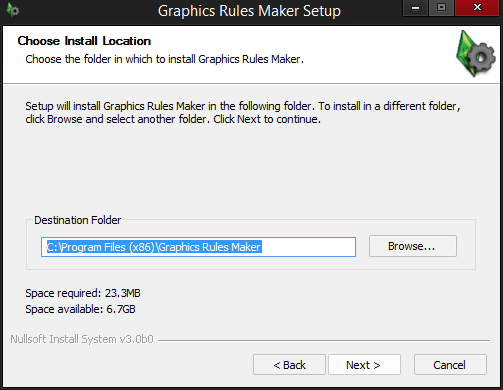
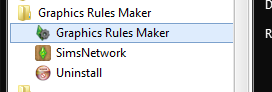
Start the application from the start menu (or directly from the installer).
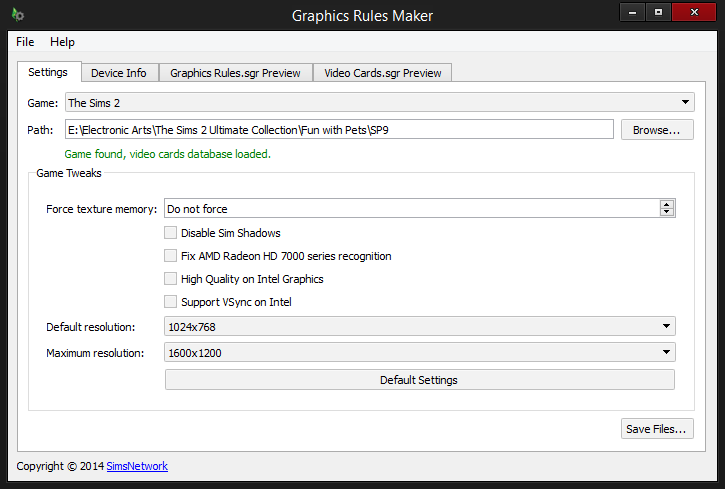
The application will try to locate your game. If it doesn't work, locate the game installation before continuing, by clicking the Browse button.
Apply the tweaks you want/need. Every tweak has a brief description as tooltip.
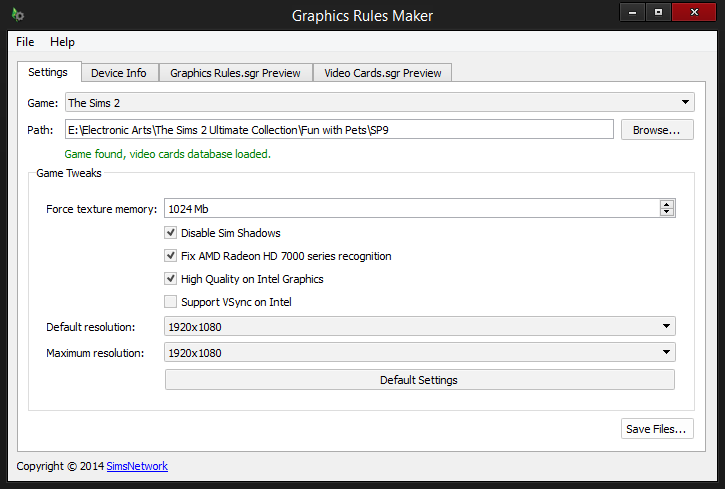
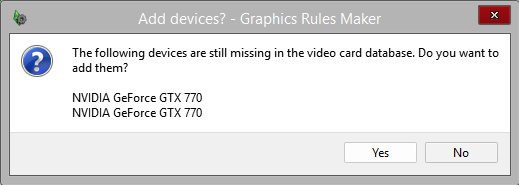
Save the files. This may ask you to add your graphics card to the game's database.
Launch the game and see if everything works as expected.
Download Graphics Rules maker 1.90.0.- Try one or more of the new features.
- Leave feedback! You can either report an issue, leave a comment below, or get in touch via Twitter (@tszcheetah). Suggestions, bug reports, crash reports etc are all very welcome!
Thank you for the help!
[paste:font size="4"]Sims 2 Tweaks
Force texture memory
This overrides texture memory detection. If the game runs in extremely low quality with most graphical options disabled and whatnot, it might be best to override it. For high quality graphics, set this to 128 Mb or higher. Better yet: check the Device Info tab for the Texture Memory value and set it to the value listed there.
Disable Sim Shadows
This removes all shadows of Sims and Pets. If you see large black rectangle's at their feet in the game, apply this tweak to remove them.
Fix Radeon HD 7000 series recognition
If your card is one in the Radeon HD 7000 series, apply this tweak. It will make the game distinguish the (modern) Radeon HD 7000 series and the older Radeon 7000 series better, allowing higher quality graphics for the HD editions.
High Quality on Intel Graphics
The game normally disables some features on most Intel cards. If you have a modern Intel card, apply this tweak to keep those features enabled. May cause performance problems if your graphics card is not powerful enough!
Support VSync on Intel
VSync is disabled by default on Intel graphics cards, to avoid a flickering UI. If you experience flickering graphics in your game, toggling this setting may help.
Default/Maximum resolution
These allow you to increase the maximum resolution (as supported by your system) of the game. On modern systems you may want to set this to the highest resolution available (lowest in the list). Note that a high resolution may cause performance problems! The default resolution only applies when you first start the game (or if you remove your save game from the Documents folder). You'll probably need to apply the resolution through the in-game settings.
SimCity Tweaks
Fix Radeon HD 7000 series recognition
If your card is one in the Radeon HD 7000 series, apply this tweak. It will make the game distinguish the (modern) Radeon HD 7000 series and the older Radeon 7000 series better, allowing higher quality graphics for the HD editions.
Force card as fast graphics card
Adds a wildcard match for any graphics card as fast cards, enabling highest quality settings. Only some old GeForce cards are explicitly excluded. Use this if you do not get all the high quality graphics in your game, such as shadows, fog etc. Note that your CPU speed and memory may still influence this setting.
Force high quality settings
Forces all settings to be available in hardware rendering mode, regardless of the detected capabilities of your card. In particular, this means you get: high cars/sims detail, high quality shadows, clouds, fog and waves on, translucency on, colored cursor, maximum screen size and 32 bit colors. This may cause performance problems, so use with care!
Version History
1.1.0 - 1 December 2014
- Improved support for Windows Vista and later (WDDM drivers)
- SimCity 4 Plugin added
- Dutch translation added
- Installer will now ask to uninstall prior to reinstalling
- First version
- Sims 2 Supported
The Graphics Rules Maker comes with no warranty whatsoever. If your game doesn't run after this, restore the back-up files or reinstall the game. Also, none of the available tweaks are guaranteed to actually fix your game.
Please contact us if you experience problems with the tool, find any bugs, etc. (Twitter: @tszcheetah). You are also welcome to contribute to it through the project page (the source code is also available through there).
Support for other games may be added in the future.
Nguồn :https://www.simsnetwork.com/tools/graphics-rules-maker#testerswanted


