phananhtom
Dragon Quest
- 4/9/10
- 1,259
- 1,154
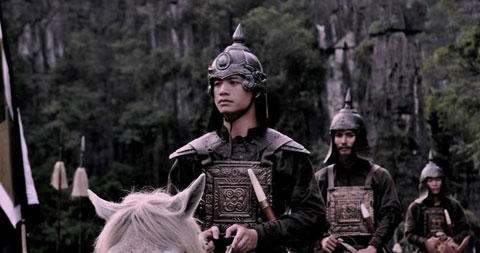
Đây là bản test thử mod lính ĐV của mình, gồm 10 lính mới:
Lưu ý: Các loại lính mới sẽ xuất hiện dần trong các post sau nên phiền các bạn kiên nhẫn theo dõi, nếu không có thể dùng tạm hàng fantasy ở trang 1.
DaiViet Peasants (cầm gậy tre đánh nhau)

DaiViet spearmen:

DaiViet Swordmen:

DaiViet Archers:

DaiViet Calvary:

DaiViet Heavy Spearmen:

DaiViet Bodyguards(mounted & dismounted):


DaiViet Bodyguards upgrade (mounted & dismounted):


DaiViet General:

+DaiViet standard (officer cầm cờ ngũ sắc)
+Unit cards
Link:
http://www.megaupload.com/?d=S6L8OXHV
Các bạn cũng có thể thử submod của bác nhinhonhinho ở trang sau: http://forum.gamevn.com/showthread.php?785186-Sub-mod-for-RTW-xgm-quot-The-DVWEA-s-invasion-quot
Down về rồi thì làm theo guide sau để add lính vô game. athenian late hoplite là 1 ví dụ. Các bạn làm tương tự với các lính khác:
[spoil]How to install the units.
Note: I will use the Athenian Late Hoplite as example.
Note#2: this install instructions refer to the text files from vanilla RTW v1.5. In general it is the same with mods too, but some of them change the path where they have the graphic or even text files installed. Other then that, the same rules apply.
Note#3: this guide will tell you how to install the units using as example one of them. It is not a guide that contains the needed text for each and every unit in the pack. It is supposed to teach you how to do that so you`ll be able to do it on your own later.
Table of contents:
I.Decompress the pack--------------------------------- -------------------- page 1
II.Placing the units in the right location----------------------------------- page 1
III.Editing the text files---------------------------------------------starts on page 2
Editing export_units------------------------------------------page 2
Editing export_descr_unit_enums--------------------------page 3
Editing export_descr_unit-----------------------------------page 3
Editing descr_model_battle---------------------------------page 5
Editing export_descr_buildings----------------------------page 6
IV.Making units available only in certain regions------------------------ page 8
V.Making units recruitable only after the reforms----------------------- page 8
VI.Making sprites for the units---------------------------------------------- page 9
VII.Adding sounds for the new added units-------------------------------- page 10
VIII.Adding the unit cards----------------------------------------------------- page 11
I. Decompress the pack
It`s a rar archive. You will notice that inside all the units have their own folder named after them and there is also a unit card folder that has the unit card for all of them.
II. Placing the unit files in the right location
You will notice that in the folder for the Athenian Late Hoplite there are 3 files. One is a JPG picture of it. That has is just for show, it has nothing to do with the install. The other two are:
Athenian_Hoplite_Late.cas
Athenian_Hoplite_Late.tga.dds
The .cas one is the model, the 3d part of the unit.
The .tga.dds one is the texture, the 2d part that covers the model and is responsible for the colors, face and so one.
You need to place the .cas file in this location:
Rome – Total War/data/models_unit
The .tga.dds file you need to place in this location:
Rome – Total War/data/models_unit/textures
Note: the texture folder do not exist there by default so you will have to create a new folder named textures inside Rome – Total War/data/models_unit
III. Editing the text files
The files being placed in their right location you need to edit the following text files:
Export_descr_unit - it is the one where the unit stats are mentioned
Export_descr_unit_enums - link the unit to the description and unit cards
Descr_model_battle – the file where the graphic aspect(texture, model and sprites) is defined
Export_units - the file where the unit description is.
Export_descr_buildings - the file where you make the unit recruitable.
Editing export_units
The file is located here:
Rome – Total War/data/text
It is a text file that you can open with notepad. This goes for all the other ones too.
If you want to modify one of the existing units do a search in the file for the name that the unit has in game. For example hoplites. You will find this entry:
{greek_hoplite} Hoplites
{greek_hoplite_descr}
Hardy\nSapping Ability\nCan Form Phalanx\n\nThe basis of nearly all military power in Greece once revolved around the hoplite. {...snip…}which doubles as a weapon if the pike shaft breaks.
{greek_hoplite_descr_short}
Hoplites are well equipped infantry that are most effective in the formidable, if slightly inflexible, phalanx formation.
¬----------------
Now, the one in blue is the name that appears in game. It has little relevance and as the description text it is cosmetic and you can change it to whatever you want. Don`t make it too long though or it will look bad in recruiting panels.
The ones in red are the lines that matter. They link the unit to its description and the unit cards. If you are simple modifying an existing unit you should leave those alone as they do not show up in game anyway.
If you want to add a unit without replacing an existing one you should copy the whole text as it is bellow and place it at the end of the text file. Then it is important that you modify the red lines if you want the new unit to have a new description and new unit cards. For example:
{athenian_hoplite_late} Late Athenian Hoplites
{athenian_hoplite_late_descr}
Hardy\nSapping Ability\nCan Form Phalanx\n\nThe basis of nearly all military power in Greece once revolved around the hoplite. {...snip…}which doubles as a weapon if the pike shaft breaks.
{athenian_hoplite_late _ descr _short}
Hoplites are well equipped infantry that are most effective in the formidable, if slightly inflexible, phalanx formation.
¬----------------
Note that you should not remove the existing brackets and the second line should end in _descr and the third in _descr_short
The text that fallows after the brackets with the _descr part is the text that appears when you right click the unit and you get the unit panel.
The text that fallows after the brackets with the _descr_short part is the short text that appears when you put your mouse on the unit in recruiting panels for example.
Editing Export_descr_unit_enums
Those red lines from export_units you need to place in the file export_descr_unit_enums.
The file is in this location:
Rome – Total War/data
Open it and at the end of the file add this according to our example:
athenian_hoplite_late
athenian_hoplite_late _descr
athenian_hoplite_late _descr_short
You need to leave one empty line between the previous group and the new one.
Editing export_descr_unit
The file is in this location:
Rome – Total War/data
This is where the unit stats are designated and a number of other things that relate to other text files. To change the unit stats you can consult the explanations at the beginning of the file. They tell you what those numbers stand for.
Now, to include a new unit you can use one of the already existing entries there. For example the one for the RTW greek hoplite since it is a similar unit. To find it you need to do a search for what was in the brackets in export_units. For example:
{greek_hoplite} Hoplites
You will find this entry:
type greek hoplite
dictionary greek_hoplite ; Hoplites
category infantry
class spearmen
voice_type Medium_1
soldier greek_hoplite, 40, 0, 1
attributes sea_faring, hide_forest, can_sap
formation 1, 1, 2, 2, 5, square, phalanx
stat_health 1, 0
stat_pri 7, 3, no, 0, 0, melee, simple, piercing, spear, 25 ,1
stat_pri_attr spear, spear_bonus_8
stat_sec 5, 2, no, 0, 0, melee, simple, piercing, sword, 25 ,1
stat_sec_attr no
stat_pri_armour 6, 5, 5, leather
stat_sec_armour 0, 0, flesh
stat_heat 3
stat_ground 2, 0, 0, 0
stat_mental 4, normal, highly_trained
stat_charge_dist 30
stat_fire_delay 0
stat_food 60, 300
stat_cost 1, 440, 170, 50, 70, 440
ownership greek_cities, slave
Copy all this and place it at the end of the file leaving two empty lines between it and the previous one.
Now, you will need to change a few things for the new unit. These are the necessary ones. The stats you can change as you want later.
First of all you need to change the entry`s title because you can`t have two entries named the same or you will get a CTD. So change this part:
type greek hoplite
to this:
type athenian late hoplite
Secondly, if you need to change the unit`s dictionary entry(the one that links to export_units). Change this line:
dictionary greek_hoplite ; Hoplites
to this:
dictionary athenian_late_hoplite ; Hoplites
Note: the sign ; is used to hide what follows after it from the game`s engine. So Hoplites in the example above will not be read. This means that you can change that to Athenian Hoplites or whatever, but you can just leave it as it is.
Thirdly you need to change the unit`s aspect. Better said the entry that links to descr_model_battle. So change this line:
soldier greek_hoplite, 40, 0, 1
to this:
soldier athenian_late_hoplite, 40, 0, 1
Now, if you want to give the unit to another country you need to edit the ownership:
ownership greek_cities, slave
Currently it is being recruited by the greek cities and the rebels. Here is a list of the factions`s internal names which you can add there in the format shown.
romans_julii
romans_brutii
romans_scipii
romans_senate
egypt
seleucid
carthage
parthia
gauls
germans
britons
greek_cities
macedon
pontus
armenia
dacia
numidia
scythia
spain
thrace
slave
I presume they are self explanatory.
Editing Descr_model_battle.
This is where you define what graphics the unit will use. The file is located in this location:
Rome – Total War/data
To add a new unit you can copy and then modify one of the existing entries. Again, it is handy to use the entry for the RTW greek hoplite as you did in export_descr_unit.
So, open the file and do a search for what was in export_descr_unit next to the soldier entry. For example:
soldier greek_hoplite, 40, 0, 1
You will find this entry:
type greek_hoplite
skeleton fs_spearman, fs_swordsman ; combat spear
indiv_range 40
texture slave, data/models_unit/textures/unit_greek_hoplite_slave.tga
texture greek_cities, data/models_unit/textures/unit_greek_hoplite_greek.tga
model_flexi data/models_unit/unit_greek_hoplite_high.cas, 15
model_flexi data/models_unit/unit_greek_hoplite_med.cas, 30
model_flexi data/models_unit/unit_greek_hoplite_low.cas, 40
model_flexi data/models_unit/unit_greek_hoplite_lowest.cas, max
model_sprite slave, 60.0, data/sprites/slave_greek_hoplite_sprite.spr
model_sprite greek_cities, 60.0, data/sprites/greek_cities_greek_hoplite_sprite.spr
model_tri 400, 0.5f, 0.5f, 0.5f
The texture entry is where you designate the texture used. Namely
Athenian_Hoplite_Late.tga.dds
In our example. The textures are designated based on faction ownership(with a special mention for mercenaries that will be made bellow). So, you need to have the wanted faction set in the unit ownership in export_descr_unit and again, here, in front of the texture.
The model (model_flexi) is not designated based on faction and will be used by all of them on this entry. So, while you can have different textures for each faction(different colors and such in game) you will only have one model. The model is in our example:
Athenian_Hoplite_Late.cas
The sprites (model_sprite) are the 2d images that you see when you zoom out from the unit. They replace the image of the 3d model so as to increase performance in game. The units in this pack do not have sprites, but I`ll show you bellow how to make them. It`s a fairly easy process.
You will notice that those lines contain the path for the files and some other stats. You need to leave those alone and just change the name of the graphic files. Like this:
type athenian_late_hoplite
skeleton fs_spearman, fs_swordsman ; combat spear
indiv_range 40
texture slave, data/models_unit/textures/Athenian_Hoplite_Late.tga
texture greek_cities, data/models_unit/textures/Athenian_Hoplite_Late.tga
model_flexi data/models_unit/Athenian_Hoplite_Late.cas, 15
model_flexi data/models_unit/Athenian_Hoplite_Late.cas, 30
model_flexi data/models_unit/Athenian_Hoplite_Late.cas, 40
model_flexi data/models_unit/Athenian_Hoplite_Late.cas, max
model_sprite slave, 60.0, data/sprites/athenian_late_hoplite_sprite.scr
model_sprite greek_cities, 60.0, data/sprites/athenian_late_hoplite_sprite.scr
model_tri 400, 0.5f, 0.5f, 0.5f
Note that I have changed the title of the entry(to athenian_late_hoplite) so that it will match with the soldier entry in export_descr_unit. As in export_descr_unit you can not have more then one entry with the same name.
Also, note that for the entry of the texture you need to not mention the .dds that is at the end in the name of the graphic file or it will CTD. It needs to end in .tga as in the example above.
The changing of the sprites I will explain bellow.
Editing Export_descr_buildings
This file is where you make the units recruitable by the desired faction from the desired building. You can also define a specific region for a unit so that it will only be available for recruitment there. This I will show you in a chapter bellow.
The file in this location:
Rome – Total War/data
If you`ve just replaced one of the already existing units then you can leave this file as it is and you`ll have that unit recruitable as it was before. If you have added a new unit then you will need to add recruiting lines for it. Open the file. You will see that you have a line that looks like this:
levels governors_house governors_villa governors_palace proconsuls_palace imperial_palace
Those are all the government buildings as they are upgraded and then you will have them detailed with the basic units they allow. If you want your unit to be recruited form the government buildings you can add it here, but in vanilla these were only for the peasant units. For a hoplite you need to go to the barracks. These are the levels:
levels muster_field militia_barracks city_barracks army_barracks royal_barracks
You will need to add your unit under the ones where you want it to be available. One thing first. The line above is the order in which they are upgraded. So, if you add your unit to be available with the second level of barracks be sure to add it to the following levels too or it will disappear once you have upgraded your barracks. In this case you can use the example of the RTW greek hoplites:
militia_barracks requires factions { barbarian, carthaginian, eastern, parthia, egyptian, greek, roman, }
{
capability
{
recruit "carthaginian city militia" 0 requires factions { spain, }
recruit "carthaginian infantry" 0 requires factions { spain, }
recruit "barb infantry briton" 0 requires factions { britons, }
recruit "barb infantry dacian" 0 requires factions { dacia, }
recruit "barb infantry gaul" 0 requires factions { gauls, }
recruit "warband spear german" 0 requires factions { germans, }
recruit "barb horse archers scythian" 0 requires factions { scythia, }
recruit "warband sword briton" 0 requires factions { britons, }
recruit "warband sword gaul" 0 requires factions { gauls, }
recruit "warband axe german" 0 requires factions { germans, }
recruit "warband axe scythian" 0 requires factions { scythia, }
recruit "warband falx dacian" 0 requires factions { dacia, }
recruit "carthaginian city militia" 0 requires factions { carthage, }
recruit "numidian javelinmen" 0 requires factions { numidia, }
recruit "carthaginian infantry" 0 requires factions { carthage, }
recruit "numidian desert warriors" 0 requires factions { numidia, }
recruit "east hillmen" 0 requires factions { eastern, }
recruit "east infantry" 0 requires factions { eastern, }
recruit "egyptian nubian spearmen" 0 requires factions { egyptian, }
recruit "egyptian nile infantry" 0 requires factions { egyptian, }
recruit "greek hoplite militia" 0 requires factions { greek, }
recruit "greek levy pikemen" 0 requires factions { seleucid, macedon, }
recruit "warband falx thracian" 0 requires factions { thrace, }
recruit "greek hoplite" 0 requires factions { greek_cities, }
recruit "roman city militia" 0 requires factions { roman, }
recruit "roman hastati" 0 requires factions { roman, } and not marian_reforms
recruit "roman infantry auxillia" 0 requires factions { roman, } and marian_reforms
}
So, you just copy this line and add it under it. You then adjust it with the new unit` name so it will look like this:
recruit "athenian late hoplite" 0 requires factions { greek_cities, }
Place this under the line for the greek hoplite.
Note:
athenian late hoplite is the one the type entry from export_descr_unit has.
0 stands for the experience with which the unit is recruited. If you want it to be recruited with experience you can increase that.
greek_cities is the faction ownership. The faction that can recruit this unit. You can add more then one, but be sure not to lose that comma after the name.
[/spoil]
Lưu ý: Các loại lính mới sẽ xuất hiện dần trong các post sau nên phiền các bạn kiên nhẫn theo dõi, nếu không có thể dùng tạm hàng fantasy ở trang 1.
DaiViet Peasants (cầm gậy tre đánh nhau)
DaiViet spearmen:
DaiViet Swordmen:
DaiViet Archers:
DaiViet Calvary:
DaiViet Heavy Spearmen:
DaiViet Bodyguards(mounted & dismounted):
DaiViet Bodyguards upgrade (mounted & dismounted):
DaiViet General:
+DaiViet standard (officer cầm cờ ngũ sắc)
+Unit cards
Link:
http://www.megaupload.com/?d=S6L8OXHV
Các bạn cũng có thể thử submod của bác nhinhonhinho ở trang sau: http://forum.gamevn.com/showthread.php?785186-Sub-mod-for-RTW-xgm-quot-The-DVWEA-s-invasion-quot
Down về rồi thì làm theo guide sau để add lính vô game. athenian late hoplite là 1 ví dụ. Các bạn làm tương tự với các lính khác:
[spoil]How to install the units.
Note: I will use the Athenian Late Hoplite as example.
Note#2: this install instructions refer to the text files from vanilla RTW v1.5. In general it is the same with mods too, but some of them change the path where they have the graphic or even text files installed. Other then that, the same rules apply.
Note#3: this guide will tell you how to install the units using as example one of them. It is not a guide that contains the needed text for each and every unit in the pack. It is supposed to teach you how to do that so you`ll be able to do it on your own later.
Table of contents:
I.Decompress the pack--------------------------------- -------------------- page 1
II.Placing the units in the right location----------------------------------- page 1
III.Editing the text files---------------------------------------------starts on page 2
Editing export_units------------------------------------------page 2
Editing export_descr_unit_enums--------------------------page 3
Editing export_descr_unit-----------------------------------page 3
Editing descr_model_battle---------------------------------page 5
Editing export_descr_buildings----------------------------page 6
IV.Making units available only in certain regions------------------------ page 8
V.Making units recruitable only after the reforms----------------------- page 8
VI.Making sprites for the units---------------------------------------------- page 9
VII.Adding sounds for the new added units-------------------------------- page 10
VIII.Adding the unit cards----------------------------------------------------- page 11
I. Decompress the pack
It`s a rar archive. You will notice that inside all the units have their own folder named after them and there is also a unit card folder that has the unit card for all of them.
II. Placing the unit files in the right location
You will notice that in the folder for the Athenian Late Hoplite there are 3 files. One is a JPG picture of it. That has is just for show, it has nothing to do with the install. The other two are:
Athenian_Hoplite_Late.cas
Athenian_Hoplite_Late.tga.dds
The .cas one is the model, the 3d part of the unit.
The .tga.dds one is the texture, the 2d part that covers the model and is responsible for the colors, face and so one.
You need to place the .cas file in this location:
Rome – Total War/data/models_unit
The .tga.dds file you need to place in this location:
Rome – Total War/data/models_unit/textures
Note: the texture folder do not exist there by default so you will have to create a new folder named textures inside Rome – Total War/data/models_unit
III. Editing the text files
The files being placed in their right location you need to edit the following text files:
Export_descr_unit - it is the one where the unit stats are mentioned
Export_descr_unit_enums - link the unit to the description and unit cards
Descr_model_battle – the file where the graphic aspect(texture, model and sprites) is defined
Export_units - the file where the unit description is.
Export_descr_buildings - the file where you make the unit recruitable.
Editing export_units
The file is located here:
Rome – Total War/data/text
It is a text file that you can open with notepad. This goes for all the other ones too.
If you want to modify one of the existing units do a search in the file for the name that the unit has in game. For example hoplites. You will find this entry:
{greek_hoplite} Hoplites
{greek_hoplite_descr}
Hardy\nSapping Ability\nCan Form Phalanx\n\nThe basis of nearly all military power in Greece once revolved around the hoplite. {...snip…}which doubles as a weapon if the pike shaft breaks.
{greek_hoplite_descr_short}
Hoplites are well equipped infantry that are most effective in the formidable, if slightly inflexible, phalanx formation.
¬----------------
Now, the one in blue is the name that appears in game. It has little relevance and as the description text it is cosmetic and you can change it to whatever you want. Don`t make it too long though or it will look bad in recruiting panels.
The ones in red are the lines that matter. They link the unit to its description and the unit cards. If you are simple modifying an existing unit you should leave those alone as they do not show up in game anyway.
If you want to add a unit without replacing an existing one you should copy the whole text as it is bellow and place it at the end of the text file. Then it is important that you modify the red lines if you want the new unit to have a new description and new unit cards. For example:
{athenian_hoplite_late} Late Athenian Hoplites
{athenian_hoplite_late_descr}
Hardy\nSapping Ability\nCan Form Phalanx\n\nThe basis of nearly all military power in Greece once revolved around the hoplite. {...snip…}which doubles as a weapon if the pike shaft breaks.
{athenian_hoplite_late _ descr _short}
Hoplites are well equipped infantry that are most effective in the formidable, if slightly inflexible, phalanx formation.
¬----------------
Note that you should not remove the existing brackets and the second line should end in _descr and the third in _descr_short
The text that fallows after the brackets with the _descr part is the text that appears when you right click the unit and you get the unit panel.
The text that fallows after the brackets with the _descr_short part is the short text that appears when you put your mouse on the unit in recruiting panels for example.
Editing Export_descr_unit_enums
Those red lines from export_units you need to place in the file export_descr_unit_enums.
The file is in this location:
Rome – Total War/data
Open it and at the end of the file add this according to our example:
athenian_hoplite_late
athenian_hoplite_late _descr
athenian_hoplite_late _descr_short
You need to leave one empty line between the previous group and the new one.
Editing export_descr_unit
The file is in this location:
Rome – Total War/data
This is where the unit stats are designated and a number of other things that relate to other text files. To change the unit stats you can consult the explanations at the beginning of the file. They tell you what those numbers stand for.
Now, to include a new unit you can use one of the already existing entries there. For example the one for the RTW greek hoplite since it is a similar unit. To find it you need to do a search for what was in the brackets in export_units. For example:
{greek_hoplite} Hoplites
You will find this entry:
type greek hoplite
dictionary greek_hoplite ; Hoplites
category infantry
class spearmen
voice_type Medium_1
soldier greek_hoplite, 40, 0, 1
attributes sea_faring, hide_forest, can_sap
formation 1, 1, 2, 2, 5, square, phalanx
stat_health 1, 0
stat_pri 7, 3, no, 0, 0, melee, simple, piercing, spear, 25 ,1
stat_pri_attr spear, spear_bonus_8
stat_sec 5, 2, no, 0, 0, melee, simple, piercing, sword, 25 ,1
stat_sec_attr no
stat_pri_armour 6, 5, 5, leather
stat_sec_armour 0, 0, flesh
stat_heat 3
stat_ground 2, 0, 0, 0
stat_mental 4, normal, highly_trained
stat_charge_dist 30
stat_fire_delay 0
stat_food 60, 300
stat_cost 1, 440, 170, 50, 70, 440
ownership greek_cities, slave
Copy all this and place it at the end of the file leaving two empty lines between it and the previous one.
Now, you will need to change a few things for the new unit. These are the necessary ones. The stats you can change as you want later.
First of all you need to change the entry`s title because you can`t have two entries named the same or you will get a CTD. So change this part:
type greek hoplite
to this:
type athenian late hoplite
Secondly, if you need to change the unit`s dictionary entry(the one that links to export_units). Change this line:
dictionary greek_hoplite ; Hoplites
to this:
dictionary athenian_late_hoplite ; Hoplites
Note: the sign ; is used to hide what follows after it from the game`s engine. So Hoplites in the example above will not be read. This means that you can change that to Athenian Hoplites or whatever, but you can just leave it as it is.
Thirdly you need to change the unit`s aspect. Better said the entry that links to descr_model_battle. So change this line:
soldier greek_hoplite, 40, 0, 1
to this:
soldier athenian_late_hoplite, 40, 0, 1
Now, if you want to give the unit to another country you need to edit the ownership:
ownership greek_cities, slave
Currently it is being recruited by the greek cities and the rebels. Here is a list of the factions`s internal names which you can add there in the format shown.
romans_julii
romans_brutii
romans_scipii
romans_senate
egypt
seleucid
carthage
parthia
gauls
germans
britons
greek_cities
macedon
pontus
armenia
dacia
numidia
scythia
spain
thrace
slave
I presume they are self explanatory.
Editing Descr_model_battle.
This is where you define what graphics the unit will use. The file is located in this location:
Rome – Total War/data
To add a new unit you can copy and then modify one of the existing entries. Again, it is handy to use the entry for the RTW greek hoplite as you did in export_descr_unit.
So, open the file and do a search for what was in export_descr_unit next to the soldier entry. For example:
soldier greek_hoplite, 40, 0, 1
You will find this entry:
type greek_hoplite
skeleton fs_spearman, fs_swordsman ; combat spear
indiv_range 40
texture slave, data/models_unit/textures/unit_greek_hoplite_slave.tga
texture greek_cities, data/models_unit/textures/unit_greek_hoplite_greek.tga
model_flexi data/models_unit/unit_greek_hoplite_high.cas, 15
model_flexi data/models_unit/unit_greek_hoplite_med.cas, 30
model_flexi data/models_unit/unit_greek_hoplite_low.cas, 40
model_flexi data/models_unit/unit_greek_hoplite_lowest.cas, max
model_sprite slave, 60.0, data/sprites/slave_greek_hoplite_sprite.spr
model_sprite greek_cities, 60.0, data/sprites/greek_cities_greek_hoplite_sprite.spr
model_tri 400, 0.5f, 0.5f, 0.5f
The texture entry is where you designate the texture used. Namely
Athenian_Hoplite_Late.tga.dds
In our example. The textures are designated based on faction ownership(with a special mention for mercenaries that will be made bellow). So, you need to have the wanted faction set in the unit ownership in export_descr_unit and again, here, in front of the texture.
The model (model_flexi) is not designated based on faction and will be used by all of them on this entry. So, while you can have different textures for each faction(different colors and such in game) you will only have one model. The model is in our example:
Athenian_Hoplite_Late.cas
The sprites (model_sprite) are the 2d images that you see when you zoom out from the unit. They replace the image of the 3d model so as to increase performance in game. The units in this pack do not have sprites, but I`ll show you bellow how to make them. It`s a fairly easy process.
You will notice that those lines contain the path for the files and some other stats. You need to leave those alone and just change the name of the graphic files. Like this:
type athenian_late_hoplite
skeleton fs_spearman, fs_swordsman ; combat spear
indiv_range 40
texture slave, data/models_unit/textures/Athenian_Hoplite_Late.tga
texture greek_cities, data/models_unit/textures/Athenian_Hoplite_Late.tga
model_flexi data/models_unit/Athenian_Hoplite_Late.cas, 15
model_flexi data/models_unit/Athenian_Hoplite_Late.cas, 30
model_flexi data/models_unit/Athenian_Hoplite_Late.cas, 40
model_flexi data/models_unit/Athenian_Hoplite_Late.cas, max
model_sprite slave, 60.0, data/sprites/athenian_late_hoplite_sprite.scr
model_sprite greek_cities, 60.0, data/sprites/athenian_late_hoplite_sprite.scr
model_tri 400, 0.5f, 0.5f, 0.5f
Note that I have changed the title of the entry(to athenian_late_hoplite) so that it will match with the soldier entry in export_descr_unit. As in export_descr_unit you can not have more then one entry with the same name.
Also, note that for the entry of the texture you need to not mention the .dds that is at the end in the name of the graphic file or it will CTD. It needs to end in .tga as in the example above.
The changing of the sprites I will explain bellow.
Editing Export_descr_buildings
This file is where you make the units recruitable by the desired faction from the desired building. You can also define a specific region for a unit so that it will only be available for recruitment there. This I will show you in a chapter bellow.
The file in this location:
Rome – Total War/data
If you`ve just replaced one of the already existing units then you can leave this file as it is and you`ll have that unit recruitable as it was before. If you have added a new unit then you will need to add recruiting lines for it. Open the file. You will see that you have a line that looks like this:
levels governors_house governors_villa governors_palace proconsuls_palace imperial_palace
Those are all the government buildings as they are upgraded and then you will have them detailed with the basic units they allow. If you want your unit to be recruited form the government buildings you can add it here, but in vanilla these were only for the peasant units. For a hoplite you need to go to the barracks. These are the levels:
levels muster_field militia_barracks city_barracks army_barracks royal_barracks
You will need to add your unit under the ones where you want it to be available. One thing first. The line above is the order in which they are upgraded. So, if you add your unit to be available with the second level of barracks be sure to add it to the following levels too or it will disappear once you have upgraded your barracks. In this case you can use the example of the RTW greek hoplites:
militia_barracks requires factions { barbarian, carthaginian, eastern, parthia, egyptian, greek, roman, }
{
capability
{
recruit "carthaginian city militia" 0 requires factions { spain, }
recruit "carthaginian infantry" 0 requires factions { spain, }
recruit "barb infantry briton" 0 requires factions { britons, }
recruit "barb infantry dacian" 0 requires factions { dacia, }
recruit "barb infantry gaul" 0 requires factions { gauls, }
recruit "warband spear german" 0 requires factions { germans, }
recruit "barb horse archers scythian" 0 requires factions { scythia, }
recruit "warband sword briton" 0 requires factions { britons, }
recruit "warband sword gaul" 0 requires factions { gauls, }
recruit "warband axe german" 0 requires factions { germans, }
recruit "warband axe scythian" 0 requires factions { scythia, }
recruit "warband falx dacian" 0 requires factions { dacia, }
recruit "carthaginian city militia" 0 requires factions { carthage, }
recruit "numidian javelinmen" 0 requires factions { numidia, }
recruit "carthaginian infantry" 0 requires factions { carthage, }
recruit "numidian desert warriors" 0 requires factions { numidia, }
recruit "east hillmen" 0 requires factions { eastern, }
recruit "east infantry" 0 requires factions { eastern, }
recruit "egyptian nubian spearmen" 0 requires factions { egyptian, }
recruit "egyptian nile infantry" 0 requires factions { egyptian, }
recruit "greek hoplite militia" 0 requires factions { greek, }
recruit "greek levy pikemen" 0 requires factions { seleucid, macedon, }
recruit "warband falx thracian" 0 requires factions { thrace, }
recruit "greek hoplite" 0 requires factions { greek_cities, }
recruit "roman city militia" 0 requires factions { roman, }
recruit "roman hastati" 0 requires factions { roman, } and not marian_reforms
recruit "roman infantry auxillia" 0 requires factions { roman, } and marian_reforms
}
So, you just copy this line and add it under it. You then adjust it with the new unit` name so it will look like this:
recruit "athenian late hoplite" 0 requires factions { greek_cities, }
Place this under the line for the greek hoplite.
Note:
athenian late hoplite is the one the type entry from export_descr_unit has.
0 stands for the experience with which the unit is recruited. If you want it to be recruited with experience you can increase that.
greek_cities is the faction ownership. The faction that can recruit this unit. You can add more then one, but be sure not to lose that comma after the name.
[/spoil]
Chỉnh sửa cuối:

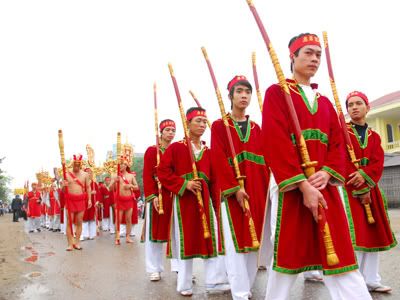


 ) thay = helmet (sẽ nói riêng) với nón của lính trong hình của ô naq nếu đc
 . Xin đc rồi post qua TWC là ta có gần đủ DV roster rồi
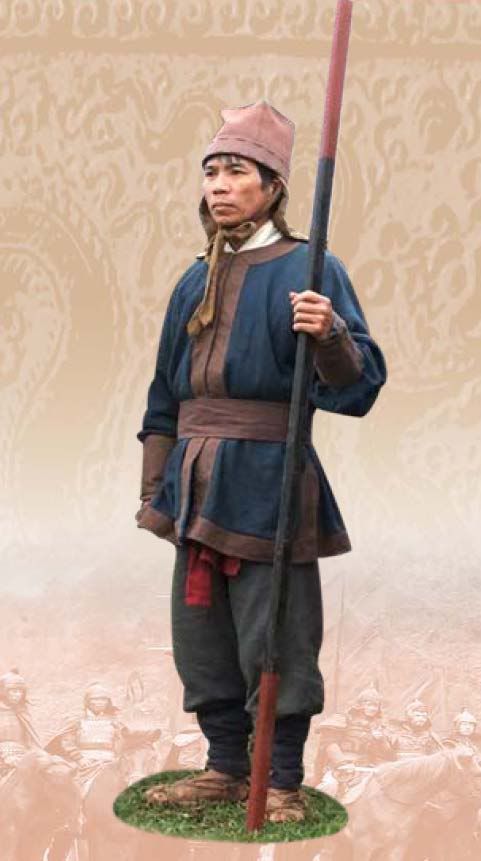

 . Thế càng tốt