

Navigation
Install the app
How to install the app on iOS
Follow along with the video below to see how to install our site as a web app on your home screen.
Note: This feature may not be available in some browsers.
Thêm tùy chọn
Style variation
-
[THÔNG BÁO] CẢNH BÁO LỪA ĐẢO MẠO DANH QUẢN TRỊ VIÊN
Chào các thành viên GameVN,
Dạo gần đây tình trạng lừa đảo scamming và phishing đang gia tăng. Ban quản trị GameVN xin lưu ý toàn bộ thành viên:
KHÔNG/ ĐỪNG / CẤM cho bất kỳ ai tự xưng là quản trị viên của server vay tiền.
Mọi hành vi lân la làm quen, tự tiện nhắn tin trên Discord, Facebook, Zalo hoặc các nền tảng mạng xã hội khác,
núp bóng dưới danh nghĩa sinh hoạt của quản trị viên, đều có tỉ lệ rất, rất cao là lừa đảo.
Nếu có tài khoản lạ add friend hoặc nhắn tin xin tiền dưới danh nghĩa admin:
Block ngay
Report ngay
Không chuyển khoản, không cung cấp thông tin cá nhân
Quản trị viên của forum và Discord server GameVN không có nhu cầu vay tiền thành viên.
Không có lý do nào để admin chủ động kết bạn rồi xin tiền.
Mọi thông báo chính thức chỉ được đăng trên kênh thông báo của server và topic chính thức trên forum.
Tin nhắn riêng từ tài khoản lạ không phải thông báo của ban quản trị.
Cảm ơn các bạn đã chú ý và cùng giữ cộng đồng an toàn.
— Ban quản trị GameVN
Tắt thông báo bằng nút X bên góc phải của bảng thông báo*
You are using an out of date browser. It may not display this or other websites correctly.
You should upgrade or use an alternative browser.
You should upgrade or use an alternative browser.
Tiên Kiếm Kỳ Hiệp Truyện 4
- Thread starter Rociel
- Ngày gửi
【Giới thiệu】 câu chuyện
Qingluan nhỏ cao điểm của cuộc sống ở Hoàng Sơn, các vị thành niên đã không bao giờ được xuống những đám mây thiên hà Milky Way, một ngọn núi tại trải qua một break để tìm kiếm bằng sợi cô gái Han Ling. Họ vòi cha mẹ của họ dưới của dải Ngân hà vào các ngôi mộ bí ẩn của đám mây, và vô tình làm cho ngôi mộ sụp đổ. Vì sợ ma của cha mình đến xem các tài khoản riêng của họ, các bậc cha mẹ cuối của quá khứ muốn phát hiện, kết hợp với nghệ thuật của Sword Sword tò mò, Han Ling Yun Thiên Hà sợi xuống theo con đường tìm kiếm cha mẹ trong quá khứ, bất tử hỏi đường.
Một sự trùng hợp may mắn, những đám mây Thiên Hà, Han Lingsha thành phố thẩm phán đã gặp con gái của Liu Shou Dream thủy tinh, và người Anh và các môn đệ Côn Lôn trở thành bạn Murong tím. Bất tử trong thiên đàng vào cuộc hành trình của trái đất, các đám mây dần dần nhận thức được một điều của quá khứ, Thiên Hà, và do đó dẫn đến các lời mời đến sự nhầm lẫn. Tại sao cha mẹ Qingluan bế quan tỏa cảng của họ cao điểm? Tại sao cha mẹ có một lớp băng trong mộ? Thạc sĩ, tại sao không bao giờ để sâu sắc của mình dạy võ thuật? Côn Lôn trường cho trồng trọt ở tất cả các chi phí, ẩn đằng sau vào cuối những gì bí mật?
Cùng với đó bị chôn vùi trong cát dưới những năm qua ngày càng nặng rõ ràng, bí ẩn nặng sẽ dần dần loại bỏ hoàn toàn, nhưng cuối cùng bị mất, nhưng thiên tai là một tình yêu tuyệt vời và cướp ... ...
【Giới thiệu】 cảnh
"Paladin bốn" (sau đây gọi là "bốn xu"), thế giới trò chơi thay mặt cho các trò chơi hơn so với cảnh trước đó sẽ được các bước đột phá lớn. Là "Bốn xu", hình ảnh ký tự sử dụng tỷ lệ thực tế, do đó, tỷ lệ chung của cảnh này là hoàn toàn phù hợp với sản xuất thực tế, như Khổng Tử là âm nhạc trong đất phải trả tiền trạm, các Bell và Drum thành phố Tower Lane Shouyang, vv, sẽ là hoàn hảo cổ điển Trung Quốc hương vị trình bày trước mặt bạn chơi.
"Bốn xu", điểm khởi đầu của hành trình là câu chuyện của các đỉnh cao của Hoàng Sơn Qingluan Anh, lướt trên đất của Trung Quốc, giữa đất và trời, các Bột Hải ở phía đông Biển Đông, phía nam tới Tứ Xuyên và phía bắc đến huyền thoại "vùng đất của Bắc Cực," cổ Thánh Sơn Tây Côn Lôn Wonderland. Cả hai, nhộn nhịp an bình của đất phong phú của đồng bằng miền Trung, có biên giới sa mạc, một quán trọ nhỏ trên con đường tơ lụa. Trong số các tòa nhà của từng thực vật, thị xã, và ngay cả những thực phẩm được bán trong các cửa hàng, tất cả đều có đặc điểm riêng của họ.
"Bốn xu", mê cung này cũng cam kết sẽ phản ánh những ngọn núi duy nhất và Trung Quốc phong cách kiến trúc cổ đại. Như cuộc hành trình của nhân vật chính, người chơi thực sự có thể cảm thấy những ngọn núi hùng vĩ và con sông, ngôi mộ cổ và thần tiên của đường xương gió tuyệt Fairy.
】 【Tiểu sử
Tian Yun
Tuổi: 18 năm
Identity: cậu bé lớn lên ở vùng núi, đã bao giờ được để Mt. Cha mẹ qua đời, vì vậy năm sống một mình trên núi
Vũ khí: kiếm, cung
Các tính năng:
■ nổi tiếng ngoài trời kỹ năng sống, giỏi săn bắn động vật hoang dã.
■ Trong hàng rào cao tài năng, nhưng không biết làm thế nào để làm hàng rào thực sự sâu sắc.
■ không kén ăn, như thịt nướng ngon nhất, một loạt các giấc mơ Chibian game.
■ tất cả các thế giới bất ổn Nannvzhiqing núi và dốt nát không biết gì, cho đến sau khi xuống dưới, thường với những ý tưởng riêng của mình phán xét, và vô lý rất nhiều rắc rối.
■ rằng tất cả những thứ bằng nhau, bệnh tật và cái chết, luật thế giới của rừng là tất cả bình thường, nhưng không phải chống lại ma quỷ, và mọi người phải suy nghĩ, có trái tim rộng lượng của mình.
■ khi ở trong những điều suy nghĩ vấn đề sẽ thay đổi hướng và không thích hỏi cho vấn đề, nhưng đối với những gì đã được tìm thấy để đối phó với họ là rất tuyến tính tư duy.
Han Lingsha
Tuổi: 17 năm
Identity: gia đình dường như là gánh nặng với số phận của cô gái trẻ ở khắp mọi nơi, bất cứ nơi nào họ đi một mình
Vũ khí: dao găm tay
Các tính năng:
■ năm lấy từ các con sông và hồ, một chút thông minh, thông minh, gặp những người không thích toàn bộ mặt khác sẽ nhìn nhỏ.
■ đơn giản và hào phóng ký tự. Các bạn bè quen thuộc, thường không quan tâm để phơi bày ngắn khác, và bạn bè của mình sẽ không được cười vì giận dữ.
■ nhát, thường "Robin Hood", nhưng không phải chơi.
■ tốt nứt quyền nghiêm trọng, và ông hiểu được nghệ thuật phong thủy Phong thủy, lớn hơn một chút, nghệ thuật không phải là xấu, được cho là lịch sử gia đình, cũng tự xưng là "một mình hàng ngàn dặm của Thieves"
Murong tím Anh
Tuổi: 19 năm
Tình trạng: Côn Lôn đệ tử
Vũ khí: thanh kiếm
Các tính năng:
■ đệ tử Côn Lôn, đã được gửi đến các thực hành ở trẻ em miền núi, bắt đầu sớm, tài năng, canh tác sâu.
■ trang trọng, ổn định, sống nội tâm, là một đối tác đáng tin cậy.
■ xuất hiện của sự thờ ơ, có vẻ như không dễ dàng để có được cùng, nhưng trong thực tế là một người đàn ông tốt có tên Shigeyoshi cảm xúc.
■ nâng cao chuyên môn thanh kiếm chống lại thanh kiếm của đường là rất bị ám ảnh bởi hận thù của bất cứ điều gì mà không tôn trọng các thanh gươm, thanh gươm Wal xuống cấp hành vi.
Lưu Dream kính
Tuổi: 18 năm
Tình trạng: Hoa hậu thành phố Shouyang nhà thẩm phán, là một con gái của màn che giữ
Vũ khí: Harp
Các tính năng:
■ Là một quan chức hành chính địa phương, Hoa hậu, có một phụ nữ yên bình giữa các tính khí, trang nghiêm và rộng lượng.
■ thành thạo trong thơ ca và hội họa, đặc biệt là về tính khí và nhiều hơn nữa được bảo hiểm, giỏi chơi đàn hạc.
■ thông minh và nhạy cảm, nhưng cũng xuất hiện trong lịch trọng điểm không phù hợp với sự xuất hiện mềm mại của quyết định.
■ So sánh tình cảm thất thường, không liên quan đến nhiều người hơn mát mẻ, những người khác giống như một niềm tin rất chu đáo và tận tâm, cảm thấy tự do để thể hiện cảm xúc của mình.
Qingluan nhỏ cao điểm của cuộc sống ở Hoàng Sơn, các vị thành niên đã không bao giờ được xuống những đám mây thiên hà Milky Way, một ngọn núi tại trải qua một break để tìm kiếm bằng sợi cô gái Han Ling. Họ vòi cha mẹ của họ dưới của dải Ngân hà vào các ngôi mộ bí ẩn của đám mây, và vô tình làm cho ngôi mộ sụp đổ. Vì sợ ma của cha mình đến xem các tài khoản riêng của họ, các bậc cha mẹ cuối của quá khứ muốn phát hiện, kết hợp với nghệ thuật của Sword Sword tò mò, Han Ling Yun Thiên Hà sợi xuống theo con đường tìm kiếm cha mẹ trong quá khứ, bất tử hỏi đường.
Một sự trùng hợp may mắn, những đám mây Thiên Hà, Han Lingsha thành phố thẩm phán đã gặp con gái của Liu Shou Dream thủy tinh, và người Anh và các môn đệ Côn Lôn trở thành bạn Murong tím. Bất tử trong thiên đàng vào cuộc hành trình của trái đất, các đám mây dần dần nhận thức được một điều của quá khứ, Thiên Hà, và do đó dẫn đến các lời mời đến sự nhầm lẫn. Tại sao cha mẹ Qingluan bế quan tỏa cảng của họ cao điểm? Tại sao cha mẹ có một lớp băng trong mộ? Thạc sĩ, tại sao không bao giờ để sâu sắc của mình dạy võ thuật? Côn Lôn trường cho trồng trọt ở tất cả các chi phí, ẩn đằng sau vào cuối những gì bí mật?
Cùng với đó bị chôn vùi trong cát dưới những năm qua ngày càng nặng rõ ràng, bí ẩn nặng sẽ dần dần loại bỏ hoàn toàn, nhưng cuối cùng bị mất, nhưng thiên tai là một tình yêu tuyệt vời và cướp ... ...
【Giới thiệu】 cảnh
"Paladin bốn" (sau đây gọi là "bốn xu"), thế giới trò chơi thay mặt cho các trò chơi hơn so với cảnh trước đó sẽ được các bước đột phá lớn. Là "Bốn xu", hình ảnh ký tự sử dụng tỷ lệ thực tế, do đó, tỷ lệ chung của cảnh này là hoàn toàn phù hợp với sản xuất thực tế, như Khổng Tử là âm nhạc trong đất phải trả tiền trạm, các Bell và Drum thành phố Tower Lane Shouyang, vv, sẽ là hoàn hảo cổ điển Trung Quốc hương vị trình bày trước mặt bạn chơi.
"Bốn xu", điểm khởi đầu của hành trình là câu chuyện của các đỉnh cao của Hoàng Sơn Qingluan Anh, lướt trên đất của Trung Quốc, giữa đất và trời, các Bột Hải ở phía đông Biển Đông, phía nam tới Tứ Xuyên và phía bắc đến huyền thoại "vùng đất của Bắc Cực," cổ Thánh Sơn Tây Côn Lôn Wonderland. Cả hai, nhộn nhịp an bình của đất phong phú của đồng bằng miền Trung, có biên giới sa mạc, một quán trọ nhỏ trên con đường tơ lụa. Trong số các tòa nhà của từng thực vật, thị xã, và ngay cả những thực phẩm được bán trong các cửa hàng, tất cả đều có đặc điểm riêng của họ.
"Bốn xu", mê cung này cũng cam kết sẽ phản ánh những ngọn núi duy nhất và Trung Quốc phong cách kiến trúc cổ đại. Như cuộc hành trình của nhân vật chính, người chơi thực sự có thể cảm thấy những ngọn núi hùng vĩ và con sông, ngôi mộ cổ và thần tiên của đường xương gió tuyệt Fairy.
】 【Tiểu sử
Tian Yun
Tuổi: 18 năm
Identity: cậu bé lớn lên ở vùng núi, đã bao giờ được để Mt. Cha mẹ qua đời, vì vậy năm sống một mình trên núi
Vũ khí: kiếm, cung
Các tính năng:
■ nổi tiếng ngoài trời kỹ năng sống, giỏi săn bắn động vật hoang dã.
■ Trong hàng rào cao tài năng, nhưng không biết làm thế nào để làm hàng rào thực sự sâu sắc.
■ không kén ăn, như thịt nướng ngon nhất, một loạt các giấc mơ Chibian game.
■ tất cả các thế giới bất ổn Nannvzhiqing núi và dốt nát không biết gì, cho đến sau khi xuống dưới, thường với những ý tưởng riêng của mình phán xét, và vô lý rất nhiều rắc rối.
■ rằng tất cả những thứ bằng nhau, bệnh tật và cái chết, luật thế giới của rừng là tất cả bình thường, nhưng không phải chống lại ma quỷ, và mọi người phải suy nghĩ, có trái tim rộng lượng của mình.
■ khi ở trong những điều suy nghĩ vấn đề sẽ thay đổi hướng và không thích hỏi cho vấn đề, nhưng đối với những gì đã được tìm thấy để đối phó với họ là rất tuyến tính tư duy.
Han Lingsha
Tuổi: 17 năm
Identity: gia đình dường như là gánh nặng với số phận của cô gái trẻ ở khắp mọi nơi, bất cứ nơi nào họ đi một mình
Vũ khí: dao găm tay
Các tính năng:
■ năm lấy từ các con sông và hồ, một chút thông minh, thông minh, gặp những người không thích toàn bộ mặt khác sẽ nhìn nhỏ.
■ đơn giản và hào phóng ký tự. Các bạn bè quen thuộc, thường không quan tâm để phơi bày ngắn khác, và bạn bè của mình sẽ không được cười vì giận dữ.
■ nhát, thường "Robin Hood", nhưng không phải chơi.
■ tốt nứt quyền nghiêm trọng, và ông hiểu được nghệ thuật phong thủy Phong thủy, lớn hơn một chút, nghệ thuật không phải là xấu, được cho là lịch sử gia đình, cũng tự xưng là "một mình hàng ngàn dặm của Thieves"
Murong tím Anh
Tuổi: 19 năm
Tình trạng: Côn Lôn đệ tử
Vũ khí: thanh kiếm
Các tính năng:
■ đệ tử Côn Lôn, đã được gửi đến các thực hành ở trẻ em miền núi, bắt đầu sớm, tài năng, canh tác sâu.
■ trang trọng, ổn định, sống nội tâm, là một đối tác đáng tin cậy.
■ xuất hiện của sự thờ ơ, có vẻ như không dễ dàng để có được cùng, nhưng trong thực tế là một người đàn ông tốt có tên Shigeyoshi cảm xúc.
■ nâng cao chuyên môn thanh kiếm chống lại thanh kiếm của đường là rất bị ám ảnh bởi hận thù của bất cứ điều gì mà không tôn trọng các thanh gươm, thanh gươm Wal xuống cấp hành vi.
Lưu Dream kính
Tuổi: 18 năm
Tình trạng: Hoa hậu thành phố Shouyang nhà thẩm phán, là một con gái của màn che giữ
Vũ khí: Harp
Các tính năng:
■ Là một quan chức hành chính địa phương, Hoa hậu, có một phụ nữ yên bình giữa các tính khí, trang nghiêm và rộng lượng.
■ thành thạo trong thơ ca và hội họa, đặc biệt là về tính khí và nhiều hơn nữa được bảo hiểm, giỏi chơi đàn hạc.
■ thông minh và nhạy cảm, nhưng cũng xuất hiện trong lịch trọng điểm không phù hợp với sự xuất hiện mềm mại của quyết định.
■ So sánh tình cảm thất thường, không liên quan đến nhiều người hơn mát mẻ, những người khác giống như một niềm tin rất chu đáo và tận tâm, cảm thấy tự do để thể hiện cảm xúc của mình.

- 29/1/10
- 1,076
- 77
thằng này ráng học tiếng Trung rùi tự dịch đi, như dzậy không khác gì Spam cho có, ko hiểu nghĩa mà cũng gáng post bài, đúng rảnh chuyện.

ngohaloc91
Youtube Master Race
- 27/5/07
- 97
- 0
ai xem ho em sao lai co loi nay voi 


cakiemcia
Donkey Kong
- 13/10/09
- 363
- 295
nếu bạn dung win 7 phiên bản đầu tiên thì cài vào , tắt antivirrus đi là chơi đc
còn nếu win 7 của bạn đã update lên bản win 7 SP1 thì bạn pải copy thêm patch này nữa mới chơi đc ! mình up lên mediafire cho bạn nè , giải nén rùi copy đè vào là cài đc ^^
còn nếu win 7 của bạn đã update lên bản win 7 SP1 thì bạn pải copy thêm patch này nữa mới chơi đc ! mình up lên mediafire cho bạn nè , giải nén rùi copy đè vào là cài đc ^^
nếu bạn dung win 7 phiên bản đầu tiên thì cài vào , tắt antivirrus đi là chơi đc
còn nếu win 7 của bạn đã update lên bản win 7 SP1 thì bạn pải copy thêm patch này nữa mới chơi đc ! mình up lên mediafire cho bạn nè , giải nén rùi copy đè vào là cài đc ^^
cảm ơn bạn
mình đang dùng sp1
 đang down roài
---------- Post added at 12:17 ---------- Previous post was at 11:28 ----------
chơi được roài
kiểu chơi của game này hơi khó chịu
chưa wen lắm
quay chóng cả mặt
ngohaloc91
Youtube Master Race
- 27/5/07
- 97
- 0
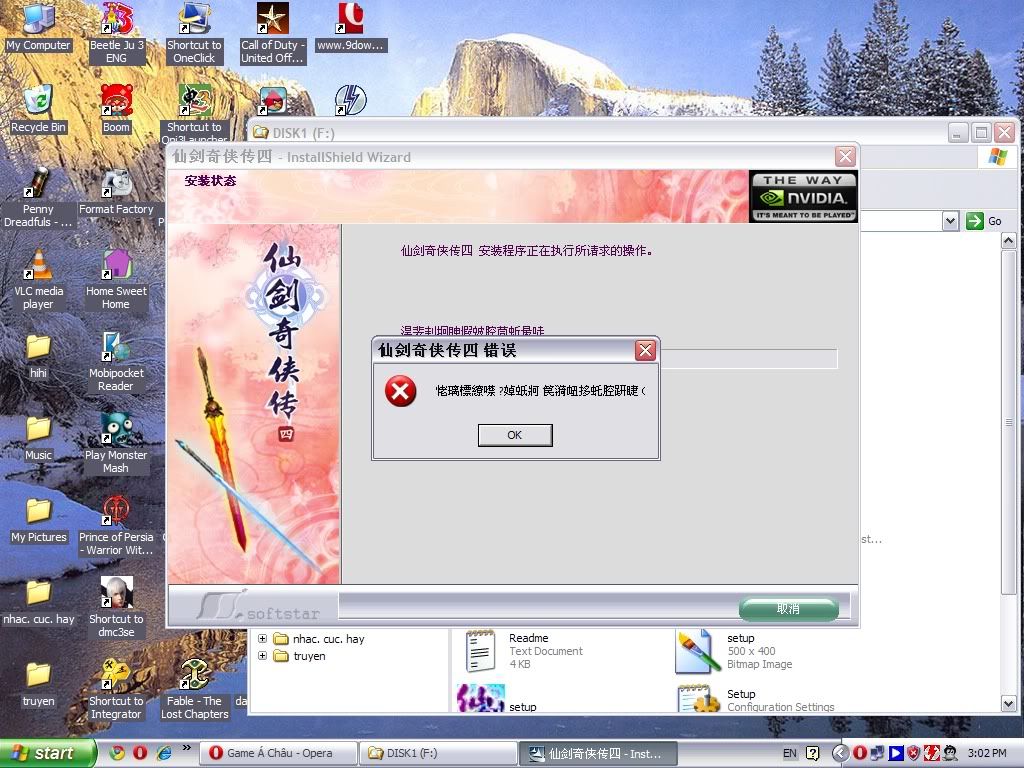
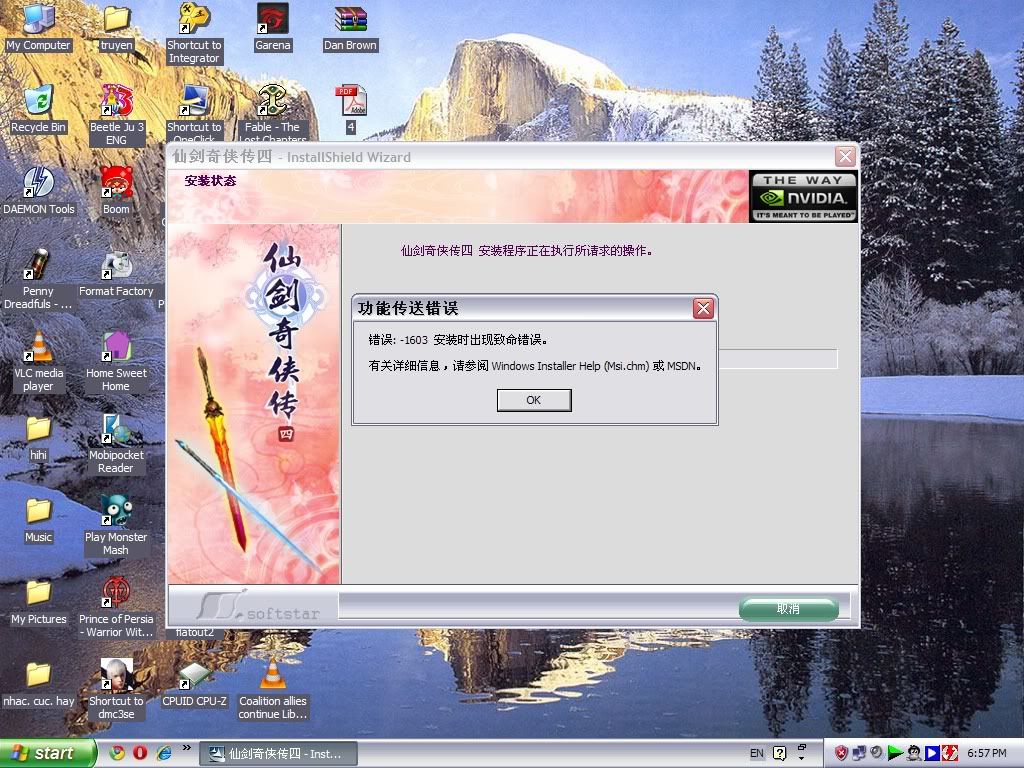
ai ranh tieng trung dich ho cai loi setup nay voi mai cha choi duoc 
ngohaloc91
Youtube Master Race
- 27/5/07
- 97
- 0
Forum khong ai ranh tieng trung het ah ai dich duoc dich ho minh voi down ve ma mai ko setup duoc
cakiemcia
Donkey Kong
- 13/10/09
- 363
- 295
Làm thử thế này nha !ai ranh tieng trung dich ho cai loi setup nay voi mai cha choi duoc
Dùng google dịch vì mình lười
thêm cách nữacách 1
方法一:
1.请关掉自启动程序,杀毒软件跟防火墙(包含各类杀毒助手、上网助手等第三方插件)
2.请关掉或删除虚拟光盘程序(见Q1)
3.请移除Applocal程序,并手动删除C:\WINDOWS\AppPatch\Apploc.tmp文件
4.重开机并安装游戏
cách 2这样删除试试:
1.先将游戏目录下的文件删除干净(如有需要可以保留saves文件夹)
2.打开C:\WINDOWS\Installer\(将这个地址复制到地址栏,不然是找不到这个文件夹的),文件夹中有一个叫“{E3990D6F-F6CE-4417-BAFA-F2C60BC3576F}”的文件夹(应该是叫这个名字,如果不是你可以把Installer文件夹中的所有文件夹打开看看),这个文件夹中就是仙剑4的一部分文件
3.从开始菜单中将“软星(上海)公司”这个文件夹删除
4.单击“开始-运行”,输入“regedit”(也就是注册表),将 “{HKEY_LOCAL_MACHINE\SOFTWARE\SOFTSTAR\}”下的“pal4”删除
5.最后再检查一下桌面上快捷方式删除了没有,这样就基本行了
6.现在再放入安装盘,重新安装,它会先卸载(都删除了,不知它还卸什么),不用管它,这回应该就可以正常卸载了,反正我就是能卸载了。卸载后,就可以正常安装了
1. 选择“开始”→“运行”
2. 输入 "regedit" 然后点击“确定”按钮
3. 用鼠标右键点击项“ HKEY_CLASSES_ROOT ”显示菜单
4. 选择“权限”
5. 如果您的用户名不在“组或用户名称”列表中,则首先要通过“添加”按钮添加您的用户名。
6. 选择您的用户名
7. 点击“高级”按钮
7. 选择您的用户名,将您的“权限”设置为“完全控制”,并将“应用于”设置为“该项及其子项”。
8. 勾选“用在此显示的 … ” (见图 )
9. 点击“应用”
10. 点击“确定”
11. 重新启动系统。
Vào đây xem cũng đc:
Chỉnh sửa cuối:
ngohaloc91
Youtube Master Race
- 27/5/07
- 97
- 0
Bác cakiemcia xem giúp em dùng google translate chả hỉu j luôn
cakiemcia
Donkey Kong
- 13/10/09
- 363
- 295
ngohaloc91
Youtube Master Race
- 27/5/07
- 97
- 0
Làm theo cách của bác cakiem khong được roài
---------- Post added at 21:02 ---------- Previous post was at 20:33 ----------
Thks bác cakiem cuối cùng cũng setup được dù không xài cách của bác
---------- Post added at 21:02 ---------- Previous post was at 20:33 ----------
Thks bác cakiem cuối cùng cũng setup được dù không xài cách của bác
Method One:
1. Please turn off from the start the program, with the firewall, antivirus software (including various types of anti-virus assistants, aides and other third-party internet plug-ins)
2. Please turn off or remove the virtual CD-ROM program (see Q1)
3. Please remove Applocal program, and manually delete the C: \ WINDOWS \ AppPatch \ Apploc.tmp file
4. reboot and install the game
cách 2Try to delete this:
1. first game directory, delete the file clean (if necessary saves to keep the folder)
2. Open the C: \ WINDOWS \ Installer \ (copy this address into the address bar, or can not find this folder), there is a folder named "{E3990D6F-F6CE-4417-BAFA-F2C60BC3576F}" in Folder (should be the name, if not you can put all the Installer folder Open the folder to see), this folder is part of the file Sword 4
3. From the Start menu will be "soft-Star (Shanghai) Company " delete this folder
4. Click "Start - Run ", type "regedit" (that is, the registry), the "{HKEY_LOCAL_MACHINE \ SOFTWARE \ SOFTSTAR \}" under the "pal4" Delete
5. Finally, check the desktop shortcut is not removed, so that the basic line
6. Now and then insert the installation disk, reinstall, uninstall it (all deleted, I do not know what it unloaded), do not ignore it, this time should be able to uninstall properly, anyway, I was able to uninstall. After uninstalling, you can normally installed
// này thì 30 char1. Select "Start"→"Run "
2. Enter "regedit" and click "OK"button
3. Right click on key "HKEY_CLASSES_ROOT" menu
4. Select the "Permissions "
5. If your username is not in the "Group or user names" list, first through the "Add " button to add your user name.
6. Choose your username
7. Click the "Advanced "button
7. Select your user name, your "permission"to"Full Control"and "applied"to"that their child. "
8. check the "used in this show ... " (see photo)
9. Click "Apply"
10. Click "OK"
11. reboot the system.


hiepluthandieu
Mr & Ms Pac-Man
- 10/10/08
- 131
- 55
Hê hê hê
lâu không vào topic này, giờ vào thấy đông quá
Bản hướng dẫn cụ thể là do chính tay mình viết, những ai không có thì mình xin share luôn:
http://www.mediafire.com/?cgdzldnmzm5
lâu không vào topic này, giờ vào thấy đông quá
Bản hướng dẫn cụ thể là do chính tay mình viết, những ai không có thì mình xin share luôn:
http://www.mediafire.com/?cgdzldnmzm5
lonnel_cutle
Legend of Zelda
- 27/12/08
- 942
- 47
Tình hình là mình mới chơi game này, mình thấy bản hướng dẫn cũng khá là chi tiết nhưng lại thiếu hai thứ khá quan trọng. Đó là tác dụng của các kỹ năng của từng nhân vật hay từng thuộc tính. Và tác dụng của từng món item nữa. Ai có trang web nào giới thiệu những thứ đó không thì share cho mình chứ lụm đồ thì nhiều mà chả biết xài ra sao. Thêm một cái nữa là không hiểu làm sao để xuất hiện mấy cái chữ Trung nữa nhìn toàn là kí tự gì đâu không à.
Hỏi luôn một cái là: Sao skill buf máu tập thể của con Mộng Ly (Không biết đúng không) lại xài không được vậy? Cho dù đã đầy nội lực rồi mà.
Thêm một cái nữa là không hiểu làm sao để xuất hiện mấy cái chữ Trung nữa nhìn toàn là kí tự gì đâu không à.Hỏi luôn một cái là: Sao skill buf máu tập thể của con Mộng Ly (Không biết đúng không) lại xài không được vậy? Cho dù đã đầy nội lực rồi mà.

zeroken763
Dragon Quest
- 20/5/10
- 1,496
- 1,048
bạn down cái Microsoft AppLocale để hiện chữ TQ http://vnsharing.net/forum/showthread.php?t=101308