

Navigation
Install the app
How to install the app on iOS
Follow along with the video below to see how to install our site as a web app on your home screen.
Note: This feature may not be available in some browsers.
Thêm tùy chọn
Style variation
-
[THÔNG BÁO] CẢNH BÁO LỪA ĐẢO MẠO DANH QUẢN TRỊ VIÊN
Chào các thành viên GameVN,
Dạo gần đây tình trạng lừa đảo scamming và phishing đang gia tăng. Ban quản trị GameVN xin lưu ý toàn bộ thành viên:
KHÔNG/ ĐỪNG / CẤM cho bất kỳ ai tự xưng là quản trị viên của server vay tiền.
Mọi hành vi lân la làm quen, tự tiện nhắn tin trên Discord, Facebook, Zalo hoặc các nền tảng mạng xã hội khác,
núp bóng dưới danh nghĩa sinh hoạt của quản trị viên, đều có tỉ lệ rất, rất cao là lừa đảo.
Nếu có tài khoản lạ add friend hoặc nhắn tin xin tiền dưới danh nghĩa admin:
Block ngay
Report ngay
Không chuyển khoản, không cung cấp thông tin cá nhân
Quản trị viên của forum và Discord server GameVN không có nhu cầu vay tiền thành viên.
Không có lý do nào để admin chủ động kết bạn rồi xin tiền.
Mọi thông báo chính thức chỉ được đăng trên kênh thông báo của server và topic chính thức trên forum.
Tin nhắn riêng từ tài khoản lạ không phải thông báo của ban quản trị.
Cảm ơn các bạn đã chú ý và cùng giữ cộng đồng an toàn.
— Ban quản trị GameVN
Tắt thông báo bằng nút X bên góc phải của bảng thông báo*
You are using an out of date browser. It may not display this or other websites correctly.
You should upgrade or use an alternative browser.
You should upgrade or use an alternative browser.
Tin tức về The Sims 3 Season
- Thread starter cogaivohinh
- Ngày gửi


cogaivohinh
Donkey Kong
- 30/6/07
- 398
- 8
- Thread starter
- #42
Hi Simmers! Tôi Ryan Vaughan, Trưởng nhóm thiết kế của bản mở rộng The Sims 3 Season . Tôi hy vọng bạn đã sẵn sàng để bung các ô dù của bạn và chuẩn bị cho một cơn bão, bởi vì khi bạn có thể đã biết, chúng tôi thông báo rằng The Sims 3 Seasons sẽ được tung ra tháng mười một! Cá nhân tôi rất vui mừng được làm việc trên bản mở rộng này, không chỉ bởi vì nó là một bản mở rộng mới và gameplay nó mang lại, mà còn bởi vì nó là một trong các bản mở rộng được trông chờ nhất cho The Sims 3! Với cả tấn tính năng mới và hiệu ứng thời tiết ấn tượng, cộng với các sự kiện mới theo mùa, lễ kỷ niệm, và các lễ hội, The Sims 3 Seasons sẽ biến đổi cuộc sống của bạn Sims theo cách độc đáo nhất từ trước đến giờ.
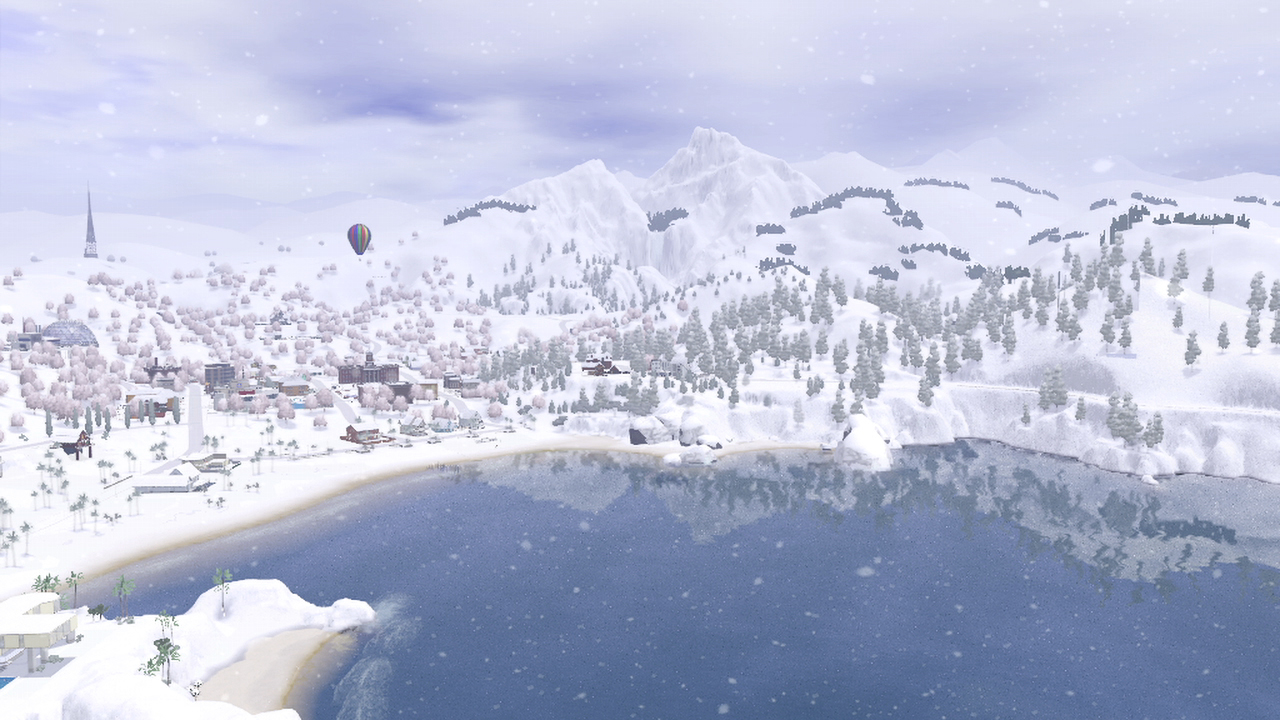
Tất nhiên, thay đổi thời tiết theo mùa là một phần lớn của trò chơi này. Cho dù đó là một cơn mưa mùa xuân, cái nắng mùa hè, hoặc thậm chí cả bão tuyết mùa đông, thời tiết và mùa chuyển tiếp tự nhiên trong quá trình của năm, cho phép Sims của bạn tương tác với môi trường thế giới mở hơn bao giờ hết. Nhưng đừng lo nếu bạn để sim sống ở Siberia và không bao giờ muốn nhìn thấy một bông hoa tuyết một lần nào nữa, thì bạn cũng hãy yên tâm vì bạn hoàn toàn có thể tuỳ chỉnh chúng!

Mùa và thời tiết được điều khiển thông qua một bảng điều khiển hoàn toàn mới trong Option Menu. Bạn muốn trải nghiệm mùa đông chỉ trong một ngày? Bạn vẫn có thể làm được!
Thời tiết không phải là tất cả những gì The Sims 3 Seasons cung cấp ! Hãy lướt qua một vài điều tuyệt vời khác, các tính năng mới được bao gồm trong gói này:
Lễ kỷ niệm theo Mùa
Lần đầu tiên, Sims của bạn có thể ăn mừng sự thay đổi của các mùa với các Sims khác tại lễ hội rất nhiều sự kiện mới. Bất kỳ thế giới nào mà bạn đang chơi (trừ 3 nơi nghỉ mát du lịch trong The Adventures Sims World 3) sẽ có một lễ hội độc đáo trong mỗi mùa, thi đấu các môn thể thao, thi thố các cuộc thi vui nhộn địa phương tổ chức và các sự kiện thú vị mới cho Sims của bạn để cùng chia sẻ. Sims có thể cảm nhận một mùa hè cuồng nhiệt bằng cách cạnh tranh trong một cuộc thi ăn hot dog, hoặc cảm nhận tiết trời vào thu bằng cách khắc một quả bí ngô và tham quan ngôi nhà ma ám! Sims của bạn có thể có một chuyến đi đến các gian hàng hội chợ mùa xuân, hoặc thậm chí tham gia vào một cuộc chiến snowball tưng bừng trong mùa đông. Có rất nhiều niềm vui để có được tại các lễ hội địa phương!
Bơi ở biển
Lần đầu tiên trong The Sims hệ PC / Mac, Sims của bạn có thể bơi biển trong 3 Seasons ! Cho dù đó là những bãi biển đầy nắng của Sunset Valley, hoặc sẽ cho một ao hồ xung quanh vùng nước âm u của Bridgeport, Sims của bạn không còn giới hạn bơi chỉ trong hồ bơi. Sims của bạn thậm chí có thể dũng cảm vục xuống nước đóng băng trong mùa đông lạnh giá .
Trượt ván tuyết
Sims của bạn có thể đến lễ hội mùa đông hoặc đặt ngay trong sân nhà rộng rãi một bộ dụng cụ cồng kềnh nhằm giúp sim luyện tập kỹ năng trượt ván.
Bóng đá Hmm, tôi nghĩ rằng điều này các bạn mong chờ đã rất lâu rồi, đúng không? Các bạn đã yêu cầu và mong chờ nó một thời gian, và giờ thì hãy đón nhận nó ! Sim của bạn bây giờ có thể tranh tài trong một loạt đá luân lưu kinh điển đấu với Sim khác, tự tập một mình , hoặc thậm chí tham gia vào một giải đấu! Chỉ cần đặt bộ bóng đá mới trong chế độ Buy Mode, và xem một không gian mở hào hứng của một sân bóng đá!

Đó chỉ là một cái nhìn sơ bộ của một vài tính năng mới và các đồ vật sẽ được bao gồm trong The Sims 3 Seasons. Tất nhiên, như với bất kỳ gói mở rộng, nó sẽ đi kèm với tấn của thời trang mới, đồ nội thất và thậm chí cả một cách mới để xây dựng nhà ở với bản thiết kế.
Hãy theo dõi để biết thêm chi tiết rằng chúng tôi sẽ được tiết lộ trong The Sims sống phát sóng vào thứ Sáu, August 3rd lúc 10 giờ sáng PST ở đây: http://www.origin.com/the-sims-3-supernatural-live-broadcast-2 hoặc bằng cách xem các trang blog của các SimGurus. Chúng tôi dự định tiếp tục đăng thông tin và trả lời các câu hỏi tất cả các cách thức thông qua sự ra mắt của 3 Seasons Sims trong tháng mười một.
Để lại câu hỏi của bạn thông qua Tweeter nhé !
Tôi chắc rằng bạn đã có cả tấn câu hỏi, vì vậy tôi đã làm việc với một số SimGurus khác để đặt cùng một danh sách các câu trả lời cho câu hỏi của bạn.
Q: The Sims 3 Seasons là gì?A: Với The Sims 3 gói Seasons mở rộng, bạn có thể chơi với cuộc sống theo những cách mới như bạn trải nghiệm thú vị cho tất cả các mùa và vui chơi trong tinh thần của thời gian yêu thích của bạn trong năm. Với tất cả các hoạt động mới, lễ hội theo mùa và lễ kỷ niệm, cộng với thức ăn mới, trang trí, thời trang và hiệu ứng thời tiết, Sims của bạn có thể tận hưởng sự hào phóng và vẻ đẹp của mùa bao giờ thay đổi hơn bao giờ hết!
Q: những đặc điểm mới và kỹ năng có sẵn trong gói mở rộng này? A: The Sims 3 Seasons giới thiệu những tính cách mới của sim "Yêu cái nóng" "yêu cái lạnh" với những đặc điểm này sẽ được hưởng nhiệt độ cực đoan hơn, Sim yêu cái nóng sẽ ít chịu được lạnh và luôn thích những hoạt động "đổ nhiều mồ hôi". Bóng đá và trượt tuyết là những kỹ năng mới . Khi họ thực hành, các Sims sẽ tiến bộ và cải thiện theo thời gian (Tăng skill)

Q: hiệu ứng thời tiết mới, chúng ta có thể mong đợi? A: Với các hiệu ứng thời tiết thay đổi mới trong trò chơi, bạn có thể mong đợi để xem rất nhiều những thay đổi mới trong thế giới Sims của bạn. Từ tuyết phủ mùa đông wonderland, mùa xuân tắm mưa và ánh nắng mặt trời mùa hè tươi sáng, màu sắc lá thay đổi vào mùa thu, The Sims 3 Seasons mang lại một loạt các khả năng sáng tạo hoàn toàn mới. Chúng ta còn có mưa đá, sương mù, sấm chớp, sấm sét và nhiều hơn nữa!
Q: Có sự nghiệp mới? A: Không có sự nghiệp mới, chỉ có một công việc mà các Aliens có thể có được là làm một "Dự án thí nghiệm" ở sở Khoa học

Q: lễ kỷ niệm theo mùa mới là gì? A: Mỗi mùa có lễ kỷ niệm riêng của mình, nơi Sims tập trung cho lễ hội, Tập trung mọi người để tổ chức các hoạt động theo mùa, với thực phẩm, đồ trang trí, các đối tượng và trang phục đặc trưng của mùa đó. Sims của bạn có thể đi trượt tuyết, Ném quả cầu tuyết vào nhau, gian hàng nụ hôn, đi săn trứng phục sinh, vẽ khuôn mặt của họ, xem pháo hoa, Hội thi ăn táo, thi ăn bánh, và còn nhiều nữa.
Q: Bạn có thể tham gia vào các hoạt động như bơi lội và trượt tuyết quanh năm? A: Có, Sims có thể tham gia vào các hoạt động vui chơi như bơi trong đại dương và trượt ván quanh năm. Ví dụ, khi trời ấm áp , Sims có thể đi đến bãi biển và đùa nghịch với sóng biển. Trong những tháng lạnh, Sims có thể nhận được "Polar Bear Club" moodlet bằng cách mạo hiểm vào vùng biển lạnh cóng của mùa đông. Sims vẫn có thể thực hiện thủ thuật lướt ván trên nửa ống trượt tuyết, mà sẽ được bao phủ với tuyết nhân tạo trong thời gian ấm áp của năm.
Q: Vật dụng yêu thích của bạn trong trò chơi này là gì? A: Đó là Diving board : cho phép Sims để thực hiện một cú nhảy tung người tại hồ bơi, The Sims 3 Seasons cũng giới thiệu ô dù cho lần đầu tiên trong Series The Sims, mà chắc chắn sẽ có ích cho sim khi gặp những cơn mưa rào mùa xuân!
Q: Sẽ có âm nhạc mới trong EP này và sẽ có những bài hát trong kỳ nghỉ? A: Sẽ có một số bài hát mới mà Sims của bạn có thể hát tưng bừng trong 3 Seasons Sims. Trong khi không có bất kỳ bài hát địa phương nào.
Q: thời tiết có thể ảnh hưởng đến các EP khác? A: Có, hiệu ứng thời tiết sẽ tương thích với tất cả các gói mở rộng trước , các công cụ trong The Sims 3 khác, ngoại trừ 3 nơi du lịch của The Sims 3 Adventure.
Q: Các tính năng mới thú vị nhất mà bạn muốn giới thiệu cho người chơi là gì? A: Một trong những bổ sung mới thú vị trong Sims 3 Season là "Blueprint Mode", người chơi có thể nhập vào Buy Mode/ Build Mode. Với tính năng mới này, người chơi có thể tạo hoặc chỉnh sửa nhà một cách dễ dàng bằng cách đặt Pre-made room layout (Setup bố cục căn nhà). Người chơi có thể sửa đổi các chi tiết tốt hơn, thiết kế trang trí và đồ nội thất sau khi chúng được thực hiện cách đặt kế hoạch chi tiết được lựa chọn của họ.
Q: Nhân vật huyền bí trong trò chơi này là gì?
A: The Sims 3 Seasons giới thiệu người ngoài hành tinh lần đầu tiên trong The Sims 3. Người ngoài hành tinh là sinh vật huyền bí trong bản này, Alien trở về từ The Sims 2 với một số tính năng cập nhật hấp dẫn. Hãy theo dõi để biết thêm về những gì người ngoài hành tinh có thể làm trong trò chơi!

Q: Sẽ có tương tác mới lãng mạn? A: Có, có một loạt các tương tác mới lãng mạn trong việc mở rộng này. Sims của bạn có thể yêu cầu cho một nụ hôn dưới cây tầm gửi, gửi bức thư tình, sử dụng máy thử nghiệm tình yêu và thậm chí tạo hồ sơ hẹn hò trực tuyến!
Q: Tùy chọn CAS mới được giới thiệu trong gói này? A: Bản mở rộng này cho phép bạn trang bị cho Sims phong cách mới của mỗi mùa, bao gồm cả thiết bị tránh tuyết giữ ấm cơ thể , quần áo bơi, áo mưa và nhiều hơn nữa. Ngoài ra còn có quần áo mới cho trẻ mới biết đi, trẻ em, thiếu niên và người lớn tuổi, bao gồm cả quần áo đi tuyết mới và các phụ kiện cho trẻ mới biết đi và trang phục Halloween mới cho mọi lứa tuổi. Ngoài ra còn có một loạt các kiểu tóc mới, có mũ mùa đông và tùy chọn để tạo ra Sims hoàn toàn hói cho lần đầu tiên trong The Sims 3!

Mùa và thời tiết được điều khiển thông qua một bảng điều khiển hoàn toàn mới trong Option Menu. Bạn muốn trải nghiệm mùa đông chỉ trong một ngày? Bạn vẫn có thể làm được!
Thời tiết không phải là tất cả những gì The Sims 3 Seasons cung cấp ! Hãy lướt qua một vài điều tuyệt vời khác, các tính năng mới được bao gồm trong gói này:
Lễ kỷ niệm theo Mùa
Lần đầu tiên, Sims của bạn có thể ăn mừng sự thay đổi của các mùa với các Sims khác tại lễ hội rất nhiều sự kiện mới. Bất kỳ thế giới nào mà bạn đang chơi (trừ 3 nơi nghỉ mát du lịch trong The Adventures Sims World 3) sẽ có một lễ hội độc đáo trong mỗi mùa, thi đấu các môn thể thao, thi thố các cuộc thi vui nhộn địa phương tổ chức và các sự kiện thú vị mới cho Sims của bạn để cùng chia sẻ. Sims có thể cảm nhận một mùa hè cuồng nhiệt bằng cách cạnh tranh trong một cuộc thi ăn hot dog, hoặc cảm nhận tiết trời vào thu bằng cách khắc một quả bí ngô và tham quan ngôi nhà ma ám! Sims của bạn có thể có một chuyến đi đến các gian hàng hội chợ mùa xuân, hoặc thậm chí tham gia vào một cuộc chiến snowball tưng bừng trong mùa đông. Có rất nhiều niềm vui để có được tại các lễ hội địa phương!
Bơi ở biển
Lần đầu tiên trong The Sims hệ PC / Mac, Sims của bạn có thể bơi biển trong 3 Seasons ! Cho dù đó là những bãi biển đầy nắng của Sunset Valley, hoặc sẽ cho một ao hồ xung quanh vùng nước âm u của Bridgeport, Sims của bạn không còn giới hạn bơi chỉ trong hồ bơi. Sims của bạn thậm chí có thể dũng cảm vục xuống nước đóng băng trong mùa đông lạnh giá .
Trượt ván tuyết
Sims của bạn có thể đến lễ hội mùa đông hoặc đặt ngay trong sân nhà rộng rãi một bộ dụng cụ cồng kềnh nhằm giúp sim luyện tập kỹ năng trượt ván.
Bóng đá Hmm, tôi nghĩ rằng điều này các bạn mong chờ đã rất lâu rồi, đúng không? Các bạn đã yêu cầu và mong chờ nó một thời gian, và giờ thì hãy đón nhận nó ! Sim của bạn bây giờ có thể tranh tài trong một loạt đá luân lưu kinh điển đấu với Sim khác, tự tập một mình , hoặc thậm chí tham gia vào một giải đấu! Chỉ cần đặt bộ bóng đá mới trong chế độ Buy Mode, và xem một không gian mở hào hứng của một sân bóng đá!
Đó chỉ là một cái nhìn sơ bộ của một vài tính năng mới và các đồ vật sẽ được bao gồm trong The Sims 3 Seasons. Tất nhiên, như với bất kỳ gói mở rộng, nó sẽ đi kèm với tấn của thời trang mới, đồ nội thất và thậm chí cả một cách mới để xây dựng nhà ở với bản thiết kế.
Hãy theo dõi để biết thêm chi tiết rằng chúng tôi sẽ được tiết lộ trong The Sims sống phát sóng vào thứ Sáu, August 3rd lúc 10 giờ sáng PST ở đây: http://www.origin.com/the-sims-3-supernatural-live-broadcast-2 hoặc bằng cách xem các trang blog của các SimGurus. Chúng tôi dự định tiếp tục đăng thông tin và trả lời các câu hỏi tất cả các cách thức thông qua sự ra mắt của 3 Seasons Sims trong tháng mười một.
Để lại câu hỏi của bạn thông qua Tweeter nhé !
Tôi chắc rằng bạn đã có cả tấn câu hỏi, vì vậy tôi đã làm việc với một số SimGurus khác để đặt cùng một danh sách các câu trả lời cho câu hỏi của bạn.
Q: The Sims 3 Seasons là gì?A: Với The Sims 3 gói Seasons mở rộng, bạn có thể chơi với cuộc sống theo những cách mới như bạn trải nghiệm thú vị cho tất cả các mùa và vui chơi trong tinh thần của thời gian yêu thích của bạn trong năm. Với tất cả các hoạt động mới, lễ hội theo mùa và lễ kỷ niệm, cộng với thức ăn mới, trang trí, thời trang và hiệu ứng thời tiết, Sims của bạn có thể tận hưởng sự hào phóng và vẻ đẹp của mùa bao giờ thay đổi hơn bao giờ hết!
Q: những đặc điểm mới và kỹ năng có sẵn trong gói mở rộng này? A: The Sims 3 Seasons giới thiệu những tính cách mới của sim "Yêu cái nóng" "yêu cái lạnh" với những đặc điểm này sẽ được hưởng nhiệt độ cực đoan hơn, Sim yêu cái nóng sẽ ít chịu được lạnh và luôn thích những hoạt động "đổ nhiều mồ hôi". Bóng đá và trượt tuyết là những kỹ năng mới . Khi họ thực hành, các Sims sẽ tiến bộ và cải thiện theo thời gian (Tăng skill)
Q: hiệu ứng thời tiết mới, chúng ta có thể mong đợi? A: Với các hiệu ứng thời tiết thay đổi mới trong trò chơi, bạn có thể mong đợi để xem rất nhiều những thay đổi mới trong thế giới Sims của bạn. Từ tuyết phủ mùa đông wonderland, mùa xuân tắm mưa và ánh nắng mặt trời mùa hè tươi sáng, màu sắc lá thay đổi vào mùa thu, The Sims 3 Seasons mang lại một loạt các khả năng sáng tạo hoàn toàn mới. Chúng ta còn có mưa đá, sương mù, sấm chớp, sấm sét và nhiều hơn nữa!
Q: Có sự nghiệp mới? A: Không có sự nghiệp mới, chỉ có một công việc mà các Aliens có thể có được là làm một "Dự án thí nghiệm" ở sở Khoa học
Q: lễ kỷ niệm theo mùa mới là gì? A: Mỗi mùa có lễ kỷ niệm riêng của mình, nơi Sims tập trung cho lễ hội, Tập trung mọi người để tổ chức các hoạt động theo mùa, với thực phẩm, đồ trang trí, các đối tượng và trang phục đặc trưng của mùa đó. Sims của bạn có thể đi trượt tuyết, Ném quả cầu tuyết vào nhau, gian hàng nụ hôn, đi săn trứng phục sinh, vẽ khuôn mặt của họ, xem pháo hoa, Hội thi ăn táo, thi ăn bánh, và còn nhiều nữa.
Q: Bạn có thể tham gia vào các hoạt động như bơi lội và trượt tuyết quanh năm? A: Có, Sims có thể tham gia vào các hoạt động vui chơi như bơi trong đại dương và trượt ván quanh năm. Ví dụ, khi trời ấm áp , Sims có thể đi đến bãi biển và đùa nghịch với sóng biển. Trong những tháng lạnh, Sims có thể nhận được "Polar Bear Club" moodlet bằng cách mạo hiểm vào vùng biển lạnh cóng của mùa đông. Sims vẫn có thể thực hiện thủ thuật lướt ván trên nửa ống trượt tuyết, mà sẽ được bao phủ với tuyết nhân tạo trong thời gian ấm áp của năm.
Q: Vật dụng yêu thích của bạn trong trò chơi này là gì? A: Đó là Diving board : cho phép Sims để thực hiện một cú nhảy tung người tại hồ bơi, The Sims 3 Seasons cũng giới thiệu ô dù cho lần đầu tiên trong Series The Sims, mà chắc chắn sẽ có ích cho sim khi gặp những cơn mưa rào mùa xuân!
Q: Sẽ có âm nhạc mới trong EP này và sẽ có những bài hát trong kỳ nghỉ? A: Sẽ có một số bài hát mới mà Sims của bạn có thể hát tưng bừng trong 3 Seasons Sims. Trong khi không có bất kỳ bài hát địa phương nào.
Q: thời tiết có thể ảnh hưởng đến các EP khác? A: Có, hiệu ứng thời tiết sẽ tương thích với tất cả các gói mở rộng trước , các công cụ trong The Sims 3 khác, ngoại trừ 3 nơi du lịch của The Sims 3 Adventure.
Q: Các tính năng mới thú vị nhất mà bạn muốn giới thiệu cho người chơi là gì? A: Một trong những bổ sung mới thú vị trong Sims 3 Season là "Blueprint Mode", người chơi có thể nhập vào Buy Mode/ Build Mode. Với tính năng mới này, người chơi có thể tạo hoặc chỉnh sửa nhà một cách dễ dàng bằng cách đặt Pre-made room layout (Setup bố cục căn nhà). Người chơi có thể sửa đổi các chi tiết tốt hơn, thiết kế trang trí và đồ nội thất sau khi chúng được thực hiện cách đặt kế hoạch chi tiết được lựa chọn của họ.
Q: Nhân vật huyền bí trong trò chơi này là gì?
A: The Sims 3 Seasons giới thiệu người ngoài hành tinh lần đầu tiên trong The Sims 3. Người ngoài hành tinh là sinh vật huyền bí trong bản này, Alien trở về từ The Sims 2 với một số tính năng cập nhật hấp dẫn. Hãy theo dõi để biết thêm về những gì người ngoài hành tinh có thể làm trong trò chơi!
Q: Sẽ có tương tác mới lãng mạn? A: Có, có một loạt các tương tác mới lãng mạn trong việc mở rộng này. Sims của bạn có thể yêu cầu cho một nụ hôn dưới cây tầm gửi, gửi bức thư tình, sử dụng máy thử nghiệm tình yêu và thậm chí tạo hồ sơ hẹn hò trực tuyến!
Q: Tùy chọn CAS mới được giới thiệu trong gói này? A: Bản mở rộng này cho phép bạn trang bị cho Sims phong cách mới của mỗi mùa, bao gồm cả thiết bị tránh tuyết giữ ấm cơ thể , quần áo bơi, áo mưa và nhiều hơn nữa. Ngoài ra còn có quần áo mới cho trẻ mới biết đi, trẻ em, thiếu niên và người lớn tuổi, bao gồm cả quần áo đi tuyết mới và các phụ kiện cho trẻ mới biết đi và trang phục Halloween mới cho mọi lứa tuổi. Ngoài ra còn có một loạt các kiểu tóc mới, có mũ mùa đông và tùy chọn để tạo ra Sims hoàn toàn hói cho lần đầu tiên trong The Sims 3!
TRANSLATE BY COGAIVOHINH - INVI
Chỉnh sửa cuối:


cogaivohinh
Donkey Kong
- 30/6/07
- 398
- 8
- Thread starter
- #44
Kỳ này 3 world của WA : Paris, China và Ai Cập lại không được ảnh hưởng thời tiết mới buồn chứ :(
Đi du lịch mà ko được ngắm tuyết, ngắm mưa :( Sao uổng quá nhỉ?
Đi du lịch mà ko được ngắm tuyết, ngắm mưa :( Sao uổng quá nhỉ?
Coi game play của Season nè
[video=youtube;V5Cq4X3wzTQ]http://www.youtube.com/watch?v=V5Cq4X3wzTQ&feature=youtu.be[/video]
[video=youtube;V5Cq4X3wzTQ]http://www.youtube.com/watch?v=V5Cq4X3wzTQ&feature=youtu.be[/video]

intoxicated_andy
Youtube Master Race
- 31/3/12
- 65
- 0
bản này có vẻ sẽ nặng hơn rất nhiều các bản trước ="=
nguy hiểm quá..
nguy hiểm quá..
lethanhvinh016
Mr & Ms Pac-Man
- 7/10/10
- 109
- 1
Mình rất mong chờ ở bản The Sims 3 Seasons này, có rất nhiều tính năng mà mình mong ước đều có ở bản này. mong là EA ko làm các fan thất vọng :)
![[T]heims[3]](/data/avatars/m/1486/1486054.jpg?1365602299)
- 9/4/12
- 266
- 2
EA tốt bụng quá, hợp Seasons và Freetime sìm thành Season sỉm 3. Chắc tiền ko rẻ và nghi EA đang cố gắng kết thúc S3 để ra S4
cogaivohinh
Donkey Kong
- 30/6/07
- 398
- 8
- Thread starter
- #49
HÌNH ẢNH MỚI
Có sàn trượt patin

[spoil]
Mùa xuân đuổi bướm hái hoa

Nhìn sóng biển muốn nhảy ùm xuống

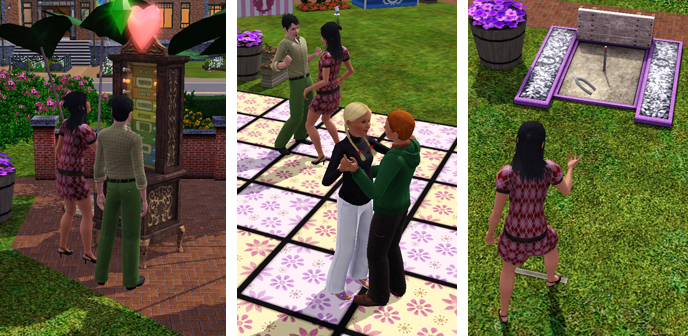
Máy đo tình cảm - Slow dance - Trò chơi ném vòng
Simbot không được ra mưa nhé !

Sưu tầm trứng phục sinh

Kising booth

Cán dù neon

[/spoil]Có sàn trượt patin
[spoil]
Mùa xuân đuổi bướm hái hoa
Nhìn sóng biển muốn nhảy ùm xuống
Máy đo tình cảm - Slow dance - Trò chơi ném vòng
Simbot không được ra mưa nhé !
Sưu tầm trứng phục sinh
Kising booth
Cán dù neon

diepthuyvy
Sonic the Hedgehog
- 16/1/12
- 4,510
- 47
Season kì này chắc dung lượng nặng lắm đó các em !!! 
- 9/4/12
- 266
- 2
Dung lượng thì ko lo, sợ cấu hình nhảy tựng tựng luôn mới chết @@Season kì này chắc dung lượng nặng lắm đó các em !!!


cogaivohinh
Donkey Kong
- 30/6/07
- 398
- 8
- Thread starter
- #53
THÔNG TIN THU THẬP TỪ LIVE CHAT
• No natural disasters like tornados or hurricanes, that level of complete destruction isn’t really in the spirit of The Sims. What you will get though are really powerful thunderstorms and blizzards in winter.• No Power Outages
• You might see thunder and lightning when storms are really bad.
• Không có thiên tai như lốc xoáy, cuồng phong với mức độ hủy diệt hoàn toàn... những thứ đó không theo tinh thần của dòng The Sims. Những gì bạn sẽ nhận được có thể là cơn bão rất mạnh và những trận bão tuyết vào mùa đông.
• Không có Cúp Điện.
• Bạn có thể thấy tiếng sấm và sét khi các cơn bão thực sự tồi tệ.
• Seasons and types of weather aren’t controlled per-world, they’re controlled per-save file. That way you can customize each world you play in to behave exactly the way you want it to.
• You’ll be able to see the temperature in-game via the HUD. For our fans around the world, you can select the temperature to display in Fahrenheit or Celsius!
• Days are longer in the summer, and shorter in the winter.
• Các mùa và loại hình thời tiết không được kiểm soát mỗi thế giới, mà có thể điều khiển ở mỗi Saved game. Bằng cách đó bạn có thể tùy chỉnh mỗi thế giới bạn chơi theo cách bạn muốn.
• Bạn sẽ có thể xem nhiệt độ trong game thông qua các HUD. Đối với người hâm mộ của chúng tôi trên khắp thế giới, bạn có thể chọn nhiệt độ hiển thị bằng độ F hoặc độ C.
• Ngày dài trong mùa hè, và ngắn hơn vào mùa đông.
• Blueprint Mode
• Available to all players, even without Seasons
• Với update mới, tất cả người chơi đều có Blueprint mode (Chế độ Bản vẽ thiết kế) mà không cần cài Season
• No Greenhouse Objects/Options
• Trees are either deciduous or evergreen, so some will change color in the fall and lose their leaves, and others will not. The store team will support Seasons content as well, so any trees that they release that should lose leaves will be updated to work properly.
• Rain will actually water your plants but you will still have to remove weeds from them. If the world gets too cold they will frost over and go into hibernation. When plants go into hibernation, they will be immune to dying
• Không có nhà kính
• Cây hoặc rụng lá hoặc thường xanh, do đó, một số cây sẽ thay đổi màu vào mùa thu và trụi lá, những cây khác thì không. Cây của EA phát hành thì sẽ rụng lá đúng theo mùa.
• Mưa thực sự sẽ tưới nước cho cây cối của bạn nhưng bạn vẫn sẽ phải nhổ bỏ cỏ dại cho chúng. Nếu thế giới trở nên quá lạnh, chúng sẽ chuyển sang ngủ đông. Khi cây cối ngủ đông, chúng sẽ không bị chết.
Festival Lots
- Khu vực Lễ hội -
- Khu vực Lễ hội -
♦ To celebrate each season, a festival will arrive to your town! Each festival is unique to the season will transform completely with new objects and decorations throughout the year. Not only will festivals appear in Sunset Valley, but they’ll appear in other worlds too. You can be living it up in The Sims 3 Late Night ’s Bridgeport, or be enjoying the dry heat of The Sims 3 Store’s Lucky Palms while participating in seasonal festivities.
Để ăn mừng mỗi mùa, những lễ hội tưng bừng sẽ được tổ chức tại Thành phố của bạn. Mỗi lễ hội mang đặc trưng riêng từng mùa sẽ được game thay đổi hoàn toàn bằng những trò chơi, vật dụng và kiểu cách bài trí cho phù hợp cho mùa đó. Không chỉ có Sunset Valley mới có những lễ hội mà các world khác đều có (Nhộn nhịp, sầm uất ở Bridgeport hay thưởng thức cái nóng khô ở Lucky Palm khi bạn tham gia các lễ hội theo mùa)
♦ The Starlight Shores festival does set up around the amphitheater at Verde Park in the center of town, so having a Simfest while enjoying all the new festival activities will definitely happen
Starlight Shores (của TS3 Showtime) có sân khấu ngoài trời ở công viên Verde ngay trung tâm thành phố nên Sim có thể vừa thưởng thức Đại nhạc hội vừa có thể tham gia vào các hoạt động của mùa đặc trưng tại đây !
♦ Advanced players will have full control over the appearance of the festival lots, or can build their own lots that change throughout the year. For most players, they’ll just see the festivals set up in their town automatically.
Những người chơi chuyên nghiệp họ có thể điều khiển toàn bộ từ cách thức trang trí, màu sắc, vật dụng ... đến sắp xếp cho Festival của họ theo lối riêng, sáng tạo và xây Lot của họ thay đổi theo từng mùa trong năm, trong khi người chơi bình thường thì chỉ xem mọi thứ diễn ra như nó vốn có một cách thụ động (chỉ xài những thứ tự game mặc định sẵn)
♦ Festivals will work in Custom & Store worlds.
Các lễ hội vẫn diễn ra được trên các World mua từ Store hay Custom World (World do người chơi tự tạo)
♦ We’re building unique festivals for every official world that’s released so far from various expansions or The Sims 3 Store. If you start a new game in a world, the festival lot for that world will already be in place – typically it’ll replace the main park in the world.
Chúng tôi thiết kế mỗi lễ hội cho mỗi EA Store World theo đặc trưng riêng. Và khi bạn bắt đầu một world mới , festival lot cho world đó đã có sẵn (tự động nó thay các công viên bằng festival lot)
If you’re loading a previously created save game after installing Seasons, you’ll be asked if you’d like to add the festival to your world, and it will show you exactly which lot it intends to replace. You’ll also have the option to manually place it somewhere else if you prefer.
Còn nếu bạn chơi một saved game cũ sau khi cài TS3 Season vào thì game sẽ hỏi bạn có muốn đặt festival lot vào world của bạn không, nó sẽ cho bạn xem một số dự kiến để bạn chọn thay thế. Và bạn cũng có thể lựa chọn những nơi khác bạn thích hơn làm Festival lot.
For all of the worlds, both the festival lot, and the lot it’s replacing will be in the community lot bin in Edit Town so that you can swap them out at any later point if you choose as well, or you can add one of them to a custom world (where they won’t auto place).
Đối với tất cả các world, bạn có thể thay đổi và gán cho các nơi công cộng những chức năng mà bạn muốn, bằng Edit Town. Hoặc bạn cũng có thể thêm vào các custom world những community lot mà world đó chưa có (những world mà không tự động đặt festival lot sẵn cho bạn bạn có thể tự chỉnh) Nói cho dễ hiểu là bạn có thể tự biến công viên thành Festival lot
For people who enjoy building custom worlds, they’re certainly able to create their own festival lots that will switch throughout the various seasons as users play in their worlds. All of the functionality of the lot changing its appearance throughout the world is controlled by a Seasonal Lot Marker object that’s available in buydebug.
Cho những ai thích tự xây dựng world, họ sẽ có thể tạo riêng các festival lots cho người chơi bằng cách dùng Seasonal Lot Marker mua trong Buy mod với Cheat Buydebug on
This marker will allow you to change what objects appear on a lot in any season; but it does not allow you to update things on lots that are controlled by build mode tools, such as walls or terrain height. You’ll even be able to use the Seasonal Lot Marker to update other community or residential lots to change throughout the year if you’d like!
Seasonal Lot Marker cho phép bạn thay đổi object trong lot đó theo mùa (Nhưng nó không cho bạn update những món trong lot được tạo bằng Build mode tool như Tường hay Terrain) Bạn vẫn có thể dùng Seasonal Lot Marker để thay đổi cách trang hoàng cho community hay residential lots theo các mùa trong năm tuỳ thích.
♦ To create a festival lot, you’d set the lot type to Festival Grounds from Edit Town mode, and the Seasonal Lot Marker would automatically be placed on the lot.
TRANSLATED BY COGAIVOHINH
Chỉnh sửa cuối:
cogaivohinh
Donkey Kong
- 30/6/07
- 398
- 8
- Thread starter
- #54
NEW SCREENSHOT
Sút -- Vào !!!


Tanning Booth (Máy nhuộm da)

Pháo bông cầm tay cho sinh nhật và các ngày lễ


- 23/2/12
- 6,095
- 3,924
- Muốn chơi quá 
diepthuyvy
Sonic the Hedgehog
- 16/1/12
- 4,510
- 47
eo! máy nhuộm da, hôm bữa ta coi phim gì trên HBO ấy, con nhỏ gì mà biết nhiền trước tương lai ấy. Có 2 con kia vô nằm trong máy nhuộm da mà bị kẹt ở trỏng luôn. Ở bên ngoài là thiết bị điều chỉnh nhiệt độ ấy, li kem rớt xuống đè lên cái nút tăng nhiệt độ của máy. OMG! Nhiệt độ trong máycứ tăng lên ngùn ngụt. Cái máy bốc cháy lun. 2 con nằm ở trong la hét wá trời lun. Bị nướng thui lun >.<!!!
Chỉnh sửa cuối:
intoxicated_andy
Youtube Master Race
- 31/3/12
- 65
- 0
thích firework... đá bóng thì chỉ có đá penalty thôi thì phải 
thôi cũng tạm ổn
thôi cũng tạm ổn
cogaivohinh
Donkey Kong
- 30/6/07
- 398
- 8
- Thread starter
- #58
eo! máy nhuộm da, hôm bữa ta coi phim gì trên HBO ấy, con nhỏ gì mà biết nhiền trước tương lai ấy. Có 2 con kia vô nằm trong máy nhuộm da mà bị kẹt ở trỏng luôn. Ở bên ngoài là thiết bị điều chỉnh nhiệt độ ấy, li kem rớt xuống đè lên cái nút tăng nhiệt độ của máy. OMG! Nhiệt độ trong máy cứ tăng lên ngùn ngụt. Cái máy bốc cháy lun. 2 con nằm ở trong la hét wá trời lun. Bị nướng thui lun >.<!!!
Là phim Final Destination phần 3!


 chừa wa + late night ... vs season thôi cho nhẹ máy .........
Similar threads

- Trả lời
- 0
- Đọc
- 219

- Trả lời
- 63
- Đọc
- 3K

- Trả lời
- 3
- Đọc
- 108
- Trả lời
- 10
- Đọc
- 703
