

Navigation
Install the app
How to install the app on iOS
Follow along with the video below to see how to install our site as a web app on your home screen.
Note: This feature may not be available in some browsers.
Thêm tùy chọn
Style variation
You are using an out of date browser. It may not display this or other websites correctly.
You should upgrade or use an alternative browser.
You should upgrade or use an alternative browser.
Grand Thief Auto IV for PC (v.3)
- Thread starter Kronpas1997
- Ngày gửi
- Status
- Không mở trả lời sau này.


khoilavodich
Mayor of SimCity
- 26/10/06
- 4,374
- 3
ai có cách nào chơi tăng performance lên ko, chơi cứ 10~20FPS ::(

 còn thằng Playboy mịe cái thằng lần nào alô cũg thái độ, ghét là kill


horizonboy
Donkey Kong
- 8/7/04
- 396
- 0
Tớ chơi trên màn hình wide và giữ nguyên res là 1024x768 nên nó bị dài ra
Chỉnh ratio lại!
Còn vu mod thì ko phải add mod ko cho vào game!mà nó bị đụng với crack và xung đột giữa các mod với nhau, add được cái này nhưng ko add thêm được cái kia .dll loạn xị cả lên.Cái nào chạy ok thì bên topic kia tui sẽ up lên.
Tui kill luôn thằng Playboy cái nhìn nhìn phát gét

horizonboy
Donkey Kong
- 8/7/04
- 396
- 0
uh, theo res nữa!cứ chỉnh ratio thấy cai map nó tròn lại là ok!diablon chơi gta4online đến mấy h?biết để vào

khoilavodich
Mayor of SimCity
- 26/10/06
- 4,374
- 3
diablon chơi GTA 4 ở mấy FPS, cấu hình máy bác ra sao


horizonboy
Donkey Kong
- 8/7/04
- 396
- 0
Oh!mới lớp 9 hả? tưởng già lắm rồi!mai chơi cung được.
tưởng già lắm rồi!mai chơi cung được.
aragon0510
For the Horde!
- 27/1/06
- 11,529
- 4,723
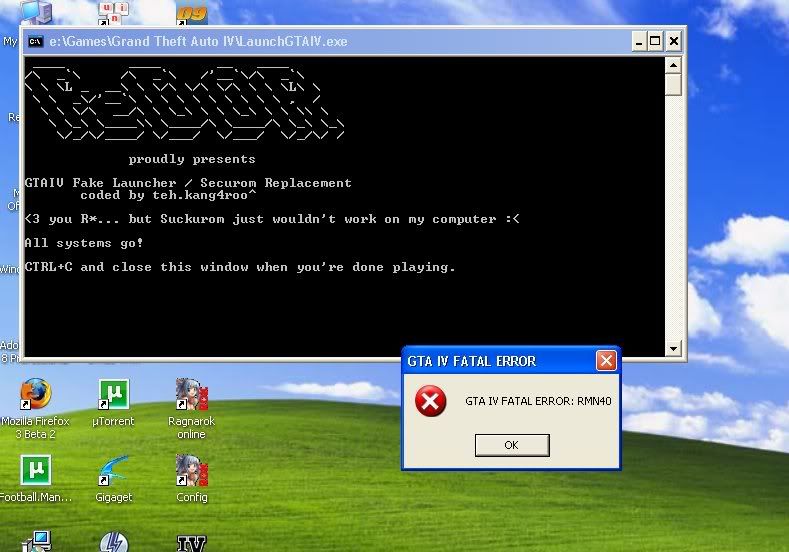
các bác cho em hỏi lỗi gì thế này, chơi ko dc game, cài mất cả buổi tối tức quá :


- 18/9/07
- 898
- 0
chỉnh registry là xong, cần j lên SP 3. up lại nè:
No need to install SP3 just do next work 100% I try
Step 1: Run Regedit by Clicking on Start -> Run , type in regedit and press enter
Step 2: Make a backup of your registry (just in case)
Step 3: Browse to "HKEY_LOCAL_MACHINE\SYSTEM\CurrentControlSet\C ontr ol\Windows"
Step 4: Modify the value of "CSDVersion" from "0x00000200" (SP2) to the Windows XP SP3 value of "0x00000300"
Step 5: Close registry editor
Step 6: Reboot
Step 7: Start GTA and freakin enjoy it already!
- Status
- Không mở trả lời sau này.
Similar threads

- Trả lời
- 0
- Đọc
- 369
- Trả lời
- 2
- Đọc
- 560

- Trả lời
- 0
- Đọc
- 235

