

Navigation
Install the app
How to install the app on iOS
Follow along with the video below to see how to install our site as a web app on your home screen.
Note: This feature may not be available in some browsers.
Thêm tùy chọn
Style variation
You are using an out of date browser. It may not display this or other websites correctly.
You should upgrade or use an alternative browser.
You should upgrade or use an alternative browser.
2 Moons
- Thread starter Crashed
- Ngày gửi


HachibeiSama
T.E.T.Я.I.S
- 2/4/08
- 609
- 1
Tui có tuyên truyền đâu... Ai muốn thì tui share thôi mừ lol

HachibeiSama
T.E.T.Я.I.S
- 2/4/08
- 609
- 1
Oan em quá... Em có lòng tốt thôi mừ. Trò đó hack tràn lan rồi. Ko hack chỉ thiệt thôi 

- 12/5/07
- 706
- 52
Xin đừng chém em nha vì không có chỗ nào phù hợp để post cái này!
Ai có thể copy cái update 2moons bad moons rising vào đĩa rồi bán cho mình được không ( là đĩa cd, xài đuợc 100% và ở Quy Nhơn càng tốt) mọi chi tiết xin liên hệ yahoo [email protected]
Xin cảm ơn :-*
Ai có thể copy cái update 2moons bad moons rising vào đĩa rồi bán cho mình được không ( là đĩa cd, xài đuợc 100% và ở Quy Nhơn càng tốt) mọi chi tiết xin liên hệ yahoo [email protected]
Xin cảm ơn :-*
tarzanxboi
Youtube Master Race
- 4/2/07
- 21
- 0
mua account bagi's 2moons lvl > 100 saigon ai bán pm yahoo [email protected]

ali33va40cogai
C O N T R A
- 3/4/07
- 1,883
- 2
game này block ip viet nam à?
sao mình đăng kí ko được vây?j
sao mình đăng kí ko được vây?j

TrinhNhanKhuong
Legend of Zelda
- 12/1/05
- 1,152
- 3
Hình như Block IP VN rùi phải hông ? Sao giờ hông đăng nhập dc rùi nè :(
HachibeiSama
T.E.T.Я.I.S
- 2/4/08
- 609
- 1
Ố là la. Đang tính bán acc. Kiểu này ko ai thèm mua rồi 

- 25/10/05
- 1,203
- 39
block IP lúc đăng ký thôi , xài cái tool giấu ip hotpotsheild jì đó ở mấy trang đầu của topic là được , mà chơi cái này giờ cũng lag lòi mắt , ping toàn ~1k thôi , chơi làm jì 
HachibeiSama
T.E.T.Я.I.S
- 2/4/08
- 609
- 1
Có thể là do server bảo trì. Hoặc là do mạng, có dạo vnn ko thể nào conect đc vào game.
@danghovu: 4 bài liên tiếp, coi chừng ăn chém
@danghovu: 4 bài liên tiếp, coi chừng ăn chém

- 1/4/05
- 1,288
- 1
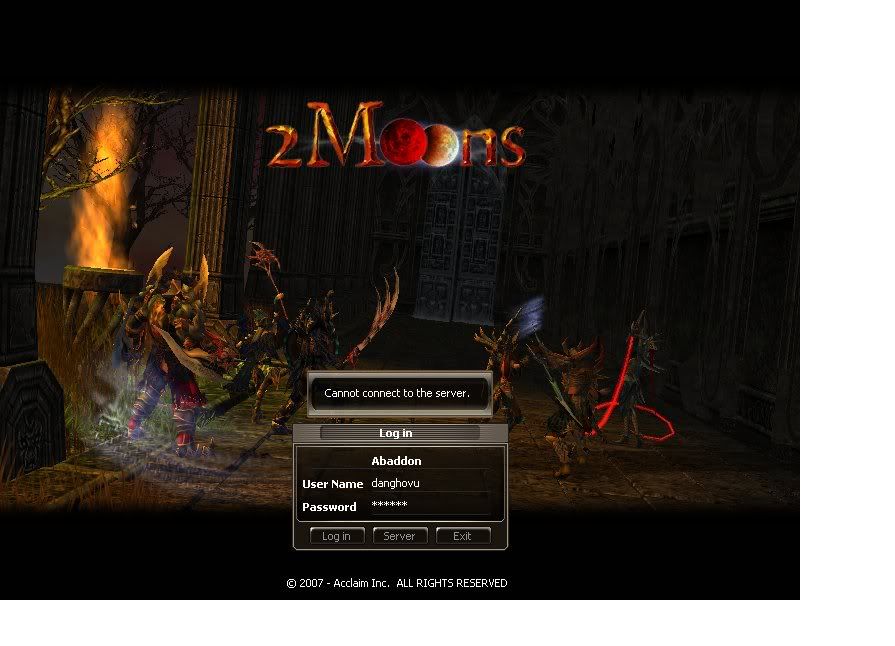
Đây là hình cụ thể khi bị Cannot connect to the sever. Anh em nào biết cách sửa chữa thì nói nhá
mạng cùi bắp, nhấn enter tầm 10 lần thì có thể vào được do SV rất đông nên khi log vào sub server thì còn hên xui cái nào ít người thì vào ngon, cậu nào bảo ping 1k thì coi lại mạng nhà mình, trò này ping chỉ tầm 200-600 thôi mà dù ping 1k vẫn chơi ngon

reg acc thì phía trước tui có nói rồi, ai reg ko được nữa thì thôi, trò này ko ban IP vn chỉ ban khi reg thôi

- 12/5/07
- 706
- 52
Vậy à, nhưng mình kiếm trên web nó có chỉ cách sữa lỗi này nhưng nhiều từ khó quá mình không dịch đượcmạng cùi bắp, nhấn enter tầm 10 lần thì có thể vào được do SV rất đông nên khi log vào sub server thì còn hên xui cái nào ít người thì vào ngon, cậu nào bảo ping 1k thì coi lại mạng nhà mình, trò này ping chỉ tầm 200-600 thôi mà dù ping 1k vẫn chơi ngon
reg acc thì phía trước tui có nói rồi, ai reg ko được nữa thì thôi, trò này ko ban IP vn chỉ ban khi reg thôi

NOTE : If you are have not uninstalled the old 2Moons client properly (2Moons game) from your system, please uninstall it (use step 4) and reinstall after downloading our new BMR (Bad Moons Rising) client. This error may also appear sometimes for short periods while logging in due to temporary server issues or maintenance, try the steps below if the issue persists -
Also note that the following countries are permanently blocked, You will not be able to access our game even if you were an existing or registered User -
• Hong Kong
• China
• Taiwan
1) Clear the cookies and temp files on your internet browser-
Click on the ‘Tools’ option in your Browser Menu at the top. Click on the option ‘Internet Options’
In the 'General' Tab, look for buttons ’Delete Cookies' and 'Delete Files' and click on them.
Click on the ‘Advanced’ Tab and click on ‘Restore Defaults’
For more detailed instructions, click HERE
2) Check your firewall settings-
Add 'launcher.exe' in the program exception list, Please disable Windows Firewall if you have an alternate firewall installed on the system. Ensure that the ports – 7881, 8222 or not blocked on your firewall. Sometimes you may need to delete all exceptions or reconfigure (re-add launcher.exe) your firewall. Some firewalls create checksums of program data, and check these every time a program connects to the internet.
3) Restart your modem/router and Computer, use the ipconfig /flushdns command-
The ipconfig /flushdns command provides you with a means to flush and reset the contents of the DNS client resolver cache. You can use this procedure to discard negative cache entries from the cache, as well as, any other dynamically added entries.
Press 'Start' and click on 'Run', in the empty box type in 'cmd',
In the black window that appears type the following -
ipconfig /flushdns
4) Uninstall and reinstall the game using the following steps –
Click on 'START’, Click 'Control Panel'. Click 'Classic View' towards the left,
Open 'Add/Remove Programs' (for Vista click on 'Programs Features'). Look for '2moons' in the list of programs and click on 'Remove'.
Delete all shortcuts and the default directory (c:\program files\acclaim\2moons)
To perform these steps - Press 'START' and click on 'Run', In the empty box, type in - 'C:\Program Files\Acclaim', Press 'OK',
Delete the directory '2moons', Be careful not to delete any other folder in the directory 'Program Files'.
Restart your Computer,
Reinstall the game again. If you encounter any installation issues, Re-download the client and install the game. For more detailed instructions, click HERE
5) Check if the 2Moons ports are blocked-
Sometimes you may need to configure your router to have the game's ports open in order to connect to the servers properly. If you need help configuring your firewall, router, or proxy you will need to contact the manufacturer for assistance. There is also a third party site (http://www.portforward.com) which may provide help on how to forward the ports on your router. Required Ports for 2Moons : Your network must be configured to allow 2Moons access to the following ports: TCP 7881, 8222.
If none of the above steps work, you may need to contact your ISP to check if any ports (7881,8222,8225) are blocked
You can also try uninstalling your firewall software completely to check if it is causing the issue, use the windows firewall (configure it to allow launcher.exe) for temporary protection/security and try launching the game. We do not recommend uninstalling the firewall if you are not an experienced user, please take the help of a friend or your system vendor.
________________________
Ai dịch dùm mình đi, please!
- 1/4/05
- 1,288
- 1
ko tin thì thôi, cái này tui bị hoài, nhất là từ 12h trưa đến khoảng 10h đêm log vô là nó toàn báo vậy, nhấn enter vài lần là log vô thôi, log vô tới sub SV mà đông quá có khi văng ra ngoài lại phải login vô lại nữa cái này giống MU ngày xưa sv đông quá nên nó thế, log vô chơi ping cũng ko lag lắm toàn tầm 600 trừ khi hôm đó mạng khìn khìn thì ping 10k+ lúc đó thì nghỉ chơi trò khác. Trò này quảng cáo vãy thôi chứ cày như trâu, tốt nhất là kiếm mấy chỗ hưu hay ra mà wanh1 lv lên mới nhanh, canh mấy lúc nó có event x2 exp mà farm
cái này giống MU ngày xưa sv đông quá nên nó thế, log vô chơi ping cũng ko lag lắm toàn tầm 600 trừ khi hôm đó mạng khìn khìn thì ping 10k+ lúc đó thì nghỉ chơi trò khác. Trò này quảng cáo vãy thôi chứ cày như trâu, tốt nhất là kiếm mấy chỗ hưu hay ra mà wanh1 lv lên mới nhanh, canh mấy lúc nó có event x2 exp mà farm
- 12/5/07
- 706
- 52
Sax! Vậy mà làm theo nó xóa hết cài lại thành bây giờ không nâng cấp GameGuard được, nó cứ báo là phải tắt chương trình Anti Virus rồi gì nữa nhưng mình đã tắt Fire wall rồi. Nếu được các bạn share mình cái Folder GameGuard đã nâng cấp rồi hoặc chỉ mình cách xem, tắt các chương trình Anti Virus đang chạy
ali33va40cogai
C O N T R A
- 3/4/07
- 1,883
- 2
có ai vn choi sẻver trieste ko?
Similar threads
- Trả lời
- 2
- Đọc
- 935


- Trả lời
- 0
- Đọc
- 149
