

Goliath Vietnam
Youtube Master Race
- 11/2/13
- 8
- 0


Mọi người chắc đã biết đến tựa game này rồi ,tuy nhiên mong muốn dc chơi mạng cùng bạn bè hoặc so tài với các người chơi khác thật là khó khăn với những bạn ko có tiền mua game bản quyền . Hôm nay Goliath sẽ giới thiệu ,hướng dẫn các bạn làm sao để chơi bản BETA crack iBerianOps
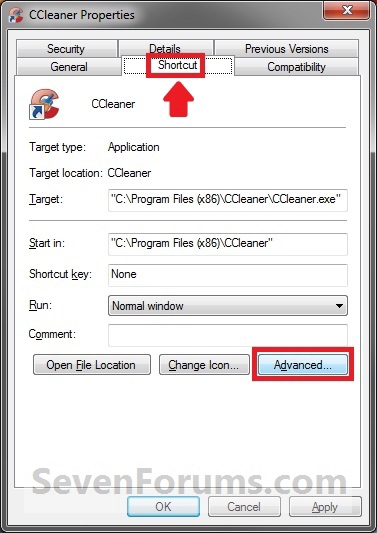
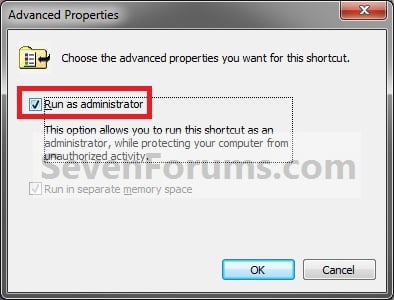
Chú ý : Những bạn cài WinVista/ Win 7 trở lên thì luôn phải Run as administrator , các bạn có thể tạo 1 shortcut ra ngoài desktop và làm theo các bước dưới đây để luôn chạy game với quyền admin
Win Vista và Win 7 thì chỉ việc chạy game= admin nó sẽ hiện lên bảng đăng nhập , điền nick +pass vào
Các bạn ko cần edit file config.dat , chỉ những người dùng WinXP mới phải down XP-Fix
B1 : Phải chuột vào shortcut > Properties
B2 : Chọn tab Shorcut > Advance
B3 : Đánh dấu vào ô "Run as administrator"
1/ Download Full Game + DLC ( mình đã seed link này với tốc độ hơn 500kb/s , mọi người nhớ cài U-Torrent ( cũng là phần mềm hỗ trợ download như IDM) trước khi click vào link , dành cho mem mới chưa biết
===Link Torrent===
===Link Exoshare ===(click vào host PutLocker >> countinue as free user >> nút dowwnload ở góc dưới bên phải màn hình)
Link này hơi nhiều quảng cáo nhưng đảm bảo 100% , anh em chịu khó nhé mình cố hết sức đi từ forum này đến forum nọ xin xỏ link rồi

===Link Mediafire + Các host VN ( phần này mình kêu gọi ai down rồi thì giữ file torrent trong máy , pause lại để seed cho anh em chứ đừng stop , sau đó mạng khoẻ thì upload lên MF hoặc những host VN để anh em có cái link dự phòng)===
Username :fpsvn.net
Password :fpsvn@2012
Cả 2 link này đều cùng 1 bản game lỗi , các bạn đừng down nhé . Post nguồn lên cho anh em cảnh giác
Nhớ là phải cóp Client iBerianOps mới nhé
2/ Download Client iBerianOps để đăng nhập và kết nối server , giải nén vào thư mục cài game , chạy BlackOpsMP hoặc BlackOpsSP ( zombie) để nó update game . Nếu bạn đã đăng ký 1 nick tài khoản thì sau khi update xong đăng nhập luôn cũng dc , cách đăng nhập mình để ở dưới
3/Đăng ký nick in-game ( ko phải nick forum)
Cách đăng nhập là down file config.dat có trong link WinXP-Fix mình up ,mở file = notepad sau đó điền thông tin đăng nhập vào , save lại , cóp vào thư mục cài
Chú ý là bạn nào cài Win 7 Vista trở lên thì ko cần cóp cái này, cứ tạo 1 file config.dat rồi đăng nhập như ví dụ bên dưới

VD :
tentaikhoan
passladay
4/Chạy file BlackOps.exe hoặc BlackOpsMP.exe , đợi nó Connecting khoảng 1 phút ( ko phải lỗi đâu nhé , cứ chờ thôi )

5/Thank thớt + Comment up bài viết rồi chơi ngon


P/s: Bản này còn đang BETA , nên sẽ có 1 số khó khăn và lỗi nhất định trong quá trình chơi , bài viết chỉ mang tính tạm thời và sẽ update hoàn toàn khi bản chính thức ra
Mọi ý kiến đóng góp trên forum sẽ dc Goliath tổng hợp góp ý lên nhóm crack game để họ hoàn thiện bản BETA
(các nhóm crack game cũng cạnh tranh với nhau kinh lắm , tấn công forum rồi DDOS nhau , kích bác ..vv ==')
======Chú ý====== : ai đã download sẵn game Black Ops bản Skidrow , alterOps rồi thì có thể download torrent vào folder cài game của các bạn, utorrent sẽ tự check những file thiếu, outdated... và chỉ down thêm update khoảng 3-5GB
===Link Download Mising English/Zombie Files (để fix lỗi crash khi chơi map Zombie COD5 và các lỗi khác nếu có)===
Localized_English_iw00 to 14 files (copy vào folder "main"):
http://www.mediafire.com/?aj3b42fux9yw1
English files needed (copy vào folder "zone" )
http://www.mediafire.com/?ael2ea9y5nrsrg7
Localization.txt in English (copy vào folder game Black Ops, ngoài ra còn fix dc lỗi EXE_CAN_NOT_FIND_ZONE
http://www.mediafire.com/?a9csa99vcnxnpb5
===Một số hình ảnh test cho các bạn yên tâm đặt gạch
===

Một số tweak để giúp chơi online mượt hơn
Vì Black Ops optimize cho PC khá lởm, mà chơi multi rất cần fps ổn định nên bổ sung thêm cái này.
Vào folder game Black Ops/players, mở file config_mp.cfg bằng notepad để edit:
seta cg_blood "0" <- default 1. Turns off blood splatter.
seta cg_brass "0" <- default 1. Turns off the empty shells from your guns.
seta cg_chatTime "60000" <- will do NOTHING to improve your game, but it will keep the chat on screen for 60 seconds, so there is plenty of time to read when you are dead. Could also be set to 0 to disable ingame chat.
seta cg_drawFPS "Simple" <- This is just so you can see your FPS if you don't use xfire or fraps instead.
seta cg_fov_default "80" <- default 65. This will give you a wider view on screen, but might also use a little more fps. But still very usefull.
seta cl_maxpackets "100" <- default 30. Will increase packets sent to server and might give more smooth gameplay.
seta drawLagometer "1" <- default 0. Will show lagometer so you can see if the server is lagging or has high ping.
seta r_aspectRatio "wide 16:9" Gives you a little wider view if you have a 16:10 monitor (widescreen monitor).
seta r_blur_allowed "0" <- default 1. Removes blur on zoom.
seta r_distortion "0" <- default 1. Removes heat and explosives distortions.
seta r_dof_enable "0" <- default 1. Removes the very annoying Depth of Field effect. Highly recommended.
seta r_gfxopt_dynamic_foliage "0" <- default 1. I have not tested this one, but think it removes tree and grass movement. (I was told it is not a good idea to change this. Take a lookie here)
seta r_gfxopt_water_simulation "0" <- same as above, but removes water animation.
seta r_glow_allowed "0" <- default 1. Should remove glow.
seta r_multiGpu "0" <- default 1. Set to 1 if your graphiccard have 2 cores or you run SLI or Crossfire.
seta r_multithreaded_device "1" default 0. Set to 1 if your CPU have more than 1 core. If you only have 1 core, you should not even be playing this game.
seta r_specular "0" <- default 1. Will remove reflections but might also make some areas of the maps much darker. See if you like it.
seta r_texFilterMipMode "Force Bilinear" Fastest mipmode, but this you can set in the ingame settings already.
seta r_vsync "0" <- default 1. Will remove the vertical sync, which feels like mouselag..
seta ragdoll_enable "0" <- default 1. I haven't tested this, but it worked in MW2. Will remove the bodies falling.
seta rate "25000" <- default should already be 25000, but just make sure that you have it.
seta sm_enable "0" <- default 1. Will remove shadows, huge fps boost on old computers. You can also remove shadows in the settings ingame.
seta snaps "30" <- default 20. Should give smoother gameplay if the server supports it.
Các hiệu ứng nên tắt là blur,glow,depth of field (rất ghét hiệu ứng này) .Ngoài ra còn multithreadCPU và multiGPU cũng nên chỉnh lại cho đúng.
Tutorial hosting Dedicated Server Multiplayer
Kêu gọi các bác mạng tốt, máy khỏe hay chủ quán net host cho anh em chơi
Happy new game year
P/s : plzzzz upload 4share hay share.vnn.vn , anh em VN muốn chơi lắm rồi
Bác nào có acc VIP thì upload hoặc cho mình mượn cám ơn
- - - Updated - - -
Bác nào có nhu cầu coop zombie hay hẹn nhau bắn phá thì đưa nick Steam mình add tiện liên lạc


