- 16/2/08
- 10,342
- 3,343
Lúc thì lục chả ra được scipt quest nào trông được được, lúc thì lại lòi ra cả đống >,<
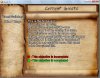
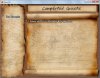
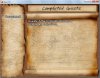
Quest Script V2.2 By Samo, The thief
Cái này với cái cho VX là một, cái này là nguyên bản, còn cái cho VX edit lại từ cái này
[*] SCIPT
[*] DEMO
Rapishare
[*] SCREENSSHOT


[*] CÁCH CÀI
Coi Demo thì biết, nói thêm cho vui
_Copy tất các scipt trên vào 1 slot mới trên script main, tên gì thì tùy
_Vào scipt Scene_Title, tới dòng $game_player = Game_Player.new, thêm cái $quest = {} vào dưới, như thế này
lưu ý là có tới 2 cái $game_player = Game_Player.new như thế lận, ta chỉ cần chèn vào Command: New Game là được
[*] CÁCH XÀI
Bấm F9 để mở CE, tạo 1 CE mới tên là Quest chả hạn, tạo hàm conditional Branch, chọn là button ... is being pressed, chọn button nào là tùy, theo demo là Y tức là phím S trên bàn phím, tạo tiếp 1 hàm conditional Branch nữa, lần này thì chọn là scipt, điền như sau: $game_system.map_interpreter.running?. rôi chèn thêm cái lệnh $scene = Scene_Quest.new này vào mục Else của hàm conditional Branch con nhé. Trigger để là parallel, condition switch chọn lấy 1 cái đề tên là active quest đi
Nếu k thích kiểu này thì có thể chèn thêm 1 cái menu trong Scene_Menu
Tạo 1 event mới k để gì cả sao cho event này là người chơi k thể nào mò đến gần được. Nhập liệu vài câu hướng dẫn gì đó, chỗ này là để nhập quest theo cấu trúc sau:
$quest[x] - Quest.new(tên quest, hình hiển thị, thông tin quest, độ khó, tình trạng quest)
x: là 1 số từ 0 tới k biết
độ khó từ là 1 số 1 ~ 5 tương đường từ EXTRA EASY đến EXTRA HARD, loại số 0 vì nó chả có gì cả
tình trạng quest từ là 1 số 1 ~ 4, số 0 là một dãy -----
Bật công tắc active quest bằng on rồi switch sang page khác
Các NPC mang nhiệm vụ thì đề theo cấu trúc sau
$quest[x].state_number = tình trạng quest
thông thường tình trạng quest là số 2 , số 4 là hoàn thành
Còn cái nữa thì dể lúc khác post
Cái này với cái cho VX là một, cái này là nguyên bản, còn cái cho VX edit lại từ cái này
[*] SCIPT
Mã:
=begin

 Quest Script v2.2 Free of Bugs by Samo, the thief.

 I removed the Enournmous header and there is a more simple one.

 Ok, this is posted because there was too much people that had the version 2.1 and it had too much bugs.
 The thing is that that version was my first script. Now i have advanced greatly much in scripting, and
 there is this new and refixed v.

~I see the script at the same than last v., what does it have of new?

 -Bugs removed when saving and loading
 -Advanced Text Paragrapher included, now you only do a long line and it will
 be automatically paragraphed.
 -More simple way to create quests.
 -Removed stupid global variables
 -Faster.


~How to install this?
 -Add this in a new slot above Main
 -Go to Scene_Title and add the lines between ADDED

    $game_player        = Game_Player.new
    #-----------------ADDED------------------------
    $quest = {}
    #-----------------ADDED-----------------------
    $game_party.setup_starting_members

~Come on, how to create a quest?

  At the start of your game in a call script

  -$quest[x] - Quest.new(name, image, line, difficulty, state)

  x will be a number.

~Great, but, the quest is always the same, I want to update it, how?
  -$quest[x].parameter = value

  parameter will be one of these next:

  name
  image
  state_number
  difficulty_level
  line

  value will be the next value of the parameter.

~Do you have something more to say?
  -Yes, if you find a bug report it.
  -If you like this new version, please, say it.
  -If you have a suggestion, please, post it.

  Good luck!
               Samo, the thief.
=end


#8 and 9 colors were done by me, and i replaced the def in window_base.
# if you want a new color, just add another when statement and copy the line.
#the color can be created more easily whith the script generator of Dubealex.


 #Samo's Quest script begins
class Window_Base
#--------------ADDED---------------------
  def text_color(n)
    case n
    when 0
      return Color.new(255, 255, 255, 255)
    when 1
      return Color.new(128, 128, 255, 255)
    when 2
      return Color.new(255, 128, 128, 255)
    when 3
      return Color.new(128, 255, 128, 255)
    when 4
      return Color.new(128, 255, 255, 255)
    when 5
      return Color.new(255, 128, 255, 255)
    when 6
      return Color.new(255, 255, 128, 255)
    when 7
      return Color.new(192, 192, 192, 255)
    when 8   # Celeste EXTRA EASY
      return Color.new(0,255,255,255)
    when 9   #rojo EXTRA HARD
      return Color.new(155,0,80,255)
    when 10   #complete
      return Color.new(62,55,0,235)
    else
      normal_color
    end
  end
#--------------ADDED---------------------

  end


#==============================================================================
# ■ Window_Command_Quest
# created for complete color feature
#------------------------------------------------------------------------------

class Window_Command_Quest < Window_Selectable
  #--------------------------------------------------------------------------
  def initialize(width, commands)
    super(0, 0, width, commands.size * 32 + 32)
    @item_max = commands.size
    @commands = commands
    self.contents = Bitmap.new(width - 32, @item_max * 32)
    self.contents.font.name = $fontface
    self.contents.font.size = $fontsize
    refresh
    self.index = 0
  end
  #--------------------------------------------------------------------------
  def refresh
    self.contents.clear
    for i in 0...@item_max
      draw_item(i, normal_color)
    end
  end
  #--------------------------------------------------------------------------
  def draw_item(index, color)
    self.contents.font.color = color
    rect = Rect.new(4, 32 * index, self.contents.width - 8, 32)
    self.contents.fill_rect(rect, Color.new(0, 0, 0, 0))
    self.contents.draw_text(rect, @commands[index])
  end
  #--------------------------------------------------------------------------
  def disable_item(index)
    draw_item(index, disabled_color)
  end
  #-----------------ADDED-----------------------------------------------
  def complete_item(index)
    draw_item(index, text_color(10))
  end
  #---------------------------------------------------------------------
  def just_finish_item(index)
    draw_item(index, text_color(6))
  end
end
#Command_Quest ends here, it doesn't replace the original window_command.


#---------------------------------------------------
#===================================================
# - CLASS Scene_Quest Begins
#===================================================
#---------------------------------------------------
class Scene_Quest

#---------------------------------------------------------------------------------
#---------------------------------------------------------------------------------
  def initialize(quest_index = 0)
    @quest_index = quest_index
    $MAP_BACKGROUND = true      #Map Background. True or false? set it as you wish.
    @quest_options = []
  end

  #------------------------------------------------

def main
  if $MAP_BACKGROUND
    @spriteset = Spriteset_Map.new
    end
    @window5 = Window_Quest_Diary.new
    @window5.z= 300

    for i in $quest.keys.sort
       name = $quest[i].name
       @quest_options.push(name)
     end
    @command_window = Window_Command_Quest.new(160, @quest_options)
    @command_window.index = @quest_index
    @command_window.z = 250
    @command_window.height = 150
    for i in $quest.keys.sort
     if $quest[i].state_number == 1
      @command_window.disable_item(i)
     elsif $quest[i].state_number == 4
      @command_window.complete_item(i)
    elsif  $quest[i].state_number == 3
      @command_window.just_finish_item(i)
   end
 end
Graphics.transition (20)
    loop do
      Graphics.update
      Input.update
     update
      if $scene != self
        break
      end
    end
    Graphics.transition
    Graphics.freeze
    @command_window.dispose
    @quest_options.clear
    @window5.dispose
  if $MAP_BACKGROUND
    @spriteset.dispose
  end
   $quest_seen = false
  end
#---------------------------------------------------------------------------------

#---------------------------------------------------------------------------------
  def update
    @command_window.update
    if @command_window.active
      update_command
      return
    end
    if Input.trigger?(Input::B)
      if @command_window.active == false
        $game_system.se_play($data_system.cancel_se)
        @command_window.active = true
        @window1.dispose
      @window2.dispose
      @window3.dispose
      @window4.dispose
          else
      $game_system.se_play($data_system.cancel_se)

#if you want that when you exit it calls the menu, just put a # before
#  $scene = Scene_Map.new and delete the # in $scene = Scene_Menu.new
      #$scene = Scene_Menu.new
      $scene = Scene_Map.new
        end

      return
    end
  end
#---------------------------------------------------------------------------------
  def update_command
    if Input.trigger?(Input::B)
      $game_system.se_play($data_system.cancel_se)
      $scene = Scene_Map.new
      return
    end
    if Input.trigger?(Input::C)

      for i in $quest.keys.sort
        case @command_window.index
          when i
            if $quest[i].state_number == 1
            $game_system.se_play($data_system.buzzer_se)
            return
          end
          $game_system.se_play($data_system.decision_se)
           $ACTUAL_QUEST = $quest[i]
          update_quest
      end
    end
  end
  end

  def update_quest
    @command_window.active = false
    @window1 = Window1.new
    @window2 = Window2.new
    @window3 = Window_Difficulty.new
    @window4 = Window_Status_Quest.new
    @window1.z= 220
    @window2.z= 200
    @window3.z= 230
    @window4.z= 230
    end

end


class Window1 < Window_Base

#---------------------------------------------------------------------------------
  def initialize
    super(120, 10, 520,100)
    self.contents = Bitmap.new(width - 32, height - 32)
    self.contents.font.name = "Comic Sans MS"
    self.contents.font.size = 40
    self.contents.font.color = text_color(3) #color of name
    self.contents.draw_text(50, 20, 400, 40, $ACTUAL_QUEST.name)
  end


  #--------------------------------

#--------------------------------
end


class Window2 < Window_Base

#---------------------------------------------------------------------------------
  def initialize
    super(80, 110, 540,340)


    self.contents = Bitmap.new(width - 32, height - 32)
    self.contents.font.name = "Comic Sans MS"
    self.contents.font.size = 26
    self.contents.font.color = text_color(0) # color of quest lines
    src_rect = Rect.new(0, 0, 500, 100) # pictures can be 480x80
    image = RPG::Cache.picture($ACTUAL_QUEST.image)
    self.contents.blt(10, 10, image, src_rect, 255)
    #self.contents.draw_text(20, 100, 500, 33, $ACTUAL_QUEST.line1)
   paragraph = str_paragraph($ACTUAL_QUEST.line,500)
    draw_paragraph(20,100,500,33,paragraph)
  end

end
#---------------------------------------------------------------------------------
# this window puts the difficulty.
 class Window_Difficulty < Window_Base
  def initialize
    super(50, 400, 300, 80)


    self.contents = Bitmap.new(width - 32, height - 32)
    self.contents.font.name = "Comic Sans MS"
    self.contents.font.size = 26
    self.opacity = 225
    self.contents.font.color = system_color
    self.contents.draw_text(10, 2, 80, 33, "Difficulty: ")
    self.contents.font.color = text_color($ACTUAL_QUEST.difficulty[0])
    self.contents.draw_text(100, 2, 100, 33, $ACTUAL_QUEST.difficulty[1])
  end

 end


 #---------------------------------------------------


 class Window_Status_Quest < Window_Base
  def initialize
    super(400, 400, 240, 80)


    self.contents = Bitmap.new(width - 32, height - 32)
    self.contents.font.name = "Comic Sans MS"
    self.contents.font.size = 26
    self.opacity = 225
    self.contents.font.color = system_color
    self.contents.draw_text(10, 2, 80, 33, "Status: ")
    self.contents.font.color = text_color(0)
    self.contents.draw_text(100, 2, 100, 33, $ACTUAL_QUEST.state)
  end

 end
#---------------------------------------------------


 class Window_Quest_Diary < Window_Base
  def initialize
    super(490, 5, 150, 60)
    self.contents = Bitmap.new(width - 32, height - 32)
    self.contents.font.name = "Comic Sans MS"
    self.contents.font.size = 26
    self.opacity = 225
    self.contents.font.color = text_color(4)
    self.contents.draw_text(0, 0, 100, 33, "Quest Diary")
  end

 end


#______________________________________________________________________________
#______________________________________________________________________________
#================================================================
#================================================================
#================================================================
#QUEST CLASS BY SAMO
#The main proccess. This creates the quests and returns their name, lines, etc.
#Only the #EDITABLE can be modified. Don't touch something else.
#================================================================
#================================================================
#================================================================
#______________________________________________________________________________
#______________________________________________________________________________


class Quest

attr_accessor :name
attr_accessor :image
attr_accessor :line
attr_reader :difficulty_level
attr_reader :state_number
attr_reader :difficulty
attr_reader :state

#-----------------------------------------------------
  def initialize(name, image, line, difficulty_level, state_number)
    @name = name
    @image = image
    @line = line
    @difficulty_level = difficulty_level
    set_difficulty_name
    @state_number = state_number
    set_state_name
  end

 #-----------------------------------------------------
  def set_state_name#EDITABLE  change the strings and if you want add another
    #when statement

    case @state_number
          when 0
      @state = "------"
          when 1
      @state = "Not Started"
          when 2
      @state = "Looking for"
          when 3
      @state = "Just finished"
          when 4
      @state = "Complete"

    end
  end
#-----------------------------------------------------
  def set_difficulty_name
  case    @difficulty_level#EDITABLE#case of the level of difficulty. To add another difficulty
                #just put another when statement and copy the line. the values are
                #  [color, "name of difficulty"]
      when 0    #Nothing
        @difficulty = [0, " "]
      when 1    #EXTRA EASY
         @difficulty = [8, "EXTRA EASY"]
      when 2    #EASY
         @difficulty = [4, "EASY"]
      when 3    #NORMAL
         @difficulty = [3, "NORMAL"]
      when 4    #HARD
         @difficulty = [2, "HARD"]
      when 5    #EXTRA HARD
         @difficulty = [9, "EXTRA HARD"]
       end
     end
def name
  if @state_number == 1
    return '----'
  else
    return @name
  end
end

def state_number=(value)
  @state_number = value
  set_state_name
end

def difficulty_level=(value)
  @difficulty_level = value
  set_difficulty_name
end


 end


 #-----THE FINAL END-------------

class Scene_Save < Scene_File

alias samo_new_save write_save_data

def write_save_data(file)
    samo_new_save(file)
    Marshal.dump($quest, file)
  end
end


class Scene_Load < Scene_File

alias samo_new_load read_save_data

def read_save_data(file)
      samo_new_load(file)
      $quest = Marshal.load(file)

end
end


 #---------------


=begin

 ATP(Advanced Text Paragrapher) V1.0 by Samo, The thief

 Ok, Something of The Scripters do normally to draw a text in form of a paragraph is
 doing an array [] that contains each line. The Time Has come For
 This Microsoft Word Effect!
 This Script Just need a Long String and it will paragraph it!

 How to call it?

   paragraph = str_paragraph(string, width of the paragraph.)

   Example :

   @my_paragraph = str_paragraph("La la la la la la la la la , This is a Looooong Strriiiing!", 120)


 Returns an Array with each line separately.

 How to draw it?

   draw_paragraph(x,y,width,height, paragraph)

 width and height for each line, not for the paragraph.

       .::-NOTE-::.

  If you put a ' ^ '(must be between spaces), the text will pass to the next line.
  This Symbol Won't be drawed.

  Reminder: Always use '' instead of ""! It works faster!

=end


class Window_Base < Window
  #--------------------------------------------------
  def str_paragraph(str_old, width)
    temp_str = ''
    str = '' + str_old
    words = []
    size = 0
    str_size = 0
    #
    while ((c = str.slice!(/./m)) != nil)
     temp_str += c
     str_size += 1
     if c == ' '
       words.push(temp_str)
       temp_str = ''
     end
     if str.size == 0
       words.push(temp_str)
       temp_str = ''
      end
    end
    lines = []
    for i in 0...words.size
      word = words[i]
      if word == '^ '
        lines.push(temp_str)
        temp_str = ''
        next
      end
      temp_str += word
      size = contents.text_size(temp_str).width
      if size > width - contents.text_size(' ').width
        for i in 1..word.size
          temp_str = temp_str.chop
        end
        lines.push(temp_str)
        temp_str = ''
        temp_str += word
      end
    end
    words = words.compact
    if temp_str != ''
      lines.push(temp_str)
    end
   return lines
 end
 #---------------------------------------------------------------------
 def draw_paragraph(x,y,width,height,lines,align = 0)
   for i in 0...lines.size
     self.contents.draw_text(x, y + i * self.contents.font.size + 1, width, height, lines[i], align)
   end
 end
 #-----------------------------------------------------------------
end
[*] DEMO
Rapishare
[*] SCREENSSHOT
[*] CÁCH CÀI
Coi Demo thì biết, nói thêm cho vui
_Copy tất các scipt trên vào 1 slot mới trên script main, tên gì thì tùy
_Vào scipt Scene_Title, tới dòng $game_player = Game_Player.new, thêm cái $quest = {} vào dưới, như thế này
Mã:
    $game_player        = Game_Player.new
    #---------------------------------------------
    $quest = {}
    #---------------------------------------------
    # Set up initial party
$game_party.setup_starting_members[*] CÁCH XÀI
Bấm F9 để mở CE, tạo 1 CE mới tên là Quest chả hạn, tạo hàm conditional Branch, chọn là button ... is being pressed, chọn button nào là tùy, theo demo là Y tức là phím S trên bàn phím, tạo tiếp 1 hàm conditional Branch nữa, lần này thì chọn là scipt, điền như sau: $game_system.map_interpreter.running?. rôi chèn thêm cái lệnh $scene = Scene_Quest.new này vào mục Else của hàm conditional Branch con nhé. Trigger để là parallel, condition switch chọn lấy 1 cái đề tên là active quest đi
Nếu k thích kiểu này thì có thể chèn thêm 1 cái menu trong Scene_Menu
Tạo 1 event mới k để gì cả sao cho event này là người chơi k thể nào mò đến gần được. Nhập liệu vài câu hướng dẫn gì đó, chỗ này là để nhập quest theo cấu trúc sau:
$quest[x] - Quest.new(tên quest, hình hiển thị, thông tin quest, độ khó, tình trạng quest)
x: là 1 số từ 0 tới k biết
độ khó từ là 1 số 1 ~ 5 tương đường từ EXTRA EASY đến EXTRA HARD, loại số 0 vì nó chả có gì cả
tình trạng quest từ là 1 số 1 ~ 4, số 0 là một dãy -----
Bật công tắc active quest bằng on rồi switch sang page khác
Các NPC mang nhiệm vụ thì đề theo cấu trúc sau
$quest[x].state_number = tình trạng quest
thông thường tình trạng quest là số 2
, số 4 là hoàn thànhCòn cái nữa thì dể lúc khác post
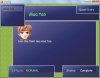


 ngày xưa làm ầm ầm mà giờ quên mất tiêu rồi ~~