
Navigation
Install the app
How to install the app on iOS
Follow along with the video below to see how to install our site as a web app on your home screen.
Note: This feature may not be available in some browsers.
Thêm tùy chọn
Style variation
You are using an out of date browser. It may not display this or other websites correctly.
You should upgrade or use an alternative browser.
You should upgrade or use an alternative browser.
PSP's Hombrews
- Thread starter Atachi
- Ngày gửi
- Status
- Không mở trả lời sau này.

Atachi
<color="Red"><b>The Boy From Nowhere</b></color>
gpSP - Giả lập GBA dành cho PSP
_Phiên bản 0.9 , đã có rất nhiều cải tiến so với những phiên bản đời đâu . Khi mà chúng ta vẫn còn phải chơi GBA với speed ở tầm 40-50 % .
_Load được nhiều game với full speed , mặc dù vẫn còn bị lỗi âm thanh bị rè và vài game ko load được .
_Download về chỉ việc chép vào trong PSP/GAME150 là xong :). gpSP nhận Rom GBA cho dù ở dạng zip hay .gba cũng được
Attachments
Atachi
<color="Red"><b>The Boy From Nowhere</b></color>


DevilX
T.E.T.Я.I.S
[PSPTube20070812]
_ Bạn muốn YouTube? Đây là giải pháp. Bây giờ bạn có thể xem những đoạn video trên YouTube ở bất cứ đâu (miễn là có wifi) bằng chú PSP yêu dấu! Đây chỉ là phiên bản beta, không hứa hẹn gì nhiều đâu nhé!
_ Tải file được đính kèm ở dưới, dùng winrar để giải nén. Bạn sẽ có 2 thư mục là 200over và 150.
+ Nếu bạn xài firmware 1.50: copy tất cả những gì trong thư mục 150 vào [thẻ nhớ\PSP\GAME\] (lưu ý là chỉ copy trong thư mục 150).
+ Nếu bạn xài firmware 2.00 trở lên: copy tất cả những gì có trong thư mục 200 vào [thẻ nhớ\PSP\GAME\]
+ Cho những ai xài custome firmware bản OE của DA: copy tất cả những gì có trong thư mục 200 vào [thẻ nhớ\PSP\GAME271\] nếu xài 2.71 OE, [thẻ nhớ\PSP\GAME303\] nếu xài 3.03 OE => các OE firmware khác cũng làm tương tự. Ví dụ: 3.40 thì copy vào PSP\GAME340, nếu không có thư mục đó thì tạo một cái với tên như vậy.
+ Nếu bạn xài 3.52 M33: copy trong thư mục 200 vào [thẻ nhớ\PSP\GAME] chạy bình thường!
_ Tạo một profile ở http://youtube.com/dev , dùng notepad để open psptube.cfg (nó nằm trong PSPTube của 200, __SCE__PSPTube của 150), thêm ID bạn vừa tạo dưới hàng chữ dev_id rồi save lại.
Download
_ Bạn muốn YouTube? Đây là giải pháp. Bây giờ bạn có thể xem những đoạn video trên YouTube ở bất cứ đâu (miễn là có wifi) bằng chú PSP yêu dấu! Đây chỉ là phiên bản beta, không hứa hẹn gì nhiều đâu nhé!
_ Tải file được đính kèm ở dưới, dùng winrar để giải nén. Bạn sẽ có 2 thư mục là 200over và 150.
+ Nếu bạn xài firmware 1.50: copy tất cả những gì trong thư mục 150 vào [thẻ nhớ\PSP\GAME\] (lưu ý là chỉ copy trong thư mục 150).
+ Nếu bạn xài firmware 2.00 trở lên: copy tất cả những gì có trong thư mục 200 vào [thẻ nhớ\PSP\GAME\]
+ Cho những ai xài custome firmware bản OE của DA: copy tất cả những gì có trong thư mục 200 vào [thẻ nhớ\PSP\GAME271\] nếu xài 2.71 OE, [thẻ nhớ\PSP\GAME303\] nếu xài 3.03 OE => các OE firmware khác cũng làm tương tự. Ví dụ: 3.40 thì copy vào PSP\GAME340, nếu không có thư mục đó thì tạo một cái với tên như vậy.
+ Nếu bạn xài 3.52 M33: copy trong thư mục 200 vào [thẻ nhớ\PSP\GAME] chạy bình thường!
_ Tạo một profile ở http://youtube.com/dev , dùng notepad để open psptube.cfg (nó nằm trong PSPTube của 200, __SCE__PSPTube của 150), thêm ID bạn vừa tạo dưới hàng chữ dev_id rồi save lại.
Download
TOPIC này không dành cho spam, ai cũng như bạn sẽ làm rối TOPIC này hết!Hình như PSP có chương trình giả lập hệ DOS huh?
Atachi
<color="Red"><b>The Boy From Nowhere</b></color>
Nester J - Giả lập Nes cho PSP
-Bạn muốn chơi lại các game nes mà ngày xưa đã từng làm bạn phải say mê với các game như Maria , Battle city , ... ? Đây là chọn lựa của bạn , Nester J cho phép bản giả lập hoàn hảo hệ máy Nes trên chiếc PSP yêu dấu của bạn . Các sử dụng rất đơn giản , giải nén và chép folder nester vào PSP/GAME150 . Sau đó chép Rom nes vào thư mục Rom và load .
Attachments
Atachi
<color="Red"><b>The Boy From Nowhere</b></color>
Music prx 0.55 (aka irsmp3.prx)
-Bạn muốn vừa chơi game vừa nghe nhạc nhưng firmware của bạn không cho phép làm chuyện này thì đã có plugin này giúp bạn làm việc đó . Music prx cho phép bạn nghe nhạc trên PSP ngay cả khi đang chơi game ISO/UMD/homebrew . Nên set clock speed lên 222hz khi dùng plugin này .
_Chép vào thư mục seplugins trong thẻ nhớ và enable nó trong recovery mode
Attachments
DevilX
T.E.T.Я.I.S
[MapThis! 0.5]

_ Sợ lạc đường? Đừng lo! Vì "MapThis!" là một bản đồ hỗ trợ GPS cực hay! Không biết giới thiệu gì nhiều nữa...
_ Nếu bạn đủ... giàu, bạn có thể mua bộ nhận GPS (khoảng 60$) cho PSP để được hỗ trợ bản đồ tốt hơn từ vệ tinh... Còn không thì cũng không sao, vì nó vẫn hoạt động như là một bản đồ bình thường khi không có GPS, chỉ có một điểm khác là sẽ không có dấu mũi tên chỉ "You are here" thể hiện bạn đang nằm ở vùng nào trên bản đồ thôi!
_ Bạn phải download bản đồ khu vực của bạn để "MapThis!" hiển thị bản đồ khu vực đó, mọi chi tiết trong... phần download!
Download
Lưu ý: Topic chỉ giới thiệu homebrew cho các bạn, không hỗ trợ hướng dẫn sử dụng cho các bạn vì hiện tại đang thiếu người... và bọn mình cũng là con người chứ không phải cái máy! Các bạn có thể post bài xin hướng dẫn, nhưng không post trong đây!
___________________________
[PSP IRC v1.0.4]
_ Công cụ Internet Relay Chat dành cho PSP, xài với wifi - làm sao mà chat nếu không có wifi nhỉ? Hỗ trợ thêm IR Keyboard!
_ Dành cho fw1.50: Download về, bung nén, chỉ copy các thư mục có trong fw1.50 vào [thẻ nhớ\PSP\GAME\].
_ Dành cho fw OE/M33: Download về, bung nén, chỉ copy các thư mục có trong fw3.x vào [thẻ nhớ\PSP\GAME\]. Hỗ trợ WPA.
@Hee: Em merge bài viết của anh làm anh phải edit lại T___T
_ Sợ lạc đường? Đừng lo! Vì "MapThis!" là một bản đồ hỗ trợ GPS cực hay! Không biết giới thiệu gì nhiều nữa...
_ Nếu bạn đủ... giàu, bạn có thể mua bộ nhận GPS (khoảng 60$) cho PSP để được hỗ trợ bản đồ tốt hơn từ vệ tinh... Còn không thì cũng không sao, vì nó vẫn hoạt động như là một bản đồ bình thường khi không có GPS, chỉ có một điểm khác là sẽ không có dấu mũi tên chỉ "You are here" thể hiện bạn đang nằm ở vùng nào trên bản đồ thôi!
_ Bạn phải download bản đồ khu vực của bạn để "MapThis!" hiển thị bản đồ khu vực đó, mọi chi tiết trong... phần download!
Download
Lưu ý: Topic chỉ giới thiệu homebrew cho các bạn, không hỗ trợ hướng dẫn sử dụng cho các bạn vì hiện tại đang thiếu người... và bọn mình cũng là con người chứ không phải cái máy! Các bạn có thể post bài xin hướng dẫn, nhưng không post trong đây!
___________________________
[PSP IRC v1.0.4]
_ Công cụ Internet Relay Chat dành cho PSP, xài với wifi - làm sao mà chat nếu không có wifi nhỉ? Hỗ trợ thêm IR Keyboard!
_ Dành cho fw1.50: Download về, bung nén, chỉ copy các thư mục có trong fw1.50 vào [thẻ nhớ\PSP\GAME\].
_ Dành cho fw OE/M33: Download về, bung nén, chỉ copy các thư mục có trong fw3.x vào [thẻ nhớ\PSP\GAME\]. Hỗ trợ WPA.
@Hee: Em merge bài viết của anh làm anh phải edit lại T___T
Atachi
<color="Red"><b>The Boy From Nowhere</b></color>
Black Speed 2.0 - Đo tốc độ chiếc thẻ nhớ của bạn
_Công cụ giúp bạn xác định tốc độ chiếc thẻ nhớ yêu quí của bạn và không sợ mua nhầm thẻ speed cùi khi mua thẻ ngoài hàng . Nếu có đi mua thẻ , ra hàng bảo nó chép cái này vào thẻ mà test cho bạn thấy . Yên tâm thì tính chuyện mua bán , còn lại thì biến , không nói nhiều .
Attachments
Atachi
<color="Red"><b>The Boy From Nowhere</b></color>
_Topic là nơi để post và giới thiệu , hướng dẫn cách sử dụng các homebrew cho những mem không biết . Không phải cái nơi hỏi đáp ! Hay là xem tiêu đề chưa hiểu ?
_Tất cả các bài post hỏi đáp vớ vẩn ngoài topic sẽ bị del và cảnh cáo ! Đừng nói là tôi không nhắc trước . Muốn hỏi đáp thì vào topic dưới kia , sẽ nhận được trả lời tốt hơn !
_Tất cả các bài post hỏi đáp vớ vẩn ngoài topic sẽ bị del và cảnh cáo ! Đừng nói là tôi không nhắc trước . Muốn hỏi đáp thì vào topic dưới kia , sẽ nhận được trả lời tốt hơn !
DevilX
T.E.T.Я.I.S
[MasterBoy 2.0]

_ Homebrew của Brunni với các chức năng giả lập Nintendo Gameboy, Super Gameboy, Gameboy Colour, SEGA Master System, và Game Gear. Tất cả trong 1!
_ Bung nén ra và copy thư mục PSP vào thẻ nhớ là xong, thư mục "Kernel mode" chỉ dành cho developer thôi!
Updated: MasterBoy 2.1 đã được có mặt, fix nhiều lỗi blah blah blah.
Download
_ Homebrew của Brunni với các chức năng giả lập Nintendo Gameboy, Super Gameboy, Gameboy Colour, SEGA Master System, và Game Gear. Tất cả trong 1!
_ Bung nén ra và copy thư mục PSP vào thẻ nhớ là xong, thư mục "Kernel mode" chỉ dành cho developer thôi!
Updated: MasterBoy 2.1 đã được có mặt, fix nhiều lỗi blah blah blah.
Download
Atachi
<color="Red"><b>The Boy From Nowhere</b></color>
PSP Type B Driver - Chơi game ISO/CSO trên PSP qua ổ cứng
_Bạn cảm thấy hơi khó chịu vì cái thẻ nhớ quá nhỏ mà nhu cầu test hay chơi game ở nhà khá nhiều mà làm biếng chép qua chép lại thì đây là giải pháp . Cách sử dụng nằm ngay trong file read me .
Attachments
Atachi
<color="Red"><b>The Boy From Nowhere</b></color>
Remotejoy GUI v1.52 - Chuyển hình ảnh từ PSP sang màn hình PC của bạn
_Bạn thích chức năng TV-out của PSP slim mà lại ko có trong tay 1 cái PSP Slim thì đây là chìa khóa . Homebrew làm được tất cả
 .
._Remotejoy cho phép bạn chuyển hình ảnh của PSP sang màn hình PC qua cổng USB , bạn có thể game , nhạc , film , ... với Remotejoy . Hoạt động tốt với 3.52 M33-3 .
_Notes: cần framework 3.0
1. First, copy and boot up the PSPLink application as in the readme. Make sure the USB cable is plugged in, and install the drivers when prompted by directing to the drivers somewhere in this package.
2. Copy and enable the two plugins mentioned in the readme in GAME and/or GAME150. Don't start Remotejoy yet.
3. Now start the game/application on your PSP.
4. When it has booted, start up Remotejoy GUI on the PC. USBHostFS will automatically start.
5. Click With FPS or Without FPS under Window or Full Screen to start the controlling/displaying application.
6. Press F3 on your keyboard to stream the PSP's screen to the PC's.
7. Press F11 to take a screenshot.
Download

kimlnog1204
Mr & Ms Pac-Man
đầu tiên là chương trình khóa PSP của bạn, nếu sợ có ai sử dụng mà ko đc phép!M33 availabe
chỉ cần để file dưới vào thư mục seplugin trên thẻ nhớ
sau đó vào RecoveryMode, bật plugin vừa cài cho enable.
bây giờ PSP của bạn sẽ ko bật lên dc, trừ khi vào RM và disible cái này!
http://www.gigasize.com/get.php/3195444877/PSP_Locker.rar
dành cho M33-> http://socom.recoding.net/PSPM33Lock.rar
chỉ cần để file dưới vào thư mục seplugin trên thẻ nhớ
sau đó vào RecoveryMode, bật plugin vừa cài cho enable.
bây giờ PSP của bạn sẽ ko bật lên dc, trừ khi vào RM và disible cái này!
http://www.gigasize.com/get.php/3195444877/PSP_Locker.rar
dành cho M33-> http://socom.recoding.net/PSPM33Lock.rar
kimlnog1204
Mr & Ms Pac-Man
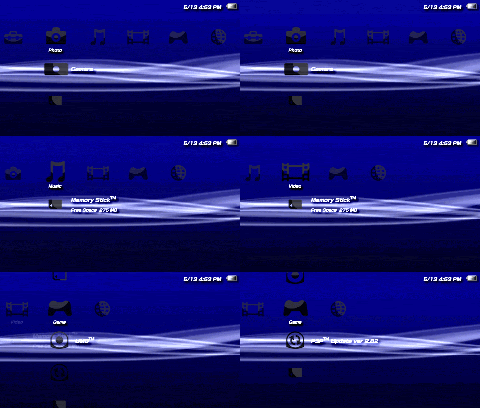
chương trình chụp ảnh màn hình cho PSP( tương tự screen capture)
bạn có thể chụp ảnh màn hình psp,( định dạng GIF), để lưu lại các pha bóng đẹp hay 1 hìn ảnh cool trong game hay video của bạn.
Đây là 1 prx nên bạn phải bật nó enable trong RM (ko brick PSP của bạn đâu, yên tâm)
cách cài đặt:
rất đơn giản,có 1 chương trình trong thư mục sẽ tự động cài mọi thứ cho bạn
đi kèm 1 gif player để bạn xem ảnh ngay sau khi chụp.
hình minh họa:

DOWNLOAD LINK:
http://www.megaupload.com/?d=MADUNECW
bạn có thể chụp ảnh màn hình psp,( định dạng GIF), để lưu lại các pha bóng đẹp hay 1 hìn ảnh cool trong game hay video của bạn.
Đây là 1 prx nên bạn phải bật nó enable trong RM (ko brick PSP của bạn đâu, yên tâm)
cách cài đặt:
rất đơn giản,có 1 chương trình trong thư mục sẽ tự động cài mọi thứ cho bạn
đi kèm 1 gif player để bạn xem ảnh ngay sau khi chụp.
hình minh họa:
DOWNLOAD LINK:
http://www.megaupload.com/?d=MADUNECW
kimlnog1204
Mr & Ms Pac-Man
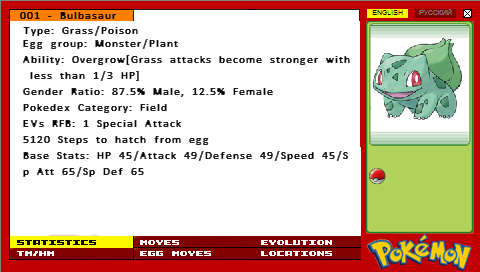
3)Pokedex:
cái này dành cho ai ghiền pokemon, có thông tin khoảng hơn 356 pokemon
DOWNLOAD LINK
http://www.megaupload.com/?d=LQ250A9S
cái này dành cho ai ghiền pokemon, có thông tin khoảng hơn 356 pokemon
DOWNLOAD LINK
http://www.megaupload.com/?d=LQ250A9S
kimlnog1204
Mr & Ms Pac-Man
4)Hiển thị % lượng pin còn lại ko cần vào system settings:

DOWNLOAD:
http://www.wikiupload.com/download_page.php?id=90024
Cách cài đặt:
1)download file về máy và giải nén.
2)Copy thư mục seplugin vào thẻ nhớ PSP,ngay tại root nhé, là nơi ngya khi click vào thẻ nhớ PSP, gồm các thư mục như VIDEO,MUSIC,ISO...
3)tạo 1 file txt (text document) trong thư mục seplugin và viết: "ms0:/seplugins/battery.prx" (ko có dấu ngoặc kép nhá)
4)tắt psp nào và khởi động ở recovery mode, vào plugin,bạn sẽ thấy battery.prx[VSH] (disabled) cho nó thành enabled nào
5)exit, mở máy và xem thành quả.
àh, các app mà tớ post tớ đều test trên máy tớ, đc tớ mới post, anh em yên tâm nhá, tớ xài 3.52 M33-4
DOWNLOAD:
http://www.wikiupload.com/download_page.php?id=90024
Cách cài đặt:
1)download file về máy và giải nén.
2)Copy thư mục seplugin vào thẻ nhớ PSP,ngay tại root nhé, là nơi ngya khi click vào thẻ nhớ PSP, gồm các thư mục như VIDEO,MUSIC,ISO...
3)tạo 1 file txt (text document) trong thư mục seplugin và viết: "ms0:/seplugins/battery.prx" (ko có dấu ngoặc kép nhá)
4)tắt psp nào và khởi động ở recovery mode, vào plugin,bạn sẽ thấy battery.prx[VSH] (disabled) cho nó thành enabled nào
5)exit, mở máy và xem thành quả.
àh, các app mà tớ post tớ đều test trên máy tớ, đc tớ mới post, anh em yên tâm nhá, tớ xài 3.52 M33-4
AFKIM: Instant Messenger for PSP v3.2.1
Chương trình để chat trên YM, ICQ, Gtalk, MSN...
fw1.5: http://zx81.zx81.free.fr/serendipity/exit.php?url_id=1144&entry_id=199
fw3x: http://zx81.zx81.free.fr/serendipity/exit.php?url_id=1145&entry_id=199
Chương trình để chat trên YM, ICQ, Gtalk, MSN...
fw1.5: http://zx81.zx81.free.fr/serendipity/exit.php?url_id=1144&entry_id=199
fw3x: http://zx81.zx81.free.fr/serendipity/exit.php?url_id=1145&entry_id=199
Atachi
<color="Red"><b>The Boy From Nowhere</b></color>
Mac Address Fixer
._Dành cho những ai xài Pandora battery và upgrade firmware dòng 3.71 M33 mà ko biết cách sửa Mac address của mình về đúng . Việc sai Mac address sẽ gây ra tình trạng ko thể online wifi hay chơi game adhoc . Ngoài ra bạn cũng có thể dùng 1 soft khác để thay đổi mac address là MAC address changer V2 .
- Status
- Không mở trả lời sau này.