Mod để chơi ở góc nhìn từ trên : http://www.moddb.com/games/unreal-tournament-3/downloads/action-cam-v10


Navigation
Install the app
How to install the app on iOS
Follow along with the video below to see how to install our site as a web app on your home screen.
Note: This feature may not be available in some browsers.
Thêm tùy chọn
Style variation
You are using an out of date browser. It may not display this or other websites correctly.
You should upgrade or use an alternative browser.
You should upgrade or use an alternative browser.
Unreal tournament 3: TITAN PACK
- Thread starter satthuphancung
- Ngày gửi
- Status
- Không mở trả lời sau này.

- 11/1/07
- 24,069
- 23,861
Mod để chơi ở góc nhìn từ trên : http://www.moddb.com/games/unreal-tournament-3/downloads/action-cam-v10
Patch 2.0 đã đào thải Mutator này, cùng với MK3rdPerson (rất hay), add vào map bị crash game.
 .
.
Hacker1618
The Warrior of Light
- 6/11/08
- 2,469
- 28
ac,ai huong dan minh cach fix loi connection failed voi ::(
- 11/1/07
- 24,069
- 23,861
Vậy thì chơi ở góc nhìn thứ 1 đi
Ko thấy mấy hình mình post à, patch 2.0, 3rd view đàng hoàng nhé. :devil::devil:
Xài mod Gears of Unreal.

- 11/1/07
- 24,069
- 23,861
Vậy bác làm sao chơi dc online ? mua key ah ?. Chứ vô room toàn connect failed ?

Mình chưa chơi online, vào multi thấy sv nào ping cũng >400 nên thôi. :p:p
Hacker1618
The Warrior of Light
- 6/11/08
- 2,469
- 28
tình hình là phải mua key,đến nản,có ai muốn chơi qua hamachi không 
taolavjp92
Youtube Master Race
- 17/12/07
- 36
- 0
cái này có cần phải cài bản gốc hok các bác


- 24/1/08
- 11,226
- 11,027
thế có link down bản gốc ko...
Hacker1618
The Warrior of Light
- 6/11/08
- 2,469
- 28
anh em thích online UT thì zô hamachi nhé :UT3 VN pass ut3
- 11/1/07
- 24,069
- 23,861
Định cuối tuần mới làm, tự nhiên giờ có thời gian rỗi nên làm luôn.
TỔNG HỢP MOD CHO UNREAL TOURNAMENT 3
-Test ở Patch 2.0, Titan Pack, Single Player.
-Hầu hết Mutator, Character Pack, Tweak đều có kèm README và đều copy vào folder UTGame, đường dẫn:
C:\Documents and Settings\ABC\My Documents\My Games\Unreal Tournament 3\UTGame
-Nhớ backup dữ liệu.
-Cái nào up dc lên mediafrie mình post link mediafire, cái nào ko cần hoặc size lớn mình để link gốc (thường là filefront, fileshack, fileplanet,..).
-Trong bài viết này mình ko đề cập đến Custom Maps và Custom Vehicle.
Phần 1: Mutator
Trong bài này mình gọi tắt Mutator là Mod cho gọn.
1)Gears Of Unreal (GOU):
Giới thiệu:
Chắc việc chơi UT3 ở 3rdperson view là dc nhiều người quan tâm nhất. Trước khi có patch 2.0 thì có 2 mod làm khá tốt việc này là ActionCam và MK3rdPerson, nhất là MK3rdPerson. Tuy nhiên 2 mutator này ko sử dụng dc đối với patch 2.0. Nên hiện nay, GOU là mod duy nhất hỗ trợ 3rdperson.
Hiện nay đã có version 1.1, change log của tác giả:


Đánh giá:
Ở ver 1.1, tác giả đã bind chết zoom function vào Right Mouse (ko config dc), nên bắt buộc ng chơi phải config alt-fire vào nút khác, Middle Mouse chẳng hạn, khá bất tiện. Tác giả hứa ở ver sau sẽ đưa config zoom function vào file .ini để mọi người có thể config thành nút khác theo ý thích. Mình đưa link cả ver 1.0 và ver 1.1, ai thích xài ver nào thì xài.
Ưu:
-Thể hiện góc nhìn ngang vai của GOW khá tốt.
Khuyết:
-Ko cho điều chỉnh camera distance, đôi khi thích kéo ra xa 1 chút để nhìn cả character cũng ko dc. Ver 1.1 bị lỗi khi sử dụng zoom function của mod đối với khẩu Sniper.
-Ko có nút toggle giữa 1st và 3rd view. Tuy nhiên ta có thể dễ dàng thực hiện việc này bằng 1 tweak nho nhỏ, xem thêm ở mục TWEAK.
Link:
1.0: http://www.mediafire.com/download.php?jlm0tlglwxy
1.1: http://www.mediafire.com/download.php?nwkyyntqm1m
2){VAS} UT3 Auto-Shields Mutator v1.2 :
Giới thiệu:
Cung cấp chức năng "tự hồi shield" , nói nôm na là y chang shield của Halo.
Đánh giá:
Ưu:
-Giúp người chơi đỡ phải lo việc kiếm máu, chỉ cần núp 1 lát, shield sẽ phục hồi lại.
Khuyết:
-1 số súng bắn làm mất cả Shield lẫn Health, nên cho dù đã hồi Shield mà Health=1 thì ăn 1 viên vẫn "đi" như thường.
-Hit Sound "xoẹc xoẹc...." khi bắn trúng Shield nghe hoài nhiều khi cũng chán.
Link:
http://www.mediafire.com/?ljwytwnyzm5
3)Sentinel Ut3 v1.0beta5:
Giới thiệu:
Cho phép người chơi đặt những ụ súng tự động bất cứ chỗ nào trên map để bảo vệ bản thân và team. Cho phép thay đổi nhiều loại súng khác nhau (pulse, rocket, minigun, flame,....), upgrade (giáp, shield, ....) cho súng.
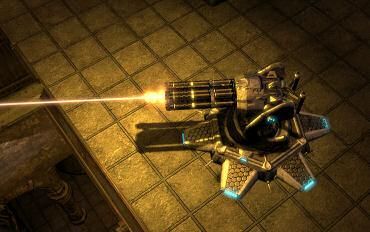
Đánh giá:
Ưu:
-Model, AI, animation, sound, hiệu ứng (nhất là flamethrower) rất tốt.
Khuyết:
-Sử dụng nhiều hơi overpower quá.
Link:
http://www.mediafire.com/download.php?w2aj2mzm0ht
4)Jurrasic Rage III :
Giới thiệu:
Spawn 2 loại khủng long là Raptor và T-Rex ở những vị trí ngẫu nhiên trên map, attack cả 2 team. Có thể config chi tiết thông số của từng loại khủng long (health, speed, strength, number, ......)

Đánh giá:
Ưu:
-Sáng tạo.
Khuyết:
-Model, animation của T-Rex ko dc tốt lắm.
Link
http://www.mediafire.com/download.php?h0gtjhnjyqu
5)RSShotgun v1:
Giới thiệu:
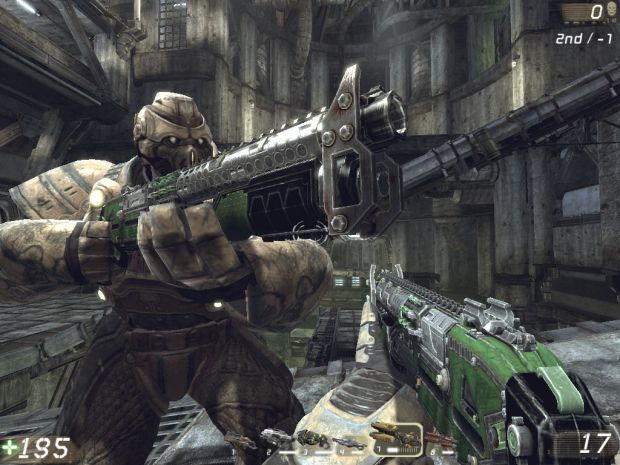
Cung cấp thêm khẩu Shotgun (custom model, custom fire-mode, sound,....) cho người chơi, súng sẽ spawn trên map như weapon thường, nằm ở slot 7 của Flak Cannon (double-tap phím 7 sẽ ra).
Đánh giá
Ưu:
-PERFECT.
Khuyết:
-Hơi overpower quá.
Link:
http://www.mediafire.com/download.php?yy20jkdhhy0
6)RSLightningGun v1.1
Giới thiệu:
Của cùng tác giả trên, cung cấp thêm khẩu Lightning Gun Custom (custom model, custom fire-mode, soud,....) cho người chơi, súng sẽ spawn trên map như weapon thường, nằm ở slot 5 của Link Gun (double-tap phím 5 sẽ ra).

Đánh giá
Ưu:
-Như trên, vẫn PERFECT.
Khuyết:
-Overpower còn hơn cây Shotgun.
Link:
http://www.mediafire.com/download.php?izzcyx4zgnu
Phần 2: Character Pack (CP)
-Hiện nay có khá nhiều CP cho UT3, đây là những CP mình cho là tốt nhất hiện nay.
-Dung lượng hơi lớn.
-Để import vào game thành công, các bạn nên đọc kỹ file README kèm theo, thường là copy paste thôi.
1)Gears of War Character Pack 1.6
Giới thiệu:
-Đây là CP khá đồ sộ, bao gồm tất cả character trong GOW, trừ Boomer.
-Do có cùng mẹ là Epic Games, cùng engine, nên mình nghĩ tác giả của CP này chỉ cần "rip" model từ GOW, add khung xương của UT3 vào, xong.


Đánh giá:
Ưu:
-"Y chang" GOW.
-Animation tốt.
-Có custom sound (các câu nói quen thuộc của nv trong GOW).
Khuyết:
-Ko có 1st person custom hands.
-Hiệu ứng shader lên model ko bằng GOW.
-Custom parts ít.
Link: cả 2 link như nhau, down cái nào cũng dc.
http://files.filefront.com/UT3+GOW+Character+Pack+16/;12258354;/fileinfo.html
http://www.game-maps.net/downloads/ut3/models/characters/gow-character-pack-1.6.rar
2) WH40k Player Models Pack v1.1
Giới thiệu:
-Nhìn tên là biết rồi, khỏi giới thiệu. :p:p


Đánh giá:
Ưu:
-Model, texture, animation tốt.
Khuyết:
-Ko đa dạng, các character chỉ khác nhau mỗi cái đầu, các parts khác đều na ná nhau.
-Ko có 1st person custom hands.
-Custom parts ít.
Link:
http://unrealtournament2004.filefront.com/file/UT_III_WH40k_Player_Models_Pack;89659
3)Spartan Bonus Pack
Giới thiệu:
-Chắc cũng ko cần giới thiệu luôn.

Đánh giá:
Ưu:
-Model, texture, animation tốt.
-Có 1st person custom hands.
Khuyết:
-Còn lỗi khi sử dụng parts ko phù hợp.
Link:
http://www.gamespot.com/pc/action/unrealtournament2007/download_6190339.html
4)Crysis - Nanosuit Pack
Giới thiệu:
-Gồm 3 anh chàng bên US và 1 anh NK.

Đánh giá:
Ưu:
-Đây là CP đẹp nhất hiện nay, chất lượng hầu như ngang ngữa Crysis, đặc biệt là hiệu ứng shader trên những mảnh kim loại của bộ Nano Suit.
Khuyết:
-Cũng ko có 1st person custom hands.
-Bị lỗi animation khi bơi.
Link:
http://unrealtournament2004.filefront.com/file/Crysis_Nanosuit;92541
-Còn khác nhiều CP khác, các bạn có thể tham khảo thêm ở các link mình đưa ở cuối bài.
Phần 3: Tweak
Đầu tiên mình sẽ liệt kê 1 số command console thông dụng của UT3 (cheat sẽ dc bôi trắng cho ai ko thích xài):
General Commands
Say [text] - Shows specified text in global chat
Teamsay [text] - Shows specified text in team chat
FOV [degrees] - Changes the Field of View to the specified degrees
Slomo [speed] - Alters the speed of the game to the value specified. Values above 1 speed up the game, values below 1 slow it down
Showhud - Toggles whether to display or hide the HUD
Togglescreenshotmode - Toggles 'screenshot mode' which removes all text, the HUD and your gun
Setbind [Key,Command] - Binds the specified command to the specified key
Setsensitivity [value] - Changes your mouse sensitivity to the specified value
Shot - Takes a screenshot in .BMP format
Exec [filename] - Executes a file under the \Program Files\Unreal Tournament 3\Binaries directory
Brightness [value] - Changes the brightness to the specified value
Contrast [value] - Changes the contrast to the specified value
Gamma [value] - Changes the gamma to the specified value
Demorec [demoname] - Starts recording an in-game demo with the name specified
Demostop - Stops recording a demo
Demoplay [demoname] - Plays back a demo with the name specified
Switchlevel [mapname] - Changes the level to the map specified
Switchteam - Toggles you to the other team
Suicide - Kills your character
Open [mapname or IP] - Loads up the specified map, or joins the specified IP address
Reconnect - Reconnects to the last connected server
Disconnect - Disconnects from current server
Exit, Quit - Exits the game to desktop immediately
Information Commands
Stat FPS - Toggles the display of your framerate
Stat Net - Toggles the display of network statistics including Ping
Stat Audio - Toggles information about the audio system
Stat Engine - Toggles information about the rendering system
Stat Game - Toggles information about the game engine
Cheat / Fun Commands
Behindview - Toggles between 1st and 3rd person view
God - Makes your character indestructible, toggles on or off
Fly - Allows your character to fly
Ghost - Allows your character to fly and move through solid objects
Walk - Switches off Fly and Ghost modes
Allweapons - Gives you all weapons
Allammo - Gives you maximum ammo for all your weapons
Loaded - Gives a combination of all weapons and all ammo
Playersonly - Freezes all bots
Addbots [number] - Adds the specified number of bots to the current game
Killbots - Kills all bots in the game
Giveweapon [itemname] - Gives yoou a weapon with the specified name. For example to summon the instagib rifle, or translocator, try the following commands:
Instagib Rifle: giveweapon utgame.utweap_instagibrifle
Translocator: giveweapon utgamecontent.UTWeap_Translocator_Content
Summon [itemname] - Summons an item/vehicle with the specified name. For example, to summon vehicles, try the following commands:
Fury: summon utgamecontent.utvehicle_fury_content
Hellbender: summon utgamecontent.utvehicle_hellbender_content
Darkwalker: summon utgamecontent.utvehicle_darkwalker_content
Manta: summon utgamecontent.utvehicle_manta_content
Scorpion: summon utgamecontent.utvehicle_scorpion_content
Cicada: summon utgamecontent.utvehicle_cicada_content
Goliath: summon utgamecontent.utvehicle_goliath_content
Nemsis: summon utgamecontent.utvehicle_nemesis
Paladin: summon utgamecontent.utvehicle_paladin
Hellfire SPMA: summon utgamecontent.utvehicle_spma_content
Raptor: summon utgamecontent.utvehicle_raptor_content
-Mở console bằng TAB hoặc F10
1)Gán phím (Binding Button):
-Việc đầu tiên là bạn muốn bind 1 nút nào thì phải vào game, Settings -> Input menu -> click Keys -> unbind nút đó. Phải bảo đảm rằng nút đó ko dc gán bất cứ chức năng nào của game.
-Chúng ta sẽ chỉnh sửa file C:\Documents and Settings\ABC\My Documents\My Games\Unreal Tournament 3\UTGame\Config\UTInput.ini , vì thế nên backup file này.
-Mở file UTInput.ini lên.
-Ta sẽ chỉnh sửa trong section bắt đầu bằng [Engine.PlayerInput] . Việc chỉnh sửa trong các section khác đều ko có tác dụng.
-Cú pháp như sau:
Bindings=(Name="X",Command="Y")
X: nút bạn muốn bind.
Y: command
VD:
Bindings=(Name="F",Command="Fly")
-1 nút có thể gán dc nhiều command, cú pháp:
Bindings=(Name="X",Command="Y | Z")
X: nút bạn muốn bind.
Y: command
Z: command
"|" ngăn cách các command với nhau, phải có 1 khoảng trắng giữa command và "|".
VD:
Bindings=(Name="F",Command="Fly | Say Hello")
-1 số nút dc gán mà mình đang sử dụng:
a)Toggle 1st-3rd person view:
-Như đã nói ở trên, mod GOU ko cho toggle giữa 1st-3rd person view, nhưng ta vẫn thực hiện dc, ở đây mình sử dụng phím X.
Bindings=(Name="X",Command="behindview")
b)Slow-Mo:
-Bạn có thể dễ dàng tạo chức năng slow-mo bằng cách gán phím, ở đây mình sử dụng phím C để toggle chức năng slow-mo.
Bindings=(Name="PipeC",Command="slomo 0.4 | setbind C PipeD")
Bindings=(Name="PipeD",Command="slomo 1 | setbind C PipeC")
Bindings=(Name="C",Command="PipeC")
_Cú pháp khá đơn giản nên chắc mình ko cần giải thích, PipeC, PipeD chỉ là 2 biến trung gian. Giá trị của command slomo bạn có thể thay đổi tùy ý.
2)Vài thứ linh tinh khác:
Đổ bóng của weapon ở 1st person view:
--Bạn mở file C:\Documents and Settings\ABC\My Documents\My Games\Unreal Tournament 3\UTGame\Config\UTGame.ini
--Tìm dòng bFirstPersonWeaponsSelfShadow=false
--Đổi false thành true
--Lúc này ở 1st person view, weapon sẽ có shadow riêng, đổ bóng lên cả cánh tay của nv.
-Tham khảo thêm Tweak cho UT3 tại đây: http://www.tweakguides.com/UT3_1.html
*Bài viết có tham khảo từ:
http://unrealtournament2004.filefront.com/
http://ut3.game-maps.net/
http://gearsforums.epicgames.com/forumdisplay.php?f=20
http://www.moddb.com/games/unreal-tournament-3
http://gearsforums.epicgames.com/showthread.php?t=648967
*Tất cả hình ảnh từ bài viết này mình đều lấy của các tác giả, vài hình in-game từ máy mình các bạn có thể xem ở post này: http://forum.gamevn.com/showpost.php?p=10450602&postcount=30
*Bạn nào copy bài viết này qua chỗ khác vui lòng ghi nguồn dùm mình, cám ơn.
TỔNG HỢP MOD CHO UNREAL TOURNAMENT 3
-Test ở Patch 2.0, Titan Pack, Single Player.
-Hầu hết Mutator, Character Pack, Tweak đều có kèm README và đều copy vào folder UTGame, đường dẫn:
C:\Documents and Settings\ABC\My Documents\My Games\Unreal Tournament 3\UTGame
-Nhớ backup dữ liệu.
-Cái nào up dc lên mediafrie mình post link mediafire, cái nào ko cần hoặc size lớn mình để link gốc (thường là filefront, fileshack, fileplanet,..).
-Trong bài viết này mình ko đề cập đến Custom Maps và Custom Vehicle.
Phần 1: Mutator
Trong bài này mình gọi tắt Mutator là Mod cho gọn.
1)Gears Of Unreal (GOU):
Giới thiệu:
Chắc việc chơi UT3 ở 3rdperson view là dc nhiều người quan tâm nhất. Trước khi có patch 2.0 thì có 2 mod làm khá tốt việc này là ActionCam và MK3rdPerson, nhất là MK3rdPerson. Tuy nhiên 2 mutator này ko sử dụng dc đối với patch 2.0. Nên hiện nay, GOU là mod duy nhất hỗ trợ 3rdperson.
Hiện nay đã có version 1.1, change log của tác giả:
I have added zooming function which is bind to Right Mouse Button. So i suggest to change alt-fire binding, to something else like Middle Mouse Button.
I have also corrected some offsets, so camera now should be little more back and lower. Just remember to set up proer FOV to your monitor. Mutator has default set to 105 which works well for 16:10 and 16:9 screens.
Đánh giá:
Ở ver 1.1, tác giả đã bind chết zoom function vào Right Mouse (ko config dc), nên bắt buộc ng chơi phải config alt-fire vào nút khác, Middle Mouse chẳng hạn, khá bất tiện. Tác giả hứa ở ver sau sẽ đưa config zoom function vào file .ini để mọi người có thể config thành nút khác theo ý thích. Mình đưa link cả ver 1.0 và ver 1.1, ai thích xài ver nào thì xài.
Ưu:
-Thể hiện góc nhìn ngang vai của GOW khá tốt.
Khuyết:
-Ko cho điều chỉnh camera distance, đôi khi thích kéo ra xa 1 chút để nhìn cả character cũng ko dc. Ver 1.1 bị lỗi khi sử dụng zoom function của mod đối với khẩu Sniper.
-Ko có nút toggle giữa 1st và 3rd view. Tuy nhiên ta có thể dễ dàng thực hiện việc này bằng 1 tweak nho nhỏ, xem thêm ở mục TWEAK.
Link:
1.0: http://www.mediafire.com/download.php?jlm0tlglwxy
1.1: http://www.mediafire.com/download.php?nwkyyntqm1m
2){VAS} UT3 Auto-Shields Mutator v1.2 :
Giới thiệu:
Cung cấp chức năng "tự hồi shield" , nói nôm na là y chang shield của Halo.
This Mutator will give players auto shields that can be set to regenerate after time.
Modifications/Settings
* VAS_MAX_Shield
This setting will change the MAX Shields for each of the four armor items for players.
* VAS_Shield_RechargeBonus
This setting will change how much shields are added to Player per second when shield recharge is on.
* VAS_Shield_RechargeTimer
How much time is needed before Auto Shields comes back on after player was damaged.
* NoShieldForTop
Top player with high score will not have AutoShields.
* NoShieldMSG
Broadcast message to all players when Top Player changes and does not have shields.
* RemovePickUps
Removed Shield Pickups in Map.
* VAS_Log Debug
Option only found in INI file. Used to debug code to console and log files.
0 = No debugs info. 1 = Minimal debug info and errors. 2= more info. 3 and 4 and so on.
Đánh giá:
Ưu:
-Giúp người chơi đỡ phải lo việc kiếm máu, chỉ cần núp 1 lát, shield sẽ phục hồi lại.
Khuyết:
-1 số súng bắn làm mất cả Shield lẫn Health, nên cho dù đã hồi Shield mà Health=1 thì ăn 1 viên vẫn "đi" như thường.
-Hit Sound "xoẹc xoẹc...." khi bắn trúng Shield nghe hoài nhiều khi cũng chán.
Link:
http://www.mediafire.com/?ljwytwnyzm5
3)Sentinel Ut3 v1.0beta5:
Giới thiệu:
Cho phép người chơi đặt những ụ súng tự động bất cứ chỗ nào trên map để bảo vệ bản thân và team. Cho phép thay đổi nhiều loại súng khác nhau (pulse, rocket, minigun, flame,....), upgrade (giáp, shield, ....) cho súng.
Đánh giá:
Ưu:
-Model, AI, animation, sound, hiệu ứng (nhất là flamethrower) rất tốt.
Khuyết:
-Sử dụng nhiều hơi overpower quá.
Link:
http://www.mediafire.com/download.php?w2aj2mzm0ht
4)Jurrasic Rage III :
Giới thiệu:
Spawn 2 loại khủng long là Raptor và T-Rex ở những vị trí ngẫu nhiên trên map, attack cả 2 team. Có thể config chi tiết thông số của từng loại khủng long (health, speed, strength, number, ......)
Đánh giá:
Ưu:
-Sáng tạo.
Khuyết:
-Model, animation của T-Rex ko dc tốt lắm.
Link
http://www.mediafire.com/download.php?h0gtjhnjyqu
5)RSShotgun v1:
Giới thiệu:
Cung cấp thêm khẩu Shotgun (custom model, custom fire-mode, sound,....) cho người chơi, súng sẽ spawn trên map như weapon thường, nằm ở slot 7 của Flak Cannon (double-tap phím 7 sẽ ra).
Đánh giá
Ưu:
-PERFECT.
Khuyết:
-Hơi overpower quá.
Link:
http://www.mediafire.com/download.php?yy20jkdhhy0
6)RSLightningGun v1.1
Giới thiệu:
Của cùng tác giả trên, cung cấp thêm khẩu Lightning Gun Custom (custom model, custom fire-mode, soud,....) cho người chơi, súng sẽ spawn trên map như weapon thường, nằm ở slot 5 của Link Gun (double-tap phím 5 sẽ ra).
Đánh giá
Ưu:
-Như trên, vẫn PERFECT.
Khuyết:
-Overpower còn hơn cây Shotgun.
Link:
http://www.mediafire.com/download.php?izzcyx4zgnu
Phần 2: Character Pack (CP)
-Hiện nay có khá nhiều CP cho UT3, đây là những CP mình cho là tốt nhất hiện nay.
-Dung lượng hơi lớn.
-Để import vào game thành công, các bạn nên đọc kỹ file README kèm theo, thường là copy paste thôi.
1)Gears of War Character Pack 1.6
Giới thiệu:
-Đây là CP khá đồ sộ, bao gồm tất cả character trong GOW, trừ Boomer.
-Do có cùng mẹ là Epic Games, cùng engine, nên mình nghĩ tác giả của CP này chỉ cần "rip" model từ GOW, add khung xương của UT3 vào, xong.
Đánh giá:
Ưu:
-"Y chang" GOW.
-Animation tốt.
-Có custom sound (các câu nói quen thuộc của nv trong GOW).
Khuyết:
-Ko có 1st person custom hands.
-Hiệu ứng shader lên model ko bằng GOW.
-Custom parts ít.
Link: cả 2 link như nhau, down cái nào cũng dc.
http://files.filefront.com/UT3+GOW+Character+Pack+16/;12258354;/fileinfo.html
http://www.game-maps.net/downloads/ut3/models/characters/gow-character-pack-1.6.rar
2) WH40k Player Models Pack v1.1
Giới thiệu:
-Nhìn tên là biết rồi, khỏi giới thiệu. :p:p
Model Pack contained:
- 5 New Characters (3 SpaceMarine Characters & 2 Chaos Characters)
- 5 heads, 5 Torses, 3 ShoulderPads, 3 Arms, 2 Thigh and 2 Boots unique parts
- 10 New Bots, based at this Models Pack
Đánh giá:
Ưu:
-Model, texture, animation tốt.
Khuyết:
-Ko đa dạng, các character chỉ khác nhau mỗi cái đầu, các parts khác đều na ná nhau.
-Ko có 1st person custom hands.
-Custom parts ít.
Link:
http://unrealtournament2004.filefront.com/file/UT_III_WH40k_Player_Models_Pack;89659
3)Spartan Bonus Pack
Giới thiệu:
-Chắc cũng ko cần giới thiệu luôn.
This is the official collection of all the current Masterchief and Spartan UT3
models made by EvilEngine in one simple and easy to download package.
Đánh giá:
Ưu:
-Model, texture, animation tốt.
-Có 1st person custom hands.
Khuyết:
-Còn lỗi khi sử dụng parts ko phù hợp.
Link:
http://www.gamespot.com/pc/action/unrealtournament2007/download_6190339.html
4)Crysis - Nanosuit Pack
Giới thiệu:
-Gồm 3 anh chàng bên US và 1 anh NK.
Đánh giá:
Ưu:
-Đây là CP đẹp nhất hiện nay, chất lượng hầu như ngang ngữa Crysis, đặc biệt là hiệu ứng shader trên những mảnh kim loại của bộ Nano Suit.
Khuyết:
-Cũng ko có 1st person custom hands.
-Bị lỗi animation khi bơi.
Link:
http://unrealtournament2004.filefront.com/file/Crysis_Nanosuit;92541
-Còn khác nhiều CP khác, các bạn có thể tham khảo thêm ở các link mình đưa ở cuối bài.
Phần 3: Tweak
Đầu tiên mình sẽ liệt kê 1 số command console thông dụng của UT3 (cheat sẽ dc bôi trắng cho ai ko thích xài):
General Commands
Say [text] - Shows specified text in global chat
Teamsay [text] - Shows specified text in team chat
FOV [degrees] - Changes the Field of View to the specified degrees
Slomo [speed] - Alters the speed of the game to the value specified. Values above 1 speed up the game, values below 1 slow it down
Showhud - Toggles whether to display or hide the HUD
Togglescreenshotmode - Toggles 'screenshot mode' which removes all text, the HUD and your gun
Setbind [Key,Command] - Binds the specified command to the specified key
Setsensitivity [value] - Changes your mouse sensitivity to the specified value
Shot - Takes a screenshot in .BMP format
Exec [filename] - Executes a file under the \Program Files\Unreal Tournament 3\Binaries directory
Brightness [value] - Changes the brightness to the specified value
Contrast [value] - Changes the contrast to the specified value
Gamma [value] - Changes the gamma to the specified value
Demorec [demoname] - Starts recording an in-game demo with the name specified
Demostop - Stops recording a demo
Demoplay [demoname] - Plays back a demo with the name specified
Switchlevel [mapname] - Changes the level to the map specified
Switchteam - Toggles you to the other team
Suicide - Kills your character
Open [mapname or IP] - Loads up the specified map, or joins the specified IP address
Reconnect - Reconnects to the last connected server
Disconnect - Disconnects from current server
Exit, Quit - Exits the game to desktop immediately
Information Commands
Stat FPS - Toggles the display of your framerate
Stat Net - Toggles the display of network statistics including Ping
Stat Audio - Toggles information about the audio system
Stat Engine - Toggles information about the rendering system
Stat Game - Toggles information about the game engine
Cheat / Fun Commands
Behindview - Toggles between 1st and 3rd person view
God - Makes your character indestructible, toggles on or off
Fly - Allows your character to fly
Ghost - Allows your character to fly and move through solid objects
Walk - Switches off Fly and Ghost modes
Allweapons - Gives you all weapons
Allammo - Gives you maximum ammo for all your weapons
Loaded - Gives a combination of all weapons and all ammo
Playersonly - Freezes all bots
Addbots [number] - Adds the specified number of bots to the current game
Killbots - Kills all bots in the game
Giveweapon [itemname] - Gives yoou a weapon with the specified name. For example to summon the instagib rifle, or translocator, try the following commands:
Instagib Rifle: giveweapon utgame.utweap_instagibrifle
Translocator: giveweapon utgamecontent.UTWeap_Translocator_Content
Summon [itemname] - Summons an item/vehicle with the specified name. For example, to summon vehicles, try the following commands:
Fury: summon utgamecontent.utvehicle_fury_content
Hellbender: summon utgamecontent.utvehicle_hellbender_content
Darkwalker: summon utgamecontent.utvehicle_darkwalker_content
Manta: summon utgamecontent.utvehicle_manta_content
Scorpion: summon utgamecontent.utvehicle_scorpion_content
Cicada: summon utgamecontent.utvehicle_cicada_content
Goliath: summon utgamecontent.utvehicle_goliath_content
Nemsis: summon utgamecontent.utvehicle_nemesis
Paladin: summon utgamecontent.utvehicle_paladin
Hellfire SPMA: summon utgamecontent.utvehicle_spma_content
Raptor: summon utgamecontent.utvehicle_raptor_content
-Mở console bằng TAB hoặc F10
1)Gán phím (Binding Button):
-Việc đầu tiên là bạn muốn bind 1 nút nào thì phải vào game, Settings -> Input menu -> click Keys -> unbind nút đó. Phải bảo đảm rằng nút đó ko dc gán bất cứ chức năng nào của game.
-Chúng ta sẽ chỉnh sửa file C:\Documents and Settings\ABC\My Documents\My Games\Unreal Tournament 3\UTGame\Config\UTInput.ini , vì thế nên backup file này.
-Mở file UTInput.ini lên.
-Ta sẽ chỉnh sửa trong section bắt đầu bằng [Engine.PlayerInput] . Việc chỉnh sửa trong các section khác đều ko có tác dụng.
-Cú pháp như sau:
Bindings=(Name="X",Command="Y")
X: nút bạn muốn bind.
Y: command
VD:
Bindings=(Name="F",Command="Fly")
-1 nút có thể gán dc nhiều command, cú pháp:
Bindings=(Name="X",Command="Y | Z")
X: nút bạn muốn bind.
Y: command
Z: command
"|" ngăn cách các command với nhau, phải có 1 khoảng trắng giữa command và "|".
VD:
Bindings=(Name="F",Command="Fly | Say Hello")
-1 số nút dc gán mà mình đang sử dụng:
a)Toggle 1st-3rd person view:
-Như đã nói ở trên, mod GOU ko cho toggle giữa 1st-3rd person view, nhưng ta vẫn thực hiện dc, ở đây mình sử dụng phím X.
Bindings=(Name="X",Command="behindview")
b)Slow-Mo:
-Bạn có thể dễ dàng tạo chức năng slow-mo bằng cách gán phím, ở đây mình sử dụng phím C để toggle chức năng slow-mo.
Bindings=(Name="PipeC",Command="slomo 0.4 | setbind C PipeD")
Bindings=(Name="PipeD",Command="slomo 1 | setbind C PipeC")
Bindings=(Name="C",Command="PipeC")
_Cú pháp khá đơn giản nên chắc mình ko cần giải thích, PipeC, PipeD chỉ là 2 biến trung gian. Giá trị của command slomo bạn có thể thay đổi tùy ý.
2)Vài thứ linh tinh khác:
Đổ bóng của weapon ở 1st person view:
--Bạn mở file C:\Documents and Settings\ABC\My Documents\My Games\Unreal Tournament 3\UTGame\Config\UTGame.ini
--Tìm dòng bFirstPersonWeaponsSelfShadow=false
--Đổi false thành true
--Lúc này ở 1st person view, weapon sẽ có shadow riêng, đổ bóng lên cả cánh tay của nv.
-Tham khảo thêm Tweak cho UT3 tại đây: http://www.tweakguides.com/UT3_1.html
*Bài viết có tham khảo từ:
http://unrealtournament2004.filefront.com/
http://ut3.game-maps.net/
http://gearsforums.epicgames.com/forumdisplay.php?f=20
http://www.moddb.com/games/unreal-tournament-3
http://gearsforums.epicgames.com/showthread.php?t=648967
*Tất cả hình ảnh từ bài viết này mình đều lấy của các tác giả, vài hình in-game từ máy mình các bạn có thể xem ở post này: http://forum.gamevn.com/showpost.php?p=10450602&postcount=30
*Bạn nào copy bài viết này qua chỗ khác vui lòng ghi nguồn dùm mình, cám ơn.


- 4/7/08
- 2,206
- 1,660
Ngoài ra bác nào muốn có cảm giác cưa xẻ máu me thì nên có cái mod này:


Tìm hiểu thêm:
http://utforums.epicgames.com/showthread.php?t=621520&highlight=hacker+weapon
Download:
http://download.beyondunreal.com/fileworks.php/fraghouse/ut3/hackerv2.zip
Nguồn:Như trên.
Tìm hiểu thêm:
http://utforums.epicgames.com/showthread.php?t=621520&highlight=hacker+weapon
Download:
http://download.beyondunreal.com/fileworks.php/fraghouse/ut3/hackerv2.zip
Nguồn:Như trên.
- 11/1/07
- 24,069
- 23,861
Ngoài ra bác nào muốn có cảm giác cưa xẻ máu me thì nên có cái mod này:
http://fraghouse.beyondunreal.com/screenshots/hacker/preview.jpg
http://fraghouse.beyondunreal.com/screenshots/hacker/hacker8.jpg
http://fraghouse.beyondunreal.com/screenshots/hacker/hacker1.jpg
http://fraghouse.beyondunreal.com/screenshots/hacker/hacker2.jpg
http://fraghouse.beyondunreal.com/screenshots/hacker/hacker3.jpg
http://fraghouse.beyondunreal.com/screenshots/hacker/hacker5.jpg
http://fraghouse.beyondunreal.com/screenshots/hacker/hacker7.jpg
Tìm hiểu thêm:
http://utforums.epicgames.com/showthread.php?t=621520&highlight=hacker+weapon
Download:
http://download.beyondunreal.com/fileworks.php/fraghouse/ut3/hackerv2.zip
Nguồn:Như trên.
Bạn re-size hình nhỏ bớt đi, hơi to quá đấy.
Mod này mình cũng có thấy nhưng ko xài.


Hacker1618
The Warrior of Light
- 6/11/08
- 2,469
- 28
dep day,nhung khong choi online thi cung vut di :(
- Status
- Không mở trả lời sau này.
Similar threads
- Trả lời
- 0
- Đọc
- 117

- Trả lời
- 0
- Đọc
- 134

- Trả lời
- 16
- Đọc
- 665

- Trả lời
- 0
- Đọc
- 231