

Navigation
Install the app
How to install the app on iOS
Follow along with the video below to see how to install our site as a web app on your home screen.
Note: This feature may not be available in some browsers.
Thêm tùy chọn
Style variation
You are using an out of date browser. It may not display this or other websites correctly.
You should upgrade or use an alternative browser.
You should upgrade or use an alternative browser.
Hỏi đáp vấn đề về kĩ thuật.
- Thread starter king_of_racing
- Ngày gửi
cristiano7
Youtube Master Race
- 8/8/06
- 6
- 0
Cho hỏi là download NFS Porche password là gì thế.Trong 2pic download ghi là www.ghvn.368.vn nhưng nhập hoài hok đúng.
cristiano7
Youtube Master Race
- 8/8/06
- 6
- 0
Download NFS Underground2 xong rùi,giải nén xong lun sao vô chơi hok dc,vô chơi chỗ nào vậy?

king_of_racing
Legend of Zelda
- 18/3/04
- 917
- 3
- Thread starter
- #645
Ko nhầm thì NFSUG2 gõ cheat lúc nó vừa chạy xong đoạn quảng cáo rồi nhấn Enter là được, nói chung cứ chạy hết quảng cáo thì gõ cheat, mỗi lần hình như chỉ gõ được 1 cheat ( chết cha dạo này mình "hình như" hơi bị nhiều :( )


moonwalker2908
Youtube Master Race
- 2/1/10
- 34
- 0
em cài cái black edition roài,copy cái file giải nén như hướng dẫn ruìmà vào đua vẫn thế,ko có j cả,các bác giúp vs,em mới lên thành phố:)

tiendung_jibe
Mr & Ms Pac-Man
- 24/1/07
- 178
- 18
tình hình là đang NFS MW, bắt đầu làm quen với tốc độ 
đua bằng keyboard thì chán quá, mua vô lăng thì tốn kém, nên đú em gamepad
cho mình hỏi là gamepad cho PC dùng cổng USB loại nào thì tốt, tầm 400vnd ấy
đua bằng keyboard thì chán quá, mua vô lăng thì tốn kém, nên đú em gamepad
cho mình hỏi là gamepad cho PC dùng cổng USB loại nào thì tốt, tầm 400vnd ấy

miaomiao1981
Youtube Master Race
- 11/5/07
- 58
- 0
Em cài nó cứ báo thế này mới điên chứ

Ai giúp em cái. Please!
Cài DirectX mới nhất xem


hoanglonghs
<b>Change The World</b>
- 8/5/07
- 605
- 5
Cho hỏi cách thay đổi file soundtrack ( bài hát) của most wanted bằng bài hát của mình. Folder chứa bài hát của MW là ở chỗ nào 

- 11/12/04
- 7,880
- 4,014
Nó là 2 file STREAM mấy trăm MB ấy. Muốn extract cũng cần phần mềm riêng, replace bài hát thì từ Underground đã làm được nhưng MW thì ko biết

hoanglonghs
<b>Change The World</b>
- 8/5/07
- 605
- 5
Vậy thì down ở đâu bạn ?most wanted thì down sound track ngoài thôi , ko extract dc
và làm sao để replace :)
- 11/12/04
- 7,880
- 4,014
Tool cho MW
Phần extract thì dùng NFSMW music extractor
sao mình install NFS shift nó toàn bị thế này :

ai biết lỗi này không? chỉ mình với
các bác cho em hỏi sao em cài nfs shift vô rồi chạy thì màn hình đen thui ko có một động tĩnh gì. mở task lên vô process thấy chương trình đang chạy . ko hiểu sao ko vô game. ai giúp em với.
lỗi này bác phải down physx về cài vô. nếu bác mua đĩa thì nó có sẵn trong đĩa đó.
Tool cho MW
Phần extract thì dùng NFSMW music extractor
cám ơn bác
đang tìm ...........
[Romano]![Vn]
Youtube Master Race
- 7/2/10
- 13
- 0
cho mình hỏi cái !!!
Lỗi này là lỗi gì và cách khắc phục :
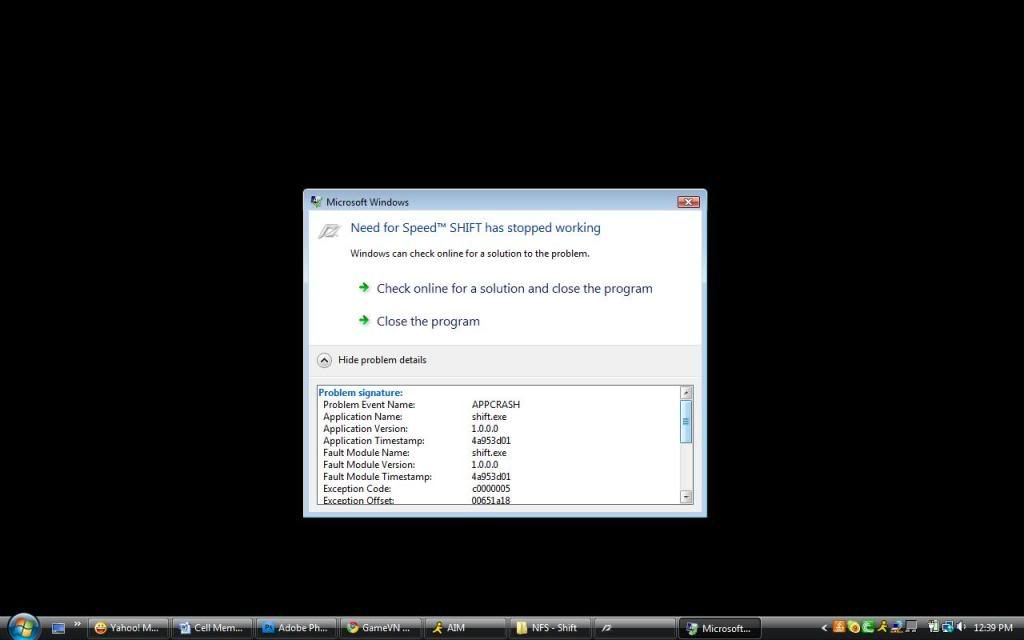
Mình sài latop card rời Ati 3400 seri nên chắc ko phải do card đồ họa rồi !!!
ai biết xin chỉ dùm...thank :)
Lỗi này là lỗi gì và cách khắc phục :
Mình sài latop card rời Ati 3400 seri nên chắc ko phải do card đồ họa rồi !!!
ai biết xin chỉ dùm...thank :)
![Romano]
Romano]![Vn
Donkey Kong
- 15/5/09
- 457
- 1
tình hình là chả ai giúp giải quyết vấn đề nên đành phải hỏi ông Google.Tuy có mất thời gian nhưng cũng tìm ra cách khắc phục .
Bạn nào bị lỗi giống như tớ ở trên thì vào thư mục C:\Users\[Romano]\Documents\NFS SHIFT sửa file graphicsconfig.xml thành :(copy any paste nhé)
chúc may mắn ...nếu ko được thì các bạn nâng cấp driver mới nhất của dòng card mình sài và unintall game cài lại rồi để cấu hình mặc định của nó ý .
Bạn nào bị lỗi giống như tớ ở trên thì vào thư mục C:\Users\[Romano]\Documents\NFS SHIFT sửa file graphicsconfig.xml thành :(copy any paste nhé)
<?xml version="1.0" ?>
<Reflection>
<class name="BRTTIRefCount" base="root class" />
<class name="BPersistent" base="BRTTIRefCount">
<prop name="Name" type="String" />
</class>
<class name="GraphicConfigData" base="BPersistent">
<prop name="Mode" type="Fct" />
<prop name="Vsync" type="Fct" />
<prop name="Windowed" type="Fct" />
<prop name="TextureFilter" type="Fct" />
<prop name="TextureResolution" type="Fct" />
<prop name="Brightness" type="Fct" />
<prop name="CarDetailLevel" type="Fct" />
<prop name="TrackDetailLevel" type="Fct" />
<prop name="ShadowDetailLevel" type="Fct" />
<prop name="MotionblurLevel" type="Fct" />
<prop name="EffectsDetailLevel" type="Fct" />
</class>
<data class="GraphicConfigData" id="0xBB11E0">
<prop name="Name" data="" />
<prop name="Mode" adapter="0" width="800" height="600" antialias="0" refresh="59" />
<prop name="Vsync" vsync="1" />
<prop name="Windowed" windowed="1" />
<prop name="TextureFilter" texturefilter="1" />
<prop name="TextureResolution" textureresolution="2" />
<prop name="Brightness" brightness="10" />
<prop name="CarDetailLevel" cardetaillevel="2" />
<prop name="TrackDetailLevel" trackdetaillevel="2" />
<prop name="ShadowDetailLevel" shadowdetaillevel="2" />
<prop name="MotionblurLevel" motionblurLevel="3" />
<prop name="EffectsDetailLevel" effectsdetaillevel="2" />
</data>
</Reflection>
chúc may mắn ...nếu ko được thì các bạn nâng cấp driver mới nhất của dòng card mình sài và unintall game cài lại rồi để cấu hình mặc định của nó ý .
Similar threads

- Trả lời
- 7
- Đọc
- 2K
- Trả lời
- 0
- Đọc
- 209

- Trả lời
- 0
- Đọc
- 148
- Trả lời
- 0
- Đọc
- 135
- Trả lời
- 0
- Đọc
- 119