


- 7/4/10
- 287
- 46

[video=youtube;0r7bDRsIK7U]http://www.youtube.com/watch?v=0r7bDRsIK7U[/video]
[video=youtube;K6kkvpkgUYQ]http://www.youtube.com/watch?v=K6kkvpkgUYQ[/video]

Developer: Microsoft
Release: August 16
Genre: MMO
Platform: PC
Publisher: Microsoft
Website: http://www.ageofempiresonline.com/

Age of Empires Online is the next evolution in the best-selling real-time strategy (RTS) franchise Age of Empires. Developed by Microsoft Game Studios for the Games for Windows – LIVE platform, Age of Empires Online invites players to create a living, growing online world, shared with friends and friendly rivals around the world. Marrying fresh features with classic RTS gameplay, Age of Empires Online pays tribute to the original game while incorporating a new look, feel, and approach that appeals to long-time fans, newcomers, and everyone in between.

2GHz CPU
Atleast 128 MB Graphics Card
1GB RAM, more the better
3GB Hard Disk space
Compatible with Windows 7, Windows Vista and Windows XP
[Spoil]


HD cài game: :misdoubt:
Vào theo đường dẫn này sẽ xuất hiện bản HD tiếng Anh còn đây là HD phiên bản Tiếng Vịt (PHẢI xem cùng phiên bản Tiếng Anh mới hiểu)
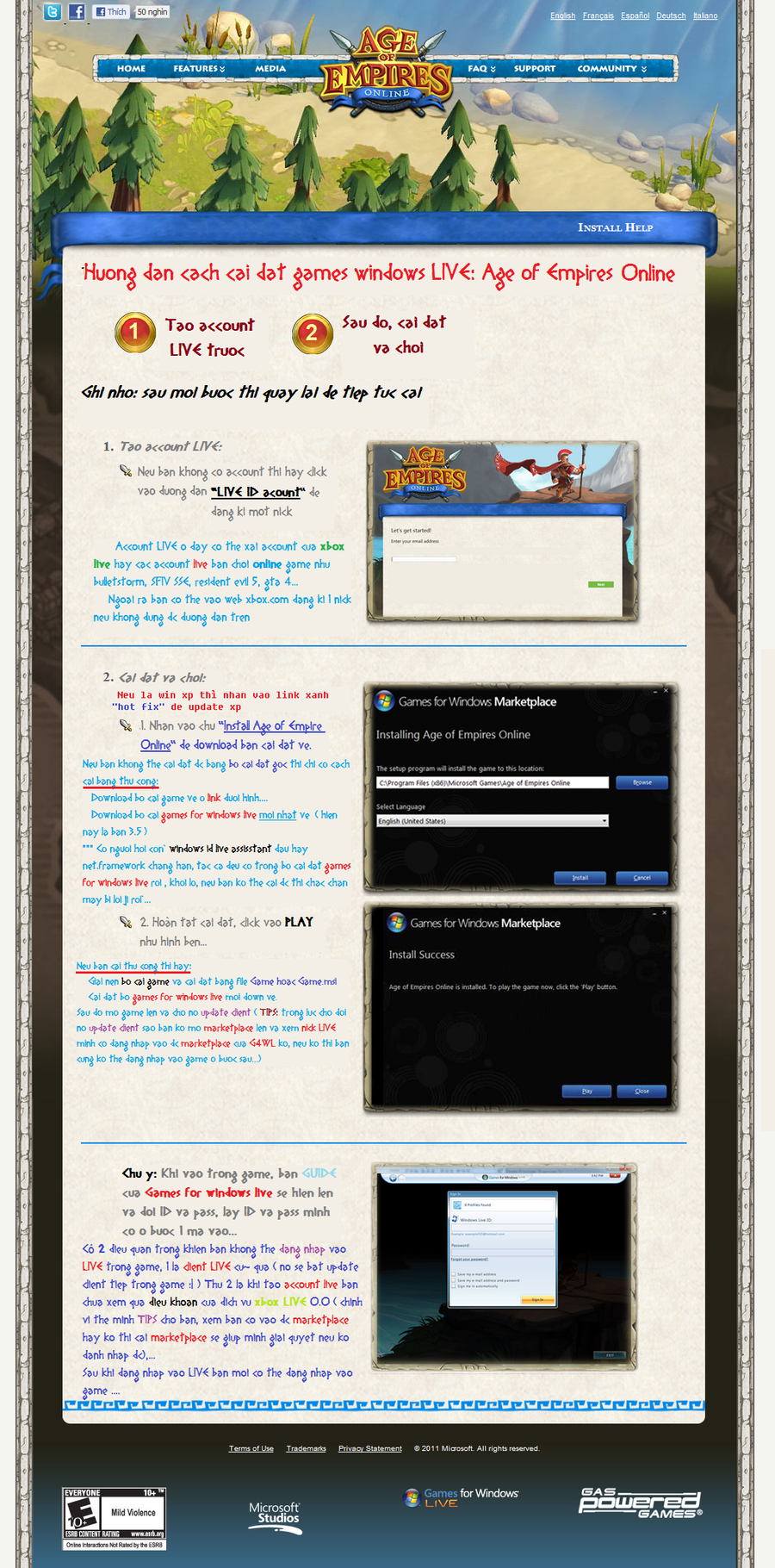
Các File cần thiết để cài đặt dành cho ai không cài đặt được bằng file gốc:
- Bộ cài Setup game (chỉ có game không có mấy thứ lăng nhăng)
- Bộ cài Games for windows LIVE client 3.5
Còn đây là bộ Client nén lại còn 1gb (UPDATED Persian Civil): http://www.mediafire.com/?vj6d8gfta13qw (Cứ giải nén là rồi nhấn AOEOnline.exe mà chơi nhưg bạn phải cài Games for windows LIVE client 3.5 trước rồi mới vào nhá)
Game chỉ khoảng 2gb có chế độ Coop lẫn PvP tối đa 4 người, chỉ unlock khi lên level 3 cho Coop và Level 5 cho PvP. Các bác thích chơi coop thì add nick mình chơi trên LIVE nha further1991...[/COLOR]. Nick LIVE mình tổng hợp được:
Wazza[GVN]:am6389
trumsoll[GVN]:trumsoll
NickyDelevis[GVN]:NickyDelevis
Njoker92's friend:The Malta
just_black :blackarrow8805
maianhtuan1312 [YH]:takeda1312
sefer1988[GVN]:sefer1988
Mujzz:Mujzz
*******:RetiaryCarton4
*******:ZVampireSlayerZ
maximusel[GVN]:RescuedMaximus
The_Angel[GVN]:DishyMeteor55
redsip:ASSMiN
7 Sins[GVN]:GardenOfSinners
M-M[GVN]:Quang89
themoon88[GVN]:MrGaucoi
billy979797[GVN]:unshavenfob1
big-rocket[GVN]:hellosirvn
vietank:zVAz
hoangfpt01[GVN]:ElitistComic2
DuyAnh92:DuyAnh92
doremon9292[YH+VOZ]:Doremon92
AustereFish004
tintin474
Galoo
TensiveQuasar72
MolecularCorn6
xxlolhell
ClichedFuture8
FoulerCashew3
ndvhung
AggrievedSleet7
SeverableCard8
BunkerWizard452
Fantasy8:syaoran2710
TO BE CONTINUED.....
Link FACEBOOK các bác vào LIKE đê: http://www.facebook.com/pages/Age-Of-Empires/144419602272652?sk=wall :gach:
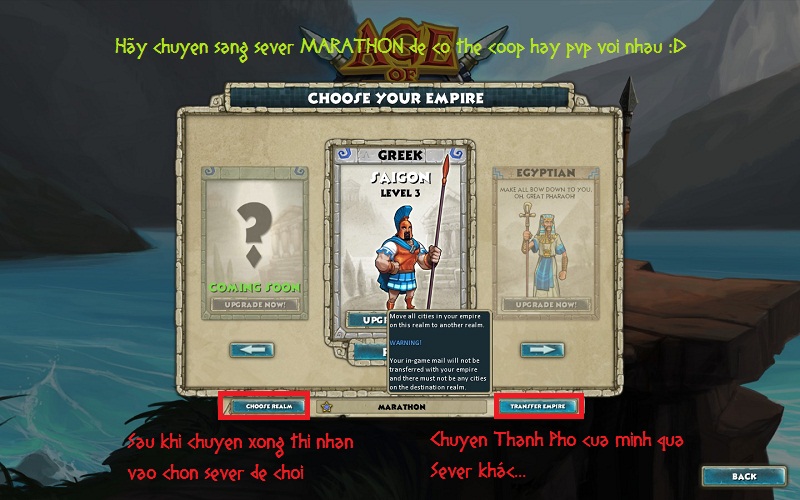
GAME Không thể Coop cùng với nhau hay PvP nhaU được nếu khác Sever cách khắc phục đó là chuyển Empire của mình về Sever chung, Đặt Sever gốc là MARATHON nha. đây là cách chuyển:
Có thể nó sẽ hỏi key 2 lần: lần 1 là khi cài đặt nó có hỏi key thì ghi bừa thì nó sẽ cho qua
 , lần 2 thì làm theo cách Njoker92 hay WorldWide nè:
Sr mình tìm trên forum thì thấy roài
Vào web này http://marketplace.xbox.com/en-GB/P...a3?nosplash=1&downloadType=GameAddon#LiveZone để đăng kí game cho account của mình (nhớ phải có account LIVe trước nha), nhấp vào BUY GAME FREE (trên cái hình games for windows LIVE ấy, nhập tên và Pass account rồi noo1 đòi BILL thì cứ lên google mà tim zipcode của từng vùng đến khi nó bảo hoàn tất là xong
1. Mở the Games For Windows Client (hay còn gọi là Marketplace search trong windows ấy)
2. Click the Downloads tab
3. Click the icon for Age of Empires Online
4. Click View Keys
5. Bạn sẽ thấy LIVE access code của game này. Vào lại game và páte nó thui.
Làm theo và vào game thôi nào
Về việc cài Games for windows LIVE báo lỗi này "Winsow XP Service 3 or later is requierd to install . Please update and try again". Đó là do chưa update lên xp sp3, có 2 cách khắc phục:
- là Fake từ windows Xp sp2 sang Sp3:
Step 1: Run Regedit by Clicking on Start -> Run , type in regedit and press enter
Step 2: Make a backup of your registry (just in case)
Step 3: Browse to "HKEY_LOCAL_MACHINE\SYSTEM\ CurrentControlSet\ Control\ Windows"
Step 4: Modify the value of "CSDVersion" from "0x00000200" (SP2) to the Windows XP SP3 value of "0x00000300"
Step 5: Close registry editor
Step 6: Reboot - là update lên luôn sp3: Download bản patch sp3 này về rồi update.
PS: Có 1 lỗi nó phát sinh từ thời Beta, đến nay hình như vẫn chưa fix đó là mỗi lần loading map đầy thanh là nó đứng, không hiện PRESS KEY TO CONTINUE, đó là lỗi Net.framework bạn thử uninstall và cài lại bản 3.5 xem, cái này gọi là "Hên Xui", hên thì không dính nó, còn xui thì tận mạng, mình từng bị khi Beta, sửa sao cũng không vào được chỉ có cách cài lại máy thì fix được thôi.
Chỉnh sửa cuối:


