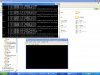
#
# A fatal error has been detected by the Java Runtime Environment:
#
# EXCEPTION_ACCESS_VIOLATION (0xc0000005) at pc=0x698de691, pid=2632, tid=3976
#
# JRE version: 7.0-b147
# Java VM: Java HotSpot(TM) Client VM (21.0-b17 mixed mode windows-x86 )
# Problematic frame:
# C [atioglxx.dll+0x8ae691]
#
# Failed to write core dump. Minidumps are not enabled by default on client versions of Windows
#
# If you would like to submit a bug report, please visit:
#
http://bugreport.sun.com/bugreport/crash.jsp
# The crash happened outside the Java Virtual Machine in native code.
# See problematic frame for where to report the bug.
#
--------------- T H R E A D ---------------
Current thread (0x4fc43c00): JavaThread "GUI" [_thread_in_native, id=3976, stack(0x50200000,0x50250000)]
siginfo: ExceptionCode=0xc0000005, reading address 0x00000bd4
Registers:
EAX=0x00000000, EBX=0x53c32748, ECX=0x00000000, EDX=0x00000000
ESP=0x50243c78, EBP=0x502455a4, ESI=0x00000000, EDI=0x00000001
EIP=0x698de691, EFLAGS=0x00010202
Top of Stack: (sp=0x50243c78)
0x50243c78: 00000000 00000000 00000000 53c32748
0x50243c88: 00000000 00000000 00000000 00000000
0x50243c98: 00000000 00000000 00000000 00000000
0x50243ca8: 00000000 00000000 000000f5 00000000
0x50243cb8: 00000000 00000000 00000000 00000000
0x50243cc8: 00000000 00000000 00000000 00000000
0x50243cd8: 00000000 00000001 00000000 00000000
0x50243ce8: 00000000 00000000 537aaa30 0000000e
Instructions: (pc=0x698de691)
0x698de671: 14 8d 43 10 50 8d 4c 24 1c 51 56 57 8d 7c 24 50
0x698de681: e8 5a 2a 04 00 8b 53 10 bf 01 00 00 00 89 43 08
0x698de691: 39 ba d4 0b 00 00 0f 85 85 00 00 00 68 b8 51 f6
0x698de6a1: 69 e8 e7 c0 56 00 83 c4 04 85 c0 74 74 be 1c c6
Register to memory mapping:
EAX=0x00000000 is an unknown value
EBX=0x53c32748 is an unknown value
ECX=0x00000000 is an unknown value
EDX=0x00000000 is an unknown value
ESP=0x50243c78 is pointing into the stack for thread: 0x4fc43c00
EBP=0x502455a4 is pointing into the stack for thread: 0x4fc43c00
ESI=0x00000000 is an unknown value
EDI=0x00000001 is an unknown value
Stack: [0x50200000,0x50250000], sp=0x50243c78, free space=271k
Native frames: (J=compiled Java code, j=interpreted, Vv=VM code, C=native code)
C [atioglxx.dll+0x8ae691] DrvPresentBuffers+0x862511
Java frames: (J=compiled Java code, j=interpreted, Vv=VM code)
j org.lwjgl.opengl.WindowsPeerInfo.nChoosePixelFormat(JIILorg/lwjgl/opengl/PixelFormat;Ljava/nio/IntBuffer;ZZZZ)I+0
j org.lwjgl.opengl.WindowsPeerInfo.choosePixelFormat(JIILorg/lwjgl/opengl/PixelFormat;Ljava/nio/IntBuffer;ZZZZ)I+15
j org.lwjgl.opengl.WindowsAWTGLCanvasPeerInfo.doLockAndInitHandle()V+59
j org.lwjgl.opengl.PeerInfo.lockAndGetHandle()Ljava/nio/ByteBuffer;+65
j org.lwjgl.opengl.AWTGLCanvas.paint(Ljava/awt/Graphics

V+47
j sun.awt.RepaintArea.paintComponent(Ljava/awt/Component;Ljava/awt/Graphics
V+6
j sun.awt.RepaintArea.paint(Ljava/lang/Object;Z)V+326
j sun.awt.windows.WComponentPeer.handleEvent(Ljava/awt/AWTEvent
V+155
j java.awt.Component.dispatchEventImpl(Ljava/awt/AWTEvent
V+869
j java.awt.Component.dispatchEvent(Ljava/awt/AWTEvent
V+2
j java.awt.EventQueue.dispatchEventImpl(Ljava/awt/AWTEvent;Ljava/lang/Object
V+41
j java.awt.EventQueue.access$000(Ljava/awt/EventQueue;Ljava/awt/AWTEvent;Ljava/lang/Object
V+3
j java.awt.EventQueue$3.run()Ljava/lang/Void;+12
j java.awt.EventQueue$3.run()Ljava/lang/Object;+1
v ~StubRoutines::call_stub
j java.security.AccessController.doPrivileged(Ljava/security/PrivilegedAction;Ljava/security/AccessControlContext
Ljava/lang/Object;+0
j java.security.ProtectionDomain$1.doIntersectionPrivilege(Ljava/security/PrivilegedAction;Ljava/security/AccessControlContext;Ljava/security/AccessControlContext
Ljava/lang/Object;+28
j java.security.ProtectionDomain$1.doIntersectionPrivilege(Ljava/security/PrivilegedAction;Ljava/security/AccessControlContext
Ljava/lang/Object;+6
j java.awt.EventQueue$4.run()Ljava/lang/Void;+11
j java.awt.EventQueue$4.run()Ljava/lang/Object;+1
v ~StubRoutines::call_stub
j java.security.AccessController.doPrivileged(Ljava/security/PrivilegedAction;Ljava/security/AccessControlContext
Ljava/lang/Object;+0
j java.security.ProtectionDomain$1.doIntersectionPrivilege(Ljava/security/PrivilegedAction;Ljava/security/AccessControlContext;Ljava/security/AccessControlContext
Ljava/lang/Object;+28
j java.awt.EventQueue.dispatchEvent(Ljava/awt/AWTEvent
V+73
j java.awt.EventDispatchThread.pumpOneEventForFilters(I)Z+245
j java.awt.EventDispatchThread.pumpEventsForFilter(ILjava/awt/Conditional;Ljava/awt/EventFilter
V+35
j java.awt.EventDispatchThread.pumpEventsForHierarchy(ILjava/awt/Conditional;Ljava/awt/Component
V+11
j java.awt.EventDispatchThread.pumpEvents(ILjava/awt/Conditional
V+4
j java.awt.EventDispatchThread.pumpEvents(Ljava/awt/Conditional
V+3
j java.awt.EventDispatchThread.run()V+9
v ~StubRoutines::call_stub
--------------- P R O C E S S ---------------
Java Threads: ( => current thread )
0x53006000 JavaThread "D3D Screen Updater" daemon [_thread_blocked, id=1196, stack(0x53860000,0x538b0000)]
0x53003800 JavaThread "FileLogger" [_thread_blocked, id=2084, stack(0x538b0000,0x53900000)]
0x509ef800 JavaThread "Thread-5" daemon [_thread_in_native, id=3832, stack(0x53990000,0x539e0000)]
0x50863000 JavaThread "Image Fetcher 1" daemon [_thread_blocked, id=4068, stack(0x52c10000,0x52c60000)]
0x50860c00 JavaThread "Image Fetcher 0" daemon [_thread_blocked, id=3816, stack(0x52210000,0x52260000)]
0x50822c00 JavaThread "Disable Screen Saver" daemon [_thread_blocked, id=3828, stack(0x52b00000,0x52b50000)]
0x00869800 JavaThread "DestroyJavaVM" [_thread_blocked, id=3008, stack(0x01580000,0x015d0000)]
=>0x4fc43c00 JavaThread "GUI" [_thread_in_native, id=3976, stack(0x50200000,0x50250000)]
0x4fc31400 JavaThread "AWT-Windows" daemon [_thread_in_native, id=2516, stack(0x500e0000,0x50130000)]
0x4fc30c00 JavaThread "AWT-Shutdown" [_thread_blocked, id=2040, stack(0x4ff70000,0x4ffc0000)]
0x4fc30400 JavaThread "Java2D Disposer" daemon [_thread_blocked, id=4072, stack(0x01530000,0x01580000)]
0x4fab0c00 JavaThread "Service Thread" daemon [_thread_blocked, id=2628, stack(0x4fe60000,0x4feb0000)]
0x4faa7400 JavaThread "C1 CompilerThread0" daemon [_thread_blocked, id=2636, stack(0x4fdd0000,0x4fe20000)]
0x4faa6000 JavaThread "Attach Listener" daemon [_thread_blocked, id=2740, stack(0x4fca0000,0x4fcf0000)]
0x4faa2c00 JavaThread "Signal Dispatcher" daemon [_thread_blocked, id=212, stack(0x014e0000,0x01530000)]
0x016ccc00 JavaThread "Finalizer" daemon [_thread_blocked, id=2536, stack(0x4f980000,0x4f9d0000)]
0x016c8000 JavaThread "Reference Handler" daemon [_thread_blocked, id=2612, stack(0x4fa00000,0x4fa50000)]
Other Threads:
0x016c2800 VMThread [stack: 0x006c0000,0x00710000] [id=3576]
0x4fad1400 WatcherThread [stack: 0x00740000,0x00790000] [id=3864]
VM state:not at safepoint (normal execution)
VM Mutex/Monitor currently owned by a thread: None
Heap
def new generation total 4992K, used 1618K [0x057d0000, 0x05d30000, 0x1ad20000)
eden space 4480K, 24% used [0x057d0000, 0x058e4ae0, 0x05c30000)
from space 512K, 100% used [0x05c30000, 0x05cb0000, 0x05cb0000)
to space 512K, 0% used [0x05cb0000, 0x05cb0000, 0x05d30000)
tenured generation total 174788K, used 171115K [0x1ad20000, 0x257d1000, 0x457d0000)
the space 174788K, 97% used [0x1ad20000, 0x2543adb8, 0x2543ae00, 0x257d1000)
compacting perm gen total 12288K, used 11289K [0x457d0000, 0x463d0000, 0x4d7d0000)
the space 12288K, 91% used [0x457d0000, 0x462d6598, 0x462d6600, 0x463d0000)
No shared spaces configured.
Code Cache [0x016d0000, 0x017e0000, 0x056d0000)
total_blobs=681 nmethods=436 adapters=178 free_code_cache=64452Kb largest_free_block=65999296
Dynamic libraries:
0x008b0000 - 0x008de000 C:\Program Files\Java\jre7\bin\java.exe
0x77d50000 - 0x77e8c000 C:\Windows\SYSTEM32\ntdll.dll
0x76390000 - 0x76464000 C:\Windows\system32\kernel32.dll
0x75fb0000 - 0x75ffa000 C:\Windows\system32\KERNELBASE.dll
0x64d00000 - 0x64d34000 C:\Program Files\AVAST Software\Avast\snxhk.dll
0x76ec0000 - 0x76f60000 C:\Windows\system32\ADVAPI32.dll
0x769b0000 - 0x76a5c000 C:\Windows\system32\msvcrt.dll
0x76ea0000 - 0x76eb9000 C:\Windows\SYSTEM32\sechost.dll
0x76200000 - 0x762a1000 C:\Windows\system32\RPCRT4.dll
0x76a60000 - 0x76b29000 C:\Windows\system32\USER32.dll
0x76480000 - 0x764ce000 C:\Windows\system32\GDI32.dll
0x76470000 - 0x7647a000 C:\Windows\system32\LPK.dll
0x77ee0000 - 0x77f7d000 C:\Windows\system32\USP10.dll
0x74e00000 - 0x74f9e000 C:\Windows\WinSxS\x86_microsoft.windows.common-controls_6595b64144ccf1df_6.0.7601.17514_none_41e6975e2bd6f2b2\COMCTL32.dll
0x76f60000 - 0x76fb7000 C:\Windows\system32\SHLWAPI.dll
0x77e90000 - 0x77eaf000 C:\Windows\system32\IMM32.DLL
0x762b0000 - 0x7637c000 C:\Windows\system32\MSCTF.dll
0x64090000 - 0x6414e000 C:\Program Files\Java\jre7\bin\msvcr100.dll
0x63290000 - 0x635b1000 C:\Program Files\Java\jre7\bin\client\jvm.dll
0x72be0000 - 0x72be7000 C:\Windows\system32\WSOCK32.dll
0x76970000 - 0x769a5000 C:\Windows\system32\WS2_32.dll
0x76380000 - 0x76386000 C:\Windows\system32\NSI.dll
0x6e110000 - 0x6e142000 C:\Windows\system32\WINMM.dll
0x764d0000 - 0x764d5000 C:\Windows\system32\PSAPI.DLL
0x6d500000 - 0x6d50c000 C:\Program Files\Java\jre7\bin\verify.dll
0x6d4e0000 - 0x6d500000 C:\Program Files\Java\jre7\bin\java.dll
0x6d4c0000 - 0x6d4d3000 C:\Program Files\Java\jre7\bin\zip.dll
0x63cc0000 - 0x63e02000 C:\Program Files\Java\jre7\bin\awt.dll
0x76b30000 - 0x76bbf000 C:\Windows\system32\OLEAUT32.dll
0x76810000 - 0x7696c000 C:\Windows\system32\ole32.dll
0x74dc0000 - 0x74e00000 C:\Windows\system32\uxtheme.dll
0x74d90000 - 0x74da3000 C:\Windows\system32\dwmapi.dll
0x75e20000 - 0x75e2c000 C:\Windows\system32\CRYPTBASE.dll
0x77100000 - 0x77d4a000 C:\Windows\system32\SHELL32.dll
0x64dd0000 - 0x64f93000 C:\Windows\system32\d3d9.dll
0x753a0000 - 0x753a9000 C:\Windows\system32\VERSION.dll
0x677e0000 - 0x677e6000 C:\Windows\system32\d3d8thk.dll
0x6c040000 - 0x6c445000 C:\Windows\system32\atiumdag.dll
0x6ab10000 - 0x6afb4000 C:\Windows\system32\atiumdva.dll
0x6d490000 - 0x6d4ba000 C:\Program Files\Java\jre7\bin\fontmanager.dll
0x689b0000 - 0x689c4000 C:\Program Files\Java\jre7\bin\net.dll
0x758c0000 - 0x758fc000 C:\Windows\system32\mswsock.dll
0x758b0000 - 0x758b6000 C:\Windows\System32\wship6.dll
0x6d520000 - 0x6d52f000 C:\Program Files\Java\jre7\bin\nio.dll
0x68680000 - 0x686b1000 C:\Program Files\Java\jre7\bin\t2k.dll
0x52b50000 - 0x52bc2000 C:\Users\Admin\Desktop\gia lap psp\jpcsp-2300-windows-x86\jpcsp-windows-x86\lib\windows-x86\lwjgl.dll
0x63fc0000 - 0x64088000 C:\Windows\system32\OPENGL32.dll
0x687b0000 - 0x687d2000 C:\Windows\system32\GLU32.dll
0x6c530000 - 0x6c617000 C:\Windows\system32\DDRAW.dll
0x6c520000 - 0x6c526000 C:\Windows\system32\DCIMAN32.dll
0x764e0000 - 0x7667d000 C:\Windows\system32\SETUPAPI.dll
0x76020000 - 0x76047000 C:\Windows\system32\CFGMGR32.dll
0x76000000 - 0x76012000 C:\Windows\system32\DEVOBJ.dll
0x6cd50000 - 0x6cd56000 C:\Program Files\Java\jre7\bin\jawt.dll
0x52270000 - 0x52283000 C:\Users\Admin\Desktop\gia lap psp\jpcsp-2300-windows-x86\jpcsp-windows-x86\lib\windows-x86\jinput-dx8.dll
0x68650000 - 0x68680000 C:\Windows\system32\DINPUT8.dll
0x74db0000 - 0x74db9000 C:\Windows\system32\HID.DLL
0x76170000 - 0x7619d000 C:\Windows\system32\WINTRUST.dll
0x76050000 - 0x7616d000 C:\Windows\system32\CRYPT32.dll
0x75f10000 - 0x75f1c000 C:\Windows\system32\MSASN1.dll
0x52ad0000 - 0x52ae2000 C:\Users\Admin\Desktop\gia lap psp\jpcsp-2300-windows-x86\jpcsp-windows-x86\lib\windows-x86\jinput-raw.dll
0x69030000 - 0x6a1b3000 C:\Windows\system32\atioglxx.dll
0x6d000000 - 0x6d00b000 C:\Windows\system32\atigktxx.dll
0x64160000 - 0x6420c000 C:\Windows\system32\aticfx32.dll
0x537b0000 - 0x537f0000 C:\Windows\system32\atiadlxx.dll
0x75500000 - 0x75517000 C:\Windows\system32\USERENV.dll
0x75e40000 - 0x75e4b000 C:\Windows\system32\profapi.dll
0x74760000 - 0x7476d000 C:\Windows\system32\WTSAPI32.dll
VM Arguments:
jvm_args: -Xmx1024m -XX:MaxPermSize=128m -XX:ReservedCodeCacheSize=64m -Djava.library.path=lib/windows-x86
java_command: bin/jpcsp.jar
Launcher Type: SUN_STANDARD
Environment Variables:
JAVA_HOME=C:\Program Files\Java\jre7
PATH=C:\Program Files\AMD APP\bin\x86;C:\Windows\system32;C:\Windows;C:\Windows\System32\Wbem;C:\Windows\System32\WindowsPowerShell\v1.0\;C:\Program Files\ATI Technologies\ATI.ACE\Core-Static;C:\Program Files\Common Files\Adobe\AGL;C:\Program Files\Common Files\Ulead Systems\MPEG;lib\;lib\windows-x86\
USERNAME=Admin
OS=Windows_NT
PROCESSOR_IDENTIFIER=x86 Family 6 Model 15 Stepping 13, GenuineIntel
--------------- S Y S T E M ---------------
OS: Windows 7 Build 7601 Service Pack 1
CPU:total 2 (2 cores per cpu, 1 threads per core) family 6 model 15 stepping 13, cmov, cx8, fxsr, mmx, sse, sse2, sse3, ssse3
Memory: 4k page, physical 2095608k(1121260k free), swap 4191216k(2873476k free)
vm_info: Java HotSpot(TM) Client VM (21.0-b17) for windows-x86 JRE (1.7.0-b147), built on Jun 27 2011 02:25:52 by "java_re" with unknown MS VC++:1600
time: Mon Sep 05 15:14:19 2011
elapsed time: 3 seconds



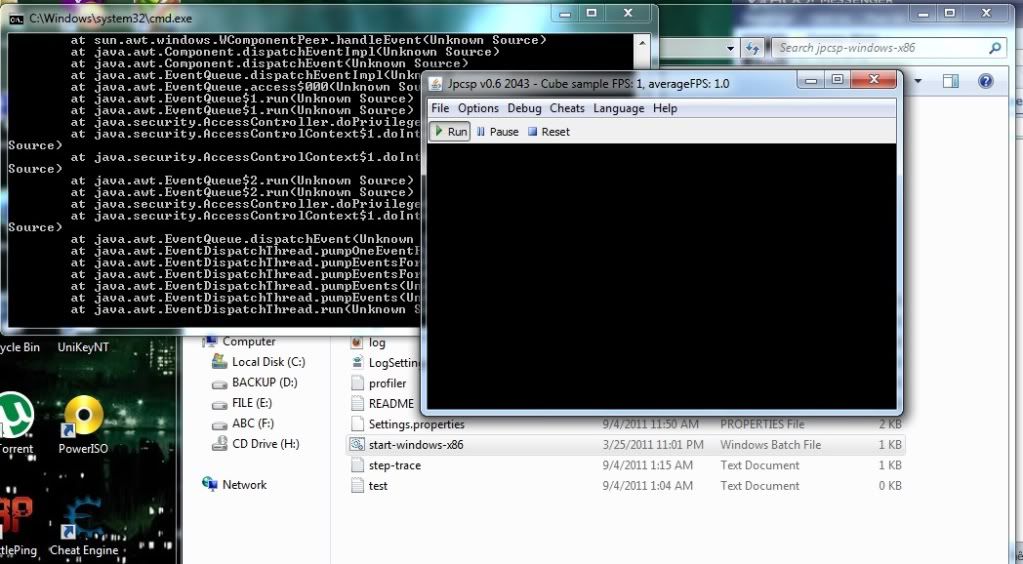


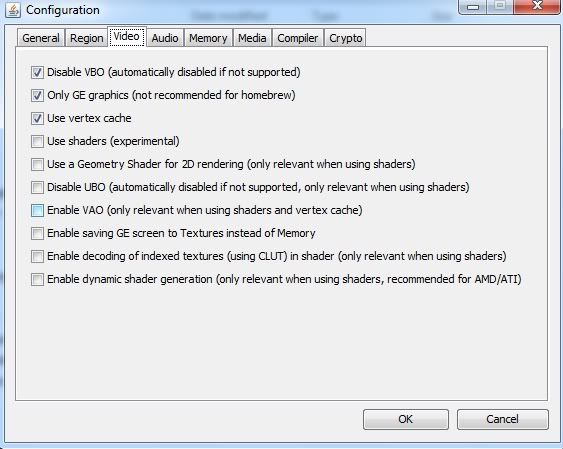
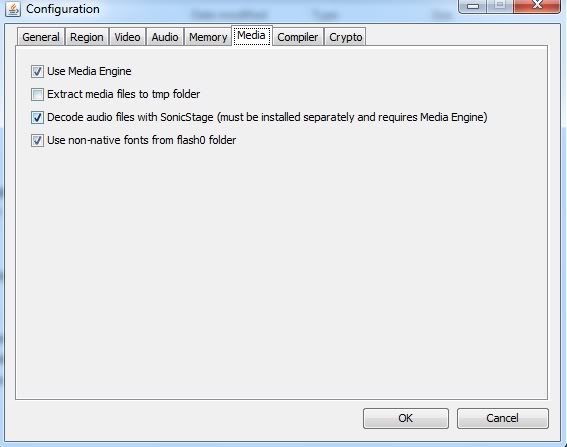

 . . Mình tính chơi giả lập trò Queen's Gate Spiral Chaos hiện tại ko tài nào vào game dc, toàn màn hình trắng :(