


- 12/9/08
- 6,225
- 3,435
Topic này chỉ dành cho những bạn đã MOD thuần thục, những bạn chưa biết thì tham khảo bên đây nhé: http://forums.gamevn.com/showthread.php?726923-Huong-dan-MOD-Yuri-amp-RA2/
trong đây sẽ dịch tài liệu hướng dẫn của Ares: http://ares-developers.github.io/Ares-docs/index.html
link Ares đây: https://launchpad.net/ares/+download
Fire Storm Wall
Tạo Super weapon UnitDelivery
Scan unit ngầm dưới nước (sub, cá heo, cá voi,.....) có cả unit tàng hình
Tank Drop thả dù tank
Reverse Engineers sao chép unit
Prerequisites
Cách summon ra inf
Cách làm cho xe lội nước
http://forums.gamevn.com/showpost.php?p=21744134
Cách tạo Clone Super Weapon
http://forums.gamevn.com/showpost.php?p=21751356
http://forum.gamevn.com/showpost.php?p=22198010
HƯỚNG DẪN TẠO DROPDOWN COLORS TRONG ARES
http://forum.gamevn.com/showpost.php?p=21076272
Cách tạo DropPod trong Ares
http://www.ppmsite.com/forum/viewtopic.php?t=33416
Cách Thêm Repair Ring.
Cách tạo súng phun lửa
trong đây sẽ dịch tài liệu hướng dẫn của Ares: http://ares-developers.github.io/Ares-docs/index.html
link Ares đây: https://launchpad.net/ares/+download
Fire Storm Wall
Mã:[GAFIRE] UIName=Name:GAFIRE Name=Fire Storm Generator Strength=800 Armor=heavy TechLevel=10 Prerequisite=GATECH Adjacent=2 Sight=5 Owner=British,French,Germans,Americans,Alliance AIBasePlanningSide=0 Cost=200 Points=30 Power=-200 Crewed=yes Capturable=true Explosion=TWLT070,S_BANG48,S_BRNL58,S_CLSN58,S_TUMU60 MaxDebris=9 SuperWeapon=FirestormSpecial MaxDebris=15 MinDebris=5 DebrisAnims=DBRIS1LG,DBRIS1SM,DBRIS4LG,DBRIS4SM,DBRIS5LG,DBRIS5SM DamageParticleSystems=SmallGreySSys,BigGreySmokeSys DamageSmokeOffset=410, 100, 165 [GAFSDF] UIName=Name:GAFSDF Name=Firestorm Wall Section BuildCat=Combat Strength=300 Prerequisite=GAFIRE Armor=concrete TechLevel=10 Repairable=false Sight=2 Capturable=false Cost=50 Points=5 ;Wall=yes Power=-2 Selectable=no Crewed=no Explosion=TWLT070,S_BANG48,S_BRNL58,S_CLSN58,S_TUMU60 ThreatPosed=20 ; This value MUST be 0 for all building addons DamageParticleSystems=SparkSys,LGSparkSys IsBase=no BaseNormal=no TogglePower=no Insignificant=yes Owner=British,French,Germans,Americans,Alliance,Russians,Confederation,Africans,Arabs,YuriCo untry AIBasePlanningSide=0 ;gs 0 for Good, 1 for Evil GuardRange=5 Firestorm.Wall=yes
Artmd.ini
Super WeaponMã:;Fire Storm Wall [GAFSDF] Image=GAFSDF Remapable=yes Foundation=1x1 Buildup=GAFSDF NormalZAdjust=-10 Cameo=FSPICON ToOverlay=GAFSDF DamageLevels=3 NewTheater=yes [GAFSDF_A] Image=GAFSDF_A ;Remapable=yes NewTheater=yes LoopStart=0 LoopEnd=4 LoopCount=-1 Rate=250 [FSIDLE] Image=FSIDLE LoopStart=0 LoopEnd=20 Rate=800 ShouldUseCellDrawer=false Report=FIRSTRM1 [FSAIR] Image=FSAIR LoopStart=0 LoopEnd=20 Rate=800 Report=FIRSTRM1 [FSGRND] Image=FSGRND LoopStart=0 LoopEnd=20 Rate=800 Report=FIRSTRM1 YDrawOffset=-20 [GAFIRE] Cameo=GAFIREICON Remapable=yes Foundation=3x2 Buildup=GAFIREMK DemandLoadBuildup=true FreeBuildup=true ActiveAnim=GAFIRE_C ActiveAnimZAdjust=-100 ActiveAnimTwo=GAFIRE_B ActiveAnimTwoZAdjust=-100 Height=3 NewTheater=no CanHideThings=True CanBeHidden=False OccupyHeight=3 AddOccupy1=-2,-1 DamageFireOffset0=25,37 DamageFireOffset1=-26,25 [GAFIRE_B] Image=GAFIRE_B Normalized=yes LoopStart=0 LoopEnd=15 LoopCount=-1 Rate=500 Surface=yes DetailLevel=2 [GAFIRE_C] Image=GAFIRE_C Normalized=yes LoopStart=0 LoopEnd=5 LoopCount=-1 Rate=220 Surface=yes [GAFIREMK] Normalized=yes Surface=yes Rate=220 NewTheater=no
Mã:[FirestormSpecial] UIName=FRST:FireStorm Name=Firestorm Defense IsPowered=true RechargeVoice=00-I162 ChargingVoice= ImpatientVoice= SuspendVoice= RechargeTime=3 Type=Firestorm SidebarImage=FSTDICON UseChargeDrain=true
nhớ khai báo đầy đủ trên trong [Animations]
xxx=GAFSDF_A
xxx=GAFIRE_A
xxx=GAFIRE_B
xxx=GAFIRE_C
xxx=FSIDLE
xxx=FSAIR
xxx=FSGRND
và [BuildingTypes]
xxx=GAFSDF
xxx=GAFIRE
Link down: http://www.mediafire.com/?2knpk091f7drjbh
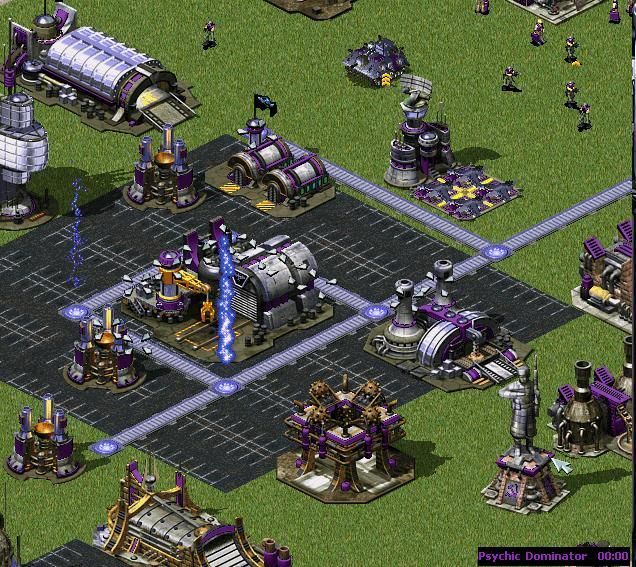
[video=youtube_share;sTo7OU2KuV0]
Tạo Super weapon UnitDelivery
Sonar Pulse_Trong SuperWeapon list thêm :
...
xx=TankSupportSpecial (xx là số thứ tự)
_Thêm SuperWeapon=TankSupportSpecial vào công trình cần có
_Cuối cùng tạo nó:
[TankSupportSpecial]
UIName=NOSTR:Tank Support
Name=Tank Support
IsPowered=false
RechargeVoice=
ChargingVoice=
ImpatientVoice=
SuspendVoice=
RechargeTime=7
Type=UnitDelivery
Action=Custom
SW.Deliver=(Danh sách các loại tank)
Deliver.Types=(Giống hệt như trên)
SidebarImage=TSSICON (Cameo , em sẽ gửi ở dưới)
ShowTimer=no
DisableableFromShell=no
SW.RequiresTarget=land,empty
SW.AITargeting=ParaDrop
SW.FireIntoShroud=yes
SW.Animation=ICERING1 (Anim , em sẽ gửi ở dưới)
SW.AnimationHeight=120
Cursor.Frame=357
Cursor.Count=12
Cursor.Interval=12
Cursor.MiniFrame=357
Cursor.MiniCount=12
Cursor.MiniInterval=12
NoCursor.Frame=384
NoCursor.Count=1
NoCursor.Interval=12
NoCursor.MiniFrame=52
NoCursor.MiniCount=1
NoCursor.MiniInterval=12
(*Lưu ý ở trên ,SW.Deliver= và Deliver.Types= là số lượng của mỗi loại tank. Code này thực ra em xí trên ppmsite . Số lượng mỗi loại phụ thuộc vào danh sách cho sau dấu = . Chẳng hạn =MTNK,MTNK thì sẽ tạo ra 2 cái Grizzly Tank. Còn cách thứ 2 ngắn gọn hơn nhưng em chưa test. Đó là bỏ dòng SW.Deliver= và thêm dòng Deliver.Num= . Như vậy dòng Deliver.Types= sẽ chỉ ghi danh sách , và dòng Deliver.Num= sẽ quy định số lượng từng loại. Test thử và nói em kết quả nhé
Scan unit ngầm dưới nước (sub, cá heo, cá voi,.....) có cả unit tàng hình
[SonarPulseSpecial]
UIName=NOSTR:Sonar Pulse
Name=Sonar Pulse
IsPowered=true
RechargeTime=5 -> thời gian charge
Type=SonarPulse
SonarPulse.Range=6 -> range để scan
SonarPulse.Delay=500 -> thời gian scan để unit ngầm hiện hình
Range=6
LineMultiplier=2
SidebarImage=SONARICON
ShowTimer=no
DisableableFromShell=no
AIDefendAgainst=no
Action=Custom
Cursor.Frame=249
Cursor.Count=10
Cursor.Interval=5
Cursor.MiniFrame=42
Cursor.MiniCount=10
SW.Animation= -> cho anim vào
Tank Drop thả dù tank
[TankDropSpecial]
UIName=NOSTR:Tank Drop
Name=Reinforcements Tank Drop
IsPowered=true
RechargeTime=4
Type=ParaDrop
Action=Custom
SidebarImage=TANKDROPICON
ShowTimer=no
DisableableFromShell=no
ParaDrop.Types=MTNK,E1,GGI ->type loại lính
ParaDrop.Num=2,6,3 -> số lượng
ParaDrop.Aircraft=VULT
ParaDrop.Count=1
Cursor.Frame=259
Cursor.Count=10
Cursor.Interval=5
Cursor.MiniFrame=516
Cursor.MiniCount=1
Cursor.MiniInterval=12
Cursor.HotSpot=Center,Middle
NoCursor.Frame=384
NoCursor.Count=1
NoCursor.Interval=12
NoCursor.MiniFrame=52
NoCursor.MiniCount=1
NoCursor.MiniInterval=12
NoCursor.HotSpot=Center,Middle
Reverse Engineers sao chép unit
Spy Behaviordùng cho các nhà có Grinding=yes
thêm code ReverseEngineersVictims=yes để kích hoạt
muốn sao chép unit nào thì unit đó phải có CanBeReversed=yes
Khi cho spy vào nhà nào thì sẽ xóa bỏ hết các công nghệ sao chép: thêm SpyEffect.UndoReverseEngineer=yes vào nhà mình chọn, thường là Yatech
Vấn đề kiếm kinh nghiệm lên cấpĐầu tiên muốn kích hoạt trên nhà nào thì nhà đó phải có SpyEffect.Custom=yes
Radar
SpyEffect.ResetRadar=yes -> sẽ làm màn hình radar reset đen thui
SpyEffect.RevealRadar=yes -> sẽ thấy đc màn hình radar của địch
Power
SpyEffect.PowerOutageDuration=150 -> thời gian mất điện ( 15= 1 giây)
Money
SpyEffect.StolenMoneyAmount=1000 -> số tiền trộm đc
SpyEffect.StolenMoneyPercentage=0.5 -> phần trăm tiền trộm đc ( 0.5 = 50% )
Super Weapons
SpyEffect.ResetSuperweapons=yes ->Super weapon sẽ bị reset
Stolen Technology
SpyEffect.StolenTechIndex=5 -> loại công nghệ của đối phương, đáp ứng với các loại công nghệ có Prerequisite.StolenTechs=5
Prerequisite.StolenTechs=5 -> add vào công nghệ nào mình muốn bị trộm
Ví dụ [E1] có Prerequisite.StolenTechs=5 thì khi cho spy vào nhà nào có SpyEffect.StolenTechIndex=5 thì [E1] sẽ bị đánh cắp
Factories
SpyEffect.UnitVeterancy=yes ->add vào nhà sản xuất lính hay xe thì mấy con lính hay xe sẽ lên 1 sao
SpyEffect.RevealProduction=yes -> thấy đc unit hay building địch đang xây

Phá hủy unit bằng EMPcó nhiều cách kiếm kn từ việc giết địch. Sau đây là cho các unit có thuộc tính Passengers, Airstrike and Mind-Control.
[TechnoType]Experience.FromPassengers=yes (mặc định=yes)
Áp dụng cho unit có OpenTopped=yes hoặc Gunner=yes. unit sẽ kiếm đc kn khi giết địch từ trong xe chở lính. Ví dụ như cho GI lên IFV thì GI sẽ lên cấp chứ ko phải IFV
[TechnoType]Experience.PromotePassengers=no (mặc định=no)
Nếu một unit có OpenTopped=yes hoặc Gunner=yes đã lên 3 sao thì các unit nó chở bên trong khi giết địch sẽ nhận đc kn
[TechnoType]Experience.PassengerModifier=100%
Kinh nghiệm nhận đc sẽ chia đều cho cả 2 theo tỉ lệ %
[TechnoType]Experience.FromAirstrike=no (mặc định=no)
Kinh nghiệm kiếm đc từ không kích (giống Boris) thì sẽ cộng cho unit nào gọi máy bay đến chứ ko phải cộng cho máy bay
[TechnoType]Experience.AirstrikeModifier=100%
Kinh nghiệm chia đều cho 2 bên theo tỉ lệ %
[TechnoType]Experience.MindControlSelfModifier=0%
nếu unit nào dùng MindControl điều khiển unit khác giết địch thì % điểm kn sẽ đc chia cho unit có MindControl
[TechnoType]Experience.MindControlVictimModifier=100%
Khi một unit có MindControl giết địch thì sẽ nhận đc kn theo tỉ lệ %
Killing DriversCác unit như Kirov, Siege Chopper hay đĩa bay sẽ ko tự rơi xuống khi bị bắn EMP bới vì chúng ko phải Aircraft. EMP.Threshold sẽ thay đổi điều này, EMP.Threshold mặc định là inair sẽ tiêu diệt bất cứ unit nào trên không khi bị dình EMP. Paradrop ko đc tính là unit bay.
[TechnoType]EMP.Threshold= (yes|no|inair hoặc số )
- Giá trị dương sẽ phá hủy unit sau 1 số frames của EMP
- Giá trị âm sẽ phá hủy unit ngay lập tức
- Nếu giá trị = 0 thì sẽ vô hiệu hoác chức năng này
Bạn có thể tạo 1 unit mà nó chỉ nhận 1 số lượng hạn chế EMP để cho không bị rơi khi trúng EMP, giống như chỉ làm nó ngưng hoạt động
Siege Choppe ko bị phá hủy khi deloy nếu xài inair
Operator[Warhead]KillDriver=yes
sẽ giết lái xe chứ ko gây thiệt hại cho xe
[TechnoType]ProtectedDriver=yes
xe sẽ miễn dịch với code kill driver
[TechnoType]CanDrive=yes
có thể tự lái xe ngay cả khi tài xế bị giết chết
Nếu một unit giống Operator logic thì đầu đạn sẽ giết tất cả hành khách trên xe chứ ko phải chỉ giết mỗi lái xe
Có thể tạo 1 TechnoType nhưng nó ko thể hoạt động, muốn nó hoạt động thì phải có 1 loại unit nào đó vào bên trong thì mới có thể hoạt động
[TechnoType]Operator= (tên một infantry hay “_ANY_”)
Unit vào bên trong TechnoType mới hoạt động, nếu unit ra ngoài thì ko hoạt động
BuildingTypes thì cần thêm code InfantryAbsorb=yes
Mirage Tanks ko xài Operator thì vẫn duy trì sự ngụy trang
Operator logic has no effect on Service Depots the Operator cannot enter.
Operator logic has no effect on deployed Siege Choppers an Operator is never needed.
Operator logic will render Refineries unusable because the Operator will not be able to enter and the Harvester will not dock.
Operator logic will render InfantryTypes unusable because InfantryTypes cannot have passengers.
Operator logic cannot be used on vehicles that deploy into buildings (e.g. MCVs) because the passenger deploy function takes precedence over DeploysInto=.
Operator logic will render VehicleTypes with BallonHover=yes unusable
Operator logic cannot be used on AircraftTypes
ko nên set Ai sử dụng code này
Prerequisites
Radar Jammers gây nhiễu radar[Unit]Prerequisite.RequiredTheaters= (list of theater names)
hình hiển thị giống Navy SEAL. Cần nghiên cứu thêm
[Unit]Prerequisite.Negative= (list of BuildingTypes): nếu sỡ hữu bất kỳ nhà trong list này thì ko thể mua unit
[Unit]Prerequisite.Lists= (số bất kỳ): đc phép tạo bao nhiêu list Prerequisite tùy theo số mình chọn, dùng cho code bên dưới
[Unit]Prerequisite.List#= (list of BuildingTypes)
ví dụ nếu set Prerequisite=GAPILE,GATECH và Prerequisite.List1=NAHAND,NATECH thì nếu người chơi có GAPILE,GATECH hoặc NAHAND,NATECH thì sẽ mua đc unit .Và cứ thế thêm số list mình cần
Prerequisite.List0 sẽ thay thế Prerequisite
Chronoshift di chuyển nhà bằng Chronoshift[TechnoType]RadarJamRadius=9 -> độ rộng khu vực gây nhiễu
Bulding có Radar=yes và SpySat=yes sẽ bị nhiễu sóng, ko hiển thị radar
Thu hút sét đc tạo ra từ lightning storm[TechnoType]Chronoshift.Allow=yes
Chronoshift có thể tác dụng đc với unit ko. Mặc định yes
[BuildingType]Chronoshift.IsVehicle=yes
Bulding nào muốn đc Chronoshift tác dụng thì add code này vào. Mặc định no
Tạo Air Strike[BuildingType]LightningRod=yes
tòa nhà sẽ thu hút sét
[BuildingType]LightningRod.Modifier=1.0
giá trị nhỏ hơn 1.0 là giảm thiệt hại do sét gậy ra, lớn hơn là tăng thiệt hại
ArmorTypes and VersesHi hí, hôm nay em sẽ viết về cái AirStrike của tối ngày hôm qua trong Ares. Chắc tác dụng của SW ai cũng biết rồi ...hi hí , không biết thì làm như dưới là biết , hi hí.
Bước 1
Khai báo loại máy bay dùng cho AirStrike trong [AirCraftTypes]
Bước 2
Khai báo số thứ tự của SW trong [SuperWeaponTypes]
Bước 3
Khai báo điều kiện để có SW khi xây 1 công trình nào đó . SuperWeapon=...
Bước 4
Tạo ra chiếc máy bay dùng cho SW. Mọi người có thể tham khảo code của em:
[A10]
UIName=Name:A10
Name=A10 Striker
Strength=125
Category=AirLift
Armor=light
TechLevel=-1
Primary=AIRSTRBOMB ;The weapon
Spawned=yes
LeadershipRating=10
Selectable=no
RadarInvisible=no
Sight=0
Landable=no
MoveToShroud=yes
PitchAngle=0 ; default is 20 degrees
Speed=20
Owner=British,French,Germans,Americans,Alliance,Russians,Confederation,Africans,Arabs,YuriCountry,VietNam,Japan,China,NorthKorea
Points=30
ROT=2
Crewed=yes
Ammo=2
Explosion=TWLT070,S_BANG48,S_BRNL58,S_CLSN58,S_TUM?U60
MaxDebris=2
Locomotor={4A582746-9839-11d1-B709-00A024DDAFD1}
MovementZone=Fly
ThreatPosed=0 ; This value MUST be 0 for all building addons
DamageParticleSystems=SparkSys,SmallGreySSys
ImmuneToPsionics=yes
CanPassiveAquire=no ; Won't try to pick up own targets
CanRetaliate=no; Won't fire back when hit
MoveSound=SpyPlaneMoveLoop
DieSound=
CrashingSound=SpyPlaneDie
ImpactLandSound=GenAircraftCrash
FlyBy=true ;GEF Don't slow down over your target
Trainable=no ;Even destroying a civilian building would promote this to Elite level... and we don't gain anything from this promotion.
[AIRSTRBOMB]
Damage=60
ROF=10
Range=7
Burst=5
Projectile=BlimpBombP2
Speed=0
Warhead=A10BombWH
Report=ApocalypseAttackGround
Floater=yes
[BlimpBombP2]
Image=ZBOMB
Arm=10
ROT=0
Shadow=no
Acceleration=1
DetonationAltitude=20000 ; Needs this to prevent premature explosionation since uses same system as nuke
[A10BombWH]
CellSpread=2
Verses=500%,500%,500%,150%,150%,100%,60%,125%,60%,200%,100%
InfDeath=3
Wall=yes
Bright=yes
Tiberium=yes
ProneDamage=350%
AnimList=S_CLSN16,S_CLSN22,S_CLSN30,S_CLSN42,S_CLSN58
Sparky=no
ShakeXlo=1
ShakeXhi=1
ShakeYlo=2
ShakeYhi=2
Lưu ý , các dòng Shake(X/Y)(lo/hi) = 1 giá trị nào đó thể hiện hiệu ứng rung màn hình dưới tác dụng của vũ khí gây ra. Nên để < 20 trong tất cả mọi trường hợp.
Bước 5
Tạo SuperWeapon như sau:
[AirStrikeSpecial]
UIName=NOSTR:Apache Airstrike
Name=Apache Airstrike
IsPowered=false
RechargeTime=0.1 (Thời gian giãn cách xuất chiêu :p)
Type=SpyPlane
Action=Custom
ShowTimer=no
DisableableFromShell=no
FlashSidebarTabFrames=120
SidebarImage=APARICON ; Make a New SW icon here. (Cameo)
SW.FireIntoShroud=no
IsAirstrike=yes
SW.RequiresTarget=land,water,empty,infantry,units,buildings
SW.AITargeting=Offensive
SpyPlane.Type=A10 ; Add your new AC-130 here. (Loại máy bay)
SpyPlane.Count=20 ; How many you want to have show up. (Số lượng máy bay ở trên)
SpyPlane.Mission=Attack
Cursor.Frame=347
Cursor.Count=4
Cursor.Interval=4
Cursor.MiniFrame=480
Cursor.MiniCount=7
Cursor.MiniInterval=5
Warhead Verses' Special ValuesTa có thể thêm vào các loại ArmorTypes khác với những thứ sẵn có (none, flak, plate, light, medium, heavy, wood, steel, concrete, special_1, special_2)
[ArmorTypes]
paper=steel
magic=11%
paper=steel nghĩa là armor mới là paper sẽ có Verses trên mỗi đầu đạn giống với steel
magic=11% nghĩa là mỗi đầu đạn tác dụng lên armor magic có Verses=11%
[Warhead]►Versus.magic=150%
nghĩa là dame của đầu đạn tác dụng lên armor magic là tổng số dame x 150%
Immunities0% means no force fire, no retaliate, no passive acquire -> ko bắn đc, ko dùng chống lại, ko tự động bắn ArmorType
1% means no retaliate, no passive acquire -> ko dùng chống lại, ko tự động bắn ArmorType
2% means no passive acquire -> ko tự động bắn ArmorType
[Warhead]►Versus.magic.ForceFire=yes
đầu đạn ko đc bắn vào ArmorType
[Warhead]►Versus.steel.Retaliate=yes
đầu đạn đc phép bắn vào ArmorType
[Warhead]►Versus.clingfilm.PassiveAcquire=yes
đầu đạn dùng tấn công ArmorType 1 cách tự động
HƯỚNG DẪN TẠO DROPDOWN COLORS TRONG ARES[ArmorTypes]
flakImmuneToFrost=flak -> ArmorType mới có Verses giống Verses của flak
[IceMan]
Armor=flakImmuneToFrost
Primary=IceBlast
[IceBlast]
Warhead=IceBlastWH
[IceBlastWH]
Versus.flakImmuneToFrost=0% -> đầu đạn ko có tác dụng với ArmorType
Versus.flakImmuneToFrost.ForceFire=yes -> đầu đạn đc phép bắn ArmorType
Versus.flakImmuneToFrost.Retaliate=yes -> đầu đạn đc phép chống lại ArmorType
Versus.flakImmuneToFrost.PassiveAcquire=yes -> đầu đạn đc phép tự động bắn ArmorType
Multi kill chỉ bằng 1 phát bắn
Add cameo vào game với định dạng pcx[SVD] ;Natasha's sniper rifle
Damage=1600 ;EM effect duration
AmbientDamage=150 ;the damage
ROF=60
Range=16
Projectile=InvisibleLow
Speed=100
IsRailgun=true
AttachedParticleSystem=NewInvisibleSniper
Report=NatashaAttack
Warhead=NatashaWH
RevealOnFire=no ; Doesn't clear shroud when fired
FireOnce=yes
[NatashaWH] ;add to [WarheadTypes]
EMEffect=yes
Verses=200%,100%,100%,1%,1%,1%,0%,0%,0%,100%,0%
PenetratesBunker=yes
ImmunityType=EMP ;works with NPatch, add xx=EMP to [ImmunityTypes]
InfDeath=1
AnimList=PIFF
ProneDamage=100%
Bullets=yes
[NewInvisibleSniper] ;add to [ParticleSystems]
BehavesLike=Railgun
HoldsWhat=NewInvisibleSPart
Spawns=yes
SpawnFrames=1
SpawnRadius=1
Slowdown=.02
ParticleCap=1
SpawnCutoff=10
SpawnTranslucencyCutoff=11
SpiralDeltaPerCoord=0
ParticlesPerCoord=.05
SpiralRadius=0
MovementPerturbationCoefficient=0
PositionPerturbationCoefficient=0
VelocityPerturbationCoefficient=0
[NewInvisibleSPart] ;add to [Particles]
BehavesLike=Railgun
BehavesLike=Smoke
MaxDC=1
MaxEC=1
Warhead=HollowPoint4
Image=
Translucency=100
Velocity=5.0
Deacc=.05
WindEffect=0
DeleteOnStateLimit=yes
EndStateAI=50
StateAIAdvance=3
Hôm nay lại mod , thấy có cái này hay hay post luôn
Cách tạo Cameo *.pcx .
Tác dụng của việc này là đỡ mất công chuyển đổi sang *.shp. Hơn nữa nhiều định dạng ảnh sẽ rất đẹp nếu để ở *.pcx nhưng sẽ xấu đi khi trở thành *.shp
Với Units , Buildings :
Trong Artmd.ini , tìm từ khóa của Units và Buildings đó, thay thế các dòng Cameo= ; AltCameo= thành các dòng CameoPCX= và AltCameoPCX=. Sau dấu bằng sẽ là tên file pcx. Ví dụ file là "icon.pcx" thì khai báo y hệt trong artmd.ini là "icon.pcx" Lưu ý tên file pcx này khi khai báo trong Artmd.ini thì phải giống hệt chữ hoa thường của tên file pcx đó.
Với Cameo của SuperWeapon :
Trong rulesmd.ini tìm SW và thêm vào : SidebarPCX= tuơng tự như trên. (Lưu ý bỏ dòng Sidebar cũ đi)
Cách tạo file pcx : Không phải cứ Save 1 file ảnh nào bằng đuôi pcx và làm như trên là game sẽ nhận . Mà ta phải chuyển hệ màu sắc cho file pcx đó. Sử dụng Paint Shop Pro để mở file ảnh. Sau đó chọn Colors > Decrease Color Depth > Chọn 256 Colors và OK. Sau đó Save , ta sẽ được 1 *.pcx cần có.

Cách summon ra inf
ví dụ cách gài mìn trên mặt đất
phần artmd và hình ảnh thì kiếm trong bản beta2 nhéMã:[MINE] UIName=NOSTR:Mine IMAGE=MINE Name=Mine AllowedToStartInMultiplayer=no NotHuman=yes TypeImmune=yes Category=Soldier Sensors=yes SensorsSight=2 Primary=MineKill Fraidycat=yes NoShadow=yes Shadow=no ;DefaultToGuardArea=yes ;GuardRange=2 Civilian=yes Trainable=no Insignificant=yes Crushable=yes RadarInvisible=yes Cloakable=yes PixelSelectionBracketDelta=-1000 CloakingSpeed=1 Selectable=no Occupier=no Prerequisite=NAHAND CrushSound=InfantrySquish Strength=1 Armor=heavy TechLevel=-1 Sight=1 Speed=5 Cost=0 Soylent=0 Points=0 IsSelectableCombatant=yes PhysicalSize=1 Locomotor={4A582741-9839-11d1-B709-00A024DDAFD1} MovementZone=Normal ThreatPosed=5 VeteranAbilities=STRONGER,FIREPOWER,ROF,SIGHT,FASTER,CLOAK EliteAbilities=SELF_HEAL,STRONGER,FIREPOWER,ROF ImmuneToVeins=yes Size=1 IFVMode=2 DontScore=yes Explodes=yes DontSayUnitLost=yes ImmuneToPsionics=yes ImmuneToRadiation=yes Invisible=yes [MineKill] Damage=100 ROF=500 Projectile=MineVertical Warhead=MineKillerWH Range=1.5 Anim=ASDFG DecloakToFire=no [MineVertical] Image=INVISO Shadow=no Acceleration=1 Vertical=yes Airburst=yes AirburstWeapon=MineEMP Cluster=1 [MineEMP] Damage=1 ROF=1 Projectile=MineEMPPr Warhead=MineEMPWH Range=1.5 DecloakToFire=no [MineEMPPr] Image=INVISO Arm=10 Shadow=no Acceleration=100 Vertical=yes DetonationAltitude=0 [MineEMPWH] Verses=5%,5%,5%,5%,5%,5%,5%,5%,5%,5%,5% CellSpread=1 AnimList=INVISO PercentAtMax=1 EMP.Duration=100 EMP.Cap=300 Versus.TitanShield=100% [MineKillerWH] ;Explosion Verses=300%,300%,300%,100%,100%,100%,10%,8%,6%,300%,300% InfDeath=6;3 CellSpread=1.5 PercentAtMax=.25 AnimList=TWLT070đang up lên MF. Code trên Ares
đây là vũ khí dùng để gài mìn, gài 1 lúc 9 trái, chưa biết cách gài từng trái
Mã:[AresMineLayer] Damage=1 ROF=100 Range=2 Burst=1 Projectile=AresMineLayerPr Report=SeawolfAttack Speed=100 FireOnce=yes Warhead=RailShot [AresMineLayerPr] Arm=2 Shadow=no Ranged=yes AG=yes Image=DRAGON ROT=60 SubjectToCliffs=no SubjectToElevation=no SubjectToWalls=no Airburst=yes AirburstWeapon=MineGeneratorAres [MineGeneratorAres] Projectile=InvisibleAll Damage=2 Warhead=GetMineAres Range=3 ROF=300 [GetMineAres] CellSpread=1 PercentAtMax=1 Verses=0%,0%,0%,0%,0%,0%,0%,0%,0%,0%,0% AnimList=TOINF7 Sparky=no
chú ý trong rulemd.ini khai báo AnimToInfantry=BRUTE,MINE
Trong artmd khai báo
Mã:[TOINF7] Layer=ground MakeInfantry=1 -> vị trí lính đứng thứ mấy trong list AnimToInfantry (đếm từ 0 đến số cao hơn) Shadow=no Rate=200 MakeInfantryOwner=invoker [ASDFG] Rate=400 Warhead=RailShot Damage=1 Report=Dummy
Cách làm cho xe lội nước
http://forums.gamevn.com/showpost.php?p=21744134
Cách tạo Clone Super Weapon
http://forums.gamevn.com/showpost.php?p=21751356
http://forum.gamevn.com/showpost.php?p=22198010
HƯỚNG DẪN TẠO DROPDOWN COLORS TRONG ARES
http://forum.gamevn.com/showpost.php?p=21076272
Cách tạo DropPod trong Ares
http://www.ppmsite.com/forum/viewtopic.php?t=33416
Cách Thêm Repair Ring.
Từ một bài viết hướng dẫn ở ĐÂY mình viết lại cách để add thêm Repair Ring vào game. Còn Repair Ring là gì thì xem hình dưới là hiểu ngay thôi.
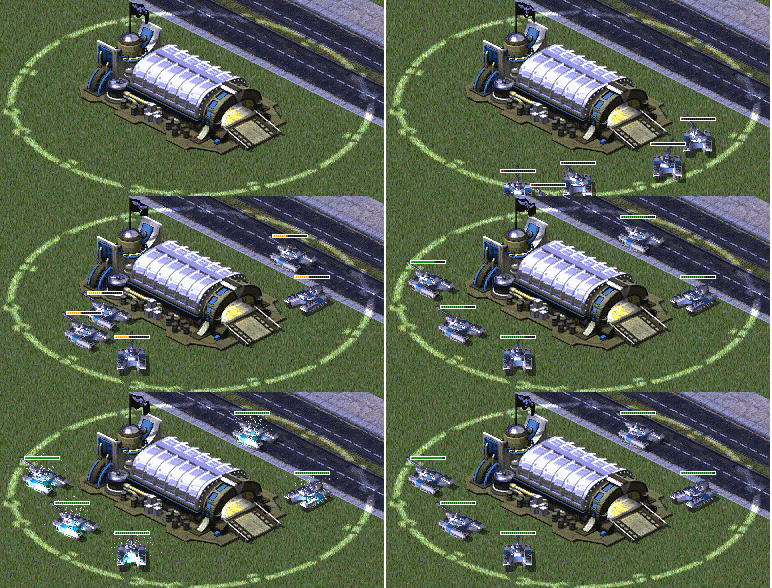
- Đầu tiên bạn tải file RepairRing.shp ở ĐÂY.
- Chọn một cái nhà nào đó bạn muốn thêm chức năng này, trong cái ảnh và trong hướng dẫn của tác giả lấy nhà tăng Allied nên mình cũng lấy nó luôn nhé.
- Tìm khóa [GAWEAP]
- Thêm đoạn mã này vào code của nó.
AlphaImage=RepairRing
Primary=RepairWeapon1
GuardRange=255
AttackFriendlies=yes
DeathWeapon=RepairWeapon
- Trong đó AlphaImage chính là file RepairRing.shp bạn vừa tải ở trên, để file đó trong thư mục game.
- Chú ý nhà các bạn chọn không nên là những nhà đã có sẵn PrimaryWeapon như mấy nhà phòng thủ (Cột sét hay GattlingGun chẳng hạn). Nên chọn mấy nhà bình thường như nhà năng lượng, vàng, tăng...
- Tiếp add đống code này ngay dưới code của nhà trên.
[RepairWeapon1]
Damage=1
ROF=65
Range=-2
Projectile=RepairPj1
Speed=40
Warhead=RailShot
[RepairPj1]
Image=120MM
Arcing=true
Dropping=yes
SubjectToCliffs=yes
SubjectToElevation=yes
SubjectToWalls=yes
AirburstWeapon=RepairWeapon
Airburst=yes
[RepairWeapon]
Damage=10
ROF=65
Range=-2
Projectile=RepairPj
Speed=40
Warhead=RepairWH
Report=RhinoTankAttack
Anim=GUNFIRE
Bright=yes
[RepairPj]
Image=120MM
ROT=100
Dropping=yes
SubjectToCliffs=yes
SubjectToElevation=yes
SubjectToWalls=yes
[RepairWH]
Verses=-100%,-100%,-100%,-100%,-100%,-100%,-100%,-100%,-100%,-100%,-100%
Rocker=no
CellSpread=4.5
AnimList=PIFFPIFF
ProneDamage=100%
InfDeath=2
AttachEffect.Animation=SparkleMaker
[SparkleWH]
Verses=0%,0%,0%,0%,0%,0%,0%,0%,0%,0%,0%
Rocker=no
CellSpread=4.5
AnimList=PIFFPIFF
ProneDamage=100%
Particle=WeldingSys2
[WeldingSys2]
HoldsWhat=WeldingSpark
BehavesLike=Spark
ParticleCap=3
SparkSpawnFrames=5
LightSize=10
OneFrameLight=true
SpawnSparkPercentage=.4
- Khai báo thêm WeldingSys2 vào trong khóa [ParticleSystems]
- Khai báo RepairWH và SparkleWH vào khóa [Warheads]
- Chèn đoạn code này vào đầu file artmd.ini
[SparkleMaker]
Image=INVISO
Warhead=SparkleWH
Damage=1
- Chỉ vậy thôi, xong rồi, vào game mua cái nhà đó rồi test xem hoạt động hay không.
Cách tạo súng phun lửa
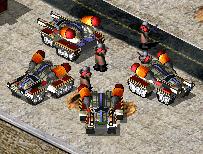
Tôi sẽ hướng dẫn các bạn tạo một cái xe tăng bắn đạn lửa. Vì loại đạn của nó là đạn đặc biệt nên code hơi khó một chút.
LINK. Các bạn down về nhé. Link up lên google drive nên không die được đâu.
- Tăng này tôi lấy của MadHQ : LINK
- Vì vào thời điểm hiện tại hầu hết mọi người đều MOD trên nền ARES Patch cả rồi, nên khuyến cáo các bạn nên chạy ares patch nhé. Code bên dưới của tôi cũng trên nền Ares. Tất nhiên cái tăng này không cần ares cũng tạo được nhưng chả tội gì không dùng ares patch
- Việc của các bạn bây giờ chỉ là chèn Code vào thôi. Code tôi cũng chèn code mới hoàn toàn để các bạn không phải edit cái đã có, cái nào trùng code đã có tôi đều clone lên rồi.
- Trước hết là code rules. Tìm các khóa bên dưới điền thêm vào mấy cái xxx= ấy
- Khai báo thêm vài thứ vào hệ thống của game.
[VehicleTypes]
xxx=MASTERFLAME
[ParticleSystems]
xxx=FireCloudSys
xxx=FireMasterSys
[Particles]
xxx=FireMasterStream
[Warheads]
xxx=FLAMEWH
xxx=FireX
- Tiếp đến khai báo thông số chiếc xe tăng.
[MASTERFLAME]
UIName=NOSTR:Master Flame ;Cái này là ares patch hỗ trợ không cần khai báo tên trong ra2md.csf nữa
Name=Master Flame
;Prerequisite=GAWEAP,GATECH ;Dòng này tôi tạm bỏ để test còn bạn muốn xây xong nhà gì mới mua được tăng này thì chỉnh sửa
Strength=300
Category=AFV
Armor=light
Turret=yes
Primary=MasterFlameGun
ElitePrimary=MasterFlameGunE
IsTilter=yes
TooBigToFitUnderBridge=true
TechLevel=1 ;Chỉnh techlevel phù hợp với yêu cầu của bạn
Sight=8
Speed=4
CrateGoodie=yes
Crusher=yes
Owner=British,French,Germans,Americans,Alliance,Russians,Confederation,Africans,Arabs,YuriCountry
Cost=1600
Soylent=1600
Points=50
ROT=5
IsSelectableCombatant=yes
AllowedToStartInMultiplayer=no
Explosion=TWLT070,S_BANG48,S_BRNL58,S_CLSN58,S_TUMU60
VoiceSelect=PrismTankSelect
VoiceMove=PrismTankMove
VoiceAttack=PrismTankAttackCommand
VoiceFeedback=
DieSound=GenVehicleDie
MoveSound=PrismTankMoveStart
CrushSound=TankCrush
Maxdebris=3
Locomotor={4A582741-9839-11d1-B709-00A024DDAFD1}
MovementZone=Destroyer
ThreatPosed=40
DamageParticleSystems=SparkSys,SmallGreySSys
DamageSmokeOffset=100, 100, 275
Weight=3.5
VeteranAbilities=STRONGER,FIREPOWER,SIGHT,FASTER
EliteAbilities=SELF_HEAL,STRONGER,FIREPOWER,ROF
Accelerates=false
ZFudgeColumn=8
ZFudgeTunnel=13
Size=3
CanBeReversed=yes
[MasterFlameGun]
Damage=50
ROF=2
Range=10
Projectile=FlameP
Speed=100
Warhead=FLAMEWH
Report=
Burst=2
UseSparkParticles=yes
AttachedParticleSystem=FireMasterSys
Report=BuildingFireBig
Anim=INITFIRE
[MasterFlameGunE]
Damage=100
ROF=2
Range=10
Projectile=FlameP
Speed=100
Warhead=FLAMEWH
Report=
Burst=2
UseSparkParticles=yes
AttachedParticleSystem=FireMasterSys
Report=BuildingFireBig
Anim=INITFIRE
[FlameP]
Inviso=yes
Image=none
SubjectToCliffs=yes
SubjectToElevation=yes
SubjectToWalls=yes
Cluster=4
[FLAMEWH]
CellSpread=2
PercentAtMax=0.5
Verses=200%,200%,200%,100%,50%,35%,100%,45%,10%,100%,100%
InfDeath=4
AnimList=INITFIRE
Particle=FireCloudSys ;this tells the warhead to spawn fire particles on the ground (optional)
ProneDamage=600%
[FireMasterSys]
HoldsWhat=FireMasterStream
Spawns=yes
SpawnFrames=2
BehavesLike=Fire
Image=FIRE02
Lifetime=60
[FireMasterStream]
Image=FIRE02
Deacc=0.01
Velocity=28.0 ;Tốc độ của tia lửa, để càng cao lửa bắn càng nhanh càng xa, nên chỉnh sao cho phù hợp nếu ko nhìn lố lắm nhé
BehavesLike=Fire
MaxEC=500
MaxDC=3
Warhead=FireX
Damage=15
StartStateAI=1
EndStateAI=19
StateAIAdvance=6
Translucent50State=0
Translucent25State=0
DeleteOnStateLimit=yes
Normalized=yes
FinalDamageState=50
Report=FLAMTNK1
[FireX]
CellSpread=1
PercentAtMax=.5
Wood=yes
Verses=600%,500%,200%,0%,0%,0%,0%,0%,0%,0%,0% ;this is so it does ambient damage only to infantry
InfDeath=4
Sparky=no
Fire=no
Bright=true
ProneDamage=100%
[FireCloudSys]
HoldsWhat=FireCloud1
BehavesLike=Fire
Spawns=yes
SpawnFrames=1
SpawnRadius=5
Slowdown=.0025
ParticleCap=20;gs30
LightSize=21
[FireCloud1]
Image=FIRE01
MaxDC=60
MaxEC=500
Damage=50 ;gs
Warhead=Fire
StartFrame=0
EndStateAI=28
Translucency=0
WindEffect=0
BehavesLike=Gas
StateAIAdvance=4
Radius=10
NextParticle=FireCloudD1
[FireCloudD1]
Image=FIRE01
MaxDC=60
MaxEC=50
Damage=20
Warhead=Fire
StartFrame=0
EndStateAI=12
Translucency=0
WindEffect=0
BehavesLike=Gas
StateAIAdvance=4
DeleteOnStateLimit=yes
- Tiếp theo là code bên artmd.ini
[MASTERFLAME]
Voxel=yes
Remapable=yes
Cameo=DUALPRISMICON
AltCameo=DUALPRISMUICON
PrimaryFireFLH=225,50,103
- OK giờ chỉ cần chép mấy file các bạn tải về
Cho vào thư mục game là xong.
- MASTERFLAMEICON.SHP
- MASTERFLAMEUICON.SHP
- MASTERFLAME.HVA
- MASTERFLAME.VXL
- MASTERFLAMETUR.HVA
- MASTERFLAMETUR.VXL
- Vào game test thôi. Tăng này tôi để bắn lửa ra từ 2 nòng.
- Link bài hướng dẫn tôi đọc và làm theo LINK
Chỉnh sửa cuối:


