Tương lai giả lập PSP

Bản 2552 chơi có nhanh bằng 1985 k pro :D
Cũng còn tùy, mỗi game mỗi cách config khác nhau. Có thể bản này mới nhưng chưa chắc đã chơi ngon game đó bằng các bản cũ, muốn tìm cách config game nào thì cứ lên google search từ khóa " tên game + jpcsp" là ra
 
Cho mình hỏi là FF VII Crisis Code thì dùng JPSCP bản nào với config ra sao nữa:4cool_confuse:. Mình down bản mới nhất về hình nó cứ nhằng nhằng mà chạy đi chạy lại mãi đoạn opening chứ ko vào được game :6cool_beat_brick:
 
Dùng bản JPCSP v0.6 rev 2391 thử xem
Cách config như sau

[-] = Unchecked
[x] = Checked
|Video|
[-] Only GE graphhics (not recommended for homebrew)
[-] Use vertex cache
[X] Use shaders (experimental)
[X] Use a Geometry Shader for 2D rendering (only relevant when using shaders)
[-] Disable UBO (automatically disabled if not supported, only relevant when using shaders)
[X] Enable VAO (only relevant when using shaders and vertex cache)
[X] Enable saving GE screen to Textures instead of Memory
[X] Enable decoding of indexed textures (using CLUT) in shader (only relevant when using shaders)
[X] Enable dynamic shader generation (only relevant when using shaders rec for AMD/ATI)

|Memory|
[X] Ignore invalid memory access (not recommended for test reports,but improves performance)
[X] Ignore unmapped imports (not recommended)

|Media|
[x] Use Media Engine (Works only with 32bit JPCSP)
[-] Extract media files to tmp folder
[x] Decode audio files with sonic stage (you must have ss installed for this to work)
[-] Use non-native fonts from flash0 folder

|Compiler|
[X] Use compiler (dynarec)
[-] Output profiler into to profiler.txt (only for compiler)
[50] Maximum method size

|Crypto|
[X] Extract decrypted EBOOT.BIN files to the TMP folder
[-] Handle SAVEDATA in crypto mode
[-] Extract original PGD files to the TMP folder
 
Dùng bản JPCSP v0.6 rev 2391 thử xem
Cách config như sau
Thank bạn nhé. Mỗi tội lúc battle thì fps toàn >20, bình thường thì ~60. Giật quá >.< Hay tại máy mình yếu nhỉ @@
 
Thank bạn nhé. Mỗi tội lúc battle thì fps toàn >20, bình thường thì ~60. Giật quá >.< Hay tại máy mình yếu nhỉ @@

Update driver lên bản mới nhất thử xem, lên mạng search driver ati, down về rồi update . Với cậu nên xem thêm cái jpcsp launcher để tăng thêm FPS. Thân
 
:6cool_surrender: Card Ati thì đừng ham chơi giả lập PSP , thất vọng tràn trề
 
Mọi người ơi tớ chơi FINAL FANTASY TACTICS: THE WAR OF THE LIONS dùng jpcsp bản mới nhất mà âm thanh ngh rè rè khó chịu quá là sao vậy? Mình down game này ở box FF dạng CSO, hay phải ISO mới đúng? Config kiểu gì cũng lỗi âm thanh. Dùng lại bản 2391 vẫn lỗi.
 
Cậu test game bằng bản r1890 xem. Config :


[-] = Unchecked
[x] = Checked
[#] = Optional, use at own risk (usually a speedup, can cause crash / bugs, disable this first if you run into problems)
-When changing options do it before you load the game, or else you'll need to close and restart Jpcsp.
-These settings are only to be used as a basic template, I encourage you to find your own settings.

|Video|
[-] Only GE graphhics (not recommended for homebrew)
[-] Use vertex cache
[x] Use shaders (experimental)
[-] Use a Geometry Shader for 2D rendering (only relevant when using shaders)
[-] Disable UBO (automatically disabled if not supported, only relevant when using shaders)
[-] Enable VAO (only relevant when using shaders and vertex cache)
[x] Enable saving GE screen to Textures instead of Memory
[-] Enable decoding of indexed textures (using CLUT) in shader (only relevant when using shaders)
[x] Enable dynamic shader generation (only relevant when using shaders rec for AMD/ATI)

|Media|
[x] Use Media Engine (Works only with 32bit JPCSP)
[-] Extract media files to tmp folder
[x] Decode audio files with sonic stage (you must have ss installed for this to work)
[x] Use non-native fonts from flash0 folder

|Compiler|
[x] Use compiler (dynarec)
[-] Output profiler into to profiler.txt (only for compiler)
[100] Maximum method size
 
Cho mình xin link jpcsp r1890
________

---------- Post added at 18:36 ---------- Previous post was at 18:18 ----------

Bạn ơi r1890 ko chạy được game này bạn à, và 1890 cũng ko có các tùy chọn config như trên luôn. Bản đó cũ quá rồi.
 
Mọi người ơi tớ chơi FINAL FANTASY TACTICS: THE WAR OF THE LIONS dùng jpcsp bản mới nhất mà âm thanh ngh rè rè khó chịu quá là sao vậy? Mình down game này ở box FF dạng CSO, hay phải ISO mới đúng? Config kiểu gì cũng lỗi âm thanh. Dùng lại bản 2391 vẫn lỗi.
Game này nhớ không nhầm cũng có trên Ps1, cậu down Epsxe về dùng mà chơi cho sướng
 
Cậu ko hiểu rồi, mình biết chứ nhưng bản PSP có job mới với lại CG được vẽ theo phong cách độc đáo hơn xưa nhiều.
 
Thế thử bản r2233 xem, config như trên hoặc như thằng này

[video=youtube;sSp2o6uT3mM]http://www.youtube.com/watch?v=sSp2o6uT3mM&feature=related[/video]
 
cấu hình máy tớ thế này
cpu intel e7400
ram 2g
vga ATI radeon hd 4600 series
cần xin config cho game 3rd birthday, thanks :D
 
cấu hình máy tớ thế này
cpu intel e7400
ram 2g
vga ATI radeon hd 4600 series
cần xin config cho game 3rd birthday, thanks :D
Bugs: Choppy/randomly disappearing sountrack(fixed in r2062), 2D graphic corruption (fixed in r21xx)

Config
"Only GE graphics" enabled = emu shows real fps
"Only GE graphics" disabled = emu shows bogus/optimistic fps and gameplay actually is less smooth.

Download :

 
Sao cứ mỗi lần chơi là cái folder /tmp nó cứ tăng dung lượng lên vậy? Có cách nào không chứ cái HDD sắp cạn rồi, mỗi lần chơi xong lại phải xóa đi :|
 
Sao cứ mỗi lần chơi là cái folder /tmp nó cứ tăng dung lượng lên vậy? Có cách nào không chứ cái HDD sắp cạn rồi, mỗi lần chơi xong lại phải xóa đi :|
Xóa tay đi cho nó lành, có thể cấm không cho thư mục được quyền write nhưng như vậy có thể gặp một số trục trặc trong quá trình chơi game
 
cho mình hỏi làm thế nào để save game, mình mở game lên thì nó toàn chơi lại, save snap shot thì ko load lại dc :9cool_too_sad:
 
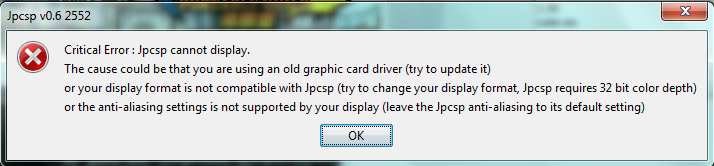
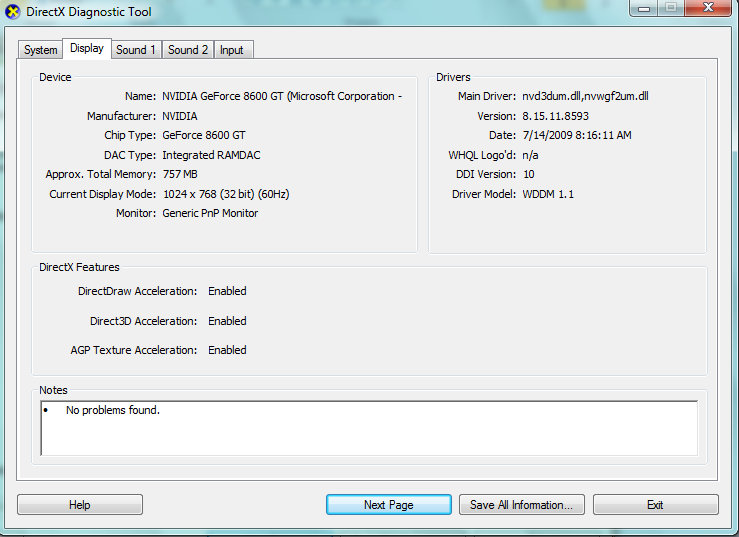
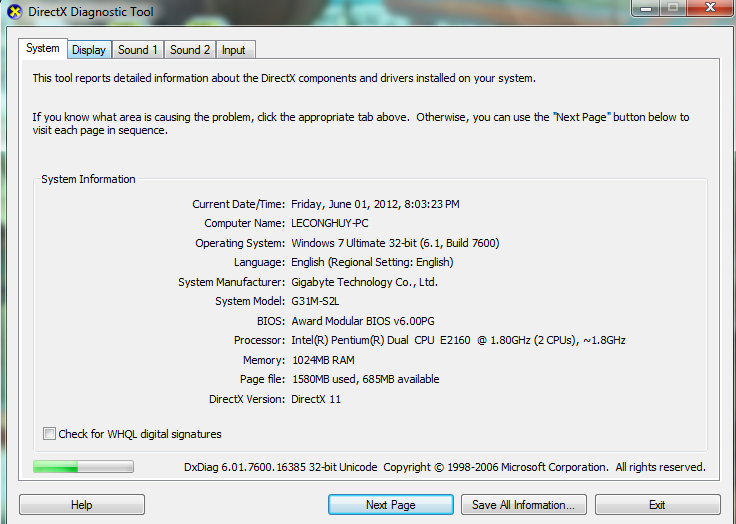
máy của thàng em mình bị lỗi này, không biết là lỗi gì vì máy nó có thể chơi tốt PES 2012

Lỗi
1-4.png


Cấu hình máy
3-3.png

2-3.png
 
Confirm cho mấy bạn là AC Bloodline với Gungnir chơi được rồi nhé :)

java2012060201514120.jpg
java2012060201524341.jpg
java2012060202400940.jpg
java2012060202413051a.jpg
 
Confirm cho mấy bạn là AC Bloodline với Gungnir chơi được rồi nhé :)

java2012060201514120.jpg
java2012060201524341.jpg
java2012060202400940.jpg
java2012060202413051a.jpg

Cậu test trên máy cậu à :-?...................
 
Back
Top