

Navigation
Install the app
How to install the app on iOS
Follow along with the video below to see how to install our site as a web app on your home screen.
Note: This feature may not be available in some browsers.
Thêm tùy chọn
Style variation
-
[THÔNG BÁO] CẢNH BÁO LỪA ĐẢO MẠO DANH QUẢN TRỊ VIÊN
Chào các thành viên GameVN,
Dạo gần đây tình trạng lừa đảo scamming và phishing đang gia tăng. Ban quản trị GameVN xin lưu ý toàn bộ thành viên:
KHÔNG/ ĐỪNG / CẤM cho bất kỳ ai tự xưng là quản trị viên của server vay tiền.
Mọi hành vi lân la làm quen, tự tiện nhắn tin trên Discord, Facebook, Zalo hoặc các nền tảng mạng xã hội khác,
núp bóng dưới danh nghĩa sinh hoạt của quản trị viên, đều có tỉ lệ rất, rất cao là lừa đảo.
Nếu có tài khoản lạ add friend hoặc nhắn tin xin tiền dưới danh nghĩa admin:
Block ngay
Report ngay
Không chuyển khoản, không cung cấp thông tin cá nhân
Quản trị viên của forum và Discord server GameVN không có nhu cầu vay tiền thành viên.
Không có lý do nào để admin chủ động kết bạn rồi xin tiền.
Mọi thông báo chính thức chỉ được đăng trên kênh thông báo của server và topic chính thức trên forum.
Tin nhắn riêng từ tài khoản lạ không phải thông báo của ban quản trị.
Cảm ơn các bạn đã chú ý và cùng giữ cộng đồng an toàn.
— Ban quản trị GameVN
Tắt thông báo bằng nút X bên góc phải của bảng thông báo*
You are using an out of date browser. It may not display this or other websites correctly.
You should upgrade or use an alternative browser.
You should upgrade or use an alternative browser.
Multi FINAL FANTASY XV
- Thread starter king_dragontb
- Ngày gửi




- 11/1/07
- 24,372
- 24,134
Đánh giá của 1 mem trên Steam (xài card R9 Fury) về ảnh hưởng của các setting đối với performance của demo :
But, here are the settings, along with what affects my framerate the most. Your mileage my vary. You may need to jump in and out of the menu and wait for the frame rate to settle. I don't know why it needs this. Sometimes turning a setting down can impart a massive jump that doesn't revert if you turn it back up.
* Resolution: Yep. Going from 100% to 75% is a stupid-high frame rate jump but of course the game starts to look like a potato.
* Assets: Someone find out for me because I can't see a difference. You'd think there would be.
* Model LOD: High to Average is a huge FPS jump. Average to Low not so much.
* TRAM: I really did not expect this to do anything but going from High to Low does affect my framerate, but small. From Highest to Low is a few FPS.
* Anisotropic Filtering: Usually a very small hit but for some reason it's a few FPS in this game.
* Geomapping: On to Off is a small jump.
* Lighting: Highest to High is a big jump. From High to Average doesn't do much.
* Shadows: Same as lighting. Highest to High is big. High to Average does almost nothing.
* Ambient Occlusion: Average to None is a big jump. Average to High doesn't do much. This setting seems very busted. Low to High SSAO is usually a fair jump, and turning it off is also a fair jump. In this game? Nope.
* Anti-Aliasing: Very small.
* Motion Blur: Varies but medium to small.
* Filtering: Average to Low is the big jump. The others don't have a very big effect so go above Average if you don't mind the hit.
* HairWorks: Don't know. Main characters don't use it and I haven't found the buffalo yet.
* VXAO: Can't use on AMD cards.
* TurfEffects: Holy♥♥♥♥♥♥ Avoid.
* ShadowLibs: Can't use on AMD cards.


- 8/6/03
- 4,259
- 713
Demo ngon, đẹp và nhẹ, load nhanh, nhất là không bị khựng khi load cảnh (lúc xoay camera) khi chơi trên PS4...
Rất mong tuần sau release để chơi!
Btw, giờ mua thiết bị phát Bluetooth rồi cắm tay cầm PS4 vào chơi được không mọi người?
Rất mong tuần sau release để chơi!
Btw, giờ mua thiết bị phát Bluetooth rồi cắm tay cầm PS4 vào chơi được không mọi người?

- 7/5/05
- 6,738
- 1,189
Demo ngon, đẹp và nhẹ, load nhanh, nhất là không bị khựng khi load cảnh (lúc xoay camera) khi chơi trên PS4...
Rất mong tuần sau release để chơi!
Btw, giờ mua thiết bị phát Bluetooth rồi cắm tay cầm PS4 vào chơi được không mọi người?
mua cục Bluetooth 4.0 (chừng 100k) rồi gắn vào chơi bình thường thôi


- 8/8/06
- 2,883
- 478
Demo ngon, đẹp và nhẹ, load nhanh, nhất là không bị khựng khi load cảnh (lúc xoay camera) khi chơi trên PS4...
Rất mong tuần sau release để chơi!
Btw, giờ mua thiết bị phát Bluetooth rồi cắm tay cầm PS4 vào chơi được không mọi người?
Mình đang dùng cái usb orico 120k bắt sóng khá tốt, thấy ngon hơn cả cía laptop mình.
Mỗi tội chơi tay PS khổ cái là nút trong game trên Win là nút Xbox, phải chơi 1 thời gian làm quen nút, nhiều lúc lớ ngớ phải out ra ngoài xem nút Xbox vị trí nào =_= .... Nhất là 4 cái nút cò, đặt tên tắt khó nhớ vãi LT, LB,... (Bumper mà trong đầu mình toàn nghĩ là Back thì nghĩ là nó cò sau
 )
)![[R]ainy™](/data/avatars/m/547/547324.jpg?1784696602)
- 11/4/08
- 8,520
- 7,771
Không biết bản full có fix ko chứ Demo cắm Headphone qua Mixamp chả có tiếng, phải bật loa của màn hình...
// Mới search thì bản benchmark với demo ko nhận âm thanh qua cổng Optical, bản full mà ko fix thì khỏi chơi luôn.
// Mới search thì bản benchmark với demo ko nhận âm thanh qua cổng Optical, bản full mà ko fix thì khỏi chơi luôn.
Chỉnh sửa cuối:

- 2/2/13
- 3,555
- 403
:( Chơi FF12 mà trong đầu tưởng tượng đang chơi FF15 ....huhuhu
- 8/6/03
- 4,259
- 713
Mình đang dùng cái usb orico 120k bắt sóng khá tốt, thấy ngon hơn cả cía laptop mình.
Mỗi tội chơi tay PS khổ cái là nút trong game trên Win là nút Xbox, phải chơi 1 thời gian làm quen nút, nhiều lúc lớ ngớ phải out ra ngoài xem nút Xbox vị trí nào =_= .... Nhất là 4 cái nút cò, đặt tên tắt khó nhớ vãi LT, LB,... (Bumper mà trong đầu mình toàn nghĩ là Back thì nghĩ là nó cò sau
Chà đọc bài này thì hơi lưỡng lự nha... nếu vậy thôi chuột + mouse cho lành, dù gì cũng optimize khá tốt, chỉ cần 1 nút chuột trái bao nhiêu thao tác rồi.. hmm...
- 8/8/06
- 2,883
- 478
Chà đọc bài này thì hơi lưỡng lự nha... nếu vậy thôi chuột + mouse cho lành, dù gì cũng optimize khá tốt, chỉ cần 1 nút chuột trái bao nhiêu thao tác rồi.. hmm...
Nói vậy thôi, trừ mấy game đòi hỏi xử lý bấm nút theo ngữ cảnh nhiều hơi ngán (kiểu GOW,Resident eveil 4,...) còn không chơi 1,2 hôm cũng quen à bác.
Định mua tay Xbox , mà thấy chơi không hợp tay, với thích cái tay PS4 quá nên thôi kệ
 !!!!
!!!!
- 13/3/03
- 51,927
- 42,637
???:( Chơi FF12 mà trong đầu tưởng tượng đang chơi FF15 ....huhuhu
???Game nhẹ mà, thấy tụi nó máy cùi cùi còn chơi mượt, dĩ nhiên ff15 dù low vẫn đẹp hơn cái ff12 max setting tỉ lần chứ
The game very is well optimized even for a low end rig like mine (Athlon 760k and GTX 660). I had around 40-50fps in 1080p with a few settings turned up to high. I was surprised at how big the playable area was in the demo.
http://store.steampowered.com/app/671210/FINAL_FANTASY_XV_WINDOWS_EDITION_PLAYABLE_DEMO/

Ezio2727
C O N T R A
- 9/2/11
- 1,553
- 555
Game vậy là đáng mua rồi, sợ anh SE ở khoản optimize như hạch hoặc port nửa mùa thôi, vẫn còn hãi cái Type-0 mua xong phải refund, vì game éo cho bind key theo ý muốn, sợ vãi nồi mấy cái port vậy ra. Mấy anh Nhật có cái tật port game thông thường không cho bind key nhưng set vị trí key mặc định thì như l'.

Rampage_Ghost
Đây là nick của kẻ Scammer 300k VND
- 20/11/10
- 12,096
- 3,742
Game đẹp, vừa thôi chứ cũng chả nhẹ vì highest game drop fps + slutter hơi bị kinh phải off bớt 1 số cái không cần thiết. Có vẻ game thêm vài cái setting dư thừa tào lao quá vì onl hay off cũng chả khác mấy hoặc từ average lên high cũng chẳng khác gì nhưng khác rõ ràng thì toàn là Highest với High. Ít ra thì ăn đứt PS4 lẫn PS4 Pro về độ nuột + đẹp, chấm game ra sẽ ủng hộ trước chơi ké vì nhìn chán giờ nhìn đẹp rồi nên có hứng hơn rồi, có điều chơi đoạn đầu vẫn muốn gục như hồi trước.... chắc do nhạc cứ dịu dịu suốt, nhạc Yoko trong battle không kéo mình tỉnh táo hơn cho lắm, hy vọng lần này lết được end game :v.



Attachments







revenge_for_hate
Legend of Zelda
- 20/8/06
- 1,039
- 206
Dzô dzô 
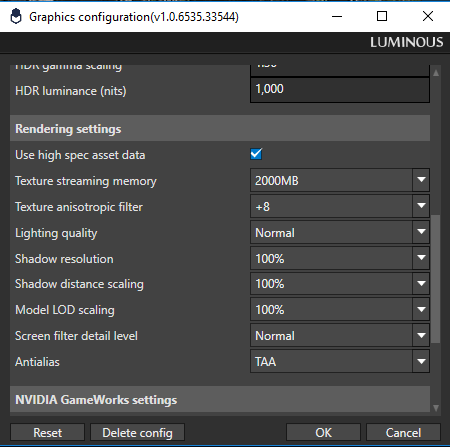
Spotted by Reddit’s member ‘Ryudo_Gaming‘, this tool is located at FFXV main directory -> tools -> GraphicsConfigurationTool. Inside that folder, you will find a program/tool called Luminous Engine tool.
