
Subasa902
T.E.T.Я.I.S
- 7/1/07
- 552
- 3
các bạn ơi, mình down file boot trên trang http://www.myvistaboot.com rồi, nhưng làm sao để sử dụng file.mui bây giờ, giúp mình với


Follow along with the video below to see how to install our site as a web app on your home screen.
Note: This feature may not be available in some browsers.

ngay tại trang đó có hd sử dụng rồi đấy thôicác bạn ơi, mình down file boot trên trang http://www.myvistaboot.com rồi, nhưng làm sao để sử dụng file.mui bây giờ, giúp mình với
 nếu ko nhin thấy thì nó đây
To install a bootscreen, you have to run through each step carefully!
1. Taking ownership of the file
First things first. To have permission to change or replace the file, you must take ownership of the file.
1.1 Browse to c:\windows\system32\EN-us
* EN-us is the folder when you're running an English version of Windows Vista,
NL-nl will be the folder when you're running a Dutch version of Windows Vista,
IT-it for Italian, and so on...
1.2 Locate the file winload.exe.mui
1.3 Open the Properties dialog by right-clicking on the file and clicking Properties
1.4 Click on the Security tab
1.5 Click the Advanced button
1.6 Click on the Owner tab to display the list of usergroups
1.7 Click on the Edit button
1.8 Select your username from the list, click Apply and then OK.
1.9 A message wil pop up warning you that taking ownership of the file may be unsafe, click OK
1.10 Now you're back in the Properties > Security window
* Leave this window opened
2. Changing permissions
To be able to replace the file you'll have to change its permissions
2.1 Click on the Edit button
2.2 In the list of users and usergroups, select Users
2.3 Change Full Control to Allow.
2.4 Repeat step 2.2 and 2.3 for the group Administrators
2.5 Close the properties dialog by clicking Apply, followed by OK
3. Creating a backup
To be able to recover the standard bootscreen, you'll have to create a backup.
3.1 Select the file winload.exe.mui and press F2 or right-click and choose rename
3.2 Press END to locate the cursor at the and of the filename and add .bak
3.3. Now the file shall be name winload.exe.mui.bak instead of winload.exe.mui
4. Installing the new bootscreen
Now we are ready to install the new bootscreen
4.1 Copy the winload.exe.mui which you've downloaded to the folder (See step 1.1)
4.2 If everything went OK you won't get a window who asks you to repace the file
5. Activating the bootscreen
Standard, full-color bootscreens are disabled in Windows Vista...
5.1 Click on Start and open the Run command
5.2 Type msconfig and click ok
5.3 Open the boot tab
5.4 Locate the item No GUI Boot and tick it to enable it
5.5 Closed the program by clicking Apply, followed by OK
Restart your computer!
* Installing a second bootscreen
It is possible that you've found a bootscreen that you like better then the one you're currently using.
The only steps you'll have to follow are steps 4.1 and 4.2.
* Recovering the original boot
If you're tired of the full-colour bootscreen, just disable the No GUI Boot in msconfig


Windows Vista Ultimate DVD Permanently Actived
Patch 2.12 for Windows Vista Ultimate x86 DVD (OEM Permanently Actived) for ppl
they dont want to download windows vista
the patch files in rar file:
ppf-o-matic3
readme
update212.ppf
product key:
6F2D7-2PCG6-YQQTB-FWK9V-932CG
Code:
http://rapidshare.com/files/24216384/wvu.rar.001
http://rapidshare.com/files/24217573/wvu.rar.002
http://rapidshare.com/files/24263665/wvu.rar.003
http://rapidshare.com/files/24266697/wvu.rar.004
http://rapidshare.com/files/24268199/wvu.rar.005
http://rapidshare.com/files/24269633/wvu.rar.006
http://rapidshare.com/files/24271073/wvu.rar.007
http://rapidshare.com/files/24272368/wvu.rar.008
http://rapidshare.com/files/24273722/wvu.rar.009
http://rapidshare.com/files/24313539/wvu.rar.010
http://rapidshare.com/files/24315786/wvu.rar.011
http://rapidshare.com/files/24317944/wvu.rar.012
http://rapidshare.com/files/24320128/wvu.rar.013
http://rapidshare.com/files/24322408/wvu.rar.014
http://rapidshare.com/files/24347470/wvu.rar.015
http://rapidshare.com/files/24349070/wvu.rar.016
http://rapidshare.com/files/24350618/wvu.rar.017
http://rapidshare.com/files/24353183/wvu.rar.018
http://rapidshare.com/files/24357713/wvu.rar.019
http://rapidshare.com/files/24366349/wvu.rar.020
http://rapidshare.com/files/24367956/wvu.rar.021
http://rapidshare.com/files/24369578/wvu.rar.022
http://rapidshare.com/files/24370900/wvu.rar.023
http://rapidshare.com/files/24372277/wvu.rar.024
http://rapidshare.com/files/24373708/wvu.rar.025
http://rapidshare.com/files/24375190/wvu.rar.026
http://rapidshare.com/files/24376590/wvu.rar.027
http://rapidshare.com/files/24377877/wvu.rar.028
http://rapidshare.com/files/24458204/wvu.rar.029
http://rapidshare.com/files/24211713/wvu.rar.030
http://rapidshare.com/files/24213128/wvu.rar.031
http://rapidshare.com/files/24214384/wvu.rar.032
http://rapidshare.com/files/24215102/wvu.rar.033


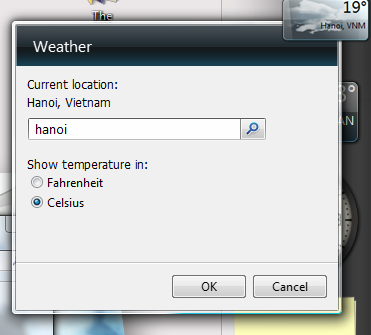

 muốn biết thời tiết việt nam phải chuyển miền về US