- 12/11/02
- 8,574
- 3,413
1. In Training go to the schedules tabmà cái lịch với lịch huấn luyện là khác nhau hả sếp , em chỉ import được vào cái lịch huấn luyện thôi , còn cái lịch kia thì chả biết ở đâu thả vào . Mới thả như hướng dẫn cũng ko được
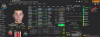
2. Select Schedules > Custom Schedules > Import Schedule
3. Now locate and LOAD the training file. This will be under: Documents/Sports Interactive/Football Manager 2024/Schedules
4. The Schedule will now show
5. Select Confirm
6. Hit the Save tab in the bottom right corner (VERY IMPORTANT)
7. If you followed the steps correctly you will see the newly imported schedule in your game
Thử lại chỗ nhấn nút save xem nó có lưu lại ko ông. Kiểu cái lịch thì nó hiển thị mấy ngày chi tiết từ cái schedule của mình, nhưng tính toán ngày có trận với ngày ko trận nó tự chia ra á

 Mà mới tìm hiểu hoá ra
  bán chuyên nghiệp clb nhỏ