

Navigation
Install the app
How to install the app on iOS
Follow along with the video below to see how to install our site as a web app on your home screen.
Note: This feature may not be available in some browsers.
Thêm tùy chọn
Style variation
-
[THÔNG BÁO] CẢNH BÁO LỪA ĐẢO MẠO DANH QUẢN TRỊ VIÊN
Chào các thành viên GameVN,
Dạo gần đây tình trạng lừa đảo scamming và phishing đang gia tăng. Ban quản trị GameVN xin lưu ý toàn bộ thành viên:
KHÔNG/ ĐỪNG / CẤM cho bất kỳ ai tự xưng là quản trị viên của server vay tiền.
Mọi hành vi lân la làm quen, tự tiện nhắn tin trên Discord, Facebook, Zalo hoặc các nền tảng mạng xã hội khác,
núp bóng dưới danh nghĩa sinh hoạt của quản trị viên, đều có tỉ lệ rất, rất cao là lừa đảo.
Nếu có tài khoản lạ add friend hoặc nhắn tin xin tiền dưới danh nghĩa admin:
Block ngay
Report ngay
Không chuyển khoản, không cung cấp thông tin cá nhân
Quản trị viên của forum và Discord server GameVN không có nhu cầu vay tiền thành viên.
Không có lý do nào để admin chủ động kết bạn rồi xin tiền.
Mọi thông báo chính thức chỉ được đăng trên kênh thông báo của server và topic chính thức trên forum.
Tin nhắn riêng từ tài khoản lạ không phải thông báo của ban quản trị.
Cảm ơn các bạn đã chú ý và cùng giữ cộng đồng an toàn.
— Ban quản trị GameVN
Tắt thông báo bằng nút X bên góc phải của bảng thông báo*
You are using an out of date browser. It may not display this or other websites correctly.
You should upgrade or use an alternative browser.
You should upgrade or use an alternative browser.
Desktop Arena - Show hàng + hỏi đáp thay đổi giao diện [VI]
- Thread starter HieuNM
- Ngày gửi
- Status
- Không mở trả lời sau này.


grandmaster07
Donkey Kong
- 18/8/05
- 485
- 5
^: Cái áo đầm là thế nào, bạn là nữ hả  Bạn đưa cái config của đồng hồ đây mình chỉnh lại cho, chắc là do set W thấp quá đó mà.

Bạn đưa cái config của đồng hồ đây mình chỉnh lại cho, chắc là do set W thấp quá đó mà.

grandmaster07
Donkey Kong
- 18/8/05
- 485
- 5
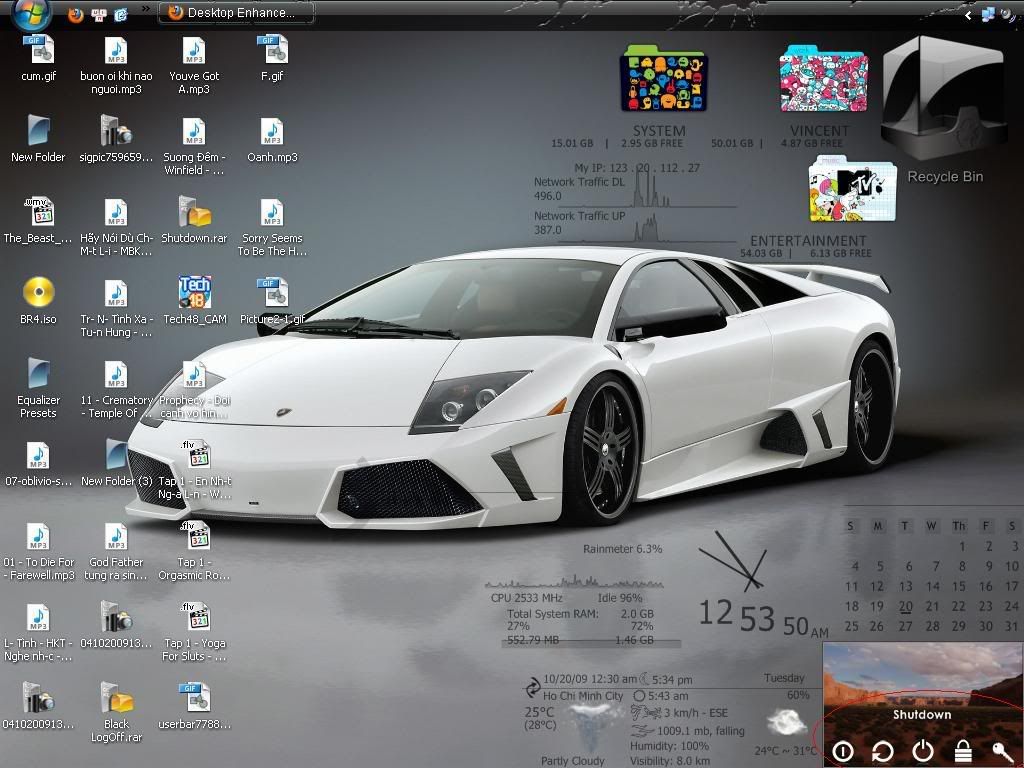
Search skin Arachnid nhé bạn :-*


anima99998
Persian Prince
- 14/12/06
- 3,503
- 0
lol, cái ở trên nhìn vào là bị recycle bin đập vào mắt, bóng hơn cả cái xe 
@grandmaster: hòa hợp lắm. nhưng mà bóng đá với đàn bà nó hơi kị nhau
.
___________Auto Merge________________
.
ủa mà mấy cái bimbim shutdown, lock,... là soft gì vậy?
@grandmaster: hòa hợp lắm. nhưng mà bóng đá với đàn bà nó hơi kị nhau
.
___________Auto Merge________________
.
ủa mà mấy cái bimbim shutdown, lock,... là soft gì vậy?
anima99998
Persian Prince
- 14/12/06
- 3,503
- 0
ai chỉ tớ cách làm note với rss facebook trong arachnid với
grandmaster07
Donkey Kong
- 18/8/05
- 485
- 5
@grandmaster: hòa hợp lắm. nhưng mà bóng đá với đàn bà nó hơi kị nhau
ủa mà mấy cái bimbim shutdown, lock,... là soft gì vậy?
Gf của tớ cũng mê bóng đá bỏ mịa đấy chứ
Tớ toàn bị dụ dỗ xem 
Cái đó là rainmeter skin Arachnid á, hình như trong phần popups, trong đó chỉ có gadget, HUD với Arachnid thôi

Sửa lại chút, gần như toàn bộ là HUD được tớ mod lại theo style vuông vuông, cứ Arachnid nó ít cái hay = HUD. Mod hơi vội nên đôi chỗ còn thừa với khít, nhìn cũng đẹp
 Nghe lời ông kia cho đàn bà nhỏ lại tí, bóng to nhất =)
anima99998
Persian Prince
- 14/12/06
- 3,503
- 0
facebook của Arachnid:
chỉnh thế nào đây?
[Variables]
FontName=Trebuchet MS
BlackFont=0,0,0,255
WhiteFont=255,255,255
BarColor1=140,140,140,200
BarColor2=20,20,20,255
FontSize1=8
FontSize2=9
FontColor1=255,255,255
FontColor2=140,140,140,200
RSSURL=http://www.facebook.com/feeds/notifications.php?id=xxxxxxxxxxxx&viewer=xxxxxxxxx&key=xxxxxxxxx&format=rss20
RSSLink=http://www.facebook.com
Substitute="&":"&",""":"","&Quot;":"","<br>":"","<![CDATA[":"","]]>":"","...":"","<":"",">":"","/PRE>":"","PRE>":"","<":"","'":"'"
chỉnh thế nào đây?
grandmaster07
Donkey Kong
- 18/8/05
- 485
- 5
Vào link này http://www.facebook.com/home.php#/notifications.php
Kéo xuống dưới cùng có chữ RSS, thay link đó vô
Kéo xuống dưới cùng có chữ RSS, thay link đó vô

- 16/4/09
- 1,087
- 2,237
vừa edit skin Arachnid theo sở thích xong :)
http://i222.photobucket.com/albums/dd64/fortedexe/untitled-5.jpg
cái thanh taskbar của bác sao nó bị nứt tùm lum hay vậy chỉ em với
- 16/4/09
- 1,087
- 2,237
chỉ em sửa cái này,skin HUD show wallpaper với,có nhiều X,Y quá em chằng biết chổ nào sửa cả...;===========================================
; Rainmeter configuration file
;===========================================
[Rainmeter]
Author=Jiri Mahel
AppVersion=1.0
; refreshed ~ 0m:30s
Update=90000
;~~~~~~~~~~~~~~~~~~~~~~~~~~~~~~~~~~~~~~~~~~~~~~~~~~~~~~~~~~~~~~~~~~~~~~~~~
; !!!!!!!!!!! YOU MUST INSTALL NCONVERT !!!!!!!
; !!! must install to Windows directory !!!
; download Nconvert from
; http://pagesperso-orange.fr/pierre.g/xnview/en_ncdownload.html
; or
; http://www.google.com/search?hl=en&q=nconvert+download
;~~~~~~~~~~~~~~~~~~~~~~~~~~~~~~~~~~~~~~~~~~~~~~~~~~~~~~~~~~~~~~~~~~~~~~~~~
;everything looks best when the source images have a 16:10 ratio.
;
;Configurable
;>>>>>>>>>>>>>>>>>>>>>>>>>>>>>>>>>>>>>>>>>>>>>
[Variables]
;!!!!!! Define Image Path !!!!!!! path needs a backslash "\" at the end.
ImagePath=E:\Pics\PICS linh tinh
; Define Subfolders (1 = Yes, 0 = NO)
subF=1
; FileFilter
fFilter=*.jpg;*.jpeg;*.png;*.bmp
; Monitor Resolution, example 1280x800 defined "-resize 1280 0"
MonitorResolution=-ratio -rtype lanczos -resize 1280 0
;>>>>>>>>>>>>>>>>>>>>>>>>>>>>>>>>>>>>>>>>>>>>>
; path is define HUD.Vision directory
rainmeter_dir=C:\Program Files\Rainmeter
dir=C:\Program Files\Rainmeter\Skins\HUD.Vision\White
fontColor.Text=255, 255, 255, 160
bar.color=255, 255, 255, 50
graph.line1=255, 255, 255, 75
graph.line2=255, 255, 255, 37
border.color=255, 255, 255, 75
FontName=Tahoma
FontHeight=8
FontHeight1=10
AntiAlias=1
;================================================
; Picture.Browser+Wallpapers Display
;================================================
[NactiObrazky]
Measure=Plugin
Plugin=Plugins\QuotePlugin.dll
PathName=#ImagePath#
FileFilter=#fFilter#
Subfolders=#subF#
;================================================
[Obrazek]
MeasureName=NactiObrazky
Meter=IMAGE
X=2
Y=2
W=200
H=125
Hidden=0
;START:FRAME
;===========================================
[cara1]
Meter=IMAGE
X=3
Y=1
W=198
H=2
SolidColor=#border.color#
[cara1_2]
Meter=IMAGE
X=1
Y=1
W=2
H=127
SolidColor=#border.color#
[cara2]
Meter=IMAGE
X=3
Y=126
W=198
H=2
SolidColor=#border.color#
[cara2_2]
Meter=IMAGE
X=201
Y=1
W=2
H=127
SolidColor=#border.color#
; END:FRAME
;===================
[cara.podpera2]
Meter=IMAGE
X=203
Y=103
W=25
H=2
SolidColor=#border.color#
[cara.podpera1]
Meter=IMAGE
X=203
Y=-79r
W=25
H=2
SolidColor=#border.color#
;=======================================
[mButt1]
Meter=IMAGE
X=5
Y=5
ImageName=new.png
Hidden=1
[mButt2]
Meter=IMAGE
X=5
Y=5
ImageName=new.png
Hidden=1
[mButt]
Meter=IMAGE
X=5
Y=5
W=30
H=19
SolidColor=255, 255, 255, 0
MouseOverAction=!Execute [!RainmeterShowMeter mButt1][!RainmeterRedraw]
LeftMouseDownAction=!Execute [!RainmeterShowMeter mButt2][!RainmeterRedraw]
LeftMouseupAction=!Execute [!RainmeterHideMeter mButt2][!RainmeterRedraw][!RainmeterRefresh]
MouseLeaveAction=!execute [!RainmeterHideMeter mButt1][!RainmeterHideMeter mButt2][!RainmeterRedraw]
[mButt3]
Meter=IMAGE
X=168
Y=105
ImageName=wall.png
Hidden=1
[mButt4]
Meter=IMAGE
X=168
Y=105
ImageName=wall.png
Hidden=1
[mButt_1]
Meter=IMAGE
X=168
Y=105
W=35
H=19
SolidColor=255, 255, 255, 0
MouseOverAction=!Execute [!RainmeterShowMeter mButt3][!RainmeterRedraw]
LeftMouseDownAction=!Execute ["#dir#\util\fileExec.exe" "nconvert.exe -v #MonitorResolution# -out bmp -o %%%USERPROFILE%\AppData\Local\VirtualStore\Windows\HUD_Vision_wallpaper.bmp%% %%[NactiObrazky]%%" "%%#dir#\util\chWallpaper.exe%% %%%USERPROFILE%\AppData\Local\VirtualStore\Windows\HUD_Vision_wallpaper.bmp%% stretch" -ew-swhide]
LeftMouseupAction=!Execute [!RainmeterHideMeter mButt4][!RainmeterRedraw][!RainmeterRefresh]
MouseLeaveAction=!execute [!RainmeterHideMeter mButt3][!RainmeterHideMeter mButt4][!RainmeterRedraw]


CatAngel
Fire in the hole!
- 20/6/09
- 2,670
- 201

- 16/2/08
- 10,348
- 3,348
định sửa cái gì thế kiachỉ em sửa cái này,skin HUD show wallpaper với,có nhiều X,Y quá em chằng biết chổ nào sửa cả...

nếu định sửa cái khung hiển thị ảnh thì thử [Obrazek] đi, vì check thấy kích thước nó bự nhất
mà lưu ý, x y là vị trí hiển thị của nó, w h là kích thước của nó
- Status
- Không mở trả lời sau này.
Similar threads
- Trả lời
- 0
- Đọc
- 153
- Trả lời
- 0
- Đọc
- 217
- Trả lời
- 0
- Đọc
- 128
- Trả lời
- 0
- Đọc
- 248
- Trả lời
- 0
- Đọc
- 256