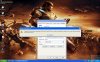
Chỉ dành cho crack noDVD( hiện tại) không dành cho crack 27kb .Khi cài GTA4, game check cấu hình máy tính và tự động thiết lập mức đồ họa rồi lại khóa lun cả cái quỉ texture đết cho config gì ráo :o anh em có máy yếu thì không chỉnh lowtexture được còn mấy chú máy thừa cân cũng đành bó chíu

. Để sửa cái quỉ này a e làm như vầy:
1. intall fullgame
2. chép
crack noDVD
3. tạo 1 shortcut
LaunchGTAIV.exe mới ở desktop
4. right click sc mới tạo/properties và thêm
-windowed vào ô target đằng sau ...exe" (chú ý là có khoảng trắng giữa
...exe"và-
windowed ). OK
5. Playgame:
Chạy Rockstargames Social Club trước (kô bấm nút Play) rồi chạy game bằng sc LaunchGTAIV mới tạo. Xong
PS: khi -windowed vào target game sẽ chạy ở chế độ cữa sổ, chỉ cần thêm command thiết lập độ phân giải game đúng với độ phân giải máy là ok
 Một số command
:
Tools:
-benchmark: Runs the benchmark tool and immediately exits game.
-help: Display list of all command line options
Graphics:
-renderquality: Set the render quality of the game. (0-4)
-shadowdensity: Set the shadow density of the game. (0-16)
-texturequality: Set the texture quality of the game. (0-2)
-viewdistance: Set the view distance of the game (0-99)
-detailquality: Set the detail quality of the game. (0-99)
-novblank: Disable wait for vblank (No Vsync)
-norestrictions: Do not limit graphics settings
-width: Set width of main render window (default is 800)
-height: Set height of main render window (default is 600)
-safemode: Run the graphics in the lowest setting possible
-frameLimit: Limit frame to interval of refresh rate
(ex If refreshrate is 60HZ –frameLimit 1 = Locks down to 60HZ)
-refreshrate: Set the refresh rate of main render window
– Warning - Monitor must support (ex. –refreshrate 60)
-fullscreen: Force fullscreen mode
-windowed: Force windowed mode
-availablevidmem: Set amount of physical Video Memory(ex. –availablevidmem 0.9)
-percentvidmem: Percentage of video memory to make available to GTA
Audio:
-fullspecaudio: Force high-end CPU audio footprint
-minspecaudio: Force low-end CPU audio footprint
System:
-noprecache: Disable precache of resources
-nomemrestrict: Disable memory restrictions