

Mình lấy bên Forum nước ngoài, Google linh tinh nó ra :).
Cơ mà mình dùng WinXP, với cả trình tiếng Anh còn gà, dịch chữ được chữ không, bài post vẫn còn mới từ tháng 7, leech về ae Win7 Check nhé :).
Cơ mà mình dùng WinXP, với cả trình tiếng Anh còn gà, dịch chữ được chữ không, bài post vẫn còn mới từ tháng 7, leech về ae Win7 Check nhé :).
Ae Win7 Check nếu ngon thì dịch lại + confirm hộ nhé. cần thiết thì lên đời Win7 luôn cho bõ ghét, khổ nỗi bh XP mình còn nhiều vướng bận quá. Dù gì cũng là bài leech về, có sai sót mong ae bỏ qua :).Alright guys. The section has been low on activity so I'd thought I'd make this post. This really helped me lower my ping from about 300-400 to 40-100(Seriously!)
Credits go to the original owner. I DID NOT make this guide.
Step 1
Open a command prompt with admin rights. To do so, go to the following location:
And then right-click on Command Prompt and select "Run as Administrator". If you have disabled the UAC, then you can just open it normally.Mã:Start Menu -> All Programs -> Accessories
Either type, or copy and paste, the following into the command prompt, and then press 'Enter' on your keyboard:
This turns on Compound TCP, which increases the TCP window much quicker than the traditional TCP algorithms allow for. This means that when a sudden burst of larger packets comes in, or goes out, Windows adjusts its settings faster than normal to compensate for it, allow for faster data transfer on broadband connections and lower latency while gaming.Mã:netsh int tcp set global congestionprovider=ctcp
Warning: I highly recommend that you create a System Restore point before proceeding with the next three steps.
Step 2
Click the 'Start' button, type regedit in the search field, and press 'Enter' on your keyboard. If you don't know how to edit the registry, then you may want to take a look at this article.
Navigate to the following registry key:
Mã:HKEY_LOCAL_MACHINE\SYSTEM\CurrentControlSet\services\Tcpip\Parameters\Interfaces
When you click to expand 'Interfaces', you will see one or more subkeys with long names that looks like the following screenshot:
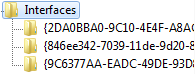
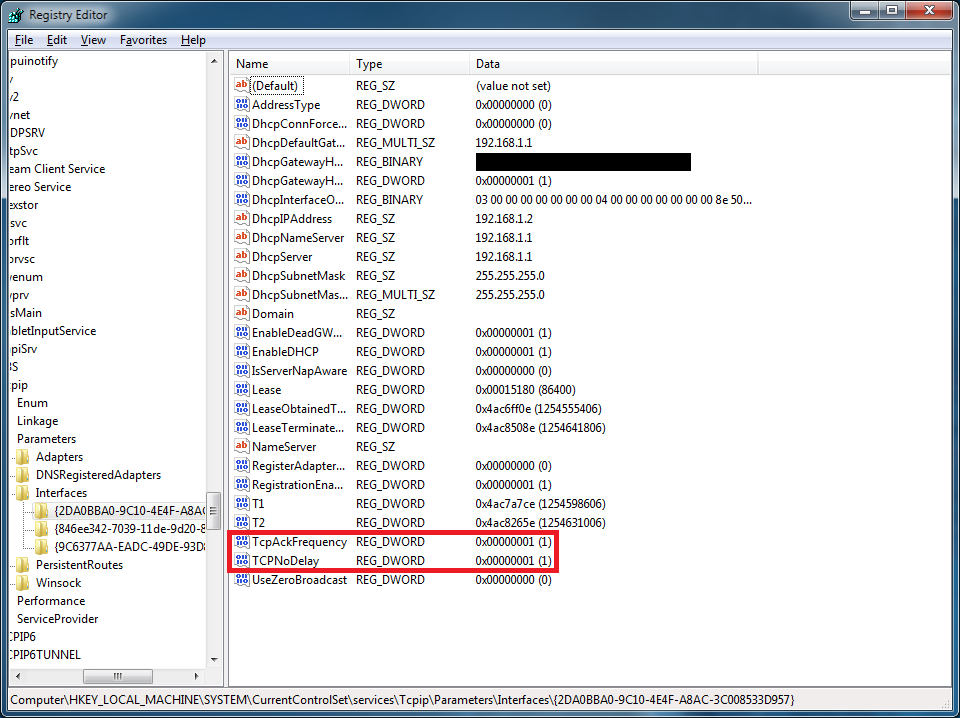
You will need to know what IP address your computer has on your local network (not on the Internet), and then find the subkey under 'Interfaces' that has the correct IP address. If you don't know how to find out the IP address on your local network, then check out this tutorial. In most cases only one of the subkeys will have all of the information, so it should be easy to find even if you get confused. Look at the following screenshot to see what all of the information looks like:

Once you find it, you need to add two registry values to it. They are both 32-bit DWORD values. They are as follows:
TcpAckFrequency
TCPNoDelay
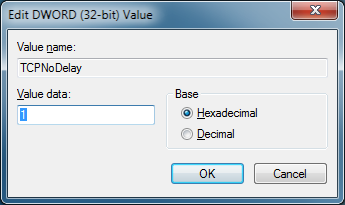
After adding both of those, double-click on each one, and give them both a hexadecimal value of 1, just like in the following screenshot:
After doing that, they should look like they do in the following screenshot:
Step 3
Click on 'Start', click on "Control Panel", click on 'Programs' in the lower-left, and then click on "Turn Windows features on or off" under the "Programs and Features" section. You will want to expand "Microsoft Messaging Queue (MSMQ) Server" by clicking the little plus to it's left, and then expand "Microsoft Messaging Queue (MSMQ) Server Core" as well. After doing that, click all of the checkboxes under the "Microsoft Messaging Queue (MSMQ) Server" section, just like in the screenshot below:

Step 4
If you closed regedit earlier, you will need to open it back up for this step.
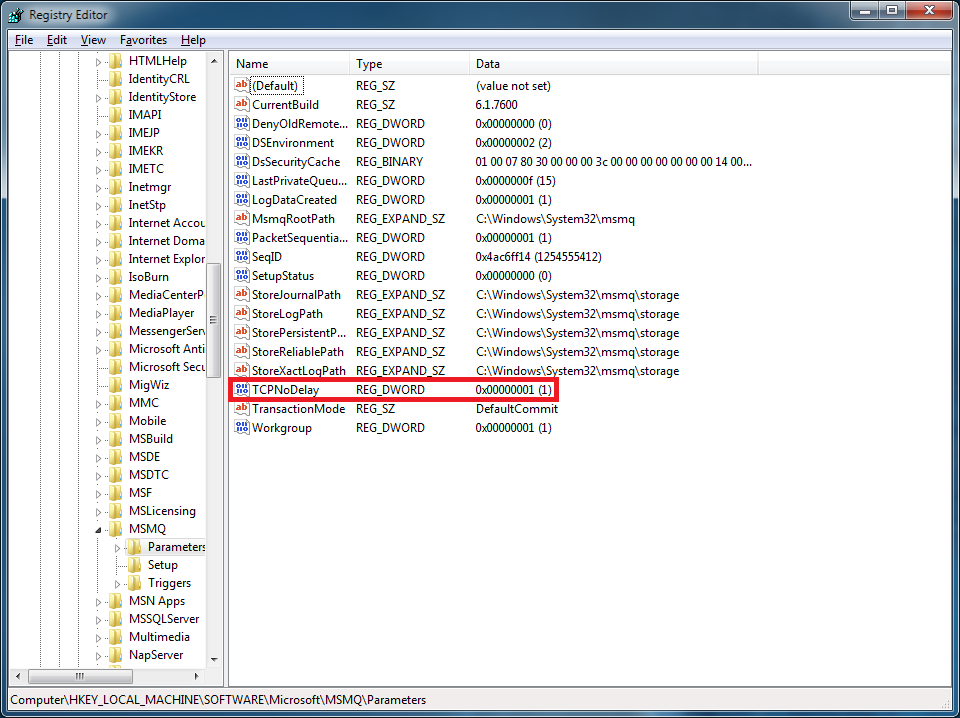
Navigate to the following key in regedit:
All we need to do here is add TCPNoDelay to the 'Parameters' key, with a 32-bit DWORD value of 1. This will work pretty much the same way that it did before. It will look like the following screenshot when done:Mã:HKEY_LOCAL_MACHINE\SOFTWARE\Microsoft\MSMQ\Parameters
If you completed those steps properly, then you should be able to play AVA, or whatever other online games you enjoy, with much less lag.
Note that I don't actually understand why installing and configuring Microsoft Messaging Queue helps reduce the latency. I just know that it helped on my computer, and has helped on other peoples' computers.


 .
.


 ?
?


 . Ông này xem nhiều quá đây mà


