

Navigation
Install the app
How to install the app on iOS
Follow along with the video below to see how to install our site as a web app on your home screen.
Note: This feature may not be available in some browsers.
Thêm tùy chọn
Style variation
You are using an out of date browser. It may not display this or other websites correctly.
You should upgrade or use an alternative browser.
You should upgrade or use an alternative browser.
Lỗi starcraft trong window 7
- Thread starter unnamed_1030
- Ngày gửi

XIII:BLACK_CAT
Sonic the Hedgehog
- 9/4/05
- 4,563
- 82
máy của mình cũng cài win 7 nhưng vào star 2 thì màn hình hiện ra chữ HZ ? bay trên màn hình là sao hả bạn @@

Tạo file .reg với nội dung như sau rồi chạy:
Windows Registry Editor Version 5.00
[HKEY_LOCAL_MACHINE\SOFTWARE\Wow6432Node\Microsoft\DirectDraw\Compatibility\StarCraft115]
"Name"="Starcraft.EXE"
"Flags"=hex:00,08,00,00
"ID"=dword:496589ca
Lưu ý dòng [HKEY_LOCAL_MACHINE\SOFTWARE\Wow6432Node\Microsoft\DirectDraw\Compatibility\StarCraft115] có thể thay đổi tùy theo version của bản SC đang chạy. Tốt nhất là nên vào regedit theo đường dẫn trên xem đang chạy SC version nào rồi sửa lại cho đúng.
Nguồn: http://forums.battle.net/thread.html?topicId=23214533181&sid=3000&pageNo=2
Down file .reg: http://home.exetel.com.au/franpa/Starcraft/
Have fun!
Windows Registry Editor Version 5.00
[HKEY_LOCAL_MACHINE\SOFTWARE\Wow6432Node\Microsoft\DirectDraw\Compatibility\StarCraft115]
"Name"="Starcraft.EXE"
"Flags"=hex:00,08,00,00
"ID"=dword:496589ca
Lưu ý dòng [HKEY_LOCAL_MACHINE\SOFTWARE\Wow6432Node\Microsoft\DirectDraw\Compatibility\StarCraft115] có thể thay đổi tùy theo version của bản SC đang chạy. Tốt nhất là nên vào regedit theo đường dẫn trên xem đang chạy SC version nào rồi sửa lại cho đúng.
Nguồn: http://forums.battle.net/thread.html?topicId=23214533181&sid=3000&pageNo=2
Down file .reg: http://home.exetel.com.au/franpa/Starcraft/
Have fun!

PePiNhiNhanh
<font color = pink>Cuteness Overload</font>
- 5/8/08
- 727
- 165
Làm bằng file .bat dễ hơn chả cần biết phiên bản làm gìTạo file .reg với nội dung như sau rồi chạy:
Windows Registry Editor Version 5.00
[HKEY_LOCAL_MACHINE\SOFTWARE\Wow6432Node\Microsoft\DirectDraw\Compatibility\StarCraft115]
"Name"="Starcraft.EXE"
"Flags"=hex:00,08,00,00
"ID"=dword:496589ca
Lưu ý dòng [HKEY_LOCAL_MACHINE\SOFTWARE\Wow6432Node\Microsoft\DirectDraw\Compatibility\StarCraft115] có thể thay đổi tùy theo version của bản SC đang chạy. Tốt nhất là nên vào regedit theo đường dẫn trên xem đang chạy SC version nào rồi sửa lại cho đúng.
Nguồn: http://forums.battle.net/thread.html?topicId=23214533181&sid=3000&pageNo=2
Down file .reg: http://home.exetel.com.au/franpa/Starcraft/
Have fun!


EM thì bị tình trạng như thế này khi mới ấn vào game thì bị nhòe hết cả màu nhưng khi vào game chơi thì lại trở lại bình thường ,em dùng Win 7 ai chỉ cách fix với .Tiện thì em hỏi luôn em dùng màn hình wide nhưng em muốn chỉnh thành màn hình vuông để chơi SCBW mà nó có 2 dọc đen 2 bên ấy ạ ai chỉ cho em với 
---------- Post added at 13:17 ---------- Previous post was at 11:36 ----------
Em đã fix đc cái lỗi nhòe màu rồi ai chưa làm được thì làm theo bước sau :
Bước 1: download cái file này https://rapidshare.com/files/714863906/StarCraft_Color_Fix.exe
Bước 2: chạy file vừa download ,chọn Browse dẫn tới file Starcraft.exe và cứ thế ấn ok đến khi phần mềm sẽ hỏi bạn tự tạo 1 cái shortcut starcraft mới thì mình đánh là Starcraft-BW rồi ok thế là xong thôi .
---------- Post added at 13:17 ---------- Previous post was at 11:36 ----------
Em đã fix đc cái lỗi nhòe màu rồi ai chưa làm được thì làm theo bước sau :
Bước 1: download cái file này https://rapidshare.com/files/714863906/StarCraft_Color_Fix.exe
Bước 2: chạy file vừa download ,chọn Browse dẫn tới file Starcraft.exe và cứ thế ấn ok đến khi phần mềm sẽ hỏi bạn tự tạo 1 cái shortcut starcraft mới thì mình đánh là Starcraft-BW rồi ok thế là xong thôi .
Ai mà chơi iccup mà bị lỗi màu thì download cái này về rồi cài là ổn hết http://sixen.org/bnet/Color Fixes.reg

soi24112001
T.E.T.Я.I.S
- 28/2/12
- 557
- 15
Tạo file .reg với nội dung như sau rồi chạy:
Windows Registry Editor Version 5.00
[HKEY_LOCAL_MACHINE\SOFTWARE\Wow6432Node\Microsoft\DirectDraw\Compatibility\StarCraft115]
"Name"="Starcraft.EXE"
"Flags"=hex:00,08,00,00
"ID"=dword:496589ca
Lưu ý dòng [HKEY_LOCAL_MACHINE\SOFTWARE\Wow6432Node\Microsoft\DirectDraw\Compatibility\StarCraft115] có thể thay đổi tùy theo version của bản SC đang chạy. Tốt nhất là nên vào regedit theo đường dẫn trên xem đang chạy SC version nào rồi sửa lại cho đúng.
Nguồn: http://forums.battle.net/thread.html?topicId=23214533181&sid=3000&pageNo=2
Down file .reg: http://home.exetel.com.au/franpa/Starcraft/
Have fun!
thanks nhé ^^ mình làm đc rùi
tớ chỉnh thế này là chơi được không bị màu
<a href="http://s307.beta.photobucket.com/user/tam_nhoc_3/media/Untitled_zpsed3333dd.jpg.html" target="_blank"><img src="http://i307.photobucket.com/albums/nn301/tam_nhoc_3/Untitled_zpsed3333dd.jpg" border="0" alt=" photo Untitled_zpsed3333dd.jpg"/></a>
- - - Updated - - -
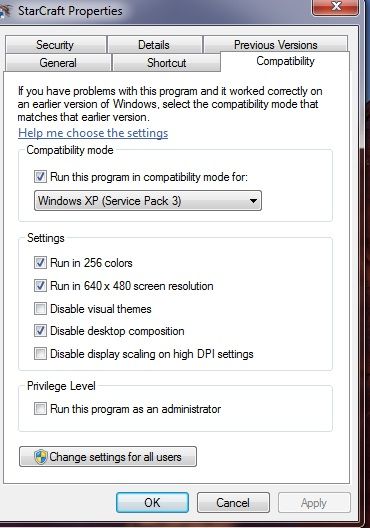
tớ làm theo hình là không bị lỗi màu nữa
<a href="http://s307.beta.photobucket.com/user/tam_nhoc_3/media/Untitled_zpsed3333dd.jpg.html" target="_blank"><img src="http://i307.photobucket.com/albums/nn301/tam_nhoc_3/Untitled_zpsed3333dd.jpg" border="0" alt=" photo Untitled_zpsed3333dd.jpg"/></a>
- - - Updated - - -
tớ làm theo hình là không bị lỗi màu nữa