
Navigation
Install the app
How to install the app on iOS
Follow along with the video below to see how to install our site as a web app on your home screen.
Note: This feature may not be available in some browsers.
Thêm tùy chọn
Style variation
You are using an out of date browser. It may not display this or other websites correctly.
You should upgrade or use an alternative browser.
You should upgrade or use an alternative browser.
Project of newbie
- Thread starter nobita900
- Ngày gửi

MasterWind
T.E.T.Я.I.S
Game gì thế sao chẳng thấy cái Game nào hết vậy .Mà hình như trước kia pác dùng RPG 2k3 phải không ,hồi đó tui hâm mộ bác với bác Zell Dinch lắm lắm đấy ..Nhưng bây giwof chuyển sang XP rồi hay vẫn dùng 2k3 .Mà thấy chữ Script thì chắc là qua XP rồi phải không ..

nobita900
C O N T R A
phù sau nhiều phút kiên nhẫn đã upload được Projects rồi, mấy pác có XP xin mời
http://www.my.opera.com/nobita900/homes/Game/project.rar
Các ý tưởng của em mà không thực hiện được:
- Encounter có hình dấu (!)
- Chiêu of Nhân vật theo hệ và Job: chiêu chia làm hệ, hoặc Job
Vd: nhân vật Karl có hệ thủy, Job Priest, thì có thể dùng Cure hoặc Water
http://www.my.opera.com/nobita900/homes/Game/project.rar
Các ý tưởng của em mà không thực hiện được:
- Encounter có hình dấu (!)
- Chiêu of Nhân vật theo hệ và Job: chiêu chia làm hệ, hoặc Job
Vd: nhân vật Karl có hệ thủy, Job Priest, thì có thể dùng Cure hoặc Water
MasterWind
T.E.T.Я.I.S
Ò chắc có nhầm lẫn gì đây .Các bạn vui lòng vào phần Script Editor chọn Main và chỉnh lại Font là "Arial" chứ không phải là "VnArial" nhé ..Trò chơi được lắm ..Khá hay ..Mà này sao lại là Tiếng Anh với lại còn thiếu vài cái BGM nữa ,nên nó không chạy được buộc mình phải thay đôit nhạc mới chơi được .Chứ ý luôn cái Text nhé ,nó bị quá khung rồi ..
nobita900
C O N T R A
Khá hay hả bạn, thế mà mình còn tưởng bị chê đấy, vì gõ tiếng việt có dấu ko được nên phải gõ tiếng A chứ sao, còn BGM vì mình dùng bản XP Knight edition nên có 1 số khác biệt, với lại lúc upload, thấy File nén nặng quá nên mình xóa bớt BGM rồi, mình sẽ gởi BGM cho các hạ sauMasterWind nói:Ò chắc có nhầm lẫn gì đây .Các bạn vui lòng vào phần Script Editor chọn Main và chỉnh lại Font là "Arial" chứ không phải là "VnArial" nhé ..Trò chơi được lắm ..Khá hay ..Mà này sao lại là Tiếng Anh với lại còn thiếu vài cái BGM nữa ,nên nó không chạy được buộc mình phải thay đôit nhạc mới chơi được .Chứ ý luôn cái Text nhé ,nó bị quá khung rồi ..
Chú thích: do không biết cách để gõ tiếng việt trong game nên nobita cố gắng chỉnh tất cả các câu tiếng việt trong Script, đó là lý do tại sao game bị "Nửa Việt nửa anh", mong mấy bạn thông cảm mà down cái này cho Script vô rồi gửi cho nobita (down thì nhanh hơn up mà)
MasterWind
T.E.T.Я.I.S
Nếu muốn hiển thị bằng tiếng Việt toàn bộ thì hãy dùng Font ".VnArial" trong phần Main .Và khi đánh các đoạn Mess thì dùng TCVN3 đấy .Sử dụng 2k3 chắc quen dụ này rồi phải không .Lúc đầu đánh thì nó không hiển thị đúng tiếng Việt nhưng khi vào Game thì khác .Trong Script cũng vậy ,bạn đổi các từ đó sang dạng TCVN3 là ok .Thế là Game đã có thể hiển thị tiếng Việt ,nhưng mà tui cảm giác hình như cái Project này chưa phải là Game hoàn chỉnh hay sao ấy ..Cảm giác thôi ..
nobita900
C O N T R A
Thì đã hoàn chỉnh đâu, còn đang tiến hành vì tui gởi Project mà, nhờ các pác giúp đỡ thui, ủa nobita có thử xài font ấy rồi mà có được đâu cà? chắc tại xài bản cũ (1.0.0.1 Postally knight Edition ấy), À nhờ bạn dán cái Script về giao diện Menu khác cho mình được không rồi gửi lại cho mình được ko? Mình thích cái Menu bằng hình chứ không phải bằng chữ (equip thì cây kiếm 9 khiên, item thì hình option etc...)MasterWind nói:Nếu muốn hiển thị bằng tiếng Việt toàn bộ thì hãy dùng Font ".VnArial" trong phần Main .Và khi đánh các đoạn Mess thì dùng TCVN3 đấy .Sử dụng 2k3 chắc quen dụ này rồi phải không .Lúc đầu đánh thì nó không hiển thị đúng tiếng Việt nhưng khi vào Game thì khác .Trong Script cũng vậy ,bạn đổi các từ đó sang dạng TCVN3 là ok .Thế là Game đã có thể hiển thị tiếng Việt ,nhưng mà tui cảm giác hình như cái Project này chưa phải là Game hoàn chỉnh hay sao ấy ..Cảm giác thôi ..
MasterWind
T.E.T.Я.I.S
Ý của Nobita là thêm Icon vào Menu ư chuyện đó không thành vấn đề mình đọc xong và ngồi một tí thời gian rồi gửi lại cho Nobita cái Script này nè .Có thể hiển thị được Icon .Made by WindMình thích cái Menu bằng hình chứ không phải bằng chữ (equip thì cây kiếm 9 khiên, item thì hình option etc...)
 ...Ồ mém tí nữa thì quên chép chồng lên cái Menu nhé .
Mã:
class Window_Command < Window_Selectable
  #--------------------------------------------------------------------------
  # * Object Initialization
  #     width    : window width
  #     commands : command text string array
  #--------------------------------------------------------------------------
  def initialize(width, commands, icon = nil)
    # Compute window height from command quantity
    super(0, 0, width, commands.size * 32 + 32)
    @item_max = commands.size
    @commands = commands
    @icon = icon
    self.contents = Bitmap.new(width - 32, @item_max * 32)
    refresh
    self.index = 0
  end
  #--------------------------------------------------------------------------
  # * Refresh
  #--------------------------------------------------------------------------
  def refresh
    self.contents.clear
    for i in 0...@item_max
      draw_item(i, normal_color)
    end
  end
  #--------------------------------------------------------------------------
  # * Draw Item
  #     index : item number
  #     color : text color
  #--------------------------------------------------------------------------
  def draw_item(index, color)
    self.contents.font.color = color
    rect = Rect.new(4, 32 * index, self.contents.width - 8, 32)
    self.contents.fill_rect(rect, Color.new(0, 0, 0, 0))
    unless @icon == nil
        bitmap = RPG::Cache.icon(@icon + index.to_s)
        self.contents.blt(4, 32 * index + 4, bitmap, Rect.new(0, 0, 30, 30))
    end
    self.contents.draw_text(rect, @commands[index])
  end
end
#==============================================================================
# ** Scene_Menu
#------------------------------------------------------------------------------
#  This class performs menu screen processing.
#==============================================================================

class Scene_Menu
  ICON_NAME = 'menu'
  #--------------------------------------------------------------------------
  # * Object Initialization
  #     menu_index : command cursor's initial position
  #--------------------------------------------------------------------------
  def initialize(menu_index = 0)
    @menu_index = menu_index
  end
  #--------------------------------------------------------------------------
  # * Main Processing
  #--------------------------------------------------------------------------
  def main
    # Make command window
    s1 = "     " + $data_system.words.item
    s2 = "     " + $data_system.words.skill
    s3 = "     " + $data_system.words.equip
    s4 = "     Status"
    s5 = "     Save"
    s6 = "     End Game"
    @command_window = Window_Command.new(160, [s1, s2, s3, s4, s5, s6],
    Scene_Menu::ICON_NAME)
    @command_window.index = @menu_index
    # If number of party members is 0
    if $game_party.actors.size == 0
      # Disable items, skills, equipment, and status
      @command_window.disable_item(0)
      @command_window.disable_item(1)
      @command_window.disable_item(2)
      @command_window.disable_item(3)
    end
    # If save is forbidden
    if $game_system.save_disabled
      # Disable save
      @command_window.disable_item(4)
    end
    # Make play time window
    @playtime_window = Window_PlayTime.new
    @playtime_window.x = 0
    @playtime_window.y = 224
    # Make steps window
    @steps_window = Window_Steps.new
    @steps_window.x = 0
    @steps_window.y = 320
    # Make gold window
    @gold_window = Window_Gold.new
    @gold_window.x = 0
    @gold_window.y = 416
    # Make status window
    @status_window = Window_MenuStatus.new
    @status_window.x = 160
    @status_window.y = 0
    # Execute transition
    Graphics.transition
    # Main loop
    loop do
      # Update game screen
      Graphics.update
      # Update input information
      Input.update
      # Frame update
      update
      # Abort loop if screen is changed
      if $scene != self
        break
      end
    end
    # Prepare for transition
    Graphics.freeze
    # Dispose of windows
    @command_window.dispose
    @playtime_window.dispose
    @steps_window.dispose
    @gold_window.dispose
    @status_window.dispose
  end
  #--------------------------------------------------------------------------
  # * Frame Update
  #--------------------------------------------------------------------------
  def update
    # Update windows
    @command_window.update
    @playtime_window.update
    @steps_window.update
    @gold_window.update
    @status_window.update
    # If command window is active: call update_command
    if @command_window.active
      update_command
      return
    end
    # If status window is active: call update_status
    if @status_window.active
      update_status
      return
    end
  end
  #--------------------------------------------------------------------------
  # * Frame Update (when command window is active)
  #--------------------------------------------------------------------------
  def update_command
    # If B button was pressed
    if Input.trigger?(Input::B)
      # Play cancel SE
      $game_system.se_play($data_system.cancel_se)
      # Switch to map screen
      $scene = Scene_Map.new
      return
    end
    # If C button was pressed
    if Input.trigger?(Input::C)
      # If command other than save or end game, and party members = 0
      if $game_party.actors.size == 0 and @command_window.index < 4
        # Play buzzer SE
        $game_system.se_play($data_system.buzzer_se)
        return
      end
      # Branch by command window cursor position
      case @command_window.index
      when 0  # item
        # Play decision SE
        $game_system.se_play($data_system.decision_se)
        # Switch to item screen
        $scene = Scene_Item.new
      when 1  # skill
        # Play decision SE
        $game_system.se_play($data_system.decision_se)
        # Make status window active
        @command_window.active = false
        @status_window.active = true
        @status_window.index = 0
      when 2  # equipment
        # Play decision SE
        $game_system.se_play($data_system.decision_se)
        # Make status window active
        @command_window.active = false
        @status_window.active = true
        @status_window.index = 0
      when 3  # status
        # Play decision SE
        $game_system.se_play($data_system.decision_se)
        # Make status window active
        @command_window.active = false
        @status_window.active = true
        @status_window.index = 0
      when 4  # save
        # If saving is forbidden
        if $game_system.save_disabled
          # Play buzzer SE
          $game_system.se_play($data_system.buzzer_se)
          return
        end
        # Play decision SE
        $game_system.se_play($data_system.decision_se)
        # Switch to save screen
        $scene = Scene_Save.new
      when 5  # end game
        # Play decision SE
        $game_system.se_play($data_system.decision_se)
        # Switch to end game screen
        $scene = Scene_End.new
      end
      return
    end
  end
  #--------------------------------------------------------------------------
  # * Frame Update (when status window is active)
  #--------------------------------------------------------------------------
  def update_status
    # If B button was pressed
    if Input.trigger?(Input::B)
      # Play cancel SE
      $game_system.se_play($data_system.cancel_se)
      # Make command window active
      @command_window.active = true
      @status_window.active = false
      @status_window.index = -1
      return
    end
    # If C button was pressed
    if Input.trigger?(Input::C)
      # Branch by command window cursor position
      case @command_window.index
      when 1  # skill
        # If this actor's action limit is 2 or more
        if $game_party.actors[@status_window.index].restriction >= 2
          # Play buzzer SE
          $game_system.se_play($data_system.buzzer_se)
          return
        end
        # Play decision SE
        $game_system.se_play($data_system.decision_se)
        # Switch to skill screen
        $scene = Scene_Skill.new(@status_window.index)
      when 2  # equipment
        # Play decision SE
        $game_system.se_play($data_system.decision_se)
        # Switch to equipment screen
        $scene = Scene_Equip.new(@status_window.index)
      when 3  # status
        # Play decision SE
        $game_system.se_play($data_system.decision_se)
        # Switch to status screen
        $scene = Scene_Status.new(@status_window.index)
      end
      return
    end
  end
end
Dương -- 44
Youtube Master Race
Thằng chó Master Wind chuẩn bị chiến dịch chửi anh em hả , cố lên nhé , nhớ chửi cả tao nữa đó :p
@ Nobita : thằng Wind này dốt cực , nó chả giúp gì cho chú đc đâu , cái Demo của chú để anh down về coi
@ All : FS2 đây , tham khảo qua xem có gì cần sửa ko hộ cái
http://my.opera.com/Duong_44/homes/files/FS2.zip
@ Nobita : thằng Wind này dốt cực , nó chả giúp gì cho chú đc đâu
, cái Demo của chú để anh down về coi@ All : FS2 đây , tham khảo qua xem có gì cần sửa ko hộ cái
http://my.opera.com/Duong_44/homes/files/FS2.zip
nobita900
C O N T R A
@ Anh Dương: cái FS2 của anh em đem về chơi lâu rồi, bug là save không có được, với lại anh dùng từ ngữ thô thiển quá (Đức vua ăn nói với các đại thần mà chửi tùm lum kiểu đó sao dân phục ), hơn nữa anh không nên nói wind như thế, trình độ em chưa bằng Wind nữa
@ Wind: cám ơn bạn nhưng bạn hiểu lầm ý mình, mình muốn bằng Icon to luôn á (ko có chữ)
@ All: Năm học mới sắp tới nên chỉ online vào Chủ nhật, mong mọi người giúp đỡ, nobita sẽ cố gắng sắp xếp lại game cho hợp với kịch bản định trước
@ Wind: cám ơn bạn nhưng bạn hiểu lầm ý mình, mình muốn bằng Icon to luôn á (ko có chữ)
@ All: Năm học mới sắp tới nên chỉ online vào Chủ nhật, mong mọi người giúp đỡ, nobita sẽ cố gắng sắp xếp lại game cho hợp với kịch bản định trước
MasterWind
T.E.T.Я.I.S
Không có chữ tức là chỉ có Icon thôi á .Cái đó cũng không khó khăn gì nhưng liệu như thế người chơi có biết được không.Để người chơi hoàn toàn hiểu hết thì phải chọn những Icon thể hiện hết cái Link mà nó muốn đưa tới đây ..Thôi được để mình làm chỉ có cái Icon không cho :nobita900 nói:@ Wind: cám ơn bạn nhưng bạn hiểu lầm ý mình, mình muốn bằng Icon to luôn á (ko có chữ)
Mã:
class Window_Command < Window_Selectable
  #--------------------------------------------------------------------------
  # * Object Initialization
  #     width    : window width
  #     commands : command text string array
  #--------------------------------------------------------------------------
  def initialize(width, commands, icon = nil)
    # Compute window height from command quantity
    super(0, 0, width, commands.size * 32 + 32)
    @item_max = commands.size
    @commands = commands
    @icon = icon
    self.contents = Bitmap.new(width - 32, @item_max * 32)
    refresh
    self.index = 0
  end
  #--------------------------------------------------------------------------
  # * Refresh
  #--------------------------------------------------------------------------
  def refresh
    self.contents.clear
    for i in 0...@item_max
      draw_item(i, normal_color)
    end
  end
  #--------------------------------------------------------------------------
  # * Draw Item
  #     index : item number
  #     color : text color
  #--------------------------------------------------------------------------
  def draw_item(index, color)
    self.contents.font.color = color
    rect = Rect.new(4, 32 * index, self.contents.width - 8, 32)
    self.contents.fill_rect(rect, Color.new(0, 0, 0, 0))
    unless @icon == nil
        bitmap = RPG::Cache.icon(@icon + index.to_s)
        self.contents.blt(50, 32 * index + 4, bitmap, Rect.new(0, 0, 30, 30))
    end
    self.contents.draw_text(rect, @commands[index])
  end
end
#==============================================================================
# ** Scene_Menu
#------------------------------------------------------------------------------
#  This class performs menu screen processing.
#==============================================================================

class Scene_Menu
  ICON_NAME = 'menu'
  #--------------------------------------------------------------------------
  # * Object Initialization
  #     menu_index : command cursor's initial position
  #--------------------------------------------------------------------------
  def initialize(menu_index = 0)
    @menu_index = menu_index
  end
  #--------------------------------------------------------------------------
  # * Main Processing
  #--------------------------------------------------------------------------
  def main
    # Make command window
    s1 = ""
    s2 = ""
    s3 = ""
    s4 = ""
    s5 = ""
    s6 = ""
    @command_window = Window_Command.new(160, [s1, s2, s3, s4, s5, s6], Scene_Menu::ICON_NAME)
    @command_window.index = @menu_index
    # If number of party members is 0
    if $game_party.actors.size == 0
      # Disable items, skills, equipment, and status
      @command_window.disable_item(0)
      @command_window.disable_item(1)
      @command_window.disable_item(2)
      @command_window.disable_item(3)
    end
    # If save is forbidden
    if $game_system.save_disabled
      # Disable save
      @command_window.disable_item(4)
    end
    # Make play time window
    @playtime_window = Window_PlayTime.new
    @playtime_window.x = 0
    @playtime_window.y = 224
    # Make steps window
    @steps_window = Window_Steps.new
    @steps_window.x = 0
    @steps_window.y = 320
    # Make gold window
    @gold_window = Window_Gold.new
    @gold_window.x = 0
    @gold_window.y = 416
    # Make status window
    @status_window = Window_MenuStatus.new
    @status_window.x = 160
    @status_window.y = 0
    # Execute transition
    Graphics.transition
    # Main loop
    loop do
      # Update game screen
      Graphics.update
      # Update input information
      Input.update
      # Frame update
      update
      # Abort loop if screen is changed
      if $scene != self
        break
      end
    end
    # Prepare for transition
    Graphics.freeze
    # Dispose of windows
    @command_window.dispose
    @playtime_window.dispose
    @steps_window.dispose
    @gold_window.dispose
    @status_window.dispose
  end
  #--------------------------------------------------------------------------
  # * Frame Update
  #--------------------------------------------------------------------------
  def update
    # Update windows
    @command_window.update
    @playtime_window.update
    @steps_window.update
    @gold_window.update
    @status_window.update
    # If command window is active: call update_command
    if @command_window.active
      update_command
      return
    end
    # If status window is active: call update_status
    if @status_window.active
      update_status
      return
    end
  end
  #--------------------------------------------------------------------------
  # * Frame Update (when command window is active)
  #--------------------------------------------------------------------------
  def update_command
    # If B button was pressed
    if Input.trigger?(Input::B)
      # Play cancel SE
      $game_system.se_play($data_system.cancel_se)
      # Switch to map screen
      $scene = Scene_Map.new
      return
    end
    # If C button was pressed
    if Input.trigger?(Input::C)
      # If command other than save or end game, and party members = 0
      if $game_party.actors.size == 0 and @command_window.index < 4
        # Play buzzer SE
        $game_system.se_play($data_system.buzzer_se)
        return
      end
      # Branch by command window cursor position
      case @command_window.index
      when 0  # item
        # Play decision SE
        $game_system.se_play($data_system.decision_se)
        # Switch to item screen
        $scene = Scene_Item.new
      when 1  # skill
        # Play decision SE
        $game_system.se_play($data_system.decision_se)
        # Make status window active
        @command_window.active = false
        @status_window.active = true
        @status_window.index = 0
      when 2  # equipment
        # Play decision SE
        $game_system.se_play($data_system.decision_se)
        # Make status window active
        @command_window.active = false
        @status_window.active = true
        @status_window.index = 0
      when 3  # status
        # Play decision SE
        $game_system.se_play($data_system.decision_se)
        # Make status window active
        @command_window.active = false
        @status_window.active = true
        @status_window.index = 0
      when 4  # save
        # If saving is forbidden
        if $game_system.save_disabled
          # Play buzzer SE
          $game_system.se_play($data_system.buzzer_se)
          return
        end
        # Play decision SE
        $game_system.se_play($data_system.decision_se)
        # Switch to save screen
        $scene = Scene_Save.new
      when 5  # end game
        # Play decision SE
        $game_system.se_play($data_system.decision_se)
        # Switch to end game screen
        $scene = Scene_End.new
      end
      return
    end
  end
  #--------------------------------------------------------------------------
  # * Frame Update (when status window is active)
  #--------------------------------------------------------------------------
  def update_status
    # If B button was pressed
    if Input.trigger?(Input::B)
      # Play cancel SE
      $game_system.se_play($data_system.cancel_se)
      # Make command window active
      @command_window.active = true
      @status_window.active = false
      @status_window.index = -1
      return
    end
    # If C button was pressed
    if Input.trigger?(Input::C)
      # Branch by command window cursor position
      case @command_window.index
      when 1  # skill
        # If this actor's action limit is 2 or more
        if $game_party.actors[@status_window.index].restriction >= 2
          # Play buzzer SE
          $game_system.se_play($data_system.buzzer_se)
          return
        end
        # Play decision SE
        $game_system.se_play($data_system.decision_se)
        # Switch to skill screen
        $scene = Scene_Skill.new(@status_window.index)
      when 2  # equipment
        # Play decision SE
        $game_system.se_play($data_system.decision_se)
        # Switch to equipment screen
        $scene = Scene_Equip.new(@status_window.index)
      when 3  # status
        # Play decision SE
        $game_system.se_play($data_system.decision_se)
        # Switch to status screen
        $scene = Scene_Status.new(@status_window.index)
      end
      return
    end
  end
end
nobita900
C O N T R A
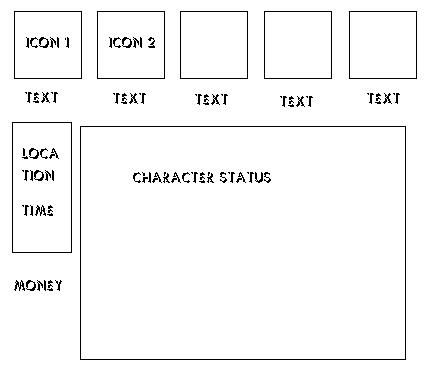
Không hẳn, thực sự dùng Pure Icon là ý tưởng riêng của mình, chưa thấy trong game khác pao giờ, nếu cần thì làm Icon nằm hàng trên, chữ ngay phía dưới và cuối cùng là các StatusMasterWind nói:Còn nếu không phải nữa thì nói .Nhưng mình đoán có phải là định nói đến cái Ring Menu không .Cái Menu xoay xoay hình tròn ấy ..Đúng không ??

MasterWind
T.E.T.Я.I.S
Ừ cái này để mình làm cho nhưng hiện giờ đang lanmf cái Chocobo theo lời của cha Dương nên hiện tại chưa làm được .Chiều nay vừa đi học vừa đi chiến với chiến hữu ở Audition nữa .Xong ngày mai là rảnh rồi mình làm cho Chai-en với Nobita luôn Thiếu mỗi Doremon nữa thôi ..
Thiếu mỗi Doremon nữa thôi ..
nobita900
C O N T R A
@ Wind: ừ, miễn sao trước thời gian bắt đầu làm nobita có thể thiết kế + chuẩn bị trước, đến hạn là làm story không thôi chứ không thiết kế gì nữa mà bạn có thể làm hiệu ứng Flashlight ko? Nếu ko thì mình nhờ Dương à?
@ Dương: Dương kéo dài quá không nhiệt tình như Wind, em biết anh giỏi hơn Wind rất nhiều nhưng để Wind giúp em vụ này nha (Lẽ ra rủ anh nữa nhưng... anh không đội trời chung mà)
@ All: Trong thời gian đăng ký nobita lo sưu tầm Script và Resource, đến khi bắt đầu cuộc thi sẽ không hỏi ai nữa, nên mọi người nhanh nhanh giùm
@ Dương: Dương kéo dài quá không nhiệt tình như Wind, em biết anh giỏi hơn Wind rất nhiều nhưng để Wind giúp em vụ này nha (Lẽ ra rủ anh nữa nhưng... anh không đội trời chung mà)
@ All: Trong thời gian đăng ký nobita lo sưu tầm Script và Resource, đến khi bắt đầu cuộc thi sẽ không hỏi ai nữa, nên mọi người nhanh nhanh giùm

Mozzila†hunder
Dragon Quest
nobita900 nói:Không hẳn, thực sự dùng Pure Icon là ý tưởng riêng của mình, chưa thấy trong game khác pao giờ, nếu cần thì làm Icon nằm hàng trên, chữ ngay phía dưới và cuối cùng là các Status
Cái này chỉ cần resize lại là được mà
MasterWind
T.E.T.Я.I.S
Không hẳn resize là ok đâu .Còn phải update cái cursor nữa .Với nhại nó cái đó cũng đơn giản .Nhờ ông Mozzila klàm nhé
Dương -- 44
Youtube Master Race
nobita900 nói:@ Wind: ừ, miễn sao trước thời gian bắt đầu làm nobita có thể thiết kế + chuẩn bị trước, đến hạn là làm story không thôi chứ không thiết kế gì nữa mà bạn có thể làm hiệu ứng Flashlight ko? Nếu ko thì mình nhờ Dương à?
@ Dương: Dương kéo dài quá không nhiệt tình như Wind, em biết anh giỏi hơn Wind rất nhiều nhưng để Wind giúp em vụ này nha (Lẽ ra rủ anh nữa nhưng... anh không đội trời chung mà)
@ All: Trong thời gian đăng ký nobita lo sưu tầm Script và Resource, đến khi bắt đầu cuộc thi sẽ không hỏi ai nữa, nên mọi người nhanh nhanh giùm
Ế ko nhiệt tình là sao ????? hừ hừ , mà ko đội trời chung với ai vậy
 trong này ai tao cũng quý mà :hug:
Ko phải ko nhiệt tình mà là dạo này gia đình đang có chuyện nên ko lên thường xuyên đc