

TuDragon76
Samus Aran the Bounty Hunter
- 9/6/02
- 6,413
- 1,590
Bình tỉnh đi, nhiều khi mail đế trể. Ko thấy thì click cái step 2 trg cái mục verify mail ấy, nó sẽ gửi lại
Btw vừa đk thử acc mới vẫn bình thường, log ra log vào bình thường, lâfn thứ 2 sau khi log vào sẽ hỏi tạo lập câu hỏi bí mật mới thôi,
chỉ chưa nhận đc mail verify
Trễ thì cũng khoản 1/2h thôi chứ chưa bao giờ thấy cái e-mail verify acc trễ đến mấy tiếng đồng hồ cả (đến thời điểm này), nó là hệ thống tự động mà chứ đâu phải là manual đâu
Ngay sau khi tạo acc xong nó nhảy ngay vào trang Log In, chẳng có cái e-mail nào đến cả thì làm gì có chuyện "làm theo bước 2" gì ? Khi tui chấp nhận reset lại pass nó hướng dẫn thế này :
How to reset your PayPal password
Dear Nguyen Tu,
To get back into your PayPal account, you'll need to create a new password.
It's easy:
Click the link below to open a secure browser window.
Confirm that you're the owner of the account, and then follow the instructions.
Reset your password now
Link not working? Copy and paste the one below into your browser:
https://www.paypal.com/vn/fq/ac=XXXXXXXXXXXXXXXXXXXXXXXXXXXXXXXXXXXXXXXXXXXXXXXXXXXXXXXXXXXXXXXXXXXXX
If you didn't ask us for help with your password, let us know right away. Reporting it is important because it helps us prevent fraudsters from stealing your information.
Yours sincerely,
PayPal
Nhấn vào đó thi nó hỏi :
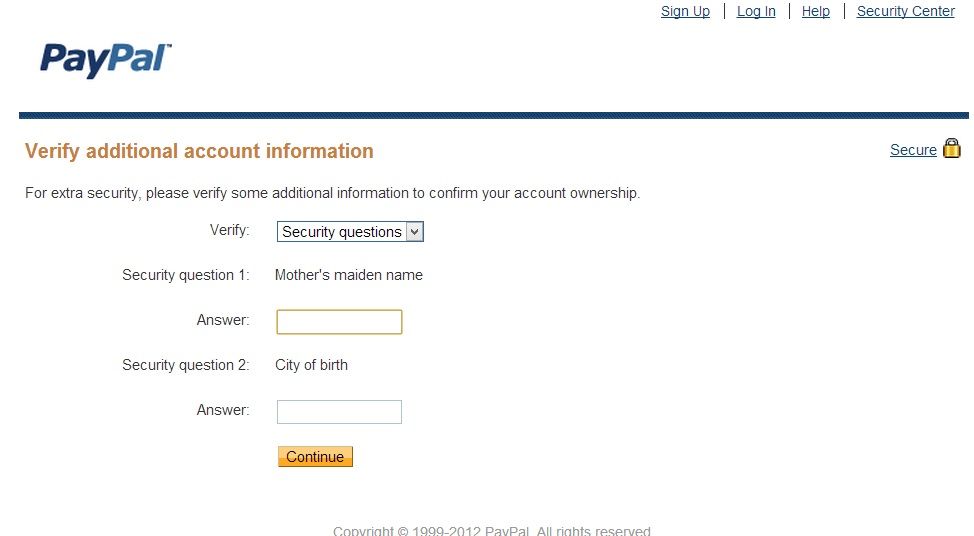
Thế tui mới bực mình, vì khi tạo acc nó đâu có hỏi mình mấy câu hỏi đó đâu mà so. Tui trả lời kiểu nào nó cũng báo là Incorrect
Vào Contact Us để chửi nó thì nó gửi lại cái e-mail thế này :
Dear Nguyen Ngoc Tu,
Thanks for contacting PayPal! We want to answer your questions, but you
emailed us from an unconfirmed email address. Please disregard any
email receipt you may have received as we will not be contacting you
back via this email address.
For security reasons, we can only provide account assistance when your
message is sent from an email address that is confirmed on your PayPal
account.
Confirming your email address is simple. When you register a new email
address, we send an email to that address so you can confirm it. Here’s
how to confirm your email address:
1. Click “Click here to confirm your additional email address” in
the email we sent.
2. Enter your password in the box and click “Confirm.”
If the link doesn’t appear in the email, you can confirm your email
address from your PayPal account. Here’s how:
1. Go to the PayPal website and log in to your account.
2. Click “Confirm email address” in Account Overview.
3. Click “Click here if the button does not appear in the email.”
4. Check your email inbox.
5. Copy the confirmation number in the email.
6. Paste the confirmation number in the box provided.
7. Click “Confirm.”
If there is a delay in receiving your email confirmation notice, it may
be because your email notification preference is set to receive HTML
format. Check with your internet service provider for steps on changing
your email format from HTML to plain text.
You can find more information on confirming your email address in our
Help Center by clicking “Help” at the top of the page.
Thứ nhất, nó nói cái e-mail này xuất phát từ 1 e-mail chưa được verify. Nó có gửi cái e-mail verify nào đâu mà to còi thế không biết

Thứ hai, nó yêu cầu log in vào rồi cập nhật cái địa chỉ e-mail đó. Đậu xanh ! Nếu bố chúng mày log in vào được thì chờ chúng mày chỉ à ?

Rốt cuộc, đầu đuôi theo tui nghĩ là do cái e-mail verify, đến giờ vẫn chưa thấy tăm tích của nó. Làm ăn như cái nơi mà thiên hạ chui ra !

 , hay là flash deal giờ thiên


