

Navigation
Install the app
How to install the app on iOS
Follow along with the video below to see how to install our site as a web app on your home screen.
Note: This feature may not be available in some browsers.
Thêm tùy chọn
Style variation
-
[THÔNG BÁO] CẢNH BÁO LỪA ĐẢO MẠO DANH QUẢN TRỊ VIÊN
Chào các thành viên GameVN,
Dạo gần đây tình trạng lừa đảo scamming và phishing đang gia tăng. Ban quản trị GameVN xin lưu ý toàn bộ thành viên:
KHÔNG/ ĐỪNG / CẤM cho bất kỳ ai tự xưng là quản trị viên của server vay tiền.
Mọi hành vi lân la làm quen, tự tiện nhắn tin trên Discord, Facebook, Zalo hoặc các nền tảng mạng xã hội khác,
núp bóng dưới danh nghĩa sinh hoạt của quản trị viên, đều có tỉ lệ rất, rất cao là lừa đảo.
Nếu có tài khoản lạ add friend hoặc nhắn tin xin tiền dưới danh nghĩa admin:
Block ngay
Report ngay
Không chuyển khoản, không cung cấp thông tin cá nhân
Quản trị viên của forum và Discord server GameVN không có nhu cầu vay tiền thành viên.
Không có lý do nào để admin chủ động kết bạn rồi xin tiền.
Mọi thông báo chính thức chỉ được đăng trên kênh thông báo của server và topic chính thức trên forum.
Tin nhắn riêng từ tài khoản lạ không phải thông báo của ban quản trị.
Cảm ơn các bạn đã chú ý và cùng giữ cộng đồng an toàn.
— Ban quản trị GameVN
Tắt thông báo bằng nút X bên góc phải của bảng thông báo*
You are using an out of date browser. It may not display this or other websites correctly.
You should upgrade or use an alternative browser.
You should upgrade or use an alternative browser.
Tổng hợp cách cài tera online bản NA và Fix lỗi
- Thread starter liptonpc
- Ngày gửi


max024
Dragon Quest
- 23/3/06
- 1,239
- 2
down lại đi bạn, quá lắm thì mất 1 ngày down thôi, 1 ngày không chơi thì nó + exp rest mà lo gì , trừ khi bạn k về làng trước khi out game
lỗi đó mình cũng bị , fix đc thì nó lòi ra lỗi khác, nói chung game này để launcher tự patch sẽ hạn chế lỗi, còn down về rồi giải nén chép đè tỉ lệ lỗi này đè lỗi kia rất là cao
lỗi đó mình cũng bị , fix đc thì nó lòi ra lỗi khác, nói chung game này để launcher tự patch sẽ hạn chế lỗi, còn down về rồi giải nén chép đè tỉ lệ lỗi này đè lỗi kia rất là cao

pleasebean
Legend of Zelda
- 11/5/10
- 1,095
- 9
Bạn tui cũng bị lỗi ih thế nhưng nó đứng ở 48% 
baophuoc01
Youtube Master Race
- 11/9/06
- 1
- 0
Mình down bằng happy cloud xong 27GB rồi. Giờ muốn chép sang cho thằng bạn chơi thì chép nguyên thư mục happy cloud hay là chép thư mục tera thôi hả mọi người ? Ai biết hướng dẫn dùm em với. Em chép cả thư mục thì bị lỗi launcher mà chép 1 mình cái tera thôi thì nó tiếp tục down lại như chưa chép  ai chỉ em với
ai chỉ em với


aramis1988
Youtube Master Race
- 20/12/10
- 11
- 0
cho mình hỏi chút: down những file này về rồi giải nén là chơi được, hay phải cài, mà nếu cần cài thì cài như thế nào? tks :)mình bị lỗi unsupport 16 bit, đọc forum thì cũng có người mắc phải, nhưng GM và mod bên đó vẫn làm lơ không trả lời trong box bug, cứ mỗi lần update thì lại có 1 cơ số người mắc lỗi. cách giải quyết đa số là phải tự down game về
link down mới cho bạn nào muốn down
http://patch.tera.enmasse-game.com/game/Game_-1to30/Game_-1to30.z01
......................
http://patch.tera.enmasse-game.com/game/Game_-1to30/Game_-1to30.z12
http://patch.tera.enmasse-game.com/game/Game_-1to30/Game_-1to30.zip
max024
Dragon Quest
- 23/3/06
- 1,239
- 2
cài giống cách 3 ở post 1.
P/s:
theo mình nên edit cách 3 1 tí để những người mới down game k bị mất công down nhầm.
phải làm bước 3 trước là cái file setup tera 87 mb
vì sao lại như vậy?
lúc cài đặt và cho nó chạy download thì nó sẽ tạo thư mục download ở chổ cài game ( vd C:\Program Files\TERA\Game_-1to29 ~> 29 là phiên bản cuối cùng ~> thì link down mới là ở trang 1)
hiện tại đã update lên phiên bản 30 nên ai down link ở trang 1 là nó ko check và bắt down lại từ đầu 100%
cách sửa link thì dễ lắm ( sửa số 29 thành 30 , lưu ý file z01 đầu tiên khi down bằng IDM nó sẽ lưu về đuôi zip ~> đổi lại thành z01)
ai lỡ down 1to29 vẫn có cách fix nhưng ko chắc work 100%.
đó là sau khi down xong 48 file ( bao gồm cả file zip cuối cùng) thì giải nén ra ~> chép đè vào thư mục cài đặt tera ~> làm lại bước 3 để nó check download ~> nó sẽ check và download phiên bản update 29to30 ( nhớ tắt hide IP để down cho lẹ,nếu hên thì đc vậy) ~> sau đó nó sẽ patch update
P/s:
theo mình nên edit cách 3 1 tí để những người mới down game k bị mất công down nhầm.
phải làm bước 3 trước là cái file setup tera 87 mb
vì sao lại như vậy?
lúc cài đặt và cho nó chạy download thì nó sẽ tạo thư mục download ở chổ cài game ( vd C:\Program Files\TERA\Game_-1to29 ~> 29 là phiên bản cuối cùng ~> thì link down mới là ở trang 1)
hiện tại đã update lên phiên bản 30 nên ai down link ở trang 1 là nó ko check và bắt down lại từ đầu 100%
cách sửa link thì dễ lắm ( sửa số 29 thành 30 , lưu ý file z01 đầu tiên khi down bằng IDM nó sẽ lưu về đuôi zip ~> đổi lại thành z01)
ai lỡ down 1to29 vẫn có cách fix nhưng ko chắc work 100%.
đó là sau khi down xong 48 file ( bao gồm cả file zip cuối cùng) thì giải nén ra ~> chép đè vào thư mục cài đặt tera ~> làm lại bước 3 để nó check download ~> nó sẽ check và download phiên bản update 29to30 ( nhớ tắt hide IP để down cho lẹ,nếu hên thì đc vậy) ~> sau đó nó sẽ patch update
aramis1988
Youtube Master Race
- 20/12/10
- 11
- 0
thanks cậu nhé ^^ tớ down = happy cloud, cứ down xong hơn 3gb chạy Client thì nó toàn lỗi Unreliable ... source nên rất chán, vào thấy có link down mới nên đang thử down lại ^^ hy vọng là ok.cài giống cách 3 ở post 1.
P/s:
theo mình nên edit cách 3 1 tí để những người mới down game k bị mất công down nhầm.
phải làm bước 3 trước là cái file setup tera 87 mb
vì sao lại như vậy?
lúc cài đặt và cho nó chạy download thì nó sẽ tạo thư mục download ở chổ cài game ( vd C:\Program Files\TERA\Game_-1to29 ~> 29 là phiên bản cuối cùng ~> thì link down mới là ở trang 1)
hiện tại đã update lên phiên bản 30 nên ai down link ở trang 1 là nó ko check và bắt down lại từ đầu 100%
cách sửa link thì dễ lắm ( sửa số 29 thành 30 , lưu ý file z01 đầu tiên khi down bằng IDM nó sẽ lưu về đuôi zip ~> đổi lại thành z01)
ai lỡ down 1to29 vẫn có cách fix nhưng ko chắc work 100%.
đó là sau khi down xong 48 file ( bao gồm cả file zip cuối cùng) thì giải nén ra ~> chép đè vào thư mục cài đặt tera ~> làm lại bước 3 để nó check download ~> nó sẽ check và download phiên bản update 29to30 ( nhớ tắt hide IP để down cho lẹ,nếu hên thì đc vậy) ~> sau đó nó sẽ patch update

VladimirPutin
C O N T R A
- 23/10/10
- 1,554
- 22
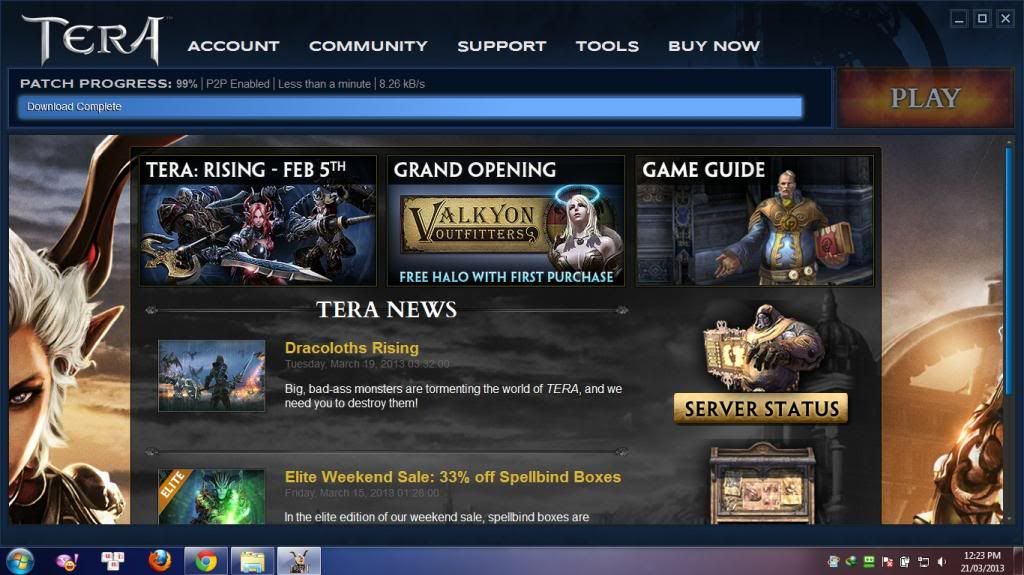
Sao cái path process đến 99% mà nó đã báo download complete nhỉ, r đợi mãi ko ấn play dc @@ bác nào giúp mình với
neulaconso3
Youtube Master Race
- 22/12/08
- 10
- 0

Mình down game từ trang chủ tera và đến khi setup xong thì thế này. mình copy sang máy khác thì lại chơi được nhưng riêng máy mình thì không đc trong khi máy mình lại khỏe hơn máy kia rất nhiều . mình thử làm nhiều cách của ad nhưng không có kết quả . mong ad giúp mình ! cảm ơn ad !
hoangthiennhi11
Donkey Kong
- 20/4/07
- 390
- 1
cho mình hỏi có cách nào cải thiện FPS ko ? laptop mình chạy game off nặng rất tốt, như crysis, time shift, còn game online thì 2-3 acc lineage 2 office vô tư max cấu hình mà sao chơi tera FPS tụt thảm hại, để cấu hình 0 mà đánh vẫn giật giật ...
jundaivuong
Youtube Master Race
- 24/3/13
- 6
- 0
Đang tẩu hỏa nhập ma vì không sao vào game đc
đang download = happy cloud được 7g rồi
Lúc đầu bị lỗi "Unable To Contact Reliable Source" mình đã chép lại file như hướng dẫn
Sau đó lại dính lỗi "Update launch xong sau đó không hiện login" lần này mình sửa theo cả 2 cách luôn
và hiện tại đến h thì login vào nó checking download sau đó nó bắt download nốt số còn lại
đang download = happy cloud được 7g rồi
Lúc đầu bị lỗi "Unable To Contact Reliable Source" mình đã chép lại file như hướng dẫn
Sau đó lại dính lỗi "Update launch xong sau đó không hiện login" lần này mình sửa theo cả 2 cách luôn
và hiện tại đến h thì login vào nó checking download sau đó nó bắt download nốt số còn lại

Tiger-tank
シェンムー Ryo Hazuki
- 17/8/09
- 9,837
- 844
- Banned
- #95
mình thì kéo torrent xong , setup xong , fakeip login launcher nó báo lỗi Error CopyCub 0xc0000005 at 01FE6318 load 01FE0000 , làm ơn giúp mình với
max024
Dragon Quest
- 23/3/06
- 1,239
- 2
mình thì kéo torrent xong , setup xong , fakeip login launcher nó báo lỗi Error CopyCub 0xc0000005 at 01FE6318 load 01FE0000 , làm ơn giúp mình với

lỗi này phải không?
thử cách fix này
[h=4]Update the stmOCX.dll file[/h] This file may have become corrupt, which has been known to cause the "TERA has encountered an error" message. You can download a new version of the file which will be saved into your default download folder. Generally, that folder is located at "C:\Users\YOUR USERNAME HERE\Downloads". Once you have located that file, follow these steps.
- Navigate to the folder where TERA is installed and skip to step 9. If you are unsure as to where that folder is, please continue with step 2.
- Click the Start button or Windows icon
- Select Computer
- Choose the drive where TERA is installed. The default drive is Local Disk (C:)
- Open the Program Files (x86) folder if you are running a 64bit version of windows or Program Files if you are running a 32 bit version
- Open the TERA folder
- In this folder, find the stmOCX.dll file and delete it
- Copy the new stmOCX.dll file to the open TERA folder
- Once the new stmOCX.dll file has been copied to the TERA folder, close all windows opened in these steps and restart the TERA Launcher
Tiger-tank
シェンムー Ryo Hazuki
- 17/8/09
- 9,837
- 844
- Banned
- #98
làm thử cách đó thì ko hiện bảng lỗi trên nữa , nhưng dùng super hide ip để login thì màn hình launcher đen xì luôn ko play được , và có dòng chữ này Error -7 when loading url https://account.enmasse.com/launcher/1/authenticate
Chỉnh sửa cuối:
Tiger-tank
シェンムー Ryo Hazuki
- 17/8/09
- 9,837
- 844
- Banned
- #100
log in được , vô launcher màn hình đã sáng , nhưng ấn nút Play ko có gì xảy ra cả dù patch 100 %
giờ log in lại thì hiện patch progess downloading
giờ log in lại thì hiện patch progess downloading
Chỉnh sửa cuối:
Similar threads
- Trả lời
- 0
- Đọc
- 108