New Option Files(Season 2007/2008)

WSAG Evolution V3 OF Now Available

Available for both PES5 and WE9I.
Realeased on 3 September 2006

Link DL trực tiếp nó từ RS nè : http://dl36cg.rapidshare.de/files/31853228/3807224761/KONAMI-WIN32PES5OPT . Anh em paste cái này vào IDM hoặc FG mà DL cho nhanh ::)

PES5 OPTION FILE

Based on the highly successful WSAG V3
special thanks to bluescouse
Link DL trực tiếp cái này nè : http://dl42cg.rapidshare.de/files/36826225/3807232943/KONAMI-WIN32PES5OPT

Download Transferpatch 3.0 (182 MB)
http://www.megaupload.com/se/?d=87LRM41B
Link DL trực tiếp cái này đây :
http://www59.megaupload.com/files/11e660dc8ce5c217c37fac25a76a24a4/Transferpatch3.zip .

Chúc vui.
@ M_H : Bác edit lại mấy bài viết rồi cho cái mấy cái link trực tiếp mà tôi đưa và luôn cho anh em tiện việc DL. Thế nhé.

Còn khoản dịch ENG thì thôi cho tui,lâu lắm lại mất thời gian...cái này dễ hiểu mà
Vậy thì post ít dòng thôi để cả trang như vậy khó theo dõi lắm. Người đọc thường chỉ quan tâm đến cái link DL thôi mà.
 
thx bác barcano1 về mấy cái link nha:wink:
nhưng làm gi` có fần edit hở bác
 
@ M_K : Ờ, tôi quên bác vẫn là LM. Vậy ráng spam hay "đóng góp" :-" gì đó cho đủ 50 bài đi. Cố gắng vì A-e tí đi mà...

Chưa có đk DL cái Tranfer về nên chưa biết để nhận xét...

Còn cái bản OP mới nhất thì phải nói 1 điều là : Mấy cái đội Classic nó làm loạn lên cả. Mất vui. ::(
 
E_text by Ma$k_Hi3p:D
DL by click here
file e_text gồm các image khá đẹp(ai là fan của Arsenal thì càng ko thể bỏ qua)
untitled1ji1.jpg

pl.png


Giải Bundesliga
bundesliga4dk.png

Giải Serie A
seriaascr3fn.png

WC2006
p1-wp-ot-wc2006-v3.png

......
 
PESC Editing Team 2.
logobundesligauv3.gif
patch Big Sound Update

New sound for club:
1.FC Kaiserslautern - FC Carl Zeiss Jena - Kickers Offenbach - Rot-Weiss Essen
Update sound for club:
- Manchester
- Arsenal
- Chelsea
- Liverpool
- Bremen
- Dortmund
FERTIG!-Phần sau Tiếng GER chịu luôn:D
Damit ihr mal einen kleinen überblick bekommt welche deutschen clubs nun eigene fangesänge haben, hier eine auflistung:
(Voraussetzung ist ihr habt den sp4 + den ESC Editing Team 2.Ligapatch + dieses Sound Update installiert!)
1. Bundesliga:
Bayern
Bremen
Hertha
Schalke
Nürnberg
BVB
VFB
Frankfurt
Hannover
HSV
Mainz
Aachen
2. Bundesliga:
Kaiserslautern
Duisburg
Erzgebirge Aue
Braunschweig
Kickers Offenbach
Carl Zeiss Jena
1860 München
Karlsruher FC
Hansa Rostock
Rot Weiss Essen
Download:http://files.filefront.com/2Liga__EPL_Sound_Update_4rar/;5985276;;/fileinfo.html
 
E_text by Ma$k_Hi3p:D
DL by click here
file e_text gồm các image khá đẹp(ai là fan của Arsenal thì càng ko thể bỏ qua)
untitled1ji1.jpg

pl.png


Giải Bundesliga
bundesliga4dk.png

Giải Serie A
seriaascr3fn.png

WC2006
p1-wp-ot-wc2006-v3.png

......

help me, cái này dùng thế nào vậy anh,chép vào chỗ nào đó
 
PES Editing Team2.
logobundesligauv3.gif
patch 06/07

-Superpatch 4.0 compelete
-New callnames
-New Titelscreen
-New stadium
ftrthfinalpreviewem0.th.gif

karlsruhefinalpreviewim8.th.jpg

yokohamafinalscreenvl0.th.jpg

-Face
facespescpatchmu7.th.jpg


DOWNLOAD


Server 1 = RAPIDSHARE

Server 2 = MEGAUPLOAD
 
help me, cái này dùng thế nào vậy anh,chép vào chỗ nào đó
Download cái file e_text đó về nha xong bỏ vào foder dat(....\Konami\Winning Eleven 9\dat)
Nếu muốn thử có thể cut file e_text gốc vào 1 foder khác,khi nào muốn dùng lại thì del file này và cho file gốc vào chỗ cũ nha
(Chú ý:File E_text by Ma$k_Hi3p
-Đã thay logo các giải bóng đá,các cup WC2006,Euro 2008,.....
-Cup WEFA đã thay = UEFA(champion league)
và cup UEFA
-Logo giải Hà Lan hơi sai lệch 1 chút,ai có thể làm đc thì sửa lại giùm nha..thx)
 
Mkuddos Option File update v1.0

This PES5 Option File Update made by Mkuddos includes : Edited Club team names, Edited player names, Edited Stadium names, All in game transfers have been done (New players have NOT been created), Club teams squad corrections, Edited squad numbers, Edited starting XIs, Unlicensed club team kits updated (Emblems and Logos added), International Kits updated (Emblems and Logos added), New boots added, Everything Unlocked, Duplicate players removed.

Download by click here
 
Bác Hiệp phải nói rõ chèn vào đâu chứ, và nó thay đổi cái gì, thế nào...ít ra phải có demo cho anh em tham khảo chứ.
 
Bác Hiệp phải nói rõ chèn vào đâu chứ, và nó thay đổi cái gì, thế nào...ít ra phải có demo cho anh em tham khảo chứ.
::( chán pác wa'.pác nói thế thì ai bít đc là pác muốn dùng Option Files hay là patch(e_text,o_text.....)
Muốn dùng các patch để update:
Download cái file ..._text đó về nha xong bỏ vào foder dat(....\Konami\Winning Eleven 9\dat)
Nếu muốn thử có thể cut file ..._text gốc vào 1 foder khác,khi nào muốn dùng lại thì del file này và cho file gốc vào chỗ cũ.
Muốn sử dụng các OF:
Bỏ OF mà tui up lên vào C:\Documents and Settings\........\My Documents\KONAMI\Winning Eleven 9\save\folder1
nếu chỉ muốn thử thì cut file gốc vào 1 chỗ khác
(VD:e_text tui đã có các image cho mọi ng` xem)
 
Superpatch 4.0
titlescreensp4lv6mq1.jpg


- New Skills and Attributes
- all transfers to 13.9.2006
- U21 Nationalteams replace Classic teams
- All teams of season 2006/2007
- All CL teams and other new teams insert:
FC Basel for Besiktas
Juventus Turin for Djurgardens
Levski Sofia for Brügge
FC Kopenhagen for Bratislava
AEK Athen for CSKA Moskau
1.FC Köln for Panathinaikos
Steaua Bukarest for Rosenborg Trondheim
MSV Duisburg for FC Thun
FC Zürich for Rapid Wien
ZSKA Moskau for Sao Paulo
- New Exe with all correct teamnames, off- and online
- Seasion 2006/2007 Kits
- Faceserver based on nadieevoweb’s Version
- Stadionserver with 200 stadiums
- Ballserver with 200 balls
- Superpatch 4.0 Online Database
- New Menu
- Callnames for all teams
- chants for all teams with Soundslots
- New slots for many Teams generated, which are filled with fanchants
- New music

Stadiumserver = 200 Stadiums

Faceserver based on nadieevoweb’s Version
Preview Face Map

Ballserver = 200 Balls
Preview Ball Map

Installation:
0_text
Copy the 0_text on your PES 5.dat Folder
0_sound
Copy the 0_sound on your PES 5.dat Folder

Optionfile
1. Exract the Optionfile.rar File.
2. Copy the File into the Save/folder1 Folder .

PES5.Exe
1. Extract the rar file.You will find: 2 File:
- SP4 German (Only for German)
- SP 4 International (Other Languages)
2. Rename the File you want in PES5.exe
3. Copy the new PES5.exe in the Main Folder of PES 5


g_sound
Copy the g_sound on your PES 5.dat Folder
For international yust import the Callnames via DKZ Studio
on x_Sound (x = your language)
1. Open DKZ Studio
2. Open x_sound
3. Edit --> Import --> Import All Files --> Choise the Callnames Folder
4. Finshed

g_text & e_text
1.Extract Menue.rar and choise the x_text for your language:
e_text = English
g_text = German
Copy them on your PES 5.dat Folder

Stadiumserver
You need Kitserver 5.2.3.2 !
Download from here

1. Delete the "stadiums" Folder on GDB Folder. "...kitserver\GDB"
2. Copy the new "stadiums" Folder from Superpatch 4.0 on this GDB Folder "...kitserver\GDB"

Faces and Hair

1. Delete the "faces and Hair" Folder on GDB Folder. "...kitserver\GDB"
2. Copy the new "Faces and Hair" Folder from Superpatch 4.0 on this GDB Folder "...kitserver\GDB"

Kits

1. Delete the "uni" Folder on GDB Folder. "...kitserver\GDB"
2. Copy the new "uni" Folder from Superpatch 4.0 on this GDB Folder "...kitserver\GDB"

-Now: Install the Kitserver again, run: ("setup.exe" in kitserver Folder)

Downloads

0_text (Filefront)
http://files.filefront.com/SP0_TEXTrar/;5505618;;/fileinfo.html

e_text
http://rapidshare.de/files/33140183/Menue.rar
Mirror Filefront:
http://files.filefront.com/Menuerar/;5514911;;/fileinfo.html

language_sound
http://rapidshare.de/files/32564273/Callnames.rar.html
Mirror Filefront:
http://files.filefront.com/Callnamesrar/;5516635;;/fileinfo.html

0_sound
http://files.filefront.com/0_SOUNDrar/;5499536;;/fileinfo.html
Mirror Rapidshare you need all 3 Parts:
0_sound:
Download Part 1
Download Part 2
Download Part 3

Optionfile
http://rapidshare.de/files/33139263/Optionfile.rar.html
Mirror Filefront:
http://files.filefront.com/Optionfilerar/;5510676;;/fileinfo.html

PES.Exe Based on Original DVD This is a not a Crack Version you need Original DVD to play
http://rapidshare.de/files/33190632/PES5_Exe.rar.html
Mirror Filefront:
http://files.filefront.com/PES5_Exerar/;5514956;;/fileinfo.html

Ballpack (Balls)
http://rapidshare.de/files/33264944/ballpack_for_kitserver_by_pauldiddy_v1.zip.html
Mirror Filefront:
http://files.filefront.com/ballsrar/;5510725;;/fileinfo.html

Stadionpack (Stadium)
http://files.filefront.com/stadiumpack_for_kitserveryuha/;5490907;;/fileinfo.html
Mirror Rapidshare you need both Parts:
http://rapidshare.de/files/33305666/stadiumpack_for_kitservery.part1.rar.html
http://rapidshare.de/files/33310741/stadiumpack_for_kitservery.part2.rar.html

Facepack (Face & Hair)
http://rapidshare.de/files/33195464/gdb.rar
Mirror Filefront:
http://files.filefront.com/Facepack__g_textrar/;5511392;;/fileinfo.html

Kits (Uni)
http://files.filefront.com/Official_Superpatch_40_K7rar/;5506543;;/fileinfo.html
Mirror Rapidshare:
http://rapidshare.de/files/33264129/Official_Superpatch_4.0_K7.rar.html

Radarcolor Fix
http://rapidshare.de/files/33257867/uni.rar
 
Superpatch 4.0 Fixes:

1.Optionfile
Delete the flags on national team kits
http://rapidshare.de/files/33341046/Optionfile.rar
Mirror:
http://files.filefront.com/Optionfilerar/;5516520;;/fileinfo.html

2.Faces
Fix Trochowski (Hamburg) and added new faces
http://rapidshare.de/files/33338343/Faces.rar.html

3.Exe fixed, Nancy now is written right
http://rapidshare.de/files/33338319/Exe.rar
Mirror:
http://files.filefront.com/Exerar/;5516626;;/fileinfo.html

Anh em download WinUHA để extract các file .uha có trong patch nha.
Link down:http://www.klaimsoft.com/winuha/download.htm
 
::( chán pác wa'.pác nói thế thì ai bít đc là pác muốn dùng Option Files hay là patch(e_text,o_text.....)
Muốn dùng các patch để update:
Download cái file ..._text đó về nha xong bỏ vào foder dat(....\Konami\Winning Eleven 9\dat)
Nếu muốn thử có thể cut file ..._text gốc vào 1 foder khác,khi nào muốn dùng lại thì del file này và cho file gốc vào chỗ cũ.
Muốn sử dụng các OF:
Bỏ OF mà tui up lên vào C:\Documents and Settings\........\My Documents\KONAMI\Winning Eleven 9\save\folder1
nếu chỉ muốn thử thì cut file gốc vào 1 chỗ khác
(VD:e_text tui đã có các image cho mọi ng` xem)

Cái đó thì em biết, nhưng mà sao khi copy mấy file text vào rồi chơi game thì máy nhà em đơ luôn(cứ vào phần chọn đội hình là CPU 100%)
 
sao có 2 cái , 1 cái là của PES , 1 cái của WE mà sao khi down cả 2 cái đều tên giống nhau và hình như đều chỉ dành cho PES thì phải
 
sao có 2 cái , 1 cái là của PES , 1 cái của WE mà sao khi down cả 2 cái đều tên giống nhau và hình như đều chỉ dành cho PES thì phải
Pác muốn hỏi về cái Superpatch 4.0 hả,thì 1 cái là các O_text,e_text,...còn cái kia là patch sound(âm thanh).
còn về Option Files thì có 2 cái,1 cái là của PES , 1 cái của WE như pác nói nhưng cái OF của PES có dung lượng nhỏ hơn của WE(hình như vậy),OF của WE thì thường là 1,221 kb là có thể dùng đc.
Pác cứ thử đi,cut OF của pác vào 1 foder nào đó,và cho OF tui up lên vào C:\Documents and Settings\........\My Documents\KONAMI\Winning Eleven 9\save\folder1( chỗ cũ của OF gốc).Vậy nha,pác cứ làm đi.
chú ý:mọi ng` lần sau hỏi phải hỏi rõ về cái j` nha,hỏi về OF hay Pạtch,tên của OF,tên của Patch là j`.
good luck
 
Cái đó thì em biết, nhưng mà sao khi copy mấy file text vào rồi chơi game thì máy nhà em đơ luôn(cứ vào phần chọn đội hình là CPU 100%)
ah`thế thì do ram của pác yếu wa',chắc là 128,hay 256.Và pác file chuyển cái file text của pác đi chỗ khác nhá.Chơi thì tắt hết các chương trình đi(bật YM vẫn chơi đc)
Ai bít đc rõ nguyên nhân của pác này thì cứ reply cho pác ý nha,còn theo tui thì nguyên nhân là như trên.
 
Cho mình xin hướng dẫn cách sử dụng mấy bản patch........Mới biết xài mấy cái Op chứ patch thì chịu , mà cho mình hỏi luôn có cái patch nào chỉnh cấu hình thấp xuống không ???Nếu có cho mình xin cái link down:D:DThanks nhìu:D:D
 
cho mình hỏi luôn có cái patch nào chỉnh cấu hình thấp xuống không ???Nếu có cho mình xin cái link down:D:DThanks nhìu:D:D
-Bạn open PES hoặc WE.
-Chọn "Options"
-Sau đó,chọn tiếp "Screen".
-Và chỉnh cấu hình game mà bạn muốn.
 
dkzpatch.gif
[DKZ Studio]Sử dụng với patches
Muốn dùng các patch bạn cần có DKZ Studio(trong topic trung tâm download.... cũng có để down) hoặc down bản mới nhất DkZStudio_0.92B
Đây là file Language:English(khi bạn install xong DKZStudio_0.92B,Language mà DKZStudio_0.92B dùng là Spanish)
Download:click here
Cách 1:(Nếu patch thuộc dạng folder)
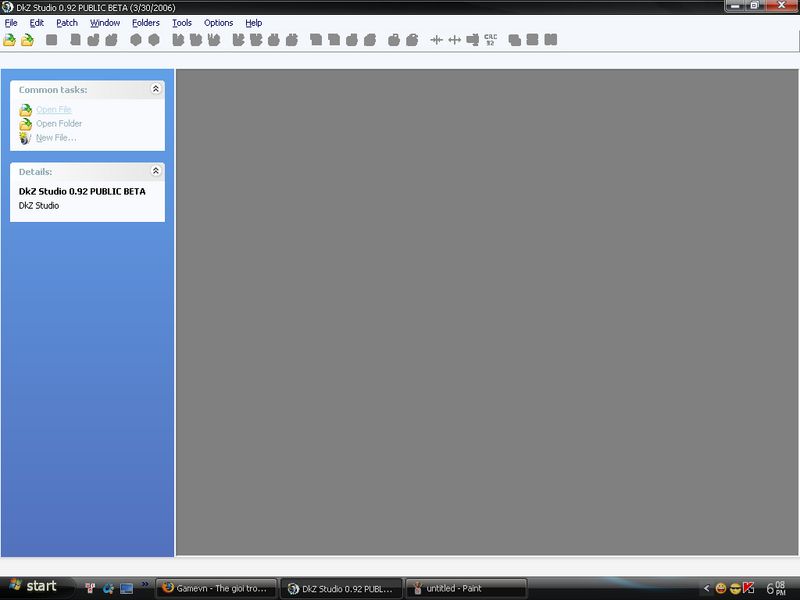
-Mở DkZStudio_0.92B lên.
-Click vào "Open File".

untitled.jpg


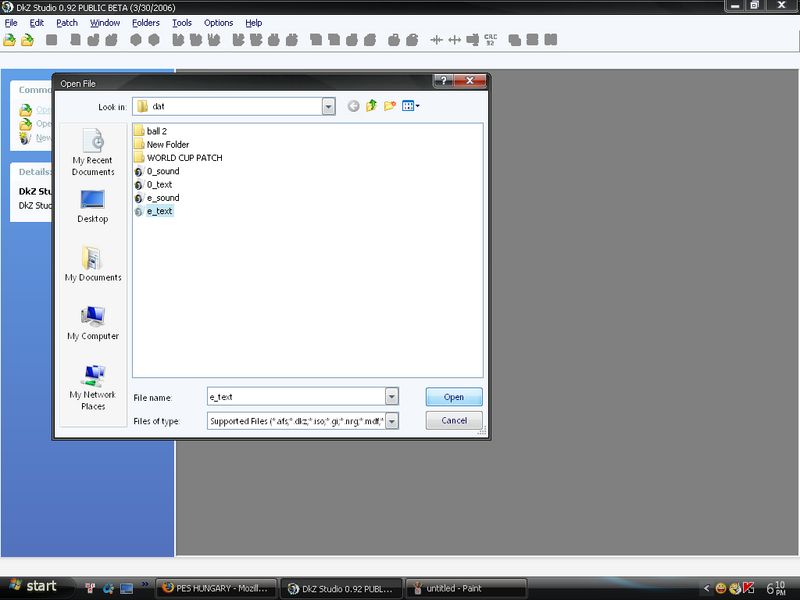
-Click vào ...._text (trong folder dat) tùy thuộc patch thuộc file text gì.

untitled2.jpg


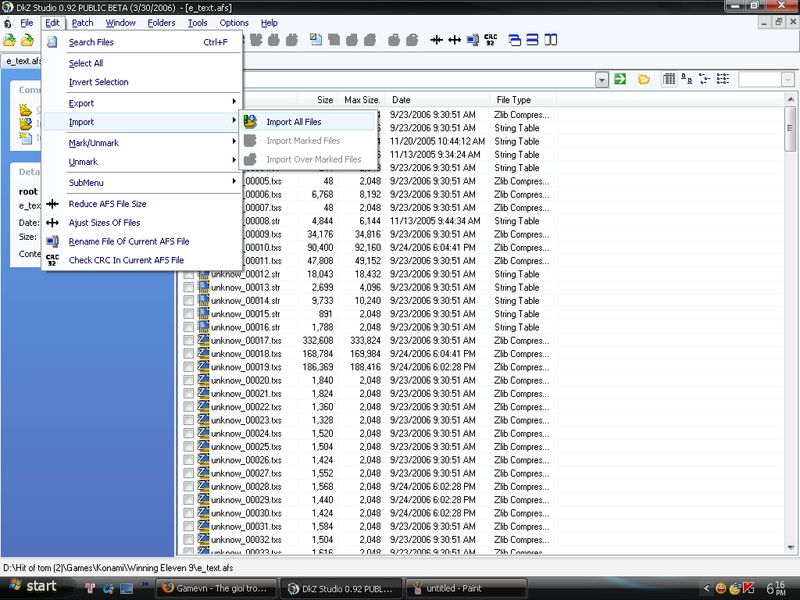
-Sau đó,Click vào "edit" -> "import" -> "import all file".

untitled3.jpg


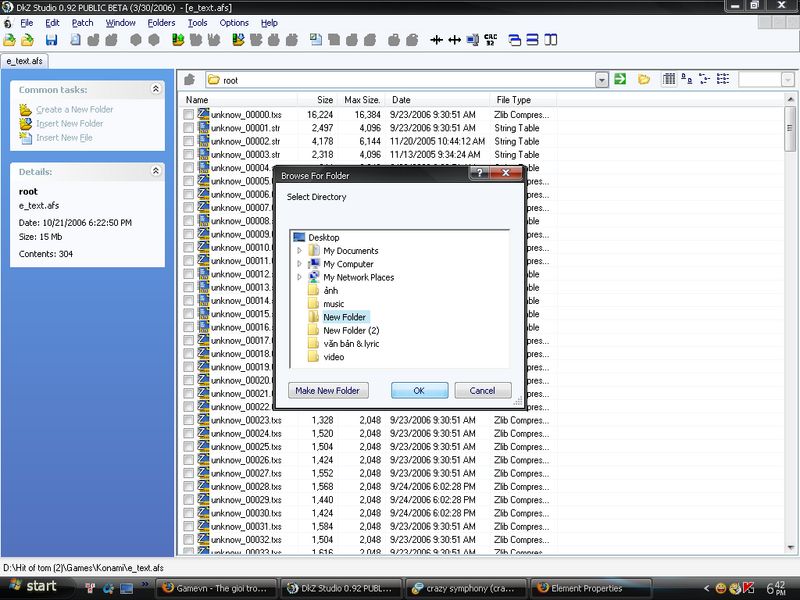
-Click vào folder mà bạn đã extract các file(từ 1file rar,zip,...)tới folder đó và click "ok".

untitled4.jpg


-Khi DKZ import xong -> click "save as" -> "close".

===================================================================


Cách 2:
(Nếu file patch thuộc dạng file dkz hoặc afs)
-Mở DkZStudio_0.92B lên.
-Click vào "Open File"(1 file afs tùy thuộc)

dkzpatch-1.JPG


-Click "patch" -> "Apply Patch in Folder".

dkzpatch-2.JPG


-Chuyển tới folder "dat".

dkzpatch-3.JPG


-Khi DKZ import xong -> click "save as" -> "close".

dkzpatch-4.JPG


Lưu ý:
-Cần giữ lại file các file ..._text gốc,bởi 1 số trường hợp do file dung lượng lớn thường khiến game bị lỗi.
Good luck!
 
Back
Top