Hỏi ngang xương !!! Hỏi xin phần mềm tại đây [I]

Status
Không mở trả lời sau này.
ah anh em cho mình xin cái phần mềm xem phim DVD nào xịn xịn , với phần mềm winnamp pro nha ...free nha đừng cho mình hàng xài thử ..cám ơn nhiều

 
ah anh em cho mình xin cái phần mềm xem phim DVD nào xịn xịn , với phần mềm winnamp pro nha ...free nha đừng cho mình hàng xài thử ..cám ơn nhiều
5yrmkx3.gif


Mã:
WinAMP 5.35 Build 1305 Pro + KEYGEN 

http://www.sendspace.com/file/5ysvza

or

http://rapidshare.com/files/43400195/Winamp_Pro_v5.35.1305.rar

or

http://www.megaupload.com/?d=RW2KWT40
ai tìm hộ cái Photoshop 8.0 với
đang đi học PS, mà chỗ dạy nó xài 8.0 ở nhà mình 9.0 có chỗ khác khác ^^
Link bản 8 die sạch rồi hay sao ý :| . Mà nó dạy PTS 8 thì bỏ đi học chỗ khác đi :|

btw, down + up xong cái Portable Windows Media Center cho ông quanzi rồi này

Portable Windows Media Center 1.0 | Mediafire

Up xong mới thấy viết sai chữ V mới đau chứ :|
 
Cho em hỏi các add nút Justify ( căn đều ) vào toolbar của MS Powerpoint 2k3.
Thanks trước.
 
Cho hỏi file .prc thì đọc bằng soft gì vậy
 
Em chẳng may xóa cái file Pont rồi RS lại máy ko tìm lại đc = cách thủ công có phần mềm nào trợ giúp ko ạ !!
 
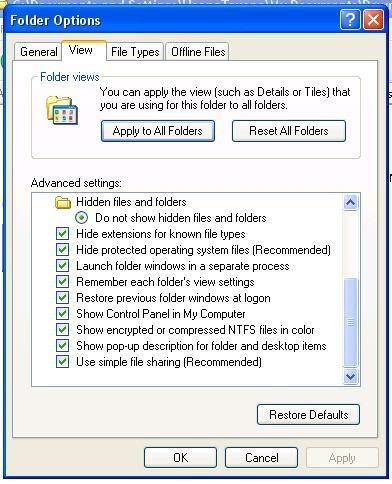
ai chỉ mình cách coi hide file mình biết hide mà mỉnh hông có biết mở để coi àh .. ai biết bảo giúp mình với !!! Thanks nhiều!!!

Theo như hướng dẫn :
Bình thường, windows giấu nhiều tập tin hệ thống, điều này có thể làm cho việc chỉnh sửa trở nên khó khăn. Để thấy hết tất cả các tập tin, chọn Tools, Folder Options, View trong bất kỳ cửa sổ thư mục hay Explorer nào. Trong danh sách Advanced settings, chọn Show hidden files and folders (hoặc Show all files nếu trong Windows 98). Trong những phiên bản khác với Windows 98, bỏ dấu đánh đấu trước nhãn Hide protected operating system files (Recommended). Nhấn Yes và sau đó là OK.

sao nhà e phần đó nó lại thế này :
2-1.jpg
 
Giúp đệ cái này Gomoku Professional [Series80] : Version 1.00F(002)

thanks !
 
Các bạn cho Hoa Đà xin phần mềm down load trên megaupload ha,và phần mềm hide IP cộng crack .
À cho Hoa Đà xin th6em phần mềm nào có thể cắt nối file nhạc ha,vì mình đang tham gia một game thách đố nhạc, thanks các bạn.
 
btw, down + up xong cái Portable Windows Media Center cho ông quanzi rồi này

Portable Windows Media Center 1.0 | Mediafire
Ôi ôi yêu quá :x :x :x :x
ah anh em cho mình xin cái phần mềm xem phim DVD nào xịn xịn
Bạn dùng thử Cyberlink PowerDVD nhá :>

Down bản trial về L-) rồi gõ serial kèm theo đây :>
 

Attachments

Các cậu có thể cho mình phần mềm chuyển đổi Video Convert Master bản mới nhất ko?
 
Cám ơn cậu So_No_Mi,cậu có thể cho mình phần mềm chỉnh sửa và tăng âm lượng tập tin nhạc Midi ko?
 
Không rành về định dạng midi lắm , nhưng muốn tăng âm cho Audio thì có thể dùng Audio Edit Magic để làm

http://rapidshare.com/files/43908600/Audio.Edit.Magic.v9.2.14.rar.html

more info :

Audio Edit Magic v9.2.14 Build 775 | 7.4 MB

Audio Edit Magic is a full-featured digital audio editing software that offers a variety of audio recording, mixing, editing, analyzing and effects processing possibilities. It provides an intuitive, easy-to-use interface and is designed for the everyday user. It has dozens of amazing audio effects and tools for converting audio files into different formats, including MP3, WMA, WAV, Ogg Vorbis and many others. And that's just the beginning of what you can do with Audio Edit Magic. If you're using audio for anything - websites, PowerPoint presentations, Flash animations, Audio Edit Magic will take your creations to the next level.

Use Audio Edit Magic to record your own music, voice or other sounds, import and export lots of audio files formats, including Windows PCM (WAV), MP3, Ogg Vorbis, WMA 9 and AIFF, play it, mix it, edit audio files visually using Cut, Copy, Paste and applying more than 20 effects and filters, including: Cut, Paste, Move, Delete, Fadein/Out , Crossfade, Vibrato, Delay, Normalize, Fade, Flanger, Amplify, Invert, Insert Silence, and more.

With Audio Edit Magic you can:
? Open, create, and save audio files in any of the supported formats (can also save any portion of a loaded file to disk as a new file);
? Display audio data waveform (Zoom Full, Zoom In, Zoom Out, Zoom Vertical);
? Play audio files or any portion of the files (Play, Pause, Stop);
? Record audio data from a microphone or any other available input device;
? Edit audio files visually (Cut, Copy, Delete Selection, Delete Silence, Paste, Paste From File, Mix, Mix From File);
? Apply various effects (Amplify, Compressor, Delay, Equalize, Fade In and Fade Out, Flanger, Invert, Normalize, Phaser, Reverb, Reverse, Silence, Shrink, Stretch, Vibrato, etc.);
? Apply different filters to any selected portion of audio files;
? Supports all major audio file formats such as uncompressed WAV; compressed WAV; MP3, MP2; Ogg; WMA; CDA (Audio CD Tracks); AVI; AIFF; AU; G.721, G.723, G.726; VOX; RAW.
? And much more!

Using audio presets In Audio Edit Magic
You can save the settings of each audio effect to a preset for later use. This presets are also available from the main menu, so you can execute them with one click of your mouse. The possibilities are unlimited!

Customizing your audio effect properties
Customize every effect available in Audio Edit Magic, test it and try it under a preset of your choice.

Output format settings
For each audio format a wide variety of format settings are available, like frequency, bitrate, compression, number of channels, and more. For each format the output settings can be changed before saving the audio file to disk.

Available audio formats
- Uncompressed WAV PCM;
- Compressed WAV (GSM, ADPCM, DSP, U-Law, A-Law and others);
- MPEG2 Layer 3 (MP3), MPEG2 Layer 2 (MP2);
- WMA (Windows Media Audio);
- Ogg Vorbis;
- AIFF, AU;
- MPC (Music Pack);
- VOX (Dialogic ADPCM);
- RAW (Uncompressed PCM, U-Law, A-Law);
- G.726, G.723, G.721;

Audio markers
Use markers in your audio file to quickly select between different selections. Markers used in audio files will be saved to disk for later use.
 
Cám ớn cậu,cậu So_No_Mi cho mình xin tiếp phần mềm phóng to ảnh nhưng ko bị nhòa đấy.Phiên bản mơi nhất nhé.
 
Status
Không mở trả lời sau này.
Back
Top