Applications for S60 Version 9.1 - Zone

  • Thread starter Thread starter So_No_Mi
  • Ngày gửi Ngày gửi
Status
Không mở trả lời sau này.

So_No_Mi

Follow_Your_Heart
Lão Làng GVN
Thread đáp ứng phần mềm dành cho các máy sử dụng hệ điều hành Symbian Series 60 3rD Edition !

Lưu ý :

S60 Version 9.1 - Zone :

Nokia E65, Nokia N80 (S60 3rd Edition), Nokia N71 (S60 3rd Edition), Nokia N73 (S60 3rd Edition), Nokia 5700 (S60 3rd Edition), Nokia E60 (S60 3rd Edition), Nokia E61(S60 3rd Edition), Nokia E70 (S60 3rd Edition), Nokia E50 (S60 3rd Edition), Nokia 5500d (S60 3rd Edition), Nokia N91 (S60 3rd Edition), Nokia 6290 (S60 3rd Edition), Nokia N76 (S60 3rd Edition), Nokia E62 (S60 3rd Edition), Nokia N75 (S60 Erd Edition), Nokia N80 IE (S60 3rd Edition), Nokia N91 8Gb (S60 3rd Ed.), Nokia 3250 (S60 3rd Edition), Nokia N95 (S60 3rd Edition) ...

Request app here !​
 
Lonely Cat Games SmartMovie v3.41 for S60v3.SymbianOS9.1.Cracked-BiNPDA

Phần mềm xem phim mang định dạng avi nổi tiếng của hãng Lonely Cat Games

Dùng thêm phần mềm SmartMovie Converter để chuyển đổi các phim định dạng thông dụng thành định dạng Avi danh cho SmartMovie . Với phần mềm SmartMovie Converter , ta có thể chuyển đổi bất kỳ một video clip nào để chơi trên thiết bị di động (mobile).

Làm theo các buớc sau để có thể xem film bằng SmartMovie trên điện thoại di động:

* Chuyển đổi bất kỳ tập tin video trên máy vi tính bằng SmartMovie Converter.
* Chuyển các file video đã chuyển đổi đó vào thẻ nhớ của máy !
* Chạy các file video đó bằng SmartMovie Player đã cài trên điện thoại !

Hỗ trợ các điện thoại :

S60 3rd edition: Nokia N95 E60, E61, E70, N71, N80, N91, N92, 5500

Đăng ký với code : 00000

Phiên bản mới nhất : Version 3.41 :>
 

Attachments

Lonely Cat Games X-plore v1.05 S60v3.SymbianOS9.1.Incl.Keygen-TSRh

phần mềm quản lý file chuyên nghiệp nhất hiện nay ...

xplorezd1.png


Features:

* View all drives / folders / files on phone in tree view *
* Integrated text and image viewer
* View file details
* Edit file attriutes (hidder, read-only, etc)
* Rename and delete files
* Create or edit text files
* Create folders
* Multi-selection
* Copy or move files and folders
* Send files by Bluetooth or Infrared
* Extract files from Zip, Rar, Jar archives
* View Word documents
* Hardware device info
* View processes and tasks **
* Built-in program update
* Viewing, saving files in Messagning folders

Versions:

1.00 - Initial version
1.01 - Packing files to Zip archive, small bugfixes
1.02 - Selectable UI font size, details of multiselection, key shortcuts for Mark all/none
1.05 - Windows Mobile version, small fixes

Download file gửi kèm ( vì file gửi kèm check thấy có virus trong file keygen.exe nên xóa đi rồi , sẽ update link bản full sau )

Dùng tạm version 1.00 , so với v1.05 thì ko có gì đổi mới lắm ...​
 

Attachments

WebGate Advanced Call Manager v2.65.123 Unsigned-BiNPDA(cracked)

acm_S60_3rd_anim.gif


Phần mềm quản lý cuộc gọi ... nhiều chức năng , có cả chức năng chặn cuộc gọi ... đang dùng thằng này , thấy nó dùng rất tốt !

more info :

The Advanced Call Manager lets you tune your mobile into several modes:

* Accept all calls (inactive)
* Reject all calls
* Accept Phonebook only
* Reject from black list (you have to define the list in advance)
* Accept from white list (you have to define the list in advance)
* Reject all + custom action (e.g. send SMS to your wife or girlfriend if she calls)

Additionally you can specify:

* Reject hidden callers (you can avoid people whose numbers cannot be retrieved)
* Accept hidden callers

For reject-call actions you can choose to:

* Send busy tone / drop
* Reply by SMS
* Divert calls
* Mute the ringer
* Send personalized greeting

Main product features

* Ultra fast searching algorithm recognizes the remote caller within a part of the second
* Convenient management of all incoming calls
* Auto run at power-on feature*
* Status indicator of the program activity
* Tight integration with the contacts from the phone book

Trang chủ : http://www.webgate.bg/products/acm/

Phần mềm này chưa sign , muốn xài được thì phải sign , request ở thread http://forums.gamevn.com/showthread.php?t=342200

Đã được bẻ khóa bởi team BiNPDA , download fuLL !​
 

Attachments

QuickOffice Premier v4.5.14.8 S60v3 Symbian OS9.x Unsigned

qoscrnlrg8ni2.jpg


more info :

Quickoffice is the First and Only Mobile Office Suite product to offer Complete Editing of Word®, Excel® and PowerPoint® for S60 Phones.
Near Desktop Level Functionality and Advanced Editing of text, lists, tables, style, and formatting.
Add images to Word and PowerPoint documents.
Complete graphical editing.
Performs Faster, Better Rendering.
Zoomview lets you pick the display size that's best for you.
Support For Complex Formulas.
No Data Loss.
FREE Software Updates delivered to you with our unique and proprietary Quickmanager™ on-device portal system.
FREE Office Templates, e-Books, and Games!
 
Rock.Your.Mobile.MultiAlarm.v1.0.S60v3.SymbianOS9.1.Unsigned.Cracked-BiNPDA

multi-alarm_right_im.jpg


Phần mềm hẹn giờ , nhiều chức năng ... cho phép hẹn giờ nhiều lần , ex : 7h , 12h , 0h ... có kèm theo thông điệp do người dùng add vào ... có thể xem như ghi chú để user có thể biết đến giờ đó làm việc gì !

NewAlarm.jpg


Phần mềm full ...

Phiên bản 1.0

Dùng cho : Nokia E60, Nokia E61, Nokia 3250, Nokia N91, Nokia N92, Nokia N93, Nokia N71, Nokia N73, Nokia N80, Nokia E50, Nokia 5500, Nokia E70, Nokia E61i, Nokia E62, Nokia E65, Nokia N93i, Nokia N95, Nokia E90, Nokia 5700, Nokia 6120, Nokia 6110, Nokia 6290, Nokia N76, Nokia N77, Samsung i520, LG JoY

GeneralView.jpg


Thông tin thêm :

Seven different alarm types (Once, Daily, Weekly, Monthly, Yearly, Working Days, Non-Working Days)
- User-defined screen messages
- User-defined sound files
- User-defined sound volume and vibration
- Support if activated phone profile
- Easy and smart usability
- Build-in Help function

Options.jpg


Like all high-quality software products for Nokia Smartphones Multi Alarm is Symbian Signed certified and tested!

Trang chủ : http://www.rock-your-mobile.com/multi-alarm.php

Download fuLL :
Rock.Your.Mobile.MultiAlarm.v1.0.S60v3.SymbianOS9.1.Unsigned.Cracked-BiNPDA
 
Có phần mềm tự điển phát âm sau khi tra từ. Cậu biết bản này ko SNM. Tớ tìm lâu nay nhưng nó link die mất rồi. Nếu cậu biết chia sẽ cho tớ với nhé, thanks nhìu ::)
 
Smartphoneware Best Profiles v 1.01 S60v3 SymbianOS9.1.Unsign.cracked-OPDA

profiles60_3_screen2.gif


Best Profiles allows automatic profiles switching according to your schedule, calendar or GSM cell location. For each profile Best Profiles allows selection of additional settings such as: backlight, sound on activate, run custom application etc.

What's new in Best Profiles for S60 3rd edition 1.01:

* GSM Location rules added;
* Today view added;
* Rules priority added;
* Lock profile feature added;
* Theme option in advanced profile added;


Best Profiles user guideBest Profiles allows automatic profiles switching according to your schedule, calendar or GSM cell location. For each profile Best Profiles allows selection of additional settings such as: backlight, sound on activate, run custom application etc.

Any user of a Nokia smartphone had experienced the following situations: while in the office, meeting or dinner suddenly your phone disturbs you. An incoming call? Not now! It's the only thing you can think about at the moment. Quite often interruption puts you into an embarrassing situation. Another example: you are lying in bed, trying to have some rest after a hard day at work, and again the phone is ringing, because you forgot to switch off "your favourite toy"... Terrible!

It is natural to expect your smartphone to be able to change profile settings automatically, for example a silent mode at night or at work. Unfortunately, the smartphone does not offer such a possibility. But there's no need to worry: Best Profiles integrates this feature into your smartphone!

Features:

* Schedule rules - allows defining a schedule to change profiles;
* Calendar rules - allows switching profiles basing on calendar events;
* Rules priority - allows configuring rules priority;
* Today view - summary view showing how exactly Calendar and Schedule rules will work, taking into account priority;
* GSM Location rules - allows switching profile automatically if GSM cell serving your phone changes;
* GSM Cell log - allows recording GSM Cells IDs in a log for easier management of Location rules;
* Charger rules - plug/unplug charger rules;
* Advanced profile settings - extended settings to take effect at respective profile activation;
* Timed profile activation - allows activating a profile for a certain period of time;
* Lock profile - Profile lock against automatic rules effect; the locked profile can be changed only manually or with help of "Cancel activation" function;


How to start:To add extra functions to standard profiles with Best Profiles, you need to configure rules and additional settings. Of course, you also have to turn Best Profiles on.

Profiles view:

profiles60_3_screen4.gif


In the main view you can see the list of system profiles. The current active profile is marked.

You can activate one of those profiles with help of menu functions. You can also make a profile active for/after a certain time or at certain hours (timed profile feature).

If you want the automatic rules to be ignored, you can set a Lock using the command "Activate and lock". It is also possible to lock a profile for a certain period of time ("Activate and lock for" command).


Advanced profile settings:

Best Profiles expand the possibilities of system profiles and let you customize additional properties for each profile. This feature offers the following options:

* Wallpaper - you can choose any picture to be shown in your Phone application (Standby screen);
* Sound on activate - allows setting a sound to play when the profile is activated;
* Bluetooth - sets Bluetooth operating mode for this profile (on/off);
* Backlight - offers the choice among the following values: "Normal" (usual behaviour), "On if charging" and "Always on";
* Run application - you can assign any application installed on your phone to be launched when this profile is activated;
* Theme - you can choose any theme to change it when this profile is activated;


Schedule rules:


The profiles will be switched according to the schedule (composed in this view). You can set profile activation time on any day(s) of the week when the profile has to be switched on, deactivation time and the profile to be turned on after deactivation of this entry. You can temporarily turn off any entry by choosing Disable. This entry will be omitted, i.e. Best Profiles will not switch to the profile indicated in this entry.

The following operations can be executed on entries: add new, change, delete entry, enable or disable it.
Every rule has the following parameters:

* Activate time - the time when it has to be activated;
* Condition - the day(s) of week when it has to be activated;
* Profile - one of five system profiles;
* Allow deactivate - when choosing "Yes", you can set profile deactivation time and the profile you want to activate after this one;
* Deactivate time & Restore profile - here you can define the profile that will be activated after the Deactivate time. You can select one of five system profiles or "Previous". If you select "Previous", the profile used before the Deactivate time will become active again.


Calendar rules:


In this view you can set Calendar rules.

Best Profiles works with your Calendar! If you have a meeting recorded in the Calendar, you don't have to add a line to your Best Profiles schedule. The program will automatically select the predefined profile when it finds a keyword assigned for this profile.

For example, you have a note in your Calendar about a meeting from 9.00 to 10.00 but you think that you may forget to switch your smartphone to the Silent profile. So you want your Best Profiles to switch to it automatically at 9.00 and then switch back to General (or any other) profile at 10.00. This is what you have to do in your Best Profiles: specify a keyword (we recommend enclosing it in special symbols, e.g. #meeting#). When Best Profiles finds this word or word combination you defined in a calendar entry, it'll switch to the profile you've defined for this keyword automatically.

The following operations can be executed on rules: add new, change, delete entry, enable or disable.
Every rule has the following parameters:

* Keyword - this is the word you will be using in your Calendar. This word must be unique because Best Profiles scan all the notes in the Calendar looking for this word.
Example: if you define the keyword work for activating Silent mode and then add to Calendar "Start work" at 9:00 and "Finish work" at 18:00, Best Profiles will switch to the Silent mode both at 9:00 and at 18:00.
To make this word unique we recommend placing it between special symbols $...$, %...% etc. E.g. #work# or %work% or !arbeit!.
Then if you add the keyword #work# for activating Silent mode and then add to Calendar "Start #work#" at 9:00 and "Finish work" at 18:00, Best Profiles will switch to the Silent mode only at 9:00.
* Profile - one of system profiles associated with the keyword;
* Allow deactivate - if "Yes" is selected and you have created a timed meeting in the Calendar (e.g. Start Time at 6:00 and End Time at 12:00), then the profile selected in the "Restore profile" option is activated;
* Restore profile - one of five system profiles or "Previous" profile can be selected to activate when this rule effect is over;


Today view:
This view is used for convenience of setting rules and controlling Schedule and Calendar rules effect. Timetable of profile changes is classified by events. For example, if a rule is activated at 6:30 and deactivated at 17:00 then two records will be shown - for activation and for deactivation. The timetable is composed with respect of priorities.


GSM Locations:
This view allows managing GSM Locations rules, which enable automatic profile switching, when the cell serving your phone changes (available operations: create new, edit, add cells, remove cells, etc). Multiple cells can be assigned to each GSM Location rule. The rule can be activated at entering respective cell zone or at leaving this cell zone; it is defined by "Activation condition" property.


GSM Cells log:
This view accumulates records of GSM Cells IDs and allows adding and removing cells in Location rules. To begin accumulating Cells records, the log must be first activated with "Enable log" command. If you don't use the Cell log for setting GSM Locations rules any more (you're done with setting all the rules you need), we recommend deactivating the log with "Disable log" command.

Warning: the log is only working when Best Profiles configuration application is running (when you close Best Profile settings application, the cells you pass are not recorded).


Charger rules:
Here you can configure the profile, to which your smartphone will switch when connecting and disconnecting the charger. For example, if your smartphone is always charging at home, you can set Silent profile to activate for "Charger on" rule and General profile for "Charger off" rule.


Rules priority:Each rule can be assigned a priority from Highest to Lowest. Timed activation and profile lock rules are an exception and have the topmost priority, which cannot be changed.
Whether a rule or a part of it will be in effect or not is defined by the following rules: priority rules guide.
You can use the Today view to check how Schedule and Calendar rules will work.​
 
sao pác không post các chương trình nghe nhạc như TTMusic hay LCGMusic đó.Post lên giùm nha pác
 
Từ điển Anh - Việt - Nga LINGVO 12 (file *.SIS) for Symbian OS 9.1

Yêu cầu hệ thống:
200 KB to store the program files (main memory);
1 MB to run the program (main memory);
9 - 250 MB to store dictionaries (main memory or memory cards):
9 - 130 MB for English-Russian versions
9 - 250 MB for European and Multilingual versions
140 MB for audio files:
60 MB for English-Russian version
140 MB for European and Multilingual versions

Download LINGVO 12 ( 27,568 KB )

download nhớ cài thêm font chuẩn dưới đây nhé
 

Attachments

soft quản lý cuộc gọi và tin nhắn

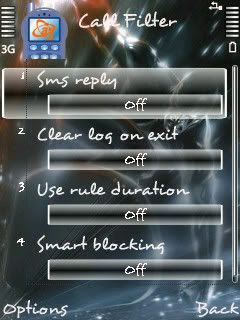
Anfy Call Filter v0.6.0.S60v3

post-16158-1186229523.jpg

Blocks unwanted calls

Allows block/unblock calls on the go ..

Maintains a log of rejected calls .. and allows to send an sms or make a call to the rejected caller immidiately !

The best of all .... its all at no cost ...

Call Filter is a utility application realised under the concept "Simple Yet Efficient" for your Symbian devices. It allows you to hang-up any incoming calls from contacts selected as a filter rule in main application screen. Gives you a very convenient and quick access to block/unblock some phone number at runtime. This is convenient in situations when your BOSS is always on your head and you don't want to answer his call at certain moments during the day, it takes a few clicks and you are done blocking your BOSS calls. The logs screen maintains a list of rejected calls and allows placing a quick call or an sms to the rejected phone number. So this is what we call "Simple Yet Efficient".
 

Attachments

soft biến mobile thành wedcam trên PC

Mobiola TM Web Camera for S60 3rd Edition v.2.2​

0000000000.jpg
0000000000000000000000.jpg

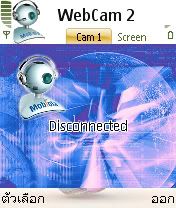
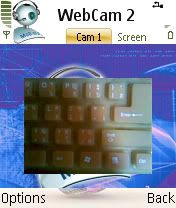
Mobiola TM Web Camera 2 for S60 3rd Edition application turns Symbian phone
into wireless web camera which works same way as usual USB camera.
Very simple in configuration and installation, Mobiola TM Web Camera 2 for
S60 3rd Edition consists of two pieces -- client application that resides on
the phone and web camera PC driver which can be used in any PC application
capable to receive video feed from the web cameras. It has comparable to USB
cameras resolution and frame rates.

Version 2.2

* Picture snapshot function have been added.

PC system requirements:

- Windows 2003, Windows XP or Windows 2000 operating system.
- USB 1.1 support.
- Installed latest version of Nokia PC Suite or Nokia Connectivity Cable
Driver.
- Bluetooth (version 1.1 minimum) compatible device which provides a virtual
serial port.
- 8 MB of free hard disk space on PC.

Phone system requirements:

- Nokia 3250/5500/5700/6110Nav/6120classic/6290/E50/E61i/E70/E90/N71/N73/N75/
N76/N77/N80/N91/N92/N93/N93i/N95 mobile phone.
- Cable DKU-2 plugged into the phone.
- 300 kb of free memory for install Mobiola TM Web Camera installation.
- 1000 kb of free runtime memory.


IMEI: 354835013375283
Reg Code: E95C-NDY8-JA3E-2P9C


chú ý là soft có 3 part thì phải down đủ 3 part xong mới được giải nén nhé
 

Attachments

soft màn hình chờ và hình nền

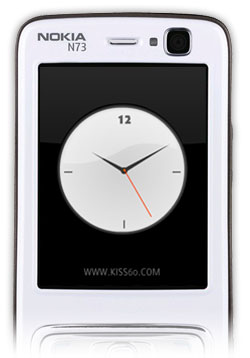
KISS60 beta - 0.8.5 [Free Flash Lite screensavers] S60v3​

20071019015714_n73_show.jpg

KISS60 is a free mobile application that allows you to use, manage and enjoy Flash Lite screensavers on S60 phones.

Please UNINSTALL previous version before installing new one

1 Download and extract screensaver ZIP file

2 Send it to your phone via Bluetooth or cable

3 When you receive the file on your phone, see options menu and set the Flash Lite content as wallpaper or screensaver, where available.


Compatible with:

Nokia 3250, 5500 sport, 5700, 6110 Navigator, 6120 Classic, 6121 Classic, 6290, E50, E51, E60, E61, E61i, E62, E65, E70, E90, N71, N73, N73 ME, N75, N76, N77, N80, N80 IE, N81, N81 8GB, N91, N91 ME, N92, N93, N93i, N95, N95 8GB, N95-3 NAM -->>
 

Attachments

soft bảo vệ tin nhắn và cuộc gọi bằng passwork

Anti Theft v1.00 S60v3 SymbianOS9.1 U.n.s.i.g.n.e.d

phonebakkw8.jpg

PhoneBAK Mobilephone is an innovative lost & found anti-theft software program that sends the thief's contact number, location and other details to a pre-defined mobile phone number when your mobilephone is stolen!

The program works quietly in the device by automatically checking on the Subscriber Identity Module (SIM) card, all without the knowledge of the unauthorized user!

When stolen, PhoneBAK Mobilephone will send out 02 SMSes (local and/or overseas) using the thief's own SIM card to destined pre-configured contact numbers together with other information to get the phonebak!
 

Attachments

Sao toàn tiếng anh dợ Sen Y_Y...Ít chi phải text thử thành công hay kinh nghiệm bản thân sử dụng rồi post lên = Tiếng việt cho anh em hiểu chức năng của nó chứ ....
 
hơ.... mấy soft đó đều nhìn hình là biết rồi mà , với lị mình đã test thành công trên chú dế của mình rồi mới post lên , bảo đảm an toàn
 
Senjuro ơi, mình dùng cái M-Dict thì có cài Font Vasa để nhận font được ko? Mình dùng E50, HDH 60 v3. Nếu được thì có bắt buộc cả phần mềm Từ điển cũng cần phải cài trên Phone không? Hiện mình đang cài M-Dict trên thẻ nhớ, còn font vasa thì nó tự động cài vào máy rồi.
 
mình nghĩ là được vì các soft việt hóa thường có cùng 1 bộ font mà
 
Status
Không mở trả lời sau này.
Back
Top