
Rampage_Ghost
Đây là nick của kẻ Scammer 300k VND
- 20/11/10
- 12,096
- 3,742
tui chơi ok, nhưng sao cutscreen lại rất lag
Cutscene thì bên tui mượt cực kì chả lag tí nào cả :v.


Follow along with the video below to see how to install our site as a web app on your home screen.
Note: This feature may not be available in some browsers.
Tắt thông báo bằng nút X bên góc phải của bảng thông báo*
tui chơi ok, nhưng sao cutscreen lại rất lag

Chỉnh có tác dụng gì đâu. Vào game nó vẫn tắt tesselation các kiểu. Hoặc có tác dụng mà không bật hết?Dzô dzô
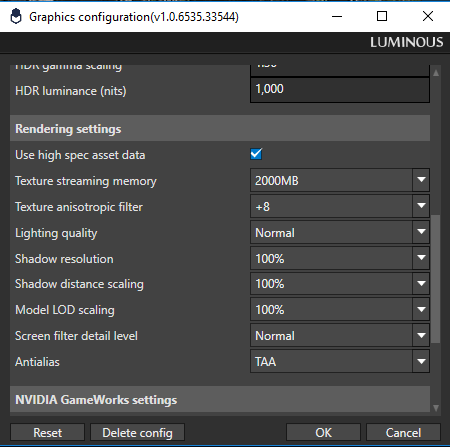


Úi xời sếp để 4k hả @@.Chỉnh có tác dụng gì đâu. Vào game nó vẫn tắt tesselation các kiểu. Hoặc có tác dụng mà không bật hết?
https://www.twitch.tv/videos/233403154
Từ phút thứ 16 trở đi. Vào combat FPS drop còn có 45-50FPS, vcl cái game.


máy mình 12GB RAM mà nó vẫn báo low memory là sao nhể, hay phải set RAM ảo ??

theo em hiểu cái setting nó giải thích thì cái tuỳ chọn TRAM là nó dùng ram để load sẵn texture vào nên nếu bật cái đấy thì có bao nhiêu nó cũng ăn bằng hết. Em ko nghĩ full load ram ảnh hưởng lắm đến performance.máy mình 12GB RAM mà nó vẫn báo low memory là sao nhể, hay phải set RAM ảo ??
Option đấy ăn VRam chứ không phải ram đâu, VGA yếu để highest nó giựt lắmtheo em hiểu cái setting nó giải thích thì cái tuỳ chọn TRAM là nó dùng ram để load sẵn texture vào nên nếu bật cái đấy thì có bao nhiêu nó cũng ăn bằng hết. Em ko nghĩ full load ram ảnh hưởng lắm đến performance.
 Nếu em skip cutscene save xong tắt game rồi load lại thì lên lại 30fps bình thường

Chỉnh có tác dụng gì đâu. Vào game nó vẫn tắt tesselation các kiểu. Hoặc có tác dụng mà không bật hết?
- Just like the title says, I discovered that the Documents\My Games\FINAL FANTASY XV PLAYABLE DEMO\Steam\zzz\savestorage\GraphicsConfig.ini (replace zzz with whatever number it is) takes priority over the Luminous Config Tool GraphicsConfig.ini from the root folder of the game.
- So in case you mess around with the tool, have in mind that you should probably delete the .ini file from Documents before trying to run the game with different configurations(or just copy the one from the root over to the Documents one)
- I'm still trying to get VXAO to work but it just does not, no matter what I do(even when I set both GraphicsConfig.ini to the same lines). I'd be glad if someone would tell me how to make VXAO work! Thanks!


