Giới thiệu/hỏi đáp/thảo luận Soft Hỗ Trợ Download (IDM, flash get,...)

Status
Không mở trả lời sau này.

Darkgamer

The Warrior of Light
Tham gia ngày
23/2/03
Bài viết
2,086
Reaction score
0
_Các vấn đề như nội dung Topic đã nêu ra .
_Không Copy và Paste các bài viết từ nơi khác hoặc chưa dịch ,tất cả nên lồng vào phần trích dẫn (không xài CODE)
_Các bài viết tốt sẽ được cộng điểm .
_Không lập thêm các topic về Download bên ngoài box chính .

Bổ sung :
Khi post 1 bài giới thiệu đề nghị mọi người nên cho vài lời nhận xét về Soft đó ,nếu có cả hình thì càng tốt .
 
Gigaget - đối thủ mới của các chương trình Download

050306221650.jpg

Với nẹc bô 700% khi download...1 đối thủ tầm cỡ, cái này đọc trên báo nên viết ngắn gọn :D
Giao diện nice...tốc dộ cool và quan trọng là 100% free ;;)

Link Download : http://help.gigaget.com/Gigaget.1.0.0.21.exe
 
Internet Download Manager 5.02 Build 6​

What is new in Build 6?

- Improved user interface. Fixed a bug in the display of toolbar,
which was visible in XP "Silver" visual style.

- Added "Browse" button to popup menu of categories

- Added a workaround for erroneous processing of "Range" HTTP header
in BestHop 2.4.4 and similar servers

- Fixed several minor bugs in IE integration

- Fixed a bug in uninstaller

- Increased the size of the buffer for file types to download automatically.
In the past it was a limitation for 50 file types.

- Fixed a bug when IDM changed save path in several cases during
downloading from command line


Download :
Mã:
http://www.internetdownloadmanager.com/commerce/8473627348820/idman502f.exe

Crack
:
Mã:
http://rapidshare.de/files/14629769/IDM_5.02_build_6_Crack.rar.html

1. Exit Internet Download Manager file .exe
2. Extract and copy file IDMan.exe to dir where u install IDM
3. Accept to Replace file, run RegKey.reg
 
ReGet Deluxe 4.2.263


ReGet Software is an international software development company with headquarters in Vancouver, Canada. Founded in the early 1997 by Vladimir Romanov and Stan Grishin, ReGet Software is presently the privately-owned company. The company is currently managed by the co-founding owner -- Stan Grishin.

The company actively conducts research in transfer information though the Internet. The ReGet Software development team consists of high-qualified specialists (many of them are Microsoft Certified Professionals) that are constantly improving implementation of data transfer protocols and interaction with browsers.

The ReGet Software's most recognized project is the ReGet download manager. Since 1996, it has evolved from simple console application to the suite of powerful tool for managing the process of downloading data from the Internet. The user interface of the ReGet download managers have been translated to many languages, making it the world-wide favorite.

To fulfill the needs of the wide range of Internet users from home users to corporate customers, the four different editions of ReGet download manager have been created: ReGet Junior for novice users; ReGet Professional for the advanced users with every-day download needs; ReGet Deluxe for advanced users with additional requirements to the management of download process; and the ReGet Enterprise -- a special edition of our software created to suit the requirements of the corporate environment.

In addition to the line of download managers, the ReGet Software is currently working on other internet-related applications.

ReGet Software programs have been recognized and awarded by the top online and printed media insituttions.

We are working hard to make using of Internet comfortable and easy not only for IT professionals, but for all people.

Download:
Mã:
http://www.reget.com/dl/regetdx.exe

Crack
Mã:
http://passchua.com/Crack/ReGetDeluxe-Patch.exe
 
Fresh Download 7.48


Mã:
 Fresh Download is an easy-to-use and very fast download manager that turbo charges downloading files from the Internet, such as your favorite mp3 files, software, picture collections, video, etc. Unlike other similar utilities, this software is 100% free, no banners, no spyware.

Mã:
 Key features of Fresh Download:

    *

      Turbo charges downloading files in both FTP and HTTP protocols using your current internet connection (dial-up, cable, DSL / ADSL, satellite, T1, etc).
    *

      Pause and resume broken downloads, recovers from a dropped Internet connection.
    *

      Multiple connections download manager. To get the highest possible speed, this powerful tool uses 4 simultaneous connections (up to 8 connections) for the same file, while many other similar software only support single connection download. Based on user reports, this method may speed up your downloads by up to 400%.
    *

      Easy integration into Internet Explorer, Mozilla Firebird and Firefox, Netscape Communicator, Opera, Avant Browser, Crazy Browser, Maxthon / MyIE2, Slim Browser, in any Windows operating system (95, 98, Me, NT, 2000, and XP). Simply grabs any URL from these popular browsers and Fresh Download will take over.
    *

      Schedule your downloads for low traffic periods.
    *

      Clipboard monitoring and drag & drop features. Easily grabs any URL from any applications.
    *

      Antivirus support. Scan downloaded files from any viruses using your current antivirus software.
    *

      Ability to download from password protected sites, in both HTTP and FTP protocols.
    *

      Proxy Server support in both HTTP and FTP protocols.
    *

      Plus now it has a built-in Zip file extractor.


Download
Mã:
http://www.freshdevices.com/files/freshdow.exe
 
Internet Download Accelerator 4.4
box_ida_01.jpg

Mã:
Internet Download Accelerator effectively solves three of the biggest problems when downloading files: speed, resuming broken downloads, and management of downloaded files.

The distinguishing features of Internet Download Accelerator are superior overall performance and convenient user interface.
[IMG]http://www.westbyte.com/ida/images/ida_scr_05avc.gif[/IMG] 
Internet Download Accelerator lets you to noticeably increase the speed of file download from the Internet using HTTP, HTTPS and FTP protocols. The acceleration is achieved by splitting a file being downloaded into several parts and downloading these parts at the same time. Internet Download Accelerator resumes broken downloads from where they left off from both HTTP, HTTPS and FTP servers.
To increase usability Internet Download Accelerator integrates with Internet Explorer, Firefox, Mozilla, Opera, Nescape and others, replacing the standard download modules. Morover, the program monitors the system clipboard and detects URLs in the clipboard.

Whatever your connection type, Internet Download Accelerator will use the bandwidth of your connection most effectively and download files extremely fast.

Power and useful tool for management of download categories. Possiblity of automatic file type detection with automatic file placement to the specified categories. Unlimited number of categories and hierarchy levels.

The program also contains:
- FTP Explorer;
- site manager for password and download folders management;
- scheduler;
- download speed control, automatic mode for the most comfortable browsing on the Web;
- dial for dial-up connection;
- search for files, programs, games, and music;
- IDA Bar - a toolbar for Internet Explorer.

Download
Mã:
http://hyperupload.com/download/0635ae96/DAP_8.0.4.4.rar.html
 
GetRight® 6.0 beta3.

Mã:
What Is GetRight®?

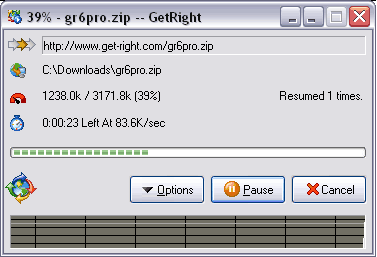
GetRight is a Download Manager program to help you download files from the Internet.


Have a Modem?
Most people have already experienced the biggest problem...you are downloading a file, and your modem gets disconnected, or call waiting interrupts, or your computer crashes, or any number of other problems. Then you have to restart the download from the very beginning, losing all the time you had already spent.

GetRight solves this problem by allowing you to resume a download. If you got part of the file before the problem, GetRight will restart the download in the middle so it only gets the rest of the file, without having to restart from the beginning. This makes downloading your files much easier and faster.

Have a fast connection (DSL/cable/etc)?
Even Better! You may have fewer broken downloads, but all the other features will be even more useful for you. GetRight's acceleration features can make a big improvement in your download speeds--GetRight can split up a file and download several pieces at the same time, which can really help get the most speed out of your fast connection.

Features for Everybody.
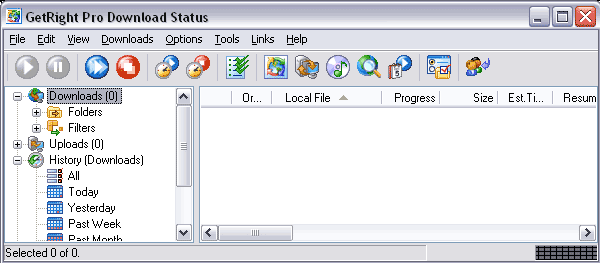
GetRight has many other more advanced features to help you download the files--from building a big list of everything to download (and setting the order for downloading) to turning off the computer when it is done getting the files (so you can just leave it alone to do the work). GetRight includes several ways to scan a website to quickly grab batches of files. You can even set a time when it should start downloading to get the files...so it can do all the work in the middle of the night while you sleep. GetRight's History will let you easily find files you've downloaded. And much more.

There are just too many other features to list here. If you have ever thought "I wish when downloading I could do ______", there's a good chance GetRight already does it!

pic-download.gif

pic-downloadstatus2.gif


Download
Mã:
http://www.get-right.com/getright_pro_60beta3.exe
 
Flashget 1.71 Cracked and Optimize Download

Flashget 1.71

Download :
Mã:
http://down1.amazesoft.net/fgf171.exe

Crack Optimize Download for FlashGet :


flashget15fv.jpg


flashget23in.jpg


Max Spilit : 100 and Max Job : 1000

Note :
Extract and copy file flashget.exe to dir where u install FlashGet to replace file original
Run RegKey.reg

Download :
Mã:
http://rapidshare.de/files/12918391/FlashGet_1.71_Cracked.rar.html
 
PicaLoader 1.47


Mã:
PicaLoader - Award-winning Picture Downloader for find, view, download and manage millions of pictures from the web easily. It is a useful utility that helps you find, download and organize pictures you find on the web. Very popular with digital artists, designers, photographers, webmasters, journalists and other people who need to quickly and efficiently get pictures form the web in large volumes.
For example:
Found a wonderful page with lots of great pictures, but don't want to click one by one by yourself to download pictures?
Found a great pictures link site, but don't want to check out pictures from every link?
Interested in pictures, but scared of viruses and pop-up advertisements?
Downloaded many pictures, but always forgot where you put them?
No more waiting, no more clicking, no more worrying, let PicaLoader complete everything!


Download:
Mã:
http://www.vowsoft.com/pl_setup.exe
imagespl_box.jpg
 
PimpFish 1 - phần mềm mới ngày 02/10/2006

Mã:
Picture & Movie Grabber toolbar for your browser
A freaky cool multi-function download manager
And file-sharing at your fingertips ...
[IMG]http://www.pimpfish.com/inc/toolbarpromo.gif[/IMG] 
Quickly save pictures and movies in bulk to your computer, from any webpage, with ONE click (Check it out Pops up in mini window)
	Intelligent download manager takes care of business (Check it out Pops up in mini window)
	Easily share any number of pictures, movies or other files you bump into online (SLAPfiles)
	Save Flash, Quicktime, Windows Media and other embedded video in a single click (Check it out Pops up in mini window)
	Intelligent and seamless password management when grabbing from protected websites and Bulletin Boards
	Features intelligent link checking which can handle Javascript links and board attachments!
	Great for picture sites and websites with embedded movie trailers and clips
	Now works in Mozilla Firefox (PimpFish for Firefox beta) (Check it out)
	Easy to install and use
	FREE unlimited trial baby!


Download:
Mã:
[URL=http://software-files.download.com/sd/iH3_1zfFMQCCUL_Y12RNKS0AVe_ISeANPXyqX2ctcjubl2fybOpR-xLZ6QkT1e6TC5gyhCro8SKp6W913J8qHfa39bpBlFYz/software/10501581/10151994/3/pfsetup_full.exe?ptype=3001&ontid=2071&siteId=4&edId=3&pid=10501581&psid=10151994]http://software-files.download.com/sd/iH3_1zfFMQCCUL_Y12RNKS0AVe_ISeANPXyqX2ctcjubl2fybOpR-xLZ6QkT1e6TC5gyhCro8SKp6W913J8qHfa39bpBlFYz/software/10501581/10151994/3/pfsetup_full.exe?ptype=3001&ontid=2071&siteId=4&edId=3&pid=10501581&psid=10151994[/URL]
 
Mass Downloader 3.2

Mã:
MetaProducts Mass Downloader (MD) is a Windows 95/98/ME/NT/2000/XP/2003/Vista download manager application that makes it easy to download individual files (or lists of files) from Internet sites at the maximum available speed. Download resume is supported. Multiple channels technology significantly reduces download time.

Mass Downloader supports a wide range of protocols: HTTP, HTTPS, FTP, RTSP, MMS, MMST. The support of stream protocols makes it simple to download stream video and audio for offline viewing.

MD also allows you to browse Zip archives before loading them and to choose only the desired files to download.

Mass Downloader has an excellent Internet Explorer-like user interface. Mass Downloader allows you to download specific files by filename, which differs from Offline Explorer in that Offline Explorer lets you speed your way through downloading entire web sites.

Download:
Mã:
http://dl.filekicker.com/send/file/167647-EPZB/mdsetup.exe
 
2 Soft hỗ trợ cho rapshare và megaupload....cực cool nhưng giờ cái mega xài thì hơi khó, up lên mọi ng` thử xài nhé :D
 

Attachments

Internet Download Manager 5.02 Build 7 (Mar/03/2006)

What is new in Build 7 ?

- Fixed a bug in download engine

Download :
Mã:
http://www.internetdownloadmanager.com/idman502.exe
Crack :
Mã:
http://rapidshare.de/files/14864092/IDMan5.02.7Cracked.rar
 
Download Accelerator Plus (DAP) 8.0.4.4

080306151529.gif


Mã:
http://rapidshare.de/files/14976311/Dap_8.0.4.4.rar
 
IDE (Internet Download Explorer ) :

I . Ưu , khuyết điểm :

Khuyết điểm :
1 - Không tách nhiều line được , chỉ có thể chạy một line duy nhất nên tốc độ donwload có phần hơi bị hạn chế .
2 - Chế độ hỗ trợ Resume hơi bị phọt phẹt , hầu như bất lực với việc Resume một file dung lượng quá lớn .
3 - Có quá ít chức năng để tinh chỉnh .

Ưu điểm :
1 - Không cần phải cài đặt , công cụ này đã được tích hợp sẵn trong bộ Windows rồi → rất tiết kiệm dung lượng ổ cứng .
2 - Chiếm cực kì ít tài nguyên của Windows , chính vì lí do này bạn có thể chơi game hoặc sử dụng các phần mềm khác song song vô tư , không sợ lag game hay giật máy ^_^ .
3 - Giao diện rất đơn sơ , mộc mạc . Thân thiện và cực kì dễ sử dụng ^_^ .
4 - Phương thức bắt file khá tốt , chỉ cần nhấn trực tiếp trái chuột vào file cần download ( hoặc nhấn phải chuột vào file đó , rồi chọn Save Target As . . . là được) .

II . Hướng dẫn sử dụng :

1 - Phải chuột vào một file bất kì muốn download , sau đó chọn dòng chức năng Save Target As như hình vẽ :

attachment.php

2 - Sau đó công cụ IDE (Internet Download Explorer ) sẽ nhảy ra một cửa sổ mới cho bạn lưu dữ liệu vào như hình sau , bạn chọn nơi lưu trữ nhé , sau đó nhấn nút Save :

attachment.php

3 - Sau khi nhấn nút Save xong , màn hình sẽ hiện lên giao diện của IDE (Internet Download Explorer ) như sau :

attachment.php

Đấy , các bạn thấy không , giao diện rất thân thiện , đơn giản và dễ sử dụng nhé , chỉ đơn thuần có 3 nút : Open , Open Folder , Cancel . Sau khi download xong một file nào đó thì nút OpenOpen Folder sẽ sáng lên . Các bạn đồng ý với mình chứ , rất đơn giản phải không ^_^ . Chúc các bạn sử dụng công cụ IDE một cách hiệu quả ^_^ .

P / S : Ngồi xem đá banh chán wa' , ngồi hị hoạy gõ cái của nợ này cả 20 phút đồng hồ , phê wa' xá là phê ^_^ . Cộng cho mình tí exp mới nhỉ ;)) .
 
ZzHowiezZ nói:
ai có cái crack của Fget 7.1 làm ơn up lên gamevn cho tui DL xuống với
Down về xong chạy cả file reg thì Flasget chia được làm 30 gói.........................................
Muốn down ở Rapid bằng IDM or FG thì phải có ơ kao.......
 

Attachments

Internet Download Manager 5.02 Build 8

What is new in Build 8?

- Reduced the consumption of system resources during downloading
that was especially visible while processing large grabber projects

- Added fixes for Farsi language. IDM changes font to Tahoma on all
dialogs to display language characters correctly when Farsi language
is selected

Download :
Mã:
http://www.internetdownloadmanager.com/commerce/8473627348820/idman502f.exe
Crack :
Hướng dẫn đăng ký IDM ko cần dùng Crack

_Đầu tiên bạn cài IDM 5.02 Build 7

_Sau khi cài xong ,khởi động lại máy xong xuôi . Vào Statmenu --> Run : gõ Regedit .Mở Regedit lên rồi ,trong cửa sổ Regedit bạn bấm Ctrl F để mở chức năng tìm kiếm của nó ,xong nhập vào từ khóa là : MDATA ,nó sẽ tự động tìm đến value MDATA (nằm ở cửa số bên phải) trong key :
Mã:
HKEY_LOCAL_MACHINE\SOFTWARE\Classes\CLSID\{6DDF00DB-1234-46EC-8356-27E7B2051192}
Click chuột phải vào value MDATA và del nó đi .

_Tiếp tục click chuột phải vào key {6DDF00DB-1234-46EC-8356-27E7B2051192} nằm ở của sổ bên trái chọn Permissions.... rồi đánh dấu chọn mục Deny cho User của bạn và của Admintrators .

_Tiếp tục Ctrl F để tìm đến key :
Mã:
HKEY_CLASSES_ROOT\CLSID\{D5B91409-A8CA-4973-9A0B-59F713D25671}
Tương tự làm giống key trên ,click chuột phải vào key {D5B91409-A8CA-4973-9A0B-59F713D25671} ở cửa số bên trái ,chọn Permissions.... rồi đánh dấu chọn mục Deny cho User của bạn và của Admintrators .

_Vậy là xong phần chỉnh sửa về Registry để ta có thể fake Serial rồi ,giờ bạn mở notepad ra , điền vô đó nội dung như sau :
Mã:
REGEDIT4

[HKEY_CURRENT_USER\Software\DownloadManager]
"isSSW_OK"=dword:00000001
"FName"=- 
"LName"=- 
"Email"=-
"Serial"=- 

[-HKEY_CLASSES_ROOT\CLSID\{6DDF00DB-1234-46EC-8356-27E7B2051192}]
[-HKEY_LOCAL_MACHINE\Software\CLASSES\CLSID\{2b2d7f6a-0b55-47d2-a8ac-c4658203c361}]
[-HKEY_CURRENT_USER\Software\Classes\CLSID\{D5B91409-A8CA-4973-9A0B-59F713D25671}]
[-HKEY_LOCAL_MACHINE\SOFTWARE\Classes\CLSID\{6DDF00DB-1234-46EC-8356-27E7B2051192}]

[HKEY_LOCAL_MACHINE\SOFTWARE\Internet Download Manager]
"FName"="CoDErED"
"Serial"="26SPF-2CC7Y-HPJLU-TGYOX"
"LName"="DownZ"
"Email"="[email protected]"
Rồi save lại dưới dạng file *.reg và chạy nó
 
Star Downloader Pro 1.52
......................... _ _ _ *** _ _ _ ............................

Star Downloader nói:
Star Downloader is a download manager that accelerates your downloads by splitting the files into several parts and downloading them simultaneously. Download speeds are increased further by choosing the fastest mirror sites.

You may automatically resume broken downloads if your connection is lost or if your computer accidentally shuts down. With the scheduler, you can download files at certain times of the day. Star Downloader may also automatically connect to your ISP and hang-up upon completion of downloads.

To help you organize and manage your downloads there is an advanced category system and an integrated unzipping utility can automatically unzip and install downloaded files. Star Downloader also integrates with your antivirus program to automatically scan files upon completion of the download.


180306031612.jpg


Star Downloader & Crack
 
cruelshade nói:
Bạn ơi cái crack mình vào thì nó ghi download seson invalid bạn cho mình cái link khác để down crack hoặc attach vào cũng đc.Thanks

Build 6 có liền nè !!!!!!!!!!!!!!!!!
 
Download thả cửa cùng


Internet Download Manager Việt


1- Đặc điểm của phiên bản (Việt hóa) này:
- Toàn bộ gói Việt hóa chỉ gồm 2 file
- Dung lượng (2 file trên) cực nhỏ
- Tỷ lệ Việt hóa: >95%
- Hiển thị Tiếng Việt tốt
- Tương thích phiên bản 5.x & 4.x

2- Một số hình ảnh hot nhất của phiên bản này:

idm-0020.gif


idm-0001.gif


idm-0000.gif


3- Những mặt tồn tại:
- 1 số chỗ câu-cú vẫn chưa được giản lược
- Chưa tích hợp được skin thay đổi giao diện kèm theo
- Chưa thể đóng gói thành nguyên bộ (giống như WinRAR t.Việt)

4- Download: Attack File

5- Cài đặt:
- Sau khi download & giải nén, bạn sẽ được 2 file chính là:
+ idm_vn.lng
+ tips_vn.txt
=> bạn chỉ cần copy 2 file này vào <folder cài đặt IDM>\Languages\

6- Lưu ý:
- Rất có thể IDM của bạn sẽ không hiển thị đúng Tiếng Việt như bạn mong muốn. Lý do chính có thể là:
+ Bạn chưa Thiết lập t.Việt trong môi trường Windows (xem thêm bài này để biết cách làm)
+ Chưa chọn ngôn ngữ mặc định là T.Việt trong IDM

idm-0019.gif


7- Chân thành cảm ơn:
- 1 lần nữa, xin chân thành cảm ơn bạn De_So ([email protected]) đã dầy công Việt hóa IDM - 1 việc làm hết sức thiết thực, có ý nghĩa đối với không chỉ riêng mình, mà còn với rất rất nhiều người. Nhiệt liệt hoan nghênh tinh thần đầy nhiệt huyết của bạn ! =d>
- Thành thật xin lỗi bạn De_So cũng như mọi người vì đã post bài này hơi trễ so với dự kiến. Rất mong mọi người thông cảm & thứ lỗi.
- Cảm ơn tất cả mọi người, những ai đã từng tin tưởng & dùng WinRAR t.Việt, ủng hộ cho phong trào Việt hóa phần mềm, "người Việt dùng hàng Việt". Sự động viên, cổ vũ của các bạn là chính là nguồn động lực giúp cho những sản phẩm thuần Việt không ngừng ra đời.

Hy vọng mọi người sẽ hài lòng với phiên bản này. Rất mong nhận được ý kiến đóng góp của mọi người để sản phẩm ngày càng hoàn thiện hơn.

Chào thân ái & đoàn kết !

Copyright Update Soft

 

Attachments

Status
Không mở trả lời sau này.
Back
Top