# HOME
http://anonymz.com/?https://www.ashampoo.com/uk/gbp
# FEATURES
[spoil]
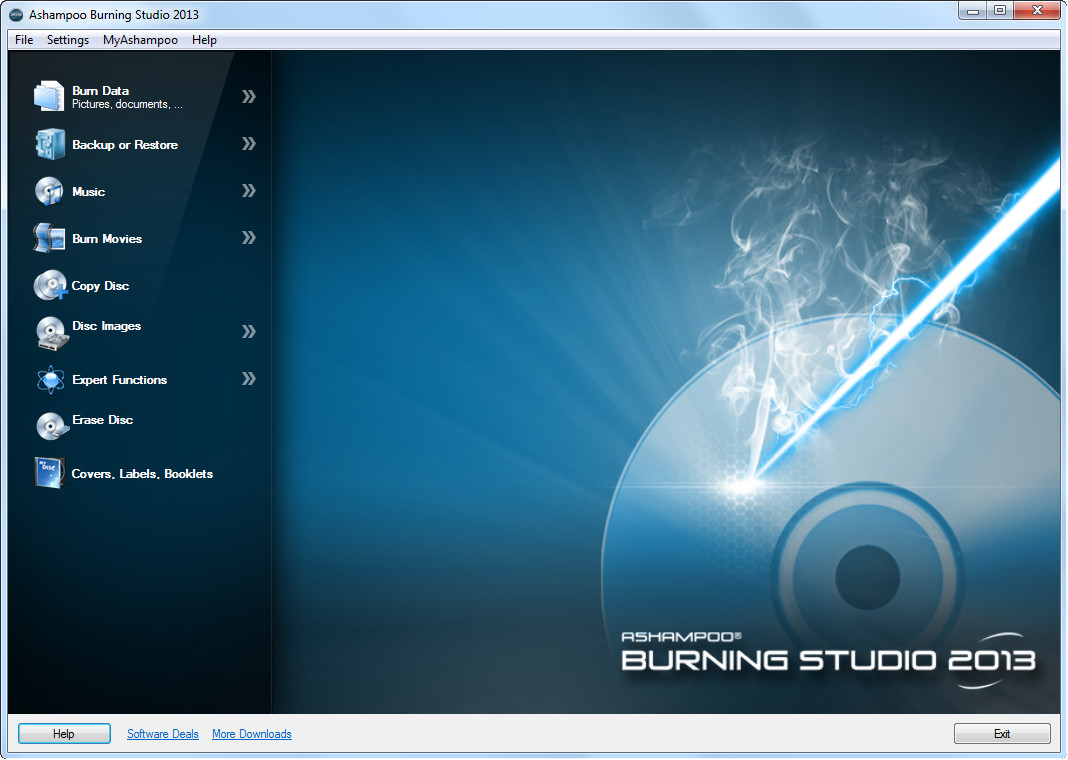
• Create data discs with optional autostart feature
• Burn data to CDs, DVDs and Blu-ray discs
• Update existing discs (multi-session)
• Backup files across several CDs, DVDs or Blu-ray discs
• Rip audio CDs to multiple formats
• Burn music to several formats (MP3/WMA disc, audio CD)
• Create HD and Full HD video discs
• Duplicate CDs, DVDs and Blu-ray discs
• Create and burn disc images
• Erase rewritable discs
• Create modified copies
• Design and print covers and booklets
[/spoil]
# COMMENT
Ashampoo Burning Studio là 1 trình ghi đĩa tuyệt vời, nó đáp ứng đầy đủ các yêu cầu ghi đĩa từ dữ liệu thông thường cho đến nhạc, phim các kiểu, ngoài ra nó còn hỗ trợ rip nhạc, sao lưu, sao chép, xóa đĩa, tạo cover... hay nhất là nó vẫn giữ lại tính năng ghi đĩa phim VCD/SVCD mà Nero 12 đã bỏ từ lâu.
Chả biết viết gì thêm, thôi thì Ashampoo Burning Studio là một trình ghi đĩa nên có, đáng dùng phục vụ đủ và thừa cho yêu cầu của các bạn.
# DOWNLOAD
Ashampoo Burning Studio hỗ trợ từ xp cho đến 8 cả x86 lẫn x64.
• Ashampoo Burning Studio 2013
[spoil]
http://anonymz.com/?http://ashampoo...ashampoo_burning_studio_2013_11.0.5_12122.exe
Cách kiếm license key
+ b1: vào trang này
http://anonymz.com/?http://www.asha...43dtv6yvnkj5cqjqubicqwjo3nqazs&ref=linktarget
+ b2: điền email vào textbox rồi bấm
Request full version key
+ b3: check mail, click vào link
Confirm "your mail"
+ b4: Điền thông tin đầy đủ rồi là có key hàng hiệu xài

[/spoil]
• Ashampoo Burning Studio FREE 6.82.4312
[spoil]
http://anonymz.com/?http://download.../ashampoo_burning_studio_6_free_6.82_4312.exe
Features:
• Multi-disc file backup and restore on CDs, DVDs and Blu-ray discs
• Create compressed backup archives with powerful password protection
• Split archives automatically across multiple CDs, DVDs or Blu-ray discs
• Restore archive contents to their original locations
• Integrated Audio CD ripper store your audio tracks as MP3, WMA or WAV files
• New option for setting the number of copies you want to burn (available for all disc formats)
• Discs can now be verified immediately without being ejected first (if the drive supports this feature)
• Numerous other small improvements that make the program easier to use and more effective
• Burn files and folders on data CDs/DVDs/Blu-ray discs
• Burn Audio CDs from WAV, MP3, FLAC, WMA and Ogg Vorbis files
• Burn MP3-CDs from your MP3 files
• Burn Video DVD, Video CD (VCD) or Super Video CD (S-VCD)
• Create and burn CD/DVD/Blu-ray disc images
• Burn speed and other options can all be set automatically
• Make copies from audio, video or data discs easily
• Interactive troubleshooting assistant for solving hardware and media problems
• Save project files so that you can burn the same discs again later
• Erase CD-RWs / DVD+RWs / DVD-RWs/ DVD-RAM/ BD-REs
• Integrated support for over 1,700 CD, DVD and Blu-ray burners
[/spoil]
#~~~~~~~~~~~~~~~~~~~~~~~~~~~~~~~~~~~~~~~~~~~~~~~~~~~~~~~~~~~~~~~~
Bonus cái trick kiếm key Uniblue Driver Scanner 2013, ai cần thì đọc, lười dịch
 http://anonymz.com/?http://vishalab...year-uniblue-driver-scanner-2013-license-key/
#~~~~~~~~~~~~~~~~~~~~~~~~~~~~~~~~~~~~~~~~~~~~~~~~~~~~~~~~~~~~~~~~
Mang tính năng xem PDF trở lại Firefox 18.
Như các bạn đã biết thì ff vừa up lên ver 18 cách đây ít ngày, ver này có nhiều thay đổi thế nào thì mình k cần biết, cái chính của bài này là built-in PDF viewer đã bị disable, nếu những ai xài plugin ngoài như foxit reader hay adobe reader thì khỏi quan tâm, còn nếu ai muốn xài hàng có sẵn và thích nó hoặc giả bạn nào có đang xài bản portable như mình thì mới cần.
Cách enable thì cũng đơn giản vô cùng, ngó lên thanh address gõ
about:config rồi click vào dòng
I'll be careful, I promise!, trên thanh search gõ
pdfjs.disable, double vào dòng pdfjs.disable để thay đỗi giá trị từ true về false, ok, mở thử 1 file pdf xem nào
Ngon ra phết, mà lên FF19 thì built-in PDF viewer sẽ sử dụng HTML5 và sẽ mượt mà hơn đấy

#~~~~~~~~~~~~~~~~~~~~~~~~~~~~~~~~~~~~~~~~~~~~~~~~~~~~~~~~~~~~~~~~
# HOME
http://www.lopesoft.com/en/fmtools/info.html
# MAIN FEATURES
[spoil]
• Add some build-in utilities in order to do operations over files and folders.
• Configure the "Send to..." submenu.
• Enable/disable the commands which are added by other applications to the context menu.
The build-in utilities are the following:
• Synchronize Folders - Synchronizes two folders. It is possible configure the synchronization type (unidirectional, bidirectional, etc.) and the file types which must be synchronized.
• Extended Delete - Deletes recursively specific file types from a folder. The file types are specified with wildcards, for example: *.txt, *.t??, etc.
• Find And Replace - Finds and replaces a text in all selected files. It is possible to use regular expressions.
• Advanced Renamer - Renames all the selected elements by using some patterns.
• Delete Locked File - Deletes files which are locked by any application and cannot be deleted normally.
• Delete and no move to Recycle Bin - Deletes definitely files and folders.
• Change Icon - Change the icon assigned to the selected folder
• Run with Arguments - Run a program with parameters typed through a dialog box.
• Command Line From Here - Open a command line window and go to selected folder.
• Split File - Splits the selected file in various parts.
• Join File - Joins the parts of a file which were previously splitted.
• Copy to... - Copies the selected elements to other folder.
• Move to... - Moves the selected elements to other folder.
• Copy Name - Copies to the clipboard the name of the all selected elements.
• Copy Path - Copies to the clipboard the path of the all selected elements.
• Copy Content - Copies to the clipboard the content of the selected element. If a folder is selected, all element names that the folder contains will be copied
• Attributes - Displays a submenu which lets change the attributes of the selected elements. If a folder is selected, it is possible change the attributes recursively.
• Change Time - Changes the creation time, the last access time and/or the last write time of the selected elements. If a folder is selected, it is possible change the time recursively.
• Register DLL - Register a DLL in Windows.
• Unregister DLL - Unregister a DLL.
• Create New Folder - Creates a new folder into the selected folder
[/spoil]
# COMMENT
FileMenu Tools giúp việc sử dụng windows dễ dàng hơn bằng cách thêm vào context-menu khá nhiều tính năng cần thiết ngoài ra chúng ta có thể tự thêm những thành phần cần thiết, đơn giản cứ right click là có.
FileMenu Tools là phần mềm miễn phí, không tuyệt sao, mình xài được khá lâu rồi, bạn nào thích thì xài thử nhé.
# DOWNLOAD
+ Install :
http://anonymz.com/?http://www.lopesoft.com/fmtools/FileMenuTools-setup.exe
+ Portable :
http://anonymz.com/?http://www.lope...ls/download?download=2:filemenutools-portable