M.U.G.E.N Club

Status
Không mở trả lời sau này.
bạn có thể giải thích rõ hơn ko
mình tìm được chiêu đó rôì, nhưng bấm vào đâu để đổi nút:(
thì tìm các dòng command của chiêu đấy
VD: F, D, B , F, D, B + x ( 2 vòng lui A )
sửa thành F, D, B + x ( 1 vòng lui A )

với F= tới , D= xuống , B= lui , ...
 
cám ơn bạn mình đổi được rôì:-*:-*
nhưng những j` bạn nói cho tới lúc thực hiện được là cả quá trình :D
 
Cho hỏi xíu , có phải con này là Evil ken hok ? :-*:-*
1-48.jpg

2-16.jpg


Nếu phải thì có thể PM yahoo tui để tui send cho . AI khủng .
 
nó là evil ken chứ con j` nưã:)
con này mình có rôì, al con này theo mình là ngon nhưng giờ nhiều con ngang ngửa cơ với quá nó rồi nên cũng thấy bt thường:))
 
Ai có cái screen pack nào mà còn sống hok , cho em đi . Đang cần lắm
 
mình có cái mấy cái screen đẹp lắm bạn lấy hok:-*
 
đang tập tành vẽ char :D
bm9fagcf61jlie7b2v0t.gif
 
nhìn cũng đẹp phết đấy nhờ
p/s đêm qua thức đêm coi mấy cái tài liệu tiếng mệt quá T__T
 
đang tập tành vẽ char :D
bm9fagcf61jlie7b2v0t.gif

Con ngựa đẹp quá , nhưng thánh giống thì chưa được cu-tè cho lắm , với lại nó để đầu 3 vá , mặc cái yếm đỏ nhìn giống hồng hài nhi trong Tay Du ký quá \:D/

Vẽ cái mặt thánh giống ngố ngố giống cậu bé bút chì ấy , cho nó nhìn man-ga tí xíu :))
 
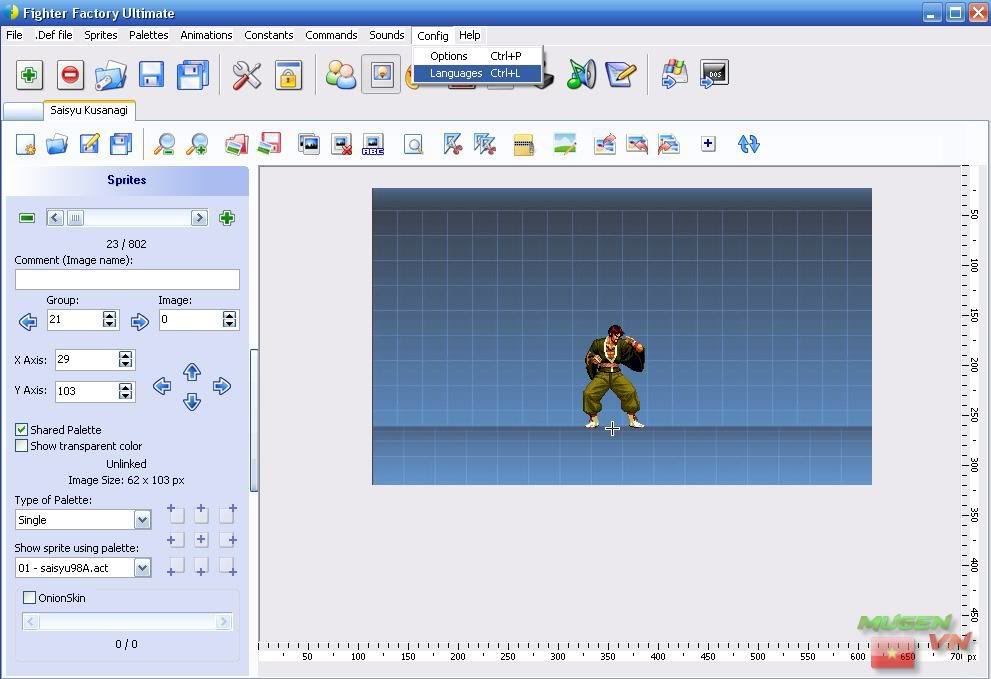
Fighter Factory Ultimate đã ra lò
Fighter Factory bản mới nhất vừa ra lò.
Đây là công cụ hỗ trợ đắc lực trong việc thiết kế nhân vật cho mugen(victory)
FFU.jpg


1 số cập nhật
General
- Improved Interface
- Performance is incredibly superior
- Less memory consumption
- Possibility of opening up to 12 chars in the same window
- Almost all functions accessible via shortcut keys
- The Esc key closes a window
- Customizable (possibility to enable or disable some recursor, usually messages of confirmation)
- Possibility to hide the panel of the editor to increase the space
- Format of the programs for chars (all except in a single file with compression - average 50% reduction)
- Zoom up to 8X
- New system of languages, much lighter and faster
- Test of char in MUGEN improved
- New organizer
- Confirmation of overwrite in all operations to save

DEF
- Possibility to comment a line, unchecking a check box (for snd valley, st, intro, ending, states and palettes)

SFF
- Customizable background image
- Movement of the image according to the zoom
- Buttons to go to the next or previous group
- Option palette of the image does not change the previous image
- Function optimize for DOS and Win Mugen
- Cut and optimize all the images 1000x faster than the previous version
- Axis-shaped buttons on adding sprites
- Ruler on one side to increase the space
- Export and import a whole SFF (own format and SprMaker)
- Possibility to save the current image, all, a group of images, range images of a group
- Image Editor

ACT
- Inclusion of the editor of pallets in the main window
- Increased floor area
- All functions apply to both the image and the char palette, chosen by the user
- Possibility to choose whether he will replace the palette or the image to adapt it
- Enhanced Function mask
- Just click on the image he selects the color without the need to activate an additional button
- Effects RGB Hue and improved, with the option of applying or permanently reset and ignore the changes
- RGB Effect will not work for value and dragging the Barrinha
- Option to replace a color by clicking it twice
- Function that puts gradient in the range of selected colors
- Removal of duplicate colors in the palette
- Generate optimized palette for the image
- Inserts in palette images with option to use the Clean PCX
- Generate optimized palette from multiple images
- Movement of the image according to the zoom

AIR
- Display of real-time transparency in the editor
- New alignment system, equal to the SFF in order to standardize and facilitate the use
- Movement of the image according to the zoom
- New system for generating animated GIF (positions and scales the image correctly, not cutting the feet or the head like before)
- Preview of sprites on thumbnail for rapid creation of animations
- Resizing and repositioning of CLSN 1px directional buttons at once by

SND
- Allows you to set the group and add sound
- Conversion of bitrate and number of channels made by the program
- System for enhanced Resample using the library LibSampleRate
- Display information on the correct sound WAVE
- Find sound
- Delete Group
- Possibility of individual sounds Resampler
- Possibility to save the current sound, all, a group of sounds, range of sounds of a group

CMD
- Display list of states with number and name
- Allows to navigate the state by double-clicking an item from the list
- New syntax coloring
- New editing system (standard in the text editors)

CNS
- System auto complete with support for functions with parameters (shows possible options or monitoring the switch current)
- System auto complete with the addition of SCtrls from a shortcut key
- Templates for SCtrls
- List of StateDefs
- Editor of PalFX
- Viewer Offset
- List of Vars
Link download
http://virtualltek.mgbr.net/
;-----------------------------------------------
[Collection] Các bài hướng dẫn mình từng viết
http://yega.game4v.vn/showthread.php?t=178549

Cái này quan trọng đây
Basic Tutorial for creating MUGEN Characters.

http://mega.1280.com/file/GCRG2KET/
rất chi tiết về phương pháp và.... down về sẽ biết; tất nhiên cái này ko phải là tiếng việt

tối vui vẻ​
 
Thanks tity nha , sự nhiệt tình của bạn làm mình nhớ tới 1 người bạn tên thần tiên tỉ tỷ bên forum volam quá .:-*

Mai mình sẽ tìm hiểu , lúc nãy mình lên website của Seravy , Seravy cũng có hồi âm cho mình về cách làm Char:

First of all, making an entire character is VERY HARD on your first try. Editing existing ones to understand how things work is usually a better idea.

While Fighter Factory is a useful tool, it has some bugs in it that can mess up certain files when saving, so I don't recommend using it for everything. I usually use it to see if everything is at it's place in the sprite or animation files, and to add the clsn boxes.

To create a character, first you need to know what files it is needed for it.

PART 1.
You'll need the sprites of the character for every move you want it to be able to do. If the character is something you draw yourself, this is a huge amount of work if you want to make it good quality with many moves.
You need to add those sprites into your .SFF file. There are two ways for that, one is Fighter Factory, which is easy to use, but to change/add new stuff, it is a slow way. The better method is to use SPRMAKER with a batchfile.

You'll need four files for this. (plus all the images for your sprites)
One is obviously SPRMAKER.EXE.
The second is the batch file, which needs to have named something.bat, and have this line in it only :
sprmaker <charname.txt
charname = the name of your character.
The third file is that charname.txt, which is a text list of the images in the following format :
Code:

; ElecbyteSpr 0.1.0.1
; 133 groups
; 709 images
;
; Options
#
; Palette
1 ;<- This is Always 1
; Shared palette
2 ;<-This can be 1 or 2. 1 means the default is individual palette, 2 means the default is shared palette.
; End of options
; Output file
eriol.sff ; <-the name of your sff file that you want to create
; From here
# ; these three lines are optional
1 ; and tell "Do not use the default shared palette"
1 ; use 1=individual palette instead for this sprite
0000000000.pcx ; <- This is the name of your first sprite image
0 ; This is the sprite group number
0 ; This is the index number
44 ; This is the X axis of your sprite
125 ; This is the Y axis
; Until here is one sprite 's definition
;Second sprite starts here and uses the default Shared Palette option.
0000000001.pcx
0
1
44
129
;and ends here
0000000002.pcx
0
2
44
130
0000600000.pcx
6
0
74
130
0000500000.pcx
5
0
74
130
0002000000.pcx
20
0
44
131
...and so on


The fourth file is optional, and it is the SFFEXTRACT.EXE tool, which does the opposite of SPRMAKER, it makes the txt file and extracts the images from the completed sff.

For the images :
-They must all be 256 color pcx files.
-If they are part of the character (and not a helper or projectile), then they MUST USE the same palette for all of them. This is called SHARED PALETTE and works this way : If a file is set to shared palette, it uses the palette of the previous sprite in the sff file and ignores it's own. So your first image's palette must be used for all the remaining images, and those files should be added to the sff with a shared palette setting.
-The first (or last depends on what image editing software you use) color of the palette is the transparent color. Anything drawn with this color doesn't appear on the screen and is transparent.
-You shouldn't have over 200 individual palette sprites total in a character, as that can lag slower computers a lot.
-The X and Y Axis is the position on the image which will be the "middle".
The character will be placed so that this point is at the position where your character is standing. This is usually set at the character's feet for characters, and whatever you need for other stuff.
-There are REQUIRED sprites. See the DOCS\SPR.GIF image to understand which is which, these are all sprites for you character getting hit by attacks.
-While you can give any group and index number to any sprite, it is recommended to use the animation's number for the group number.
-I suggest using PaintShopPro for sprite and palette editing, but you can use whatever you want as long as it can work on 256 color pcx files.

Còn dài lắm , các bạn đọc thêm ở link này : CLick ( đăng ký rồi mới thấy bài viết , lẹ tay vô đăng ký nà , forum mới có 6 thành viên à ;)) )

theo Sera nói với Rose thì có hai cách để tạo nhân vật, Fighter Factory là một chương trình dễ sử dụng,nhưng có thể thay đổi ,bổ sung nội dung mới một cách chậm chạp. Các phương pháp tốt hơn là sử dụng SPRMAKER với một batchfile...

Rose hiện giờ chưa biết nhiều về Fighter factory , thêm cái SPRMaker lại càng mù tịt . :D Nhưng sẽ cố gắng đọc hết những tài liệu đang có và thực hành thử . Mọi người có time thì vô forum của Sera thảo luận phụ mình với , mình hông rành thảo luận bằng tiếng Anh lắm đâu :)) .

@nhamte : đã có tài liệu , cùng nghiên cứu với nhau nè ! :-*
 
o` o` thankx ba'c Tyti nhiu nhe' .ba'c róe cùng nhau nghiêu cứu liền
 
mọi người giup mình với
đưa một tấm ảnh vào phải chuyển về dạng 256 màu mới hiển thị được phải ko, mình đang tập làm cái lifebar với cái screen thì chuyển về 256 màu bị nhòe, có cách nào chuyển về 256 màu mà hình ko bị nhòe ko:((:((
 
có nhiều cách để làm đưa 1 ảnh về 256 màu; dùng ct Paint của Microsoft cũng dc; Photoshop cũng dc. cách mình xài để giữ gần trọn vẹn số màu là dùng ct này
Picture Resize Genius 2
http://yega.game4v.vn/showthread.php?t=88001
 
trích dẫn từ Sera
For the images :
-They must all be 256 color pcx files.
-If they are part of the character (and not a helper or projectile), then they MUST USE the same palette for all of them. This is called SHARED PALETTE and works this way : If a file is set to shared palette, it uses the palette of the previous sprite in the sff file and ignores it's own. So your first image's palette must be used for all the remaining images, and those files should be added to the sff with a shared palette setting.
-The first (or last depends on what image editing software you use) color of the palette is the transparent color. Anything drawn with this color doesn't appear on the screen and is transparent.
-You shouldn't have over 200 individual palette sprites total in a character, as that can lag slower computers a lot.
-The X and Y Axis is the position on the image which will be the "middle".
The character will be placed so that this point is at the position where your character is standing. This is usually set at the character's feet for characters, and whatever you need for other stuff.
-There are REQUIRED sprites. See the DOCS\SPR.GIF image to understand which is which, these are all sprites for you character getting hit by attacks.
-While you can give any group and index number to any sprite, it is recommended to use the animation's number for the group number.
-I suggest using PaintShopPro for sprite and palette editing, but you can use whatever you want as long as it can work on 256 color pcx files.
Sera dùng PaintShopPro , còn Rose thì dùng Photoshop quen rồi .
Để hướng dẫn chi tiết từng thứ thì rất khó , vì Fighter Factory có rất nhiều phần , code cũng có nhiều code . Cho nên làm tới đâu thì nghiên cứu tới đó , chỗ nào chưa thông thì tìm tài liệu hoặc post bài hỏi . Rose tạm thời ngưng công việc 1 tuần vì lý do sức khỏe .

3 ngày nữa Rose sẽ nhập viện theo định kỳ :(...
 
uh; chúc rose mau hết bệnh; đừng quá chú tâm vào nó vì nó cũng chỉ là trò chơi thôi; cuộc đời mới là thật :)
 
cám ơn anh tity nhiều em làm được rồi:D
 
các anh hướng dẫn em cách làm char ẩn vơí, kiểu như là phá đảo arcade hay survivar bằng 1 char nào đó thì sẽ chỉ mở được 1 nhân vật bằng chính char đó:D
 
Status
Không mở trả lời sau này.
Back
Top