

Navigation
Install the app
How to install the app on iOS
Follow along with the video below to see how to install our site as a web app on your home screen.
Note: This feature may not be available in some browsers.
Thêm tùy chọn
Style variation
You are using an out of date browser. It may not display this or other websites correctly.
You should upgrade or use an alternative browser.
You should upgrade or use an alternative browser.
[MAPS][GameVN] Các map do mem tự chế hoặc giới thiệu
- Thread starter Orpheus
- Ngày gửi
![_[Hiyono]_](/data/avatars/m/960/960508.jpg?1300248651)
_[Hiyono]_
T.E.T.Я.I.S
- 15/12/09
- 692
- 33
làm đi bé______________________
Hum này load cái map của anh về nhà vào đến đoạn Precachinh Resources thì ............. đơ lại
 . Giúp em cái vấn đề bên topic Hỏi đáp code AMXX đi


kobebryant_hp
Legend of Zelda
- 15/10/09
- 1,131
- 0
- Banned
- #105
bản CS nhà tui chơi đủ mọi thể loại lunbắn vs zbot chỉ chơi được mặc định thôi ạ. còn những kiểu chơi khác ko được
à nham`
chỉ chơi dc zombie plague + CSDM team + gun game thui
còn CSDM single và ZBio thì pod bot
a cho hỏi muốn tách zpot sang bản CS khác thì copy nhưng file j` thế

ps/ cả cách tách podbot và yabpot lun

- 19/8/06
- 3,397
- 1,215
Hôm nay cài lại plugin deathmatch, đặt cho respawn ở nhà rồi bắn, cảm giác rất là sướng  .
.
p/s: mình đón năm mới muộn 12 tiếng so với ở VN
.p/s: mình đón năm mới muộn 12 tiếng so với ở VN
- 19/8/06
- 3,397
- 1,215
Mình dùng Counter-Strike 1.6 DigitalZone v35, chạy được cả zbot lẫn amxmodx ngon lành, ko bị mất bot do việc chỉnh file dll cả.
- 19/8/06
- 3,397
- 1,215
Happy New Year ở VN nha  (chậm mất những 10' )
Quên mất là cái Counter-Strike 1.6 DigitalZone v40 trong topic download cũng chạy chung với plugin mà ko bị mất bot đấy.
Nhân dịp năm mới, đây là hình chơi deathmatch với bot trong tàu chở hành
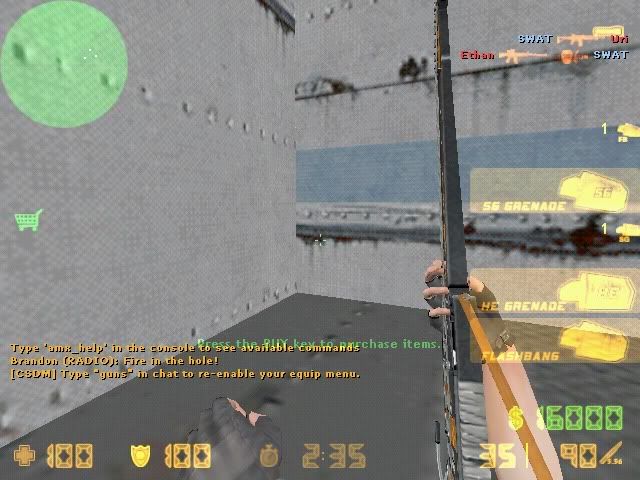
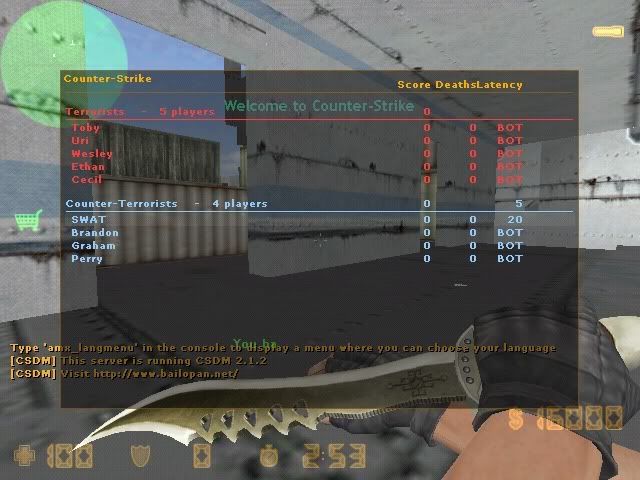
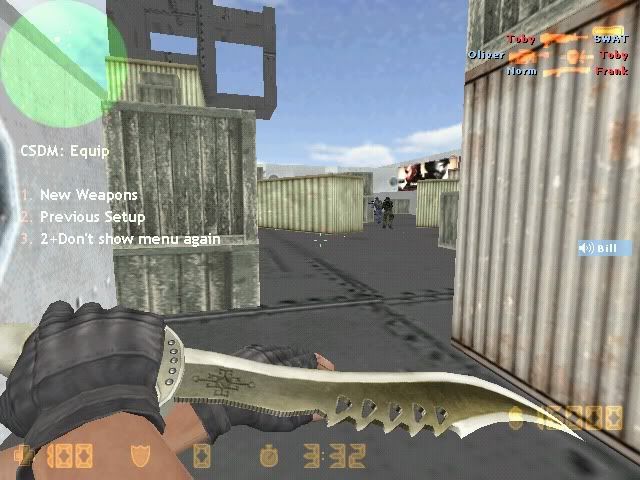
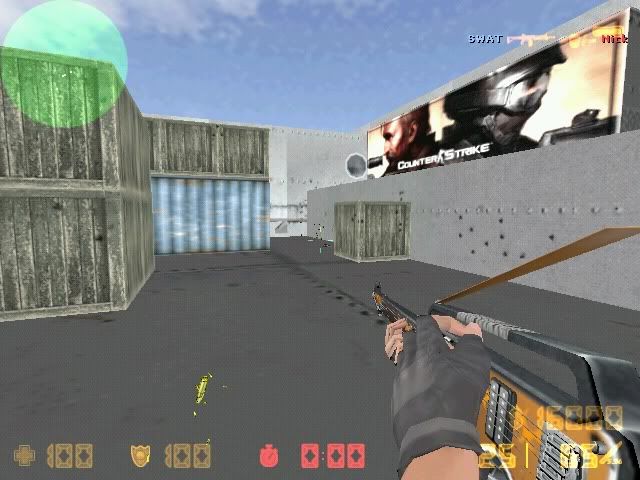
(chậm mất những 10' )Quên mất là cái Counter-Strike 1.6 DigitalZone v40 trong topic download cũng chạy chung với plugin mà ko bị mất bot đấy.
Nhân dịp năm mới, đây là hình chơi deathmatch với bot trong tàu chở hành

- 30/3/09
- 4,067
- 130
- Thread starter
- #109
@G4Ugroup-map: gửi file .map rồi đó
---------------
Thông báo với anh em:
Source của map "Tàu chở hàng" đã được Okokoloko gửi cho nhóm G4U. Nhóm G4U toàn quyền sử dụng và chỉnh sửa map này mà không cần hỏi ý kiến tác giả.
Okokoloko tuyên bố hết trách nhiệm với map "Tàu chở hàng".
Những phiên bản tiếp theo của map này sẽ do G4Ugroup phụ trách.
Cảm ơn các bạn đã ủng hộ trong thời gian beta.
Mong các bạn tiếp tục ủng hộ G4U hoàn thiện map này và các dự án khác của nhóm
hehe
-----------
edit: @G4Ugroup-map tiếp tục viết bài không dấu sẽ lãnh thêm sẹo nữa nhé!
---------------
Thông báo với anh em:
Source của map "Tàu chở hàng" đã được Okokoloko gửi cho nhóm G4U. Nhóm G4U toàn quyền sử dụng và chỉnh sửa map này mà không cần hỏi ý kiến tác giả.
Okokoloko tuyên bố hết trách nhiệm với map "Tàu chở hàng".
Những phiên bản tiếp theo của map này sẽ do G4Ugroup phụ trách.
Cảm ơn các bạn đã ủng hộ trong thời gian beta.
Mong các bạn tiếp tục ủng hộ G4U hoàn thiện map này và các dự án khác của nhóm
hehe
-----------
edit: @G4Ugroup-map tiếp tục viết bài không dấu sẽ lãnh thêm sẹo nữa nhé!

cocalon.cocachai
Mr & Ms Pac-Man
- 28/5/09
- 269
- 2
"XƯỞNG TÀU HỎA" CF cho CS_____
Hình ảnh đầu tiên:
[spoil]

[/spoil]
Map đang trong quá trình dựng khung, nhưng cứ chém gió phát để anh em có thể theo dõi nó từ phôi thai
dự kiến map này sẽ chuẩn, đẹp và tinh tế hơn "Tàu chở hàng" vì được làm dựa vào một số hình ảnh chụp từ CF. Thanks protosscout for his screenshots (nhưng mà ông chụp xấu quá cơ, có một số chỗ phải mò)
Những thông tin tiếp theo về map sẽ được cập nhật trong post này.
[spoil]


[/spoil]
_________________________________________
XƯỞNG TÀU HỎA, verson 1 beta
Một vài hình ảnh:
[spoil]


 [/spoil]
Trailer:
[spoil][video]<object width="425" height="344"><param name="movie" value="http://www.youtube.com/v/dFUydqR_zDo&hl=en_GB&fs=1&"></param><param name="allowFullScreen" value="true"></param><param name="allowscriptaccess" value="always"></param><embed src="http://www.youtube.com/v/dFUydqR_zDo&hl=en_GB&fs=1&" type="application/x-shockwave-flash" allowscriptaccess="always" allowfullscreen="true" width="425" height="344"></embed></object>[/video][/spoil]
Map hiện đang được test bởi: hung_bo21, protosscout, Kyori, theanh21, kobebryant_hp, maxskillzx
Hiện tại chưa phát hiện bug!
_________________________________________
Xưởng tàu hỏa v.2/final
Một số hình ảnh:
[spoil]


 [/spoil]
trailer
[spoil]
[video]<object width="425" height="344"><param name="movie" value="http://www.youtube.com/v/NAbDqkCHILM&hl=en_GB&fs=1&"></param><param name="allowFullScreen" value="true"></param><param name="allowscriptaccess" value="always"></param><embed src="http://www.youtube.com/v/NAbDqkCHILM&hl=en_GB&fs=1&" type="application/x-shockwave-flash" allowscriptaccess="always" allowfullscreen="true" width="425" height="344"></embed></object>[/video][/spoil]
What's new?
[spoil]
1. Fix hết các lỗi (chắc là hết) Chỉnh sửa và thêm một số chi tiết ~> đảm bảo các góc bắn, tỉa nhau.
2. Cho treo lên đường ống và tầng xép được (với 2 người chồng nhau - xem trailer ver.1) ~> cho chơi zombie.
3. Thay toàn bộ texture, sử dụng một số texture CF ~> rất giống
4. Verson 2 là bản final, được share public. Các bạn có thể chia sẻ map này không giới hạn với điều kiện ghi rõ nguồn GameVN. "Xưởng tàu hỏa" là một map Okokoloko rất thích từ hồi mới chơi CF. Map này được Okokoloko dựng tặng cho những người yêu thích CS/CF. Hy vọng các bạn vui vẻ khi chơi trên map được chuyển cho CS này.
5. Các bạn có thể thay texture cho map để giống CF hơn, đẹp hơn... (nếu retexture, các bạn để lại logo GameVn nhé/ cũng để cho tôi "tự sướng" tí ). Bạn nào retexture cho map thì share trong topic này nhé
Chúc các bạn vui vẻ!
[/spoil]
LINK
[spoil]
password:
[/spoil]
_________________________________________
Xưởng tàu hỏa v.3/final
What's new?
[spoil]
-Không có gì mới cả. chỉ là giảm lag cho game. Chạy thử nghiệm trên cùng 1 bản CS cho thấy chơi trên map v.3, game có số fps trung bình gấp 2 lần so với bản trước (v.2). (trên máy của tôi, fps giao động khoảng 40 đến trên dưới 60) [khi chạy trên csdm, xác + súng, lựu, máu me, vết đạn tùm lum]
-Vào chiến đi, các tình yêu!!
[/spoil]
[NOTE: file wad có một chút thay đổi so với bản trước nhé]
LINK
[spoil]
password:
[/spoil]
_________________________________________
Xưởng tàu hỏa v.3/final - MỘT BẢN RETEXTURE
Một bản retexture rất đẹp của oknoproblem.Cảm ơn vì đóng góp của oknoproblem.
[spoil]
LINK
[spoil]
Link uploaded by oknoproblem
Link reuploaded by Okokoloko (nội dung giống link trên, được up lại trên mediafire)
[/spoil]
_________________________________________
Hình ảnh đầu tiên:
[spoil]
[/spoil]
Map đang trong quá trình dựng khung, nhưng cứ chém gió phát để anh em có thể theo dõi nó từ phôi thai
dự kiến map này sẽ chuẩn, đẹp và tinh tế hơn "Tàu chở hàng"
vì được làm dựa vào một số hình ảnh chụp từ CF. Thanks protosscout for his screenshots (nhưng mà ông chụp xấu quá cơ, có một số chỗ phải mò)Những thông tin tiếp theo về map sẽ được cập nhật trong post này.
[spoil]
[/spoil]
_________________________________________
XƯỞNG TÀU HỎA, verson 1 beta
Một vài hình ảnh:
[spoil]
Trailer:
[spoil][video]<object width="425" height="344"><param name="movie" value="http://www.youtube.com/v/dFUydqR_zDo&hl=en_GB&fs=1&"></param><param name="allowFullScreen" value="true"></param><param name="allowscriptaccess" value="always"></param><embed src="http://www.youtube.com/v/dFUydqR_zDo&hl=en_GB&fs=1&" type="application/x-shockwave-flash" allowscriptaccess="always" allowfullscreen="true" width="425" height="344"></embed></object>[/video][/spoil]
Map hiện đang được test bởi: hung_bo21, protosscout, Kyori, theanh21, kobebryant_hp, maxskillzx
Hiện tại chưa phát hiện bug!
_________________________________________
Xưởng tàu hỏa v.2/final
Một số hình ảnh:
[spoil]
trailer
[spoil]
[video]<object width="425" height="344"><param name="movie" value="http://www.youtube.com/v/NAbDqkCHILM&hl=en_GB&fs=1&"></param><param name="allowFullScreen" value="true"></param><param name="allowscriptaccess" value="always"></param><embed src="http://www.youtube.com/v/NAbDqkCHILM&hl=en_GB&fs=1&" type="application/x-shockwave-flash" allowscriptaccess="always" allowfullscreen="true" width="425" height="344"></embed></object>[/video][/spoil]
What's new?
[spoil]
1. Fix hết các lỗi (chắc là hết
) Chỉnh sửa và thêm một số chi tiết ~> đảm bảo các góc bắn, tỉa nhau.2. Cho treo lên đường ống và tầng xép được (với 2 người chồng nhau - xem trailer ver.1) ~> cho chơi zombie.
3. Thay toàn bộ texture, sử dụng một số texture CF ~> rất giống
4. Verson 2 là bản final, được share public. Các bạn có thể chia sẻ map này không giới hạn với điều kiện ghi rõ nguồn GameVN. "Xưởng tàu hỏa" là một map Okokoloko rất thích từ hồi mới chơi CF. Map này được Okokoloko dựng tặng cho những người yêu thích CS/CF. Hy vọng các bạn vui vẻ khi chơi trên map được chuyển cho CS này.
5. Các bạn có thể thay texture cho map để giống CF hơn, đẹp hơn... (nếu retexture, các bạn để lại logo GameVn nhé/ cũng để cho tôi "tự sướng" tí
). Bạn nào retexture cho map thì share trong topic này nhéChúc các bạn vui vẻ!
[/spoil]
LINK
[spoil]
Mã:
http://www.mediafire.com/file/jizzmjytznx/Xuong_tau_hoa_v2_final.oko
Mã:
i_love_okokoloko_________________________________________
Xưởng tàu hỏa v.3/final
What's new?
[spoil]
-Không có gì mới cả
. chỉ là giảm lag cho game. Chạy thử nghiệm trên cùng 1 bản CS cho thấy chơi trên map v.3, game có số fps trung bình gấp 2 lần so với bản trước (v.2). (trên máy của tôi, fps giao động khoảng 40 đến trên dưới 60) [khi chạy trên csdm, xác + súng, lựu, máu me, vết đạn tùm lum]-Vào chiến đi, các tình yêu!!
[/spoil]
[NOTE: file wad có một chút thay đổi so với bản trước nhé]
LINK
[spoil]
Mã:
http://www.mediafire.com/file/zankm0yznmm/Xuong_tau_hoa_v3.oko
Mã:
i_love_okokoloko_________________________________________
Xưởng tàu hỏa v.3/final - MỘT BẢN RETEXTURE
Một bản retexture rất đẹp của oknoproblem.Cảm ơn vì đóng góp của oknoproblem.
[spoil]
[/spoil]Hey. Mình vừa thay các texture của map Xưởng tàu hỏa cho giống với CF. Các bạn xem có được không :).

LINK: ở phía dưới
Sr.mình vào forum lâu rồi nhưng ngại đăng ký tài khoản
Nên mới có vài bài. Các bạn yên tâm không có virut đâu :).
LINK
[spoil]
Link uploaded by oknoproblem
Mã:
http://www.megaupload.com/?d=OM1416VL

pass unrar:i_love_okokoloko
Link reuploaded by Okokoloko (nội dung giống link trên, được up lại trên mediafire)
Mã:
http://www.mediafire.com/?nzxmmmuanrn

Note:đổi đuôi oko thành đuôi rar, giải nén với password: i_love_okokoloko_________________________________________
Last edited by a moderator:
- 19/8/06
- 3,397
- 1,215
Sorry nha, chụp vội ấy mà . Thực ra cái xưởng tầu hỏa này địa hình 2 bên như nhau, chả khác gì mấy cả 
Giờ cũng đang đọc mấy cái tutorial làm map để nghịch cùng
. Thực ra cái xưởng tầu hỏa này địa hình 2 bên như nhau, chả khác gì mấy cả Giờ cũng đang đọc mấy cái tutorial làm map để nghịch cùng

- 28/12/09
- 1,077
- 3
creat halp map then kick and choose all then copy and pree ctrl I and ctrl L ! Ok
Can you test map Nga Tu Tu Than? PM To Me.
Sorry for write by English.
Thank for oko because send file.map to g4ugroup. I will finish this map.
English can not write all. sorry all you
Can you test map Nga Tu Tu Than? PM To Me.
Sorry for write by English.
Thank for oko because send file.map to g4ugroup. I will finish this map.
English can not write all. sorry all you
- 19/8/06
- 3,397
- 1,215
Correct lỗi cho hung_bo: Test chứ ko phải Text
And, can you give me the map Nga Tu Tu Than (Crossroad in English) to test too?
And, can you give me the map Nga Tu Tu Than (Crossroad in English) to test too?
- 28/12/09
- 1,077
- 3
Can you make water on map?
My map(NTTT) is not water!
Help me.
My map(NTTT) is not water!
Help me.

hung_bo21
Mario & Luigi
- 16/11/08
- 700
- 0
mapper cần chú ý điều này:
cái này liên quan đến tại sao mấy map của g4u và của okolo lại bị tụt fps so với các map defaut hay các map trện banana
Mã:
What are r_speeds?
R_speeds are a measure of how fast the engine is rendering the game, and how much it's having to render. They are named for the console variable that you set to see them: r_speeds. Set r_speeds to 1 to see them. In English, type r_speeds 1 at the console. If you can't access the console, see this article for instructions. You will see some numbers in the top left of your screen.
The first one from the left will have "fps" after it. This is your frames per second, or how many times the engine is drawing the game to your screen every second. The higher this number, the better.
[SIZE="4"][COLOR="Blue"]The second number is the texture load time. [/COLOR][/SIZE]If this number is high, you are probably getting bad FPS.
The third number from the left is your w_poly. This is how many world polygons the game is displaying right now. This includes world brushes and brush based entities. The lower this number, the better. Your FPS will be higher (better) if this number is lower.
The last number is your e_polys; this is how many polygons you have from point based entities, or models like monster or weapons.
W_polys should be kept below 800, which is the maximum that software mode can render. For muliplayer maps, try to keep it under 600, just for the sake of playability. For an overview of common ways to reduce your r_speeds, see this article.
- 30/3/09
- 4,067
- 130
- Thread starter
- #120
Chuyện.. lần này làm cho thật giông
nhưng sẽ để nguyên texture, vụ retexute nhờ kyori
hình ảnh mới nhất:làm thật giống luôn (vì còn là dựng khung nên tạm để texture cùi đó thôi lúc retext nó sẽ có bộ mặt mới
ai chụp dùm thêm mấy hình bên cánh phải khi đi khỏi nhà spawn
+bro nào muốn test beta thì báo nhé!
nhưng sẽ để nguyên texture, vụ retexute nhờ kyori
hình ảnh mới nhất:làm thật giống luôn (vì còn là dựng khung nên tạm để texture cùi đó thôi
lúc retext nó sẽ có bộ mặt mới
ai chụp dùm thêm mấy hình bên cánh phải khi đi khỏi nhà spawn
+bro nào muốn test beta thì báo nhé!
Similar threads

- Trả lời
- 3
- Đọc
- 636


- Trả lời
- 0
- Đọc
- 513
- Trả lời
- 0
- Đọc
- 64
- Trả lời
- 0
- Đọc
- 235