I.
THIS IS FOR WINDOWS XP IM NOT SURE HOW THIS WILL WORK ON ANY OTHER OS
First you will need the files
REMOTEJOY LITE 0.19 (now with 64bit drivers)
After the download is done extract it (extract it to a new folder to keep everything neat) if you did put it in a new folder all the files will be in that folder you will see these files after the extraction "libusb0.dll, RemoteJoyLite.exe, RemoteJoyLite.prx, RemoteJoyLite_en.exe, psp.inf, & RemoteJoyLite.prx
now you will need your psp
put your psp in usb mode & open your seplugins folder place the RemoteJoyLite.prx in the seplugins folder then open your vsh.txt (both are located in the seplugin folder) and write this line "ms0:/seplugins/RemoteJoyLite.prx" & do the same to the game.txt (no spaces in it also don't put the quotes)
NOTE: if you dont have a vsh.txt or game.txt just make a normal text file name it game or vsh and place it in the seplugins folder
now turn off your psp all of the way & enter recovery by holding R when turning on the system & enable remotejoy for vsh or game after one is enabled turn on your psp & connect usb you should see a install wizard saying new hardware was found (PSP TYPE B)
NOTE:if you enable the game.txt version you wont see the wizard unless you enter a game
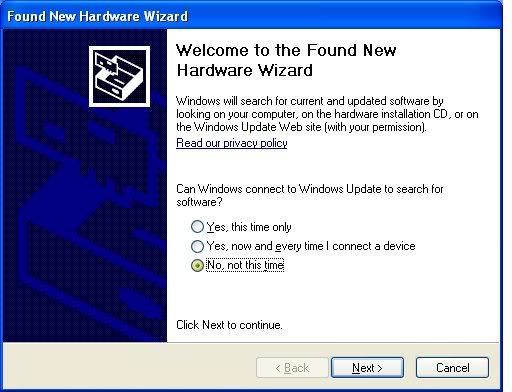
when the wizard comes up you should see a window like this
choose "No, not this time" and click next
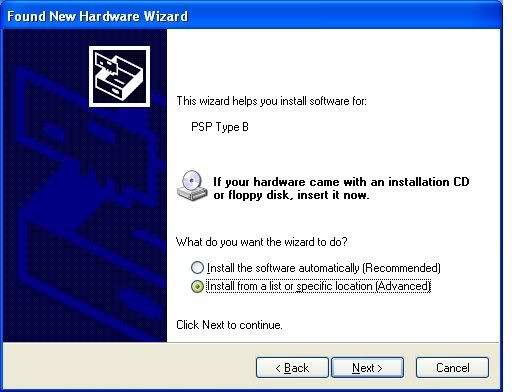
now you shold see a window like this
choose "install from a list or specific location" then click next
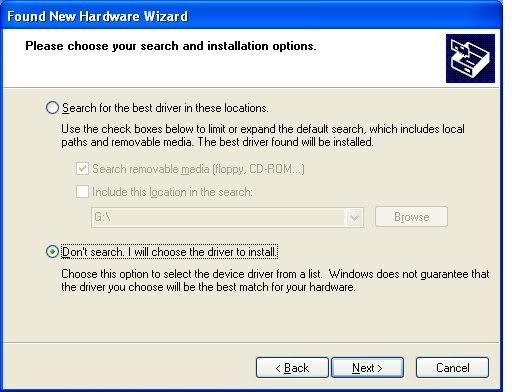
the next window should look like this
choose "don't search i will choose the driver to install" then next
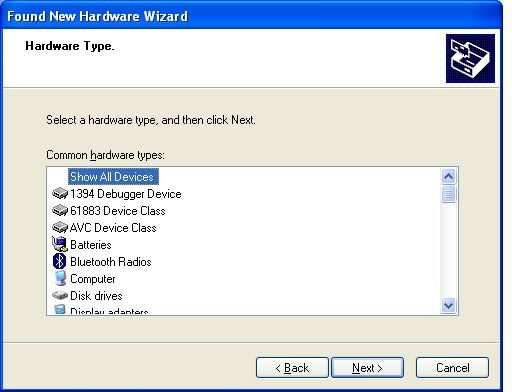
now on the next window
highlight "show all devices" then next
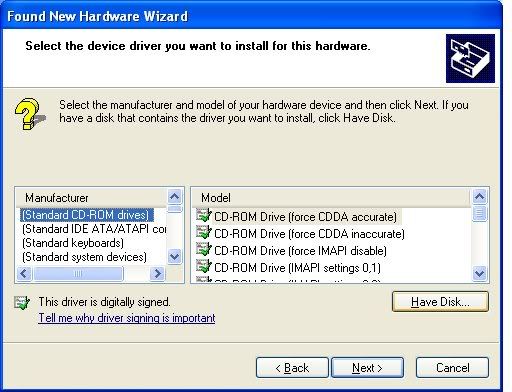
on this window
ignore everything & click "have disk"
after you click have disk this is the window you should be on
click browse in the window that came up browse to the folder you extracted the files to & choose the psp.inf file
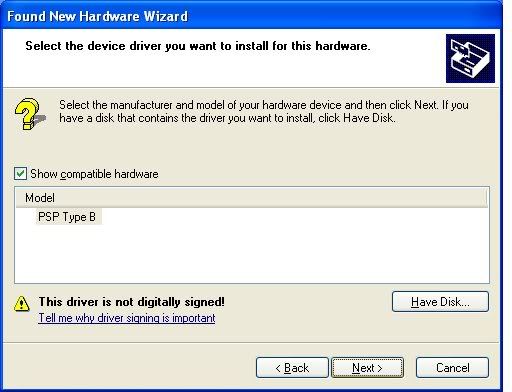
after that this window should show up
highlight "PSP TYPE B" then click next
you should be done have fun (custom firmware is needed for this also make sure that you have directx9 and direct3D on your pc)
II.
this part will be on what settings i think are the best for recording
when you open remotejoy right click on the screen of the window to bring up the settings and go to the capture tab check the enable AVI capture change the bar under the box to 10FPS
(that's the best setting to me but you may choose what you like)
now Enable WAV capture then go and click the codec button change the box under the word Compressor to Full Frames (uncompressed) this gave me a really good picture but it makes the file really large click ok after thats done click save to save the settings
after you have the settings you like you can start recording by pressing F12 also if you press F11 you can take a snapshot of the screen
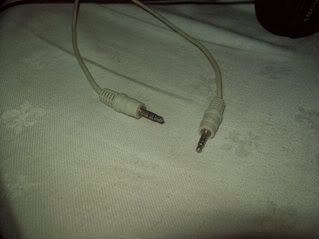
to record sound you will need a wire that goes from the psp's headphone jack to the computers line in jack here is a picture of the one that i use
also you may get some sounds that doesn't come from the psp and can mess with the recoding of the sound you can fix this by opening the speaker settings on your pc and under the wave setting check mute under wave
(don't forget to uncheck after its done recoding or you wont hear anything)
III.
now this part will be on how to get remotejoy working with ps1/psx games
to get remotejoy working with ps1/psx games make a pops.txt in the seplugins folder and add these lines flash0:/kd/usb.prx and ms0:/seplugins/RemoteJoyLite.prx if you have one already just add them to the one that is in your seplugins folder
NOTE:you will need popsloader for some ps1 games to work correctly
you can find it here popsloader also you might want to check this thread out Rain's PlayStation One on PSP SuperGuide
now that you put those lines in the pops.txt go to recovery and enable them and it should work now have fun
IV.
this part will be on how to uninstall remotejoy lite
connect your psp to usb with remotejoy enabled go to device manager you should see LibUSB-win32 devices and within that is psp type b right click on the psp type b then click uninstall it should be off of your pc now



 > Nghe miêu tả có vẻ giống cái của em