ductrung1906
Youtube Master Race
- 23/5/09
- 24
- 0
Sr vì đã post bài ở đây nhưng bí quá nen đành fai? hỏi.hic.có bác nào có hướng dẫn cài HB xem web tiếng việt đc ko?cảm ơn nhiều nha.


Follow along with the video below to see how to install our site as a web app on your home screen.
Note: This feature may not be available in some browsers.
Tắt thông báo bằng nút X bên góc phải của bảng thông báo*


[PSP-Hacks Homebrew Idol 2]
Battlegrounds 3 - v0.4
by Xfacter
[About]
BG3 is a hovertank deathmatch game. Using a variety of weapons, defeat your opponents to bring glory to your homeland.
[Controls]
Movement - TRIANGLE, CIRCLE, CROSS, SQUARE
Look - Analog Nub
Change Weapon - D-Pad Left/Right
Fire - Right Trigger
(Note: Change look inversion and analog deadzone in the config.ini file)
[Gameplay]
There are a range of weapons in BG3 with varying levels of effectiveness. In order to defeat an enemy you must deplete his shields and armor.
The machine gun is a good all-around weapon. The laser is effective against shields. The tank shells are effective against armor.
The missiles are better all-around weapons.
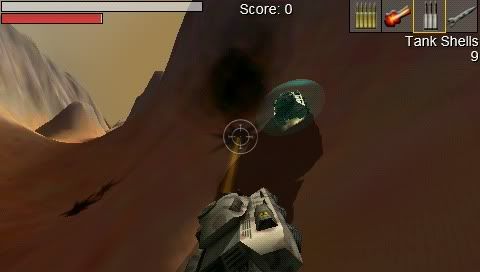
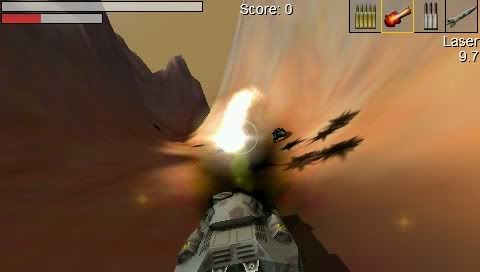
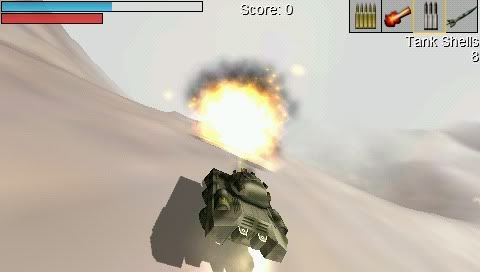
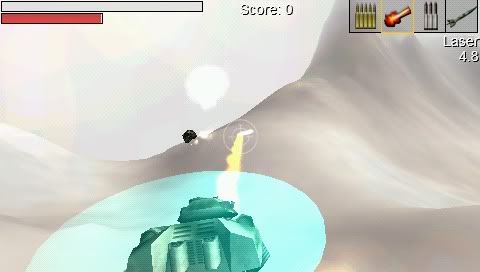
Features
* Chase camera - The default camera view is from behind the helicopter, rather than from isometrically above. The original (retro) camera view can be selected from the controls screen.
* Player profiles - Player names and data can now be saved to a database.
* Enhanced particle effects -ÊThese are used for missile impacts and bullet to ground impacts.
* Airstrike! - An A-10 Thunderbolt II can be called using L+R trigger. Includes audio.
* New Apache model.
* Ingame messages can be printed to the HUD.
* Briefing screens - To add meaing to the madness, there are short mission descriptions for each mission (excludes Instant Action).
* Three new missions.
* Friendly tanks.
* Player Statistics - Mission data is saved to a player's profile. This includes flight time, accuracy, deaths etc.
* Post mission score board -ÊThe score board summarises statistical data of a just completed/failed mission.
* New Ammo and Health display on the HUD.
* The player helicopter can start some missions airborne.
* New factory building.
* Existing buildings have been scaled more accurately.
* Tweaked existing missions so that the player is less likely to be overwhelmed.
Under the Hood (for your interest)
* Particle Engine, Terrain and rendering optimisations.
* Splash Screen fixes.
* You can now shoot through destroyed buildings so that units inside them can be hit.
* Using the sqlite database for player data.
Known Issues
* Sometimes there is incorrect textures loaded (very elusive).
* Three Player Profile limit.
* High memory usage. Beware of too many PSP background processes.
* Suspend mode not supported.
* There is a delay between the mission being won/lost and the scoreboard being visible. This is because of the time taken to write data to the database.
* Slow load times; about 8 seconds (minus Sony logo).
* Some instances of near plane clipping of the terrain resulting in small amounts of unrenedered terrain.


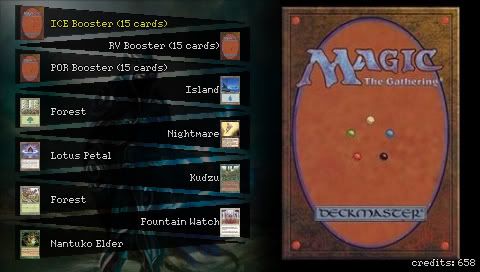
Wagic is an heroic-fantasy collectible card game for your PSP, in which you battle with your creatures against the CPU. It is based on the rules of a famous card game. A nice credits system allows you to improve your army as you win battles. The game features a cool deck editor, extra modes to unlock (such as Momir Basic), and allows you to create your own cards with a simple text editor. Wagic made it to the top 10 of this year’s Neoflash spring competition, and each new release is extremely well received by international PSP sites. Thanks to the community, you can play with completely original cards from Final Fantasy, Naruto… (even wrestling superstars!). This gives the game a high replay value (close to what commercial games can give you), and once you get hooked, you will spend hours on Wagic!
Light Cycle 3D
by SG57
This is a PSP clone of a Tron Light Cycle racing game. Objective of the game is to make your enemies collide with the trail you leave behind you as you speed along the grid in cyber space.
Features:
- Variety of different skins from a Default black grid in cyber space to the classic environment from the Movie to a more 21st century-esque metal arena.
- Variable number of enemies; go 1v1 or All v All with 4 speeding cycles in one cramped arena - good luck heh..
- Variable speed allowing for greater or lesser difficulty (and chaos)
- Custom paint jobs on your light cycle with 5 customizable components of your cycle; Hull, Window, Rims, Top and Chassis
- Custom MP3 Playback support; PSP/MUSIC and /MUSIC directories supported, 1 level of sub-folders as well
Controls:
~-~Main Menu~-~
D-pad - select option
X - select
O - back/cancel
L/R Trigger - Cycle through Mp3s
~-~Customization~-~
Up/down - pick R, G or B values to edit
Left/Right - chance current component color you're editing
X - save
O - go back
~-~In Game~-~
Left/Right - turn
X - Play again (at screen)
O - back to main menu (at screen)
L / R / L+R Trigger - Look left, right or behind (if you're dead you change the camera's target)
Start - Pause
~-~Pause Menu~-~
Start- unpause
L / R Trigger - cycle through your music


cho mình xin HB ảnh màn hình cả ở ngoài lẫn trong game cái ở trang đầu thì lúc vào game ấn nút music không chụp được

- Change the speed of the PSP CPU/FSB while under the VSH (PSP Menu) or in-game (Umd/Iso/Homebrews) from the cfe menu or with a quick combo key.
- Change the brightness of the PSP while under the VSH or in-game from the cfe menu or with a quick combo key.
- Take some screenshot while under the VSH or in-game from the cfe menu or with a quick combo key.
- Load some PRX plugins while under the VSH or in-game from the cfe menu. Note that on slim PSP, they are loaded in the extra slim memory, so you should be able to load more plugins than you usally can.
- Start and stop USB under the VSH or in-game from the cfe menu.
- Play your Umd/Iso/Homebrews on your PC screen and make some in-game videos with the help of remotejoyLite from Akind, based on Tyranid work.
- Stream/play Iso/Homebrews hosted on your computer via USB (based on HostCore by Poison).
- Reset and Power off the PSP while under the VSH or in-game.
- Listen custom music (mp3, at3, oma, omg and aa3) while under the VSH or in-game, based on music.prx by joek2100. Note that if you have some subfolders under an album folder, files won't be found for now.
- "Time Machine" feature, you can reboot to any TM compatible firmwares, they are automatically detected by cfe 3.0. Note that you must configure each TM firmware to load CFE under the VSH to be able to easly reboot to your original firmware. There is already a sample configuration under the TM folder in this archive. If you encounter some problem's to go back to your original firmware, connect to your PSP via USB, go to the "TM" folder and replace "config.txt" with "config.txt.back" to restore your original configuration.
- Change/mute volume of each music channel's of the psp.
- Grab some informations about the PSP memory (Usefull to know how much space a prx plugin require) and battery.
- Set a default CPU/BUS speed at startup.
- Set a default brightness level at startup.
- Configure all the buttons/settings from the cfe menu.
- Removed the USB autostart feature since the 5.00 fw include a similar function.
- Fixed a bug that prevented the auto-sleep and backlight auto-off features to work.
- Combo button's are back (change the cpu/brightness, take screenshots with a quick combo key).
- Fully configurable via the menu, changes can be saved. Note that there is now a different configuration file for game and vsh modes.
- Usb streaming recoded, based on the great work of Poison (hostcore). PC hard drive is redirected to the PSP, alowing streaming of homebrews, music, videos, and isos in any mode (sony, m33, umd..). Just select "Remap usb to ms" in the menu then browse your games like you usally do.
- Music player improved, can now be completly stopped from the menu, and/or properly restarted with another music directory source.
- PSP phat compatibility added, but in-game music player is removed for now (not tested).
- Gui colors configurable via the configuration files ("game.cfg" and "vsh.cfg") in ABGR hex format.
- Added the possibility to prevent the plugin to be loaded (hold L trigger) while starting a game, or load the light version of cfe (hold R trigger) so extra slim memory is not used, preventing some plugins (pspstates) to not work.

cho tớ xin cái hb nào cho psp tính toán giống máy tính điện tử đi


It's a normal top view paintball game. The 2 players shoot at each other. Each hit can equal 1 or 2 points. That depends if you got a good hit on the other player. Once someone gets to 10 then the game is over.
Here is the changelog:
*Game Menus:
~Main Menu
~Map Selection Menu
~End Of The Game Menu
*5 Maps In Total
~The old one
~4 New
*New GFX
~Eboot Icon
~Eboot Background
~Player Models With Transperency
~Maps
*Compatible With Both PSP Phat & PSP Slim
*Readme & Changelog files are now included
*Some Bug Fixes
*Loading is now functional

Alex the Allegator 4 is a true jump'n'run, just like the old classic ones. Guide Alex through the jungle in order to save his girlfriend Lola from evil humans who want to make a bag of her.
Read the readme_psp.txt for installation notes and button configuration.
Alex the Allegator 4 PSP comes with an extra menu for choosing custom level packs, read readme_psp.txt on how to install new custom packs (there are already four custom packs included).
đã test thừ home brew này tren win vista, cực kỳ ổn định và dễ sử dụng, cảm giác thật sướng, đã test cả việc kết nối qua wifi, rất tốt trời ơi thật là sung sướngCác bạn nghĩ sao khi RemoteJoyLite cho phép xuất màn hình psp lên màn hình PC thông qua cáp usb.. Ôi thật tuyệt..
Nhưng các bạn có bao giờ nghĩ đến việc xuất màn hình PC lên màn hình psp không?
PSPdisp sẽ giúp các bạn thực hiện điều đó..
Download PSPdisp tại đây: (bản cài đặt cho PC)
http://www.jjs.at/software/PSPdisp_v0.2_setup_all_platforms.exe
Và đây là video hướng dẫn cài đặt cho WinXP
http://www.youtube.com/watch?v=25LkVjzy6_E&fmt=18
Chi tiết thêm về PM này.. mình đã test và dùng rất nuột trên WinXp.. Win7 thì thiếu chức năng làm màn hình phụ.. còn Vista xin phép chưa test vì không xài vista
Với PM này bạn có thể sử dụng PSP làm một màn hình phụ hoặc xuất hình PC lên PSP thông qua cáp usb hoặc Wirelan (mình chưa có AS router nên không test được).. Ngoài ra còn có thể điều khiển chuột bằng PSP.. so cool.. :-* xoay xoay cái analog thấy con chuột nó chạy hay lắm.. (phải đánh dấu cái "mouse emulation" trong phần Control nhá)
Thêm cái pic cho nó hoành tráng.. Win7 nha :) Vẫn xuất hình được nhưng không cài được driver để làm màn hình phụ..

.
___________Auto Merge________________
.
P/s: nút vuông là chuột phải, nút x là chuột trái, L cuộn lên, R cuộn xuống.. các bác cứ thử nha.. theo giới thiệu thì có thể chơi được cả diablo đấy..
.
___________Auto Merge________________
.
Ax.. sao không thấy nút edit bài viết đâu thế này.. diễn đàn gì kỳ cục..
Sr mem cái đoạn bên trên là do lỗi kỹ thuật nha.. ai chỉ cho mình cách edit bài viết với..
Custom Firmware Extender 3.1
vì mình thấy cái này rối quá
Ngoài cái này ra còn HB nào chỉ chuyên môn hóa 1 nhiệm vụ là chụp ảnh màn hình ko vậy
Fw mấy cậu mà 5.00m33 trở lên thì dơn cái pack này của mình về nè:
Link Download: http://www.mediafire.com/?ijmyhjzytjx Pass: karjn
Down về coppy thư mục seplugins vào thẻ nhớ, sau đó vào R-Mode enable cả lên là sẽ chụp hình đc
Bấm nút hình nốt nhạc để chụp, chụp đc cả trong game lẫn ở ngoài màn hình thông thường

đã test thừ home brew này tren win vista, cực kỳ ổn định và dễ sử dụng, cảm giác thật sướng, đã test cả việc kết nối qua wifi, rất tốt trời ơi thật là sung sướng
.
___________Auto Merge________________
.
ah quên mình còn dùng psp 3k nữa chứ, fw gen a
Brick’s PSPMarble is another example of some top-notch ‘brew… It somewhat reminds me of Mark Cerny’s Marble Madness. Carefully guide your marble through the various physics-based 3D environments and rack them points up to achieve the highest possible score.

Highlighted features:
* Uses a heavily modified version of LTE.
* Physics based game play.
* Physics modifiers (platforms/jump pads).
* Stacked events (physics animation & sfx events).
* Advanced scene management with ranged triggers/events/geometry culling & light management.
* Dynamic scenes.
* Event driven tutorial mode.
* Dynamic “session caching” system.
* Hi-score system.
* LEVEL EDITOR.
* Comes with 7 levels (6 mods, plus the tutorial).
What's New?
* COMPLETED REQUEST regarding the camera system (wrapping is allowed now). Requested by “the underminer”.
* UPDATED physics module, now marble goes a bit faster, but the controls remain accurate, and they won’t make your life harder with “puzzles”.
* UPDATED stacked particle system for smoother animation.
* UPDATED session cache manager, and now the load times while you switch menu-related session are improved.
* UPDATED an input event in the tutorial mode.
* Plus more not-so-worth to mention.