Security Software - Download here (07/2007-06/2008)

  • Thread starter Thread starter VeryBad
  • Ngày gửi Ngày gửi
Status
Không mở trả lời sau này.
McAfee VirusScan Plus 2008 2.0.155.0
box_mvsf_89x115.gif
AntiVirus, Firewall & AntiSpywareEssential PC Protection

* Cung cấp chế độ bảo vệ máy tính 3 trong 1 trước virus, hacker và spyware giúp bạn lướt web một cách an toàn
* Ngăn chặn các cuộc tấn công đa hướng nhờ những công nghệ diệt virus, tường lửa và diệt spyware tích hợp
* Đơn giản hóa bảo mật với giao diện McAfee SecurityCenter mới và được cải tiến.
* Bảo vệ máy tính của bạn mọi lúc : luôn kích hoạt, luôn cập nhật, luôn bảo vệ.
* Cảnh báo bạn về các trang gửi spam, cài đặt adware, hoặc lừa đảo trực tuyến.
Mã:
  http://myfreefilehosting.com/f/4fbc83e765_71.72MB..
pass:songthaibinh.com
 
PC Tools Internet Security 2008 – All-in-one Protection

screenshotkd1.gif


Download:
Mã:
http://www.pctools.com/mirror/issetup.exe

Free 15 days license codes:
Mã:
http://www.pctools.com/internet-security/trial/
 
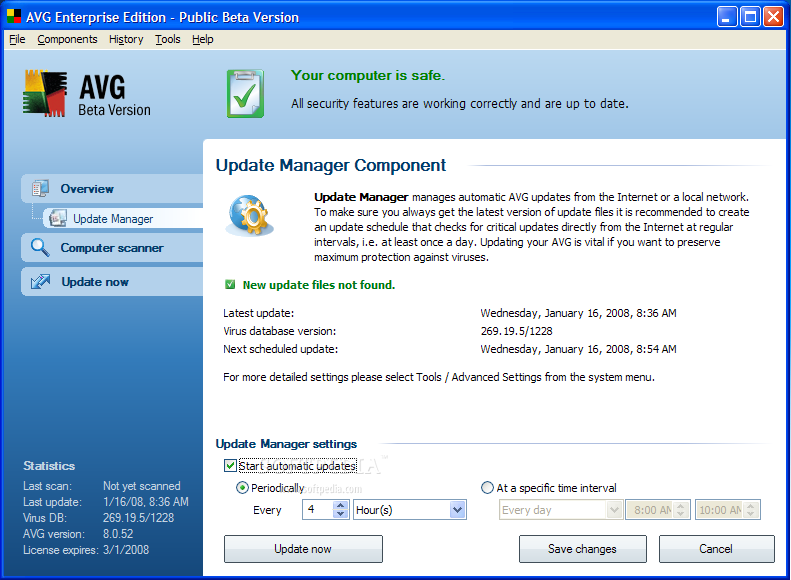
AVG Enterprise Edition 8.0 Build 52 Public Beta 2​
AVG-Enterprise-Edition_1.png

AVG-Enterprise-Edition_9.png
The AVG Enterprise Edition was designed to be an extremely reliable, fast and light on resources, antivirus product.

· Free program and virus updates are provided via ultra reliable Akamai servers. AVG Professional Edition updates itself automatically whenever updates are available. Alternatively you can update manually, or configure AVG Professional to download updates at a scheduled time that suits you.
· Multiple language support in one package. No need to buy a special language version as all languages are included in the one product. A simple click of the mouse and the entire interface (including help files) will instantly change to your required language
· AVG holds the VB100% award and is ICSA certified, so you can be assured of the highest level of antivirus protection.
· AVG Professional Edition has many more features that make it the best value antivirus protection available
· The powerful AVG Resident Shield provides maximum protection by scanning every file opened, executed, or saved. It will also prevent the opening or executing of infected files.
· The AVG Personal E-mail Scanner checks every e-mail sent or received, providing much needed protection from e-mail borne threats. AVG supports all leading e-mail clients including MS Outlook, The bat!, Eudora and all other SMTP/POP3 based email
clients such as Outlook Express. Encrypted connections using SSL are also supported.
· AVG Professional can scan attachments of instant message services (like ICQ, MSN Messenger) for viruses and other threats.
· AVG provides support for the detection of "potentially unwanted programs".
· AVG’s scanning engine uses a unique combination of heuristic analysis and generic detection methods to detect all known viruses.
· The AVG Resident Shield can include/exclude files from scanning based on individual file extensions.
· Automatically attempts to heal/remove infected files and other threats such as trojans, worms, and java applets. Removed files are quarantined in the AVG Virus Vault.
· AVG Professional has flexible password protection so you can select which settings you wish to protect from other users.
· AVG Professional now supports Microsoft Windows 64 bit platforms.
New Components:
· Web shield - web content scanner (HTTP and Instant Messaging)
· Link scanner - Safe Search and Safe Surf (includes Exploit Prevention Labs scanner)
· System tools
· Anti-Rootkit

Scanning engine
· Completely new scanning engine
· Improved detection capabilities
· New, much more effective, heuristic analysis
· Improved performance
· Reduced system requirements

Testing
· Possibility to set scan priority also during testing
· Unified virus and spyware detection

Scheduler
· All scheduled tasks run as SYSTEM
· It is possible to run only one scheduled scan at one time
· Cooperation with power supply facilities
· Improved settings for scheduled tasks

Update
· Program update is separated from virus updates
· Faster reaction to specific threats
· Automatic proxy server detection

GUI
· Simplified, intuitive and effective navigation
· Merged testing and configuration interface

Configuration
· Simple configuration for most users
· Advanced and detailed settings for IT professionals

Other features
· Improved support for scanning exceptions
· Button for direct dispatch of suspicious file for analysis in Virus Vault
· Improved synchronization with Windows startup


Requirements:

· CPU Intel Pentium, 1.2 GHz
· 70 MB free space on HDD
· 256 MB RAM


NOTE: Beta version is not fully supported, it may contain bugs, and be unstable! Backup your data before install any beta version!


WHAT'S NEW IN VERSION 8.0 Build 52 Public Beta 2:

* Added tray notification window.

* Added System Tools.

* Link Scanner (Safe Search a Safe Surf) may be activated/deactivated from AVG GUI.

* Improvements and fixes in GUI.

* Information windows are displayed correctly on the top.

* Overview tab is correctly focused after Update.

* Fixed problem with saving personal email scanner configuration.

* Fixed problem with saving configuration of Additional Scan Reports (in Advanced settings - Scans).

* Fixed problem with blocking of some web pages caused by Web Shield.

* Fixed problems with AVG Firewall Profile switching.

* Changes in AVG Firewall default configuration.

* Information in Scan Results is changed correctly after healing, removing infections.

* It is not possible to remove already removed infections.

* Fixed problem with saving Anti-spam settings.

* Fixed problem with AVG Firewall start up on Windows x64 edition.

* Files are correctly deleted from Virus Vault after restoring.

* Added some missing texts.

* AVG Firewall could be disabled and switched to Emergency mode correctly.

* Fixed problem with assigning profile to adaptor or network area.

* Settings of servers for Personal Email Scanner are correctly accepted.

* Improved Anti-Rootkit detection.

* Improved Web Shield detection possibilities.

* Improved detection of some infections.

* Fixed AVG crashes during scanning.

* Fixed possible crash during closing AVG application.

* Update settings are displayed correctly.

* Tasks scheduled from Advanced Settings are saved correctly.

* Fixed problem with entering blank password in a dialog during scanning password protected archives.

* Correct Date of storage is displayed for files moved to Virus Vault.

* 'Empty Vault' button has been added into Virus Vault.

* Fixed computer freezing caused by AVG Firewall.

* Fixed crash during AVG Firewall component reinstallation.

* Improvements in Update process.

* Fixed blocked network connection after Update if AVG Firewall installed.

* Fixed automatic and manual proxy server settings.

* Fixed applications rules storing in AVG Firewall.

* Fixed problem with AVG Firewall configuration modification.

* Information on update process is displayed correctly.

* Fixed problem with healing files under some conditions.

* Fixed crash during update process.

* Fixed crash caused by Personal Email Scanner.

* Manually set Personal Email Scanner servers work correctly.

* Fixed problem with sudden AVG Firewall deactivation.

* Added settings for Potential Unwanted Programs exceptions.

* It is possible to set ports which are scanned by Web shield.


!~!~!~!~!~!~!~!~!~!~!~!~!~!~!~!~!~!~!~!~!~!~!~!~!~ !~!
Developer: Grisoft
License: Trial
Size / OS: 46 MB, Windows 2K/XP/2003/Vista/XP X64
!~!~!~!~!~!~!~!~!~!~!~!~!~!~!~!~!~!~!~!~!~!~!~!~!~ !~!
Mã:
 v8.0 Build 52 Public Beta 2 (Trial)
http://download1us.softpedia.com/dl/8301ebbc60fbab71cba59c61a2c45c7f/478f6e7a/100091833/software/antivirus/avg80f_52a1239.exe
Or
Mã:
http://download.softpedia.ro/dl/3b65c10158da05bd39e348ba2a25d827/478f6e7a/100091833/software/ANTIVIRUS/avg80f_52a1239.exe
-_-,giao diện đẹp quá :'>
 
PANDA.Antivirus.v2008.Retail.READ.NFO-TFT​
And here comes another antivirus application with funny name - PANDA Antivirus.
I didn’t try it, so i don’t know how is compared to other antivir products, but according to screenshot looks good.

Description:

The new Panda Antivirus 2008 is the easiest-to-use protection for your computer.
Just install it and forget about all viruses, spyware and online fraud. And you hardly have to lift a finger,
so you can chat, share photos and videos with friends, read your favorite blogs or simply surf the Web,
with complete peace of mind. And it’s so light, you won’t even notice it.

Includes:

Antivirus
AntiSpyware
AntiPhishing
AntiRootkit
TotalScan Pro
B73DDB29.png
Mã:
http://rapidshare.com/files/84739919/PANDA.Antivirus.v2008.Retail.READ.NFO-TFT.rar
Or
Mã:
http://dl.phazeddl.com/1078650/PANDA_Antivirus_v2008_Retail/LatestDown.Com
RarPass: softbase.info


or

http://dl.phazeddl.com/1078650/PANDA_Antivirus_v2008_Retail/LatestDown.Com
RarPass: softbase.info


or

http://dl.phazeddl.com/1078650/PANDA_Antivirus_v2008_Retail/LatestDown.Com
RarPass: softbase.info
Mã:
For Activation/Update Serial use: GGRAQ5-28583179
 
Kaspersky Internet Security 8.0.0.188 Beta
Mã:
Download Kaspersky Internet Security 8 Beta:
http://downloads1.kaspersky-labs.com/devbuilds/8.0.0.188/English/2008_01_18_18_38/kis.en.msi
Mã:
Registration:
http://downloads1.kaspersky-labs.com/devbuilds/8.0.0.188/kis8_beta_02a8fa48.key
 
Kaspersky Internet Security 7.0.0.125 + Lifetime Keys
Kaspersky® Internet Security 7.0 is a fully integrated solution that protects your computer from all of the most common Internet threats, including viruses, hacker attacks, adware, spam and spyware.
Today, threats to PCs are appearing in ever-greater numbers and diversity. Cyber criminals on the Internet are well organized and tend to target PCs with combined threats. A standalone antivirus solution is no longer enough to fully protect your PC. Kaspersky Internet Security combines reactive detection methods with the latest proactive technologies, protecting your PC from viruses, hacker attacks, spam and spyware. Seamless integration of all product components eliminates system conflicts and provides fast performance.
DOWNLOAD & Huge Collection with working keys (till 2010)
Mã:
http://rapidshare.com/files/52351380/KIS7E_www.kwarez.net.rar
 
Tổng hợp key cho KIS & KAV 7-20/1​
Mã:
Mới kiếm được đống này.Dùng tẹt ga:
Download:
http://www.mediafire.com/?9znm431fzwm
PASS IF NEED:megasharesvn.com
:'>
 
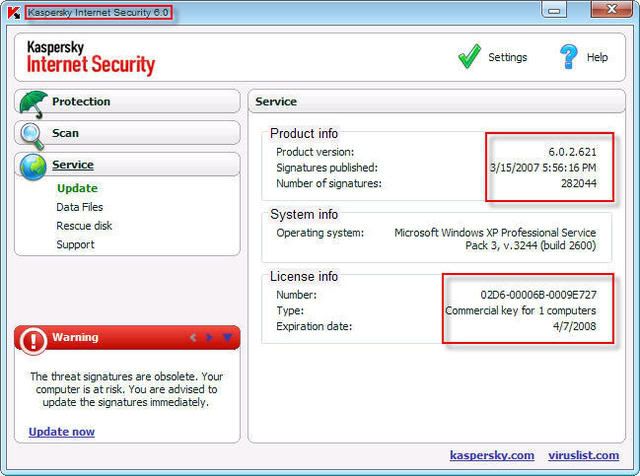
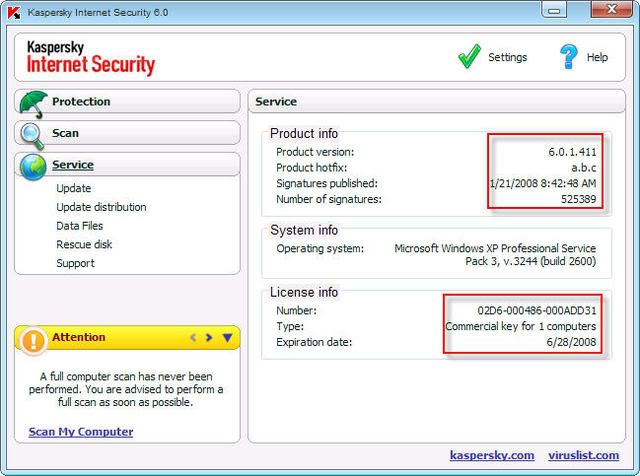
Cái key này có thời hạn đến 7.4.2008 , chưa blacklist , điều đặc biệt là nó có thể active cho các bản kaspersky sau:
Kav và Kis 6.0.1.411
Kav và Kis 6.0.2.614
Kav và Kis 6.0.2.621
Thật ngạc nhiên phải không các bạn.!!!
(Tui đã test với các bản Kav & Kis 6.0.1.411 và 6.0.2.621 . Các bạn thử coi !)
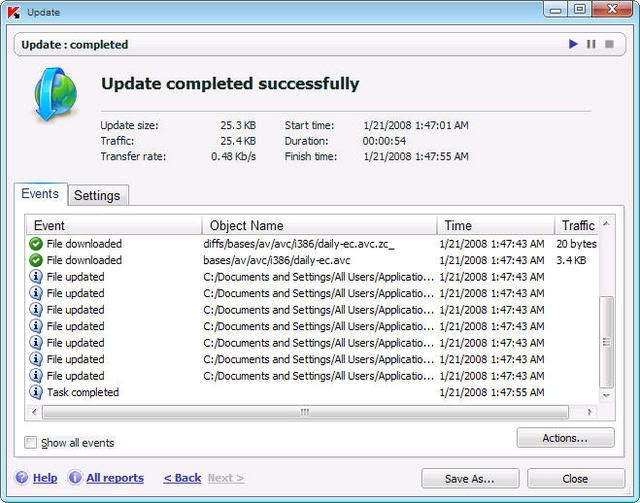
kis1.jpg

kis2.jpg
Mã:
http://www.zshare.net/download/67110426b9195f/
kis.jpg
Mã:
http://www.zshare.net/download/6724386534765b/
http://www.zshare.net/download/6724724082a162/
http://www.zshare.net/download/67248305e143e1/
thích chọn cái nào thì chọn :'>
 
Clamwin 0.92 - Antivirus mã nguồn mở​
ClamWin là chương trình chống virus miễn phí cho Microsoft Windows 98/Me/2000/XP/2003. Nó cung cấp một giao diện người dùng đồ hoạ. Tính năng giao diện dòng lệnh cho việc quét file, cập nhật nhận biết virus, và tốc độ qút nhanh hơn cần cho hệ thống hiệu năng cao.

ClamWin Free Antivirus For Windows hoàn toàn miễn phí và gói phần mềm chống virus nguồn mở. Nó sử dụng GNU General Public License bởi Free Software Foundation.

Tính năng của ClamWin Free Antivirus:
- Tỉ lệ nhận biết virus và phần mềm gián điệpcao;
- Lập lịch quét;
- Tự tải về cập nhật của Virus Database. ClamAV cập nhật đều đặn Virus Databases bao gồm virus và biến mới ngay sau khi nó xuất hiện;
- Trình quét virus chạy độc lập;
- Menu chuột phải tích hợp trong Microsoft Windows Explorer;
- Addin cho Microsoft Outlook để loại bỏ việc gắn kèm file nhiễm virus tự động. Hỗ trợ dững sẵn cho mbox, Maildir và file raw mail
- Hỗ trợ sẵn RAR (2.0), Zip, Gzip, Bzip2, Tar, MS OLE2, MS Cabinet files, MS CHM (Compressed HTML), MS SZDD
- Hỗ trợ sẵn cho file nén thực thi với UPX, FSG, và Petite
Mã:
http://uploadcool.com/download.php?file=13210b8710a957d41d61e65371d22ba5
 
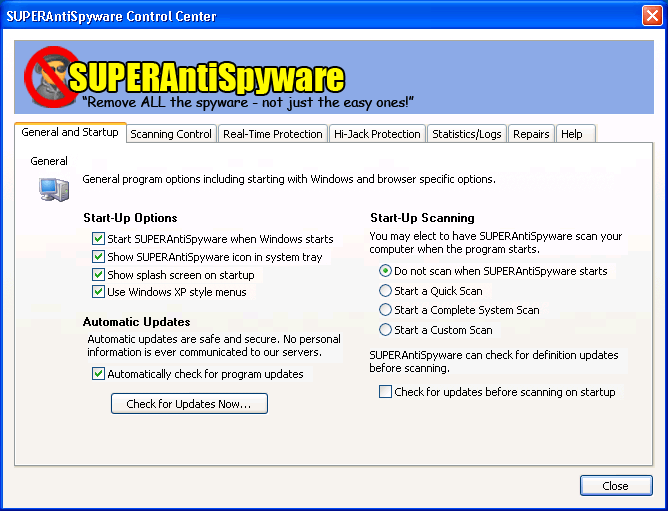
[Free] SUPERAntiSpyware 4.0.1106
IMGSASGeneralFull.gif
SUPERAntiSpyware là chương trình quét Spyware kỹ lưỡng nhất trên thị trường hiện nay với công nghệ quét đa chiều Multi-Dimensional Scanning và công nghệ Process Interrogation sẽ phát hiện được mọi spyware mà các phần mềm cùng loại cố tình bỏ qua.

Dẽ dàng loại bỏ hơn 100,000 loại gián điệp cỡ như SmitFraud, Vundo, WinFixer, SpyAxe, SpyFalcon, và còn hơn thế nữa.
Mã:
http://uploadcool.com/download.php?file=076c49fe326267a2421c9788ce6f2482
 
ALWIL avast! antivirus v4.7 Home-Professional + keygen
869wsgo.jpg
Description:

avast! 4 Professional Edition is a collection of award winning, high-end technologies that work in perfect synergy, having one common goal: to protect your system and valuable data against computer viruses. It represents a best-in-class solution for any Windows-based workstation.

DOWNLOAD:
Mã:
http://rapidshare.com/files/85871756/avst_aa4.7_hpro_kgn__.rar
 
Dr.Web 4.44.1.01210 for Windows​
713f610300f9ff2d2c6ac0d8350dc1b6_fu.jpg
Mã:
Phần mềm Dr. Web là phần mềm miễn phí antivirus, anti malware của Dr. Web. Nó có thể loại bỏ các virus, trojans, spyware và các trình malware khác bằng antivirus engine của Dr. Web.

Không cần phải cài đặt, do đó khi cần thiết thì bạn download về và quét mà không phải vấn đề xung đột với trình antivirus đang cài trên máy của bạn (nếu có). Đồng thời, bạn cũng có thể chép nó vào USB flash của bạn luôn mang theo trên người như một trình quét virus khẩn cấp cho những máy tính khác trong công việc của bạn.
Mã:
http://download.drweb.com/files/windows/drweb-444-win-as-en.exe
Mã:
Key
http://www.box.net/shared/bimo1nsow4
 
Comodo Memory Firewall 2.0.4.20​
973257d057.gif
Comodo Memory Firewall is a buffer overflow detection and prevention tool which provides the ultimate defence against one of the most serious and common attack types on the Internet - the buffer overflow attack.

Comodo Memory Firewall protects against data theft, computer crashes and system damage by preventing most types of buffer overflow attacks. This type of attack occurs when a malicious program or script deliberately sends more data to its memory buffer than the buffer can handle. It is at this point that a successful attack can create a back door to the system though which a hacker can gain access. The goal of most attacks is to install malware onto the compromised PC whereby the hacker can reformat the hard drive, steal sensitive user information, or even install programs that transform the machine into a Zombie PC.

The product is aimed for system administrators as well as desktop users to protect their systems and detects suspicious code executions in the stack or the heap portions of the memory.
Mã:
32Bit
http://download.comodo.com/cmf/download/setups/CMF_Setup_2.0.4.20_XP_Vista_2k3_x32.exe
Mã:
64Bit
http://download.comodo.com/cmf/download/setups/CMF_Setup_2.0.4.20_XP_Vista_2k3_x64.exe
 
FireLion IE Protector 3.0
Trong thời gian gần đây, các loại virus lây lan qua chương trình chat như Yahoo! Messenger ngày càng nhiều và càng tinh vi. Để khỏi phải lo lắng về vấn nạn này hầu có được sự thoải mái trong khi chat, bạn có thể nhờ đến phần mềm nhỏ gọn FireLion IE Protector 3.0 .

Theo quan sát của BKIS, hơn 7.000 máy tính đã bị lấy cắp thông tin trong số những máy tính bị nhiễm virus lây qua Yahoo! Messenger trong thời gian vừa qua. Để tránh hiểm họa này, bạn có thể sử dụng phần mềm tiếng Việt FireLion IE Protector 3.0. Nó sẽ tự động ngăn chặn AutoIt program ngay trước khi được thực thi và bảo vệ IE trước những lỗi chưa được công bố.
Các chức năng của FireLion IE Protector 3.0:

- Điều khiển: Chức năng này hoạt động thường trực để bảo vệ IE trên máy tính của bạn không bị nhiễm các loại tập tin lạ tự chạy khi bạn truy cập vào một trang web nào đó.

- Kiểm tra AutoIt: Tự động tiêu diệt các chương trình AutoIt thông qua kiểm tra các tập tin, thư mục, bộ nhớ hoặc toàn bộ máy tính. Qua đó, bạn sẽ tiêu diệt được các ứng dụng AutoIt đang chạy. Khi bạn chọn tính năng nào đó, danh sách những ứng dụng viết bằng AutoIt (nếu có) sẽ được hiển thị trong mục “Đã phát hiện”. Để vô hiệu hóa chúng thì bạn chỉ cần bấm vào nút “Diệt tất cả”.

- Tiến trình: Hiển thị danh sác các process đang chạy trong hệ thống (tương tự Task Manager). - Cấu hình: Điều chỉnh chương trình FireLion IE Protector 3.0 hoạt động theo ý của bạn. Phần mềm FireLion IE Protector phiên bản 2.0 tương thích với các hệ điều hành Windows.
Mã:
http://sucmanhuocmo3.googlepages.com/IEProtectorSetup30.zip
 
Ai cứu tui với, máy tui đang nhiễm virus nặng quá. Bkav hay AVG ko ăn thua gi. Vào Dos quét bằng Mcafe nhưng cũng không hết. Bây giờ cứ mở file là nhìn thấy con Data Asmintrante.exe + filename`.exe nhìn thấy ghét quá. làm ơn cho tui file download + code luôn nhé. Tui thử mấy cái dùng keygen không được. Híc, méo hết cả mặt rùi....Cứu cứu cứu....:((
 
[FireLion] File Explorer 1.0​

Trong thời gian gần đây, chúng tôi thường nghe các bạn than phiền về việc mất chức năng ẩn hoặc mở lên thì lại bị tắt gây rất nhiều khó khăn trong việc gởi mẫu hoặc xoá các loại malware. Vì vậy, chúng tôi quyết định ra mắt ứng dụng [FireLion] File Explorer 1.0 với mục đích giúp bạn dễ dàng hơn trong việc khống chế malware.
Attachment:
File comment: [FireLion] File Explorer 1.0
FileExplorer.png
FileExplorer.png [ 118.94 KB | Viewed 17 times ]


Tiêu đề của cửa sổ là một tiêu đề bất kỳ. Điều này sẽ giúp cho chương trình tránh được các loại malware tìm thấy từ [FireLion] là khởi động lại máy.
Để lấy mẫu malware từ máy, bạn làm theo những bước sau:
1. Mở ứng dụng và di chuyển đến thư mục có chứa file mà bạn ghi ngờ là virus, trojan, worm...
2. Những tập tin nào ở dạng Ẩn. Cột Attributes sẽ hiển thị có chữ H hoặc S. Như trong hình bạn sẽ thấy tập tin IO.SYS có thuộc tính Ẩn và Hệ thống (H - Hidden, S - System)
3. Chọn tập tin cần gởi mẫu, nhấn vào nút Submit phía trên. Bạn sẽ có được tập tin malware.enc. Đây là một tập tin được mã hoá, vì vậy các anti virus không thể ngăn cản bạn upload tập tin bất cứ đâu.
4. Vào diễn đàn Cứu Hộ Máy Tính và upload tập tin vào mục Mẫu Virus. Chúng tôi sẽ kiểm tra giùm bạn xem có phải chương trình nguy hiểm hay không.

[FireLion] File Explorer sẽ được tích hợp vào All Tools In One trong phiên bản kế tiếp.
Bạn có thể góp ý hoặc thắc mắc ở diễn đàn Hỏi - Đáp của chúng tôi.

Download:
EXE - http://fasthelper.fire-lion.com/downloa ... plorer.exe
ZIP - http://fasthelper.fire-lion.com/downloa ... plorer.zip

Mirror:
EXE - http://fasthelper.vnsi4h.com/download/FileExplorer.exe
ZIP - http://fasthelper.vnsi4h.com/download/FileExplorer.zip

Hàng Việt Nam chất lượng vũ trụ
 
SpyBot - Search & Destroy 1.5.2​
Spybot - Search & Destroy can detect and remove spyware of different kinds from your computer. Spyware is a relatively new kind of threat that common anti-virus applications do not yet cover. If you see new toolbars in your Internet Explorer that you didn't intentionally install, if your browser crashes, or if you browser start page has changed without your knowing, you most probably have spyware. But even if you don't see anything, you may be infected, because more and more spyware is emerging that is silently tracking your surfing behaviour to create a marketing profile of you that will be sold to advertisement companies.

Spybot-S&D can also clean usage tracks, an interesting function if you share your computer with other users and don't want them to see what you worked on. And for professional users, it allows to fix some registry inconsistencies and extended reports.
Spybot-S&D can start in two modes: Easy mode for new users who want just the basic features, and Advanced mode for professional users and those who want more control. Both modes are available in the free version.

Spybot - Search & Destroy now officially "Works with Vista"
2008-01-23
Keylogger
+ Ardamax + NiceSpy.Keylogger + NiceSpy.XPKeylogger
Malware
+ Fraud.XPAntivirus + Safestrip + VirusProtect + Win32.Renos
Spyware
+ WebWatcher
Trojan
+ Hupigon + Smitfraud-C.MSVPS + Win32.Agent.bkd + Win32.Alphabet.ap (670) + Win32.Autorun (10) + Win32.Bagle.hi (2) + Win32.Small.hk + Win32.VB.ke + Zlob.Downloader.dcc + Zlob.Downloader.oid + Zlob.Downloader.vdt + Zlob.Downloader.xot
Total: 522840 fingerprints in 112714 rules for 3569 products.
Mã:
Beta
http://fileforum.betanews.com/sendfile/1043809773/1/spybotsd152.exe
Mã:
Final
http://www.spybotupdates.com/files/spybotsd152.exe
Mã:
Update
http://www.spybotupdates.com/updates/files/spybotsd_includes.exe
 
Spyware Terminator 2.1.0.302 Beta​
Mã:
Chương trình này có hiệu quả trong việc tìm diệt spyware, adware, trojans, keylogger cũng như những chương trình “chiếm đoạt” homepage của trình duyệt hay những chương trình nguy hiểm khác. Ngoài tính dễ dùng, yêu cầu cấu hình thấp, tốc độ quét nhanh, Spyware Terminator còn có một tính năng rất hay là bảo vệ máy tính của bạn trong thời gian thực khỏi những nguy cơ nói trên.MALWARE LÀ THUẬT NGỮ ĐƯỢC DÙNG ĐỂ CHỈ NHỮNG PHẦN MỀM ĐỘC HẠI, DO KẺ XẤU TẠO RA NHẰM THỰC HIỆN MỘT MỤC ĐÍCH ĐEN TỐI NÀO ĐÓ NHƯ PHÁ HOẠI MÁY TÍNH CỦA NGƯỜI KHÁC, ĐÁNH CẮP MẬT KHẨU, “DỘI BOM” QUẢNG CÁO, GỞI THƯ RÁC HOẶC ĐỂ DÙNG MÁY TÍNH BỊ NẠN LÀM BÀN ĐẠP TẤN CÔNG NHỮNG MÁY TÍNH KHÁC. MALWARE TỒN TẠI DƯỚI NHIỀU DẠNG THỨC VÀ BIẾN TƯỚNG, TỪ PHẦN MỀM GIÁN ĐIỆP (SPYWARE), PHẦN MỀM QUẢNG CÁO (ADWARE), NGỰA THÀNH TROA (TROJAN HORSE) CHO ĐẾN TRÌNH GHI PHÍM (KEYLOGGER)... CHÚNG CỨ NHƯ NHỮNG BÓNG MA VÔ HÌNH, LỞN VỞN, CHỰC SẴN VÀ VỒ LẤY NHỮNG MÁY TÍNH KHÔNG ĐƯỢC TRANG BỊ CÁC GIẢI PHÁP PHÒNG VỆ THÍCH HỢP.
Để chủ động và có thể nhổ sạch mọi malware trên PC, xin giới thiệu với bạn Spyware Terminator 1.9.2.141 (ST) - một trình tìm diệt malware với cơ chế bảo vệ theo thời gian thực (một tính năng thường chỉ xuất hiện ở những phần mềm thương mại). ST có tốc độ quét cực nhanh nhưng lại có thể truy cùng đuổi tận mọi malware do khả năng can thiệp rất sâu vào lõi hệ thống, và không ngốn bộ nhớ máy tính như bao giải pháp cùng loại. Ổ đĩa cứng, bộ nhớ, các tiến trình, khóa Registry và thậm chí cả cookie cũng không thể qua mắt được ST. Ngoài ra, phần mềm này sống khá hòa thuận, không xung đột với những trình tìm diệt spyware khác trên máy tính.[/font]
Cài đặt và kích hoạt ST, bấm nút Next, để phát huy hiệu quả tìm diệt malware. Bạn nên kết nối máy tính với Internet để cập nhật chương trình. Chọn Yes, download and install updates automatically (recommended), thực hiện các thao tác còn lại theo hướng dẫn của ST, bấm Next. Chọn Yes, protect my computer (recommended), bấm Next. Chọn No khi bắt gặp câu hỏi Would you like to send information to Crawler Spyware Central? Bấm Next > Finish. Gỡ bỏ dấu kiểm trước mục Run Fast Scan every day at nếu bạn không thích quét malware hàng ngày. Bấm Close để tiếp tục.
Giao diện tương tác của ST sẽ xuất hiện. Hãy bấm lên thẻ Spyware Scan, bấm nút Scan, chọn mục Full Spyware Scan trong vùng Scan Type Settings nếu là lần đầu tiên sử dụng chương trình (ở những lần sử dụng kế tiếp, bạn có thể chọn mục Fast Spyware Scan để quét nhanh). Chọn tiếp mục Test All Files trong vùng Deep Files Scan rồi bấm nút Start Scan Now để tiếp tục. Trong suốt quá trình quét malware, bạn có thể tạm ngưng công việc này bằng cách bấm nút Pause hoặc chọn Abort Scan nếu muốn kết thúc sớm hơn yêu cầu. Sau khi hoàn tất quá trình này, bạn sẽ được cung cấp một số thông tin hữu ích trong vùng Summary bao gồm tổng số đối tượng đã được “khám xét” (Objects Scanned), tổng số đối tượng khả nghi đã được phát hiện (Objects Identified), tổng số đối tượng đã được “miễn truy cứu” (Objects Ignored), tổng số đối tượng bị xếp vào diện cực kỳ nguy hiểm (Critical Objects), tổng số tiến trình đang mở trên máy tính (Running Processes), tổng số tiến trình khả nghi đã được phát hiện (Processes Identified), tổng số khóa Registry có dính líu đến malware đã được phát hiện (Registry Identified) và tổng số tập tin có dấu hiệu bị nhiễm malware đã được phát hiện (Registry Identified). Nếu phát hiện có malware trên máy tính, ST sẽ nhóm chúng thành 3 thẻ trong vùng Last Scan Report bao gồm nguy hiểm (Threats), spyware “lành tính” (Safe SW) và spyware nằm ngoài khả năng hiểu biết của chương trình (Unknown SW). Hãy chọn thẻ Scan Report để xem báo cáo chi tiết về kết quả của đợt truy quét malware vừa rồi. Để xóa sổ những malware này, bạn hãy chọn thẻ Threats, bấm nút Remove, chọn Yes 2 lần rồi bấm nút OK để kết thúc.
Sau khi đã dẹp loạn malware và trả lại sự bình yên cho máy tính, để tránh bị chúng quay trở lại tấn công (lại phải đi quét chúng nữa!), bạn cần thiết lập một lớp vỏ bảo vệ cho PC theo thời gian thực bằng cách chọn thẻ Real-Time Protection, đánh dấu kiểm trước tất cả những tùy chọn trong vùng Real-Time Shield Settings rồi bấm nút Save Settings để cập nhật mọi thay đổi. Kể từ thời điểm này, mỗi khi phát hiện có một ứng dụng, một tiến trình lạ sắp được kích hoạt, ST sẽ bật hộp thoại cảnh báo và ngăn chặn tức thời.
===
Ngoài công năng chính là tìm diệt malware các loại, ST còn được tích hợp một số tiện ích khác. Hãy bấm thẻ Spyware Scan, bấm nút Utilities rồi chọn khai thác các tính năng này, bao gồm: khôi phục những thiết lập mặc định của máy tính (Restore default system[i] settings), trả máy tính trở về trạng thái trước đó (Restore computer to an earlier time),phân tích chi tiết một tập tin lạ (Analyze file), và tháo gỡ một tập tin mà trước đó bạn chẳng tài nào xóa được bằng lệnh Delete của Windows.
Nếu muốn lên lịch quét malware định kỳ, bạn hãy chọn thẻ Settings, bấm nút, xác lập một thời điểm cụ thể từ vùng Select Your Scan Times, đánh dấu kiểm trước những tùy chọn mong muốn trong vùng Scan Schedule Options rồi bấm nút Save Settings để cập nhật mọi thay đổi.
Đã hiển thị
Mã:
http://dnl.spywareterminator.com/dnl/config/316/SpywareTerminatorSetup.exe
 
G DATA InternetSecurity 2008​
Anti-VirusGo safe. Go safer. G DATA.
G DATA InternetSecurity 2008 now offers even more comprehensive protection: With improved virus detection, an expanded firewall which, among other things, was optimized for games and less system load, the best in test as rated by the German "Stiftung Warentest" continues to expand its role as a quality leader.

G DATA AntiVirus
* DoubleScan: best, award-winning virus detection
* OutbreakShield: Immediate protection against new viruses
* New Heuristics detects even more unknown viruses
* Improved protection vfrom viruses, worms, rootkits, spyware, dialers, Trojans, backdoors, and more.
* Virus blockers for e-mails and instant messaging

G DATA Personal Firewall
* Award-winning protection against attacks
* New optimization for games: Switches automatically to Autopilot for transparent firewall protection
* Easier to use, thanks to new rules
* Four levels of security, or expert mode

G DATA AntiSpam
* Expanded by language blocker: detects and blocks ten different e-mail languages as desired

G DATA Child Protection
* Individual user profiles, blocks offensive contents and more
* Keywort-Filter for full text search (extensible)

G DATA WebFilter / Data shredder
* Trace eraser and data shredder
* Blocks banners, pop-ups, Flash, Java / VB script, etc.

Updates / Upgrades
* Update detection every minute, software updates and upgrades are included for one year

What’s NEW:
* Award-winning virus detection improved yet again
* Quickest reaction to new virus attacks
* Firewall optimized for games: Autopilot allows transparent firewall protection during game sessions
* Spamfilter expanded by language blocker
* Noticeably less system load

Operating System: Windows Vista, Windows XP (as of SP2), or Windows 2000 (as of SP4)

Download Full
Mã:
http://www.4filehosting.com/file/93410/GDataIS2008-COV-ENG-rar.html
 
Kaspersky Anti-Virus/ Internet Security 8.0.0.219 Beta
aspersky Internet Security 8.0 – is a new line of Kaspersky Labs products, which is designed for the multi-tiered protection of personal computers. This product is based on in-house protection components, which are based on variety of technologies for maximum levels of user protection regardless of technical competencies. This product utilizes several technologies, which were jointly developed by Kaspersky Labs and other companies; part of them is implemented via online-services.

During product preparation several competitor offerings were considered and analyzed - firewalls, security suites systems, which position themselves as proactive in defence and HIPS systems. Combination of in-hosue innovative developments and results from analysis gathered through the industry allowed to jump onto a new level of protection for personal users, whereby offering even more hardened and less annoying computer protection from all types of electronic threats – malicious programs of different types, hacker attacks, spam mailings, program-root kits, phishing emails, advertisement popup windows etc.

Product contains 6 main subsystems, and each of those includes basic protection components:
1) System watch. System watcher (all-in-one system for registering events).
- HIPS (host intrusion prevention system - proactive defense, which is based on limiting application actions on a system)
- PDM (system of proactive defense, which is based on application behavior analysis for malicious/suspicious activities)
- Firewall (personal protection screen)
2) Malware protection
- Protection of files and memory (File-Antivirus)
- Protection of email and IM (Mail-Antivirus)
- Protection of WEB (Web-Antivirus)
3) Online Security
- Protection from Phishing (Anti-Phishing)
- Protection against network attacks (IDS)
- Protection from auto-dialers (Anti-Dialer)
4) Content Filtering
- Spam Filtering (Anti-Spam)
- Banner Filtering (Anti-Banner)
- Parental Control
5) On Demand Scanning (Scan tasks)
6) Updater

First build supports only english localization and only full installation mode. This build does not support installing on top of current Kaspersky Labs products and also security products of other vendors (antivirus, firewalls, and security suites). The installation must be performed on a "clean OS" or remove potentially incompatible products manually. For product installation simply launch a distributive and follow on screen wizard prompts.
Activation code: TO-DO

Homepage - http://www.kaspersky.com

Size: 25.1 MB

Mã:
KAV
http://downloads1.kaspersky-labs.com/devbuilds/8.0.0.219/KAV/English/2008_02_01_21_09/kav.en.msi
Mã:
KIS
http://downloads1.kaspersky-labs.com/devbuilds/8.0.0.219/KIS/English/2008_02_01_21_09/kis.en.msi
Mã:
HTWUA-543AX-SZ9DB-YQZSQ
Mã:
Key
http://rapidshare.com/files/80393583/New_keys_for_Kaspersky_7___8.rar
 
Status
Không mở trả lời sau này.
Back
Top