Security Software - Download here (07/2007-06/2008)

  • Thread starter Thread starter VeryBad
  • Ngày gửi Ngày gửi
Status
Không mở trả lời sau này.
AVG Anti-Malware v7.5.0.504
Integrated security protection against viruses, worms, trojans, spyware and adware. Compatible with Windows Vista!
Includes
Anti-Virus protects from viruses, worms and trojans
Anti-Spyware protects from spyware, adware and other malicious programs
Features
Easy to use protection �C install and forget
New program versions and updates, for free, throughout the license duration
Quality proven by all major antivirus certifications (VB100%, ICSA, West Coast Labs Checkmark)
24/7 technical support provided at no extra cost
Improved virus detection based on better heuristics and NTFS data streams scanning
Unique automatic threat-removal anti-spyware engine
Smaller installation and update files
Resident shield with on-access scanning
Mã:
http://download2.grisoft.cz/filedir/inst/avg75amwt_516a1225.exe
Key
75M-TH1T71-P05-C02-S2KL7F-6TG-9C4Y
 
Bitdefender Total Security 2008 Vietnamese

btsvnxc6.png


btsvn2qw0.png


Download:
Mã:
http://download.bitdefender.com/windows/desktop/total_security/final/vi/bitdefender_totalsecurity_2008_32b.exe
Key xài chung với Eng ver được!
 
CA Antivirus Antispyware and Firewall 2008​
CA.jpg
CA Antivirus Antispyware and Firewall 2008 | 45Mb


Anti-Virus:

Daily, Fully Automatic Updates easily and effectively address the #1 reason PC users suffer attacks: out-of-date signature files.Automatic Email Scanning protects against viruses that arrive via email, before they can cause damage.Scheduled and On-Demand Scanning allow you to run a scan at any time, or schedule scans at pre-selected intervals to meet your needs.Real-time Scanning proactively stops viruses by scanning files when they are opened, closed or saved to your PC.Advanced Heuristic Scanning helps detect new threats even before virus protection updates are created.Interactive Virus Detection Messages provide links to helpful resources in the CA Virus Information Center when threats are detected.

Anti-Spyware:

Comprehensive Spyware Detection and Removal provides comprehensive protection against a wide range of spyware, adware, keyloggers, browser hijackers and other threats.Real-time Protection detects and removes spyware running in memory, prevents and removes unwanted Browser Helper Objects and browser toolbars, and prevents spyware from making malicious changes to the Registry.Frequent Automatic Updates help ensure you're protected against the latest threats.Detailed Scan Results show the specific threat level of any spyware found, and allow you to link to the CA Spyware Information Center for more details.Scheduled and On-Demand Scanning allow you to run a scan at any time, or schedule scans at pre-selected intervals to meet your needs.Custom Scans allow you to select specific drives, files and folders to scan.File Exclusion List allows you to exclude specific files and folders from scans.

Personal Firewall:

Pre-loaded Security Settings give you optimal protection right out of the box, and reduce firewall warnings for known programs.Application Control informs you when programs attempt to access the Internet, and lets you allow or deny access.Detailed Alerts allow you to decide how to handle attempts by programs to access the Internet, intrusion attempts, and other security events.Automatic Network Detection identifies the addition of a new network, and helps ensure proper protection for your local network or router configuration.Ad Blocking cuts out annoying pop-up and pop-under ads, letting you surf in peace.ID Theft Protection helps you store sensitive personal information, alerts you when it is about to leave your PC through the Internet or email, and helps you block the transmission if desired.
Mã:
http://rapidshare.com/files/88222565/CA_AV_AS_Firewall.part1.rar
http://rapidshare.com/files/88223146/CA_AV_AS_Firewall.part2.rar
Mã:
Pass: invincible2
 
edit: bản này ko phải bản full, sry ae nào đã download về, kron hay mod nào đấy xóa dùm đi


WINDOWS LIVE ONE CARE [FULL VERSION]

i344_1.jpg


WindowsLiveOneCare15.jpg


Micro$ofts new "All in one pritection and maintenance service for your Windows XP PC"

It Includes:
~Antivirus
~Antispyware
~Firewall
~Performance Tune-Ups
~Data Back-up and Restore

Download-FULL VERSION NOT 90 DAYS TRIAL

Mã:
http://rapidshare.com/files/28321875/Window_Live_One_Care_by_Mike44.zip

Super M - Warez-bb.org nói:
This requires update..and with update it will become full..!!

ENJOY
 
SUPERAntiSpyware Professional v4.0.0.1126​
IMGSASGeneralFull.gif
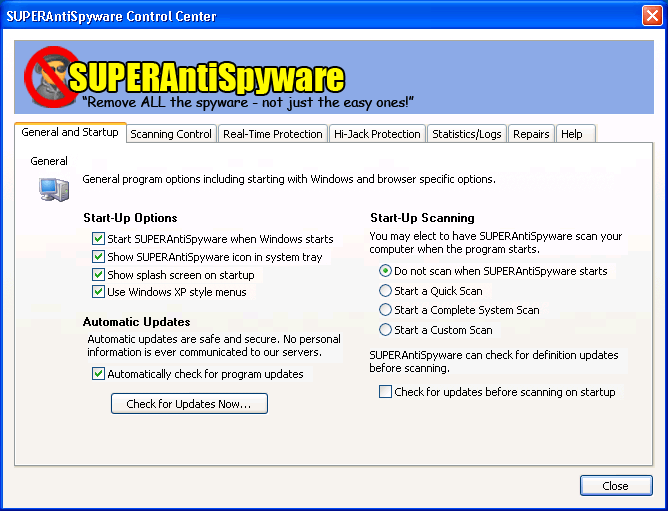
SAS có thể quét để phát hiện và tiêu diệt hàng ngàn phần mềm độc hại ẩn nấp trong máy tính như: Phần mềm gián điệp (Spyware); phần mềm quảng cáo (Adware); các loại Hi-Jacker tác động đến trình duyệt, các loại sâu, virus, trojan…

Sau khi tải về, trong quá trình cài đặt nếu máy tính có kết nối internet sẽ được cập nhật tự động. Tại giao diện chính của SAS có 5 nút lệnh, bao gồm :

- Scan your computer: Quét hệ thống, tìm ra các phần mềm độc hại và tiêu diệt chúng.
- Scheduled scaning: Lập lịch để chương trình tự động quét theo định kỳ.
- Check for update: Kiểm tra việc cập nhật cho SAS.
- Manage quarantine: Quản lý các file độc hại đang bị "cầm tù".
- Preference: Quy định cấu hình cho SAS và các tham chiếu khác.

Trong thẻ Preference:
- General and Startup: Các quy định chung bao gồm cả việc khởi động cùng với Windows và xác định các tùy chọn đối với trình duyệt.
- Scaning Control: Tùy biến cách thức mà SAS sẽ quét hệ thống.
- Real-Time Protection: Ngăn cản các phần mềm độc hại nếu nó đang hoạt động.
- Hi-Jack Protection: Bảo vệ địa chỉ trang chủ đã quy định trong trình duyệt.
- Stactistics/Log: Bản báo cáo về các phiên làm việc của SAS.
- Repair: Tính năng giúp sửa chữa trình duyệt và thiết lập hệ thống.
Mã:
http://uploadcool.com/download.php?file=c64d5a0937da0f37c27a7230f75b6766
Patch
http://www.box.net/shared/zx44nnjoco
 
Comodo Firewall Pro 3.0.16.295​
695__comodo1.png
omodo Personal Firewall là một trong những tường lửa cá nhân hữu hiệu và thông minh nhất.Tường lửa kết hợp bộ lọc nguồn vào và ra với bộ lọc nguồn ra mạnh mẽ tại cổng mạng. Giao diện mới giúp đỡ việc điều chỉnh phần lớn chức năng một cách dễ dàng bao gồm bảng điều khiển chi tiết các luật bảo mật cho tường lửa.

Comodo Personal Firewall giúp bạn hiểu rõ chuyện gì đang diễn ra bằng cách phân tích mỗi cảnh báo và cung cấp cho bạn một phần "Sự cân nhắc về an toàn" cho mỗi câu hỏi tường lửa hỏi. Với cơ sở dữ liệu bên trong, Comodo Personal Firewall phân loại ra hơn 10,000 loại khác nhau dựa theo mức độ nguy hiểm như An toàn, spyware, adware, v.v... Đây là tường lửa duy nhất có cơ sở dữ liệu lớn và sử dụng cơ sở dữ liệu đó để phân tích sự nguy hiểm bảo mật. Comodo Personal Firewall là một hàng rào hiệu quả, dễ sử dụng để bảo vệ thông tin cá nhân, tránh khỏi các kẻ cắp thông tin.

- Thường xuyên theo dõi và phòng thủ, bảo vệ máy tính khỏi sự tấn công từ Internet.
- Không tốn tiền để nâng cấp.
- Kiểm soát tất cả các chương trình nào kết nối vào Internet.
- Sự nâng cấp cơ sở dữ liệu tự động giúp ngăn chặn các mối nguy hiểm mới xuất hiện.
- Sự kiểm soát lưu thông tức thời cho phép bạn phản ứng kịp thời với các mối nguy hiểm và vận hành giới hạn băng truyền.
- Giao diện dễ sử dụng và thiết đặt
- Miễn phí cho cá nhân lẫn mạng rộng.
Mã:
http://as2.download.comodo.com/cfp/download/setups/CFP_Setup_3.0.16.295_XP_Vista_x32.exe
 
Symantec AntiVirus Corporate Edition 10.2.276 For Vista (32-bit)
Symantec AntiVirus Corporate Edition for Vista provides protection against viruses and security risks for managed and unmanaged clients running on Windows Vista (32-bit and 64-bit editions). Symantec AntiVirus Corporate Edition combines industry-leading, real-time malware protection for enterprise workstations and network servers with graphical Web-based reporting and centralized management and administration capabilities. Side-effect repair keeps systems operational during security disruptions. Centralized configuration and deployment eases administrative burden and overhead. Integrated response content helps maximize system uptime.


In addition to providing comprehensive malware protection for every network tier in an integrated, easy-to-deploy solution, Symantec AntiVirus Enterprise Edition 10.2 now adds antivirus and anti-spyware client support for the Vista platform. In addition to offering adware and spyware protection for enterprise workstations and network servers, Symantec AntiVirus Enterprise Edition now includes Symantec Client Security 3.1, which provides proactive client protection from complex threats by integrating antivirus, anti-spyware, firewall and intrusion prevention technologies under a single console. Symantec AntiVirus Enterprise Edition also provides content filtering and spam prevention for the Internet gateway and Domino and Exchange environments.


Key Features and Benefits:
- Advanced, enterprise-wide virus protection and monitoring from a single management console
- NEW! Vista® client support
- Integrated Web-based graphical reporting
- Improved protection from spyware and adware, including:
- Spyware repair enhancements automatically block spyware installation
- Stealthed spyware detection and remediation
- Improved spyware repairs for invasive risks
Mã:
Homepage
http://www.symantec.com
Mã:
http://rapidshare.com/files/85447445/Sym.Virus.Cor10.2.276Vista32.rar
 
Sophos AntiVirus V6.x WITH SERIAL

6numw5z.jpg[


* Fast, stable and reliable software
* 100% Virus Detection rates as certified by numerous magazines and journals
* 24 x 7 x 365 Live Technical Support to minimse your downtime
* Automatic Updates
* Network Anti-Virus software incorporating simple Central Installation and updating
* Multiple Operating Sytem support
* Single point of management
* Free home use upto the licence limit

Mã:
http://rapidshare.com/files/85769422/00AV0_Sophos_AntiVirus_V6.x_WITH_SERIAL.rar
 
Complimentary Webroot Spy Sweeper Subscription for 1 Year

2mn57hx.jpg


Webroot Spy Sweeper is the industry leader in antispyware protection, having received more awards for its antispyware software than any other manufacturer.

Download:
Mã:
http://sales.webroot.com/downloads/registered/links/en/sspsetup1_1.exe

Link to obtain FREE Key:
Mã:
http://www.webroot.com/activate

Instructions:

Visit the page above
E-mail*: Enter a valid Email address here
E-mail (Confirm)*: Re-enter the Email address here
Click [Register]
Check your Email
Enjoy Complimentary Webroot Spy Sweeper Subscription for 1 Year!
 
Kaspersky Anti-Virus/ Internet Security 7.0.1.323 (Critical Fix)
aspersky® Internet Security 7.0 is a fully integrated solution that protects your computer from all of the most common Internet threats, including viruses, hacker attacks, adware, spam and spyware.
Today, threats to PCs are appearing in ever-greater numbers and diversity. Cyber criminals on the Internet are well organized and tend to target PCs with combined threats. A standalone antivirus solution is no longer enough to fully protect your PC. Kaspersky Internet Security combines reactive detection methods with the latest proactive technologies, protecting your PC from viruses, hacker attacks, spam and spyware. Seamless integration of all product components eliminates system conflicts and provides fast performance.

Advantages:
- Integrated protection from all Internet threats
- Cutting-edge antivirus technologies
- Personal firewall
- Protection from spam and phishing
- Automatic database updates using the instant update technology
- Free technical support

Key Features:
- Real-time monitoring of all data streams, including email, Internet traffic and network connections
- Protection from viruses, Trojans and worms
- Protection from spyware, adware and other potentially hostile programs
- Proactive defense against new malicious programs
- Protection from network attacks and system hijacking
- Blocking of popup windows and banners
- Rollback of changes made by malicious programs on your computer
- Blocking of links to phishing websites
- Trainable spam filtration system

Protection from viruses:
* Email protection. The program scans email traffic for viruses according to the protocol via which it is sent (POP3, IMAP and NNTP for incoming mail and SMTP for outgoing mail) on any mail program. We also offer plug-ins and treatment for viruses in Microsoft Outlook and Microsoft Outlook Express mail databases.
* Scanning of Internet traffic. All HTTP Internet traffic is scanned for viruses in real-time, ensuring that infected objects are not saved to the computer’s hard disk. Statistics about harmful scripts can be accessed using a plug-in for Microsoft Internet Explorer.
* File system protection. Individual files, catalogues and disks can be designated for antivirus scanning. Users can limit antivirus scanning to critical areas of the operating system and startup objects to ensure that attention is focused on the most vulnerable areas of the system.
* Proactive protection. Kaspersky Internet Security monitors program activity and all processes launched in RAM. It notifies users of dangerous, suspicious or hidden processes (that is, rootkits), prevents harmful changes to the file system and restores the system after malicious activity.

Protection from spyware:
* Secures confidential information. The program prevents confidential information (such as passwords, bank account numbers and credit card details) being stolen from your computer. It detects phishing messages and disables links to phishing sites.
* Safe Internet surfing. The program prevents dangerous scripts from being launched on websites, and blocks popup windows and advertising banners.
* Blocks automatic dial up programs. Any unauthorized attempts to dial up premium-rate telephone services from your modem are blocked.

Protection from hackers:
* Blocks network attacks. Intrusion detection system monitors any network activity that has the characteristics of a hacker attack. The program prevents hacker attacks by blocking connections from the hacker’s computer.
* Full control over network activity. The program controls all requests from applications to websites, in accordance with the program rules that have been set, and tracks all incoming and outgoing data packages.
* Safety on all networks. When a computer connects to a network, the program asks you to specify the type of network (a trusted network, Intranet or the Internet), so that the firewall can choose how strict the rules should be.
* Stealth mode. This technology makes the computer invisible to outside users, effectively preventing all types of DoS (Denial of Service) attacks.

Protection from spam:
* Integrated protection from spam. Several methods are used in combination to ensure the highest possible level of spam detection, including blacklists and whitelists of IP addresses and word combinations typical of spam together with self-learning algorithms. The program also scans graphic images for spam attributes.
* Support for common mail programs. An expansion module, specifically designed for Microsoft Outlook and Microsoft Outlook Express, enables you to set processing rules for messages according to their post-analysis status.
* Preliminary analysis of messages. To economize time and network traffic, the Mail Manager conducts preliminary analyses of message headings in all incoming email before downloading them from the mail server. This also reduces the risk of spam and viruses being downloaded to your computer.

Kaspersky Internet Security 7.0 offers new cutting-edge technologies with integrated solution that protects users from all types of online threats. The seventh-generation products has a powerful heuristic analyzer that, with the help of the existing proactive defense module, detects and removes unknown malicious programs based on their behavior. The new product also feature an even more user-friend interface and a number of improvements that greatly enhance its functionality and protection capabilities.
The new Parental Control module, which includes a linguistic analyzer blacklists forbidden web addresses, The Privacy Control module, which protects confidential data, prevents the theft of potentially lucrative personal information, including email addresses, passwords, bank details and credit card numbers.

Homepage - http://www.kaspersky.com

Size: 26.9 MB

Kaspersky AntiVirus
Mã:
http://downloads1.kaspersky-labs.com/products/english/homeuser/kav7.0/kav7.0.1.321en.exe
Kaspersky Internet Security
Mã:
http://downloads1.kaspersky-labs.com/products/english/homeuser/kis7.0/kis7.0.1.321en.exe
 
Form: Ware-bb.org

Instructions for cracking BITDEFENDER

1. Install BitDefender Total Security / Internet Security / Antivirus; Sorry I didn't have time to dl and re-install it :(
2. REBOOT After installation (easy enough)
3. Follow the little pictures i uploaded.

89hzgur.jpg


85mavrd.jpg


8fza2bp.jpg


6svpob9.jpg


6kab0qg.jpg


8bi9csg.jpg


8ajym8w.jpg


6z9jdrb.jpg


867hkpk.jpg


4. Add 127.0.0.1 update.bitdefender.com so it should look like this

850rtzm.jpg


5. After that press save on file tab
Note If your hosts file is set to read-only, untick and apply or else it won't save!
6. Turn on your internet and try updating.

8fdgjk4.jpg


5ccb9d.gif


BitDefender Total Security
Mã:
http://download.bitdefender.com/windows/installer/en/bitdefender_tsecurity.exe

BitDefender Internet Security
Mã:
http://download.bitdefender.com/windows/installer/en/bitdefender_isecurity.exe

BitDefender Antivirus
Mã:
http://download.bitdefender.com/windows/installer/en/bitdefender_antivirus.exe

Keymaker
Mã:
http://rapidshare.com/files/85074294/Key_Generator.rar
 
AVG Anti-Virus 8.0 Build 62a1257​
Trial nhé​
AVG Anti-Virus has been protecting computers around the world for more than 12 years!
AVG for workstations provide comprehensive antivirus protection for personal computers. The unique combination of detection methods (heueristic analysis, generic detection, scanning and integrity checking) ensures that your computer receives the maximum protection possible on multiple levels (Resident Shield, Email Scanner plug-ins, Personal Email Scanner, On-Demand and other tests, etc.). It is available as AVG Professional Single Edition for single workstation protection and AVG SoHo Edition (Small office - Home office) for home or small offices.

Highlights include:
- Automatic update functionality
- The AVG Resident Shield, which provides real-time protection as files are opened and programs are run
- The AVG E-mail Scanner, which protects your e-mail
- The AVG On-Demand Scanner, which allows the user to perform scheduled and manual tests
- The AVG heueristic analysing monitor
- Free Virus Database Updates for the lifetime of the product
- AVG Virus Vault for safe handling of infected files
- Great customer satisfaction!

Homepage - http://www.grisoft.com

Size: 50.1 MB
Mã:
http://free3.grisoft.cz/others/avg80f_62a1257.exe
 
AVG Anti-Virus Free Edition 7.5.516 Build 1262​
AVG.gif
AVG Anti-Virus has been protecting computers around the world for more than 12 years!
AVG Anti-Virus FREE Edition is the well-known anti-virus protection tool. AVG Anti-Virus FREE is available free-of-charge to home users for the life of the product! Rapid virus database updates are available for the lifetime of the product, thereby providing the high-level of detection capability that millions of users around the world trust to protect their computers. AVG Anti-Virus FREE is easy-to-use and will not slow your system down (low system resource requirements).

Highlights include:
- Automatic update functionality
- The AVG Resident Shield, which provides real-time protection as files are opened and programs are run
- The AVG E-mail Scanner, which protects your e-mail
- The AVG On-Demand Scanner, which allows the user to perform scheduled and manual tests
- The AVG heueristic analysing monitor
- Free Virus Database Updates for the lifetime of the product
- AVG Virus Vault for safe handling of infected files
- Great customer satisfaction!

Homepage - http://www.grisoft.com

Size: 33.1 MB
Mã:
http://download.grisoft.cz/softw/70/filedir/inst/avg75free_516a1262.exe
 
UnHackMe 4.7 Build 287​
UnHackMe.jpg
UnHackMe - First BootWatch AntiRootkit! Now it is the must have tool for you!
UnHackMe is specially designed to detect and remove Rootkits (a new generation of Trojan programs - invisible Trojans). A rootkit is a program that a hacker uses to mask intrusion and obtain administrator-level access to a computer or computer network. The intruder installs a rootkit on a computer using a user action or by exploiting a known vulnerability or cracking a password. The rootkit installs a backdoor giving the hacker a full control of the computer. It hides their files, registry keys, and process names, and network connections from your eyes.

Your antivirus could not detect such programs because they use compression and encryption of its files. The sample software is Hacker Defender rootkit. UnHackMe allows you to detect and remove Rootkits.

Supported Windows NT4/2000/XP(64)/2003(64)/Vista. Compatible with all known antiviral software.

What's new in version 4.7:
1. Updated UnHackMe for resolving some BSOD problems;
2. Improved "Virus Scan" for removal Medichi rookits;
3. Fixed bug in Partizan.sys driver.

UnHackMe tested for removal all modern rootkits: Rustock, Haxdoor, Hacktool, Elite Keylogger etc.

Homepage - http://www.greatis.com/unhackme/

Size: 3.52 MB
Mã:
http://rapidshare.com/files/91832833/UnHackMe.4.7.287.revenge.zip
Mã:
http://www.sendspace.com/file/qdsjm1
 
Anti-Porn v9.1.3.29​
Anti-Porn parental controls has blocked ten thousands of porn websites, and it allows you to predefine websites you don't let kids visit by yourself. It always filters any porn website, which appears recently. Anti-Porn parental controls check the whole contents of webpage quickly, and will close the forbidden webpage before kids see it. It limits your kids to use popular chat software and access to major chat rooms. You can easily assign Internet access time at certain hours, even on specific day. It is very easy. This program provides history log and screen log to you. You can use these logs to watch all websites that your kids visited, filtered out or not. It makes screen snap every certain interval, which you set. This program also provides password protection to make sure that anyone can't close Anti-Porn parental controls without parental password.
Mã:
http://www.ziddu.com/download.php?uid=cqqclJqrbqudlpSlt6yZlJyiaayWlZqn9
Mã:
pass is Khan007
 
Norton Security Scan 1.3.0.26

NSSLogoGoogleP2.jpg


nss.jpg


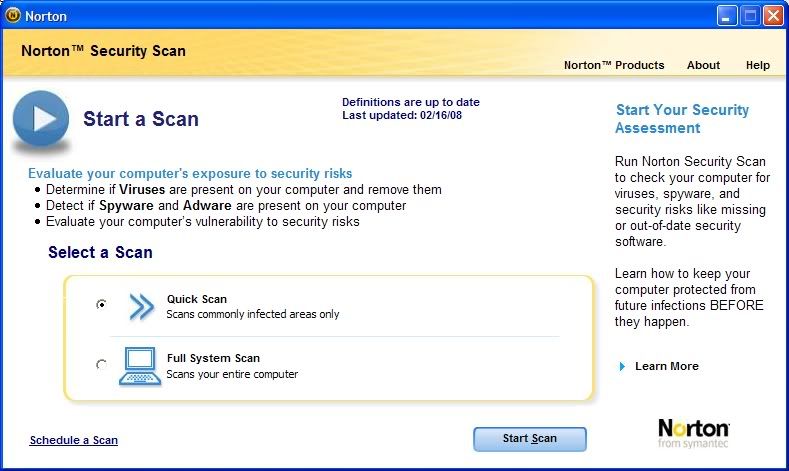
What is Norton Security Scan?

Norton Security Scan is a software tool designed to help you understand if your computer is currently protected from known threats. Norton Security Scan will scan your computer and identify if there are existing viruses, worms, spyware, unwanted adware or Trojans residing on your computer. Norton Security Scan checks to see how your computer is currently protected.


Key Features of Norton Security Scan

* Scans for threats residing on your PC
* Detects and removes viruses, worms, and Trojan horses
* Warns you of spyware(*) and unwanted adware
* Schedules regular scans
* Automatically receives updates(**)


System Requirements:
Windows® XP Home / XP Professional/ Vista™

* 300MHz or higher processor
* 256MB of RAM Minimum
* 100 MB of hard disk space

Internet connection is required to download the latest protection updates.

(*)Norton Security Scan detects but does not remove spyware or adware.

(**)In the event that Norton Security Scan is removed from the Google Pack, the Norton Security Scan service may be discontinued at Symantec's discretion at any point in time following six (6) months after the date of such removal.

Download:
Mã:
http://pack.google.com/
 
Kaspersky Anti-Virus/Internet Security 7.0.1.325
Kaspersky® Internet Security 7.0 is a fully integrated solution that protects your computer from all of the most common Internet threats, including viruses, hacker attacks, adware, spam and spyware.
Today, threats to PCs are appearing in ever-greater numbers and diversity. Cyber criminals on the Internet are well organized and tend to target PCs with combined threats. A standalone antivirus solution is no longer enough to fully protect your PC. Kaspersky Internet Security combines reactive detection methods with the latest proactive technologies, protecting your PC from viruses, hacker attacks, spam and spyware. Seamless integration of all product components eliminates system conflicts and provides fast performance.


Advantages:
- Integrated protection from all Internet threats
- Cutting-edge antivirus technologies
- Personal firewall
- Protection from spam and phishing
- Automatic database updates using the instant update technology
- Free technical support

Key Features:
- Real-time monitoring of all data streams, including email, Internet traffic and network connections
- Protection from viruses, Trojans and worms
- Protection from spyware, adware and other potentially hostile programs
- Proactive defense against new malicious programs
- Protection from network attacks and system hijacking
- Blocking of popup windows and banners
- Rollback of changes made by malicious programs on your computer
- Blocking of links to phishing websites
- Trainable spam filtration system

Protection from viruses:
* Email protection. The program scans email traffic for viruses according to the protocol via which it is sent (POP3, IMAP and NNTP for incoming mail and SMTP for outgoing mail) on any mail program. We also offer plug-ins and treatment for viruses in Microsoft Outlook and Microsoft Outlook Express mail databases.
* Scanning of Internet traffic. All HTTP Internet traffic is scanned for viruses in real-time, ensuring that infected objects are not saved to the computer’s hard disk. Statistics about harmful scripts can be accessed using a plug-in for Microsoft Internet Explorer.
* File system protection. Individual files, catalogues and disks can be designated for antivirus scanning. Users can limit antivirus scanning to critical areas of the operating system and startup objects to ensure that attention is focused on the most vulnerable areas of the system.
* Proactive protection. Kaspersky Internet Security monitors program activity and all processes launched in RAM. It notifies users of dangerous, suspicious or hidden processes (that is, rootkits), prevents harmful changes to the file system and restores the system after malicious activity.

Protection from spyware:
* Secures confidential information. The program prevents confidential information (such as passwords, bank account numbers and credit card details) being stolen from your computer. It detects phishing messages and disables links to phishing sites.
* Safe Internet surfing. The program prevents dangerous scripts from being launched on websites, and blocks popup windows and advertising banners.
* Blocks automatic dial up programs. Any unauthorized attempts to dial up premium-rate telephone services from your modem are blocked.

Protection from hackers:
* Blocks network attacks. Intrusion detection system monitors any network activity that has the characteristics of a hacker attack. The program prevents hacker attacks by blocking connections from the hacker’s computer.
* Full control over network activity. The program controls all requests from applications to websites, in accordance with the program rules that have been set, and tracks all incoming and outgoing data packages.
* Safety on all networks. When a computer connects to a network, the program asks you to specify the type of network (a trusted network, Intranet or the Internet), so that the firewall can choose how strict the rules should be.
* Stealth mode. This technology makes the computer invisible to outside users, effectively preventing all types of DoS (Denial of Service) attacks.

Protection from spam:
* Integrated protection from spam. Several methods are used in combination to ensure the highest possible level of spam detection, including blacklists and whitelists of IP addresses and word combinations typical of spam together with self-learning algorithms. The program also scans graphic images for spam attributes.
* Support for common mail programs. An expansion module, specifically designed for Microsoft Outlook and Microsoft Outlook Express, enables you to set processing rules for messages according to their post-analysis status.
* Preliminary analysis of messages. To economize time and network traffic, the Mail Manager conducts preliminary analyses of message headings in all incoming email before downloading them from the mail server. This also reduces the risk of spam and viruses being downloaded to your computer.

Kaspersky Internet Security 7.0 offers new cutting-edge technologies with integrated solution that protects users from all types of online threats. The seventh-generation products has a powerful heuristic analyzer that, with the help of the existing proactive defense module, detects and removes unknown malicious programs based on their behavior. The new product also feature an even more user-friend interface and a number of improvements that greatly enhance its functionality and protection capabilities.
The new Parental Control module, which includes a linguistic analyzer blacklists forbidden web addresses, The Privacy Control module, which protects confidential data, prevents the theft of potentially lucrative personal information, including email addresses, passwords, bank details and credit card numbers.
Download KIS 7.0.1.325
Download KAV 7.0.1.325
KIS Key
KAV Key UNTESTED
Đừng đổi pass cái FTP nhé
 
Norton Internet Security 2008
box_NIS08new_HHO.gif
Symantec nói:
Key Technologies
+ Antivirus
+ Antispyware
+ Two-way firewall
+ Antiphishing
+ Rootkit detection
+ Antispam and Parental Control† Intrusion prevention
+ Web site authentication
+ Eavesdropping protection
+ Confidential information management
Key Features
+ Detects and eliminates spyware.
+ Removes viruses and Internet worms automatically.
+ Protects email and instant messaging from viruses.
+ Protects against hackers.
+ Blocks identity theft by phishing Web sites.
+ NEW! Improved performance delivers faster starts and scans.
+ NEW! One click access to expert support.
+ NEW! Network security monitoring helps protect your wireless network.
+ NEW! Norton Identity Safe delivers enhanced ID theft protection.
+ NEW! Works quietly in the background.
+ Download antispam and parental controls. More Info.
+ Protection for up to 3 PCs.
+ Includes one year of automatic definition updates, new product features, and access to updated versions of Norton Internet Security™ throughout the life of your service subscription.*
+ On-going Protection keeps your computer protected from the latest Internet risks by automatically renewing your subscription at the regular subscription price (plus applicable tax), so you don't have to.
For more information, Click here.
Cách cài full
Follow the instruction (Do Not Connect to the internet) :
1. Uninstall all previous nis program include Live Update program. check in add or remove program that you really uninstall it.
2. Delete the cache file from Symantec in the following folder Documents And Settings\All Users\Application Data (hidden Folder)/Symantec.
3. Set the computer date to future date, e.g Jan 1, 2009 , July 1, 2009 Dec 1, 2011 or whenever you want
4. Install NIS 2007 and use the keygen from EDGE with 2 years subscription. ( you may take 3 - 11 year subscription, i'm not recommended)
5. After Finish, you should get 2 year subscription. if you get 0 day subscription, stop the next step because it will broken.
uninstall it and start again with different date.
6. take CLTVault.dll File from Program Files\Norton Internet Security\ to anywhere e.g desktop.
7. Uninstall NIS 2007, then install NIS 2008, when finalizing step, choose activate later, and then No. you should get 15 day trial
subscription. if you get 0 day subscription, stop the next step because it will broken.
uninstall it and start again with different date.
8. Open NIS program, click Norton Internet Security Tab, then Click tab Option, Norton Internet Security.
on the general option, uncheck "turn on protection for norton product"
9. take CLTVault.dll file from NIS 2007 in desktop, and replace to Program Files\Norton Internet Security\
10. restart your computer.
11. after restart, Open NIS program, you should 730 day subscription, if Not, click the help & Support tab, then run activation.
click next, next, activate later, no, ok, skip. wait a second then you get 730 day subscription.
12. check if all of the feature is secure except Protection Update and spyware definition. if Not, do not run next step because it will broken.
13. Set back your computer date to normal date. it mean the "now date". then restart your computer.
14. now check on the NIS program, you should 730 day subscription on the "date now" with all feature is enable.
15. Go to Norton Internet security tab, click report and statistic tab, then click "View Activity Log". the log viewer will appear.
16. on the Log Viewer, click Intrusion Prevention, then check that the last report say that intrusion prevention is enable.
17. Now, connect to the internet, then run live update untill finish. check if its not broken.
18. wait for 1 day, and check that your subscription is 729 day.
19. Done. you get NIS 2008 Full
Dịch
Làm theo hướng dẫn (không được kết nối Internet)
1. Uninstall tất cả cái gì liên quan đến Norton Internet Security bao gồm cả Live Update
2. Xóa luôn folder Symantec trong C:\Documents And Settings\All Users\Application Data
3. Chỉnh ngày của máy tới tương lai, ví dụ 1/1/2009, 1/7, 1/12/2009, năm 2011 hoặc là bất cứ cái gì bạn muốn
4. Cài NIS 2007 và dùng keygen của EDGE với subscription 2 năm (bạn có thể lấy subcription 3 - 11 năm, tôi không khuyến khích)
5. Xong rồi thì bạn có thể được bản quyền 2 năm. Nếu thấy subscription 0 ngày thì ngưng, uninstall NIS và bắt đầu lại với ngày khác
6. Copy file CLTVault.dll vào đâu đó, như Desktop
7. Uninstall NIS 2007, cài NIS 2008, tới bước cuối của setup chọn activate later, sau đó No. Bạn có có thể được subcription 15 ngày dùng thử. Nếu không được, ngưng rồi uninstall NIS và bắt đầu lại với ngày khác
8. Mở NIS, click thẻ Norton Internet Security, sau đó click thẻ Option, Norton Internet Security. Trong thẻ Option, bỏ dấu check "Turn on protection for norton product"
9. Lấy file CLTVault.dll hồi nãy đè lên file trong Program Files\Norton Internet Security
10. Restart
11. Restart xong, mở NIS, bạn sẽ được subcription 730 ngày, nếu không, click thẻ Help & Support, sau đó chạy Activation, click next, next, activate later, no, ok, skip. Đợi một chút và sau đó bạn sẽ được subcription 730 ngày
12. Kiểm tra tất cả các chức năng đều bảo mật trừ Protection Update và Spyware Definition. Nếu không, ngưng và uninstall...
13. Chỉnh lại ngày bình thường rồi restart
14. Kiểm tra NIS, bạn sẽ được subcription 730 ngày với tất cả chức năng đều được mở
15. Vào thẻ Norton Internet Security, click thẻ Report and Statistic, sau đó click "View Activity Log". Log Viewer sẽ hiện ra.
16. Trong Log Viewer, click Intrusion Prevention, sau đó kiểm tra và chắc rằng cái báo cáo cuối cùng bảo rằng Intrusion Prevention đã được mở.
17. Bây giờ, kết nối Internet và chạy Live Update cho đến khi nó kết thúc.
18. Đợi 1 ngày, kiểm tra và chắc rằng bạn đã được subcription 729 ngày.
19. Xong, bạn đã được NIS 2008 full
Coi bộ khó khăn đây :))
 
Spyware Doctor 5.5.0.204​
spywaredoctorwv1.png
Mã:
http://www.pctools.com/mirror/sdsetup.exe
Mã:
Crack :'>
http://www.box.net/shared/i89r1imtoq
 
Status
Không mở trả lời sau này.
Back
Top