

Navigation
Install the app
How to install the app on iOS
Follow along with the video below to see how to install our site as a web app on your home screen.
Note: This feature may not be available in some browsers.
Thêm tùy chọn
Style variation
You are using an out of date browser. It may not display this or other websites correctly.
You should upgrade or use an alternative browser.
You should upgrade or use an alternative browser.
Seven Knights
- Thread starter zFantasyz
- Ngày gửi

Vouu3
Liu Kang, Champion of Earthrealm
- 6/12/16
- 5,450
- 5,467
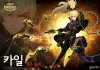
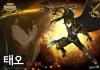
Giờ đang chơi lại acc mới, team teo + kyle rank cũng được 3k rồi thì phảiMi chơi team Teo Kyle lên rank bao nhiêu rồi?

Vouu3
Liu Kang, Champion of Earthrealm
- 6/12/16
- 5,450
- 5,467
Rudy ( semi-support ), kris ( dps semi-healer ), jave ( damge aoe ), spike hay là elsa ( kháng cc ), karl ( reduce cd )Phang toàn Giáo Rồng rồi giờ sao chơi team Phép đây :soldier_baby3:
Bác nào tư vấn e 1 team Tank cho tương lai với, đổi gió :soldier_baby2:
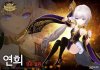
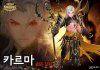
Team tank trên là meta cũ, bây giờ nếu dùng leo rank chắc chỉ tới 3k là cùng. Bây giờ team magic lên ngôi, karma + shylvester + yeonhee + mercure là best team
Btw team teo + kyle bây giờ éo còn đú nổi meta hiện tại rồi


vuATULA
Mario & Luigi
- 19/1/16
- 815
- 70
Pallamus gì đó thấy HOT lắm mà, cũng out meta luôn rùi à bác?Rudy ( semi-support ), kris ( dps semi-healer ), jave ( damge aoe ), spike hay là elsa ( kháng cc ), karl ( reduce cd )
Team tank trên là meta cũ, bây giờ nếu dùng leo rank chắc chỉ tới 3k là cùng. Bây giờ team magic lên ngôi, karma + shylvester + yeonhee + mercure là best team
Btw team teo + kyle bây giờ éo còn đú nổi meta hiện tại rồi

Vouu3
Liu Kang, Champion of Earthrealm
- 6/12/16
- 5,450
- 5,467
Pallanus cũng ngon, nhưng mà đi vào pvp mà không build speed thì đứng đợi lượt tới cuối trận. Mà một khi đã build speed rồi thì ẻm đánh cũng không lực, mình toàn dùng ẻm để clear map hay đi daily dungeon thôi chứ đem vào pvp không ổn :(Pallamus gì đó thấy HOT lắm mà, cũng out meta luôn rùi à bác?

_Hiro_
C O N T R A
- 4/10/07
- 1,850
- 22
trại dưỡng lão của ta là bền nhất theo năm tháng đấy kakakCái đệch chủ trại dưỡng lão ở trên này à)
Đây là cách để sử dụng thùng đồ mới bên hàn.
New Blacksmith System - How to's
(It's ACTUALLY GOOD!)
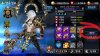
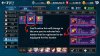
Image 1 - To equip stuff to your Heroes you have to register them first to the faction where your hero belong. Click on Purple button circled on the image.
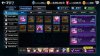
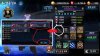
Image 2 - I've translated all the tabs so it should be straightforward. Y-axis on the left shows the faction and X-axis on top shows what type of equipment.
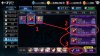
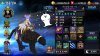
Image 3 - In this example, I wanted to equip my Miho with a lethal WB weapon. So in the faction where my Miho is located, I clicked on the Magic type weapon which would show me the options on the right side corner. Since I wanted lethal, I ticked on it and ticked register.
NOTE: Before proceeding be mindful of what faction or equipment you register as you won't be able to un-register them once you've already registered the equipment. Especially with your limited number of precious OEMP Gems.
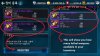
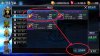
Image 4 - In the right hand corner should show me what I have available in my inventory that matches what I selected in image 3. In this example, I have two so I selected one and registered.
NOTE: The number of items available in your inventory means the number of times you can register to a faction. Once registered you can equip with any hero in that faction UNLIMITED TIMES!! (one registry can FULLY EQUIP ALL MEMBERS in that faction)
Image 5 - You'll notice the icon changed to the one that I registered which means it is ready for me to equip it on Miho.
Image 6 - If I tap one of the weapon slots on Miho, you'll see every weapon that I have registered, which in this case is the lethal magic WB weapon.
NOTE: You have unlimited perfect +5 equipment of every type and option provided by the game by default that you can use to equip even if you don't have anything like that in your inventory. YAAAAY!
Image 7 - If you tap the "+" button, this will equip the weapon on Miho and YOU'RE DONE. YAAAY!
Image 8 - Also you can un-equip/re-equip what you registered FREE of Charge!
New Blacksmith System - How to's
(It's ACTUALLY GOOD!)
Image 1 - To equip stuff to your Heroes you have to register them first to the faction where your hero belong. Click on Purple button circled on the image.
Image 2 - I've translated all the tabs so it should be straightforward. Y-axis on the left shows the faction and X-axis on top shows what type of equipment.
Image 3 - In this example, I wanted to equip my Miho with a lethal WB weapon. So in the faction where my Miho is located, I clicked on the Magic type weapon which would show me the options on the right side corner. Since I wanted lethal, I ticked on it and ticked register.
NOTE: Before proceeding be mindful of what faction or equipment you register as you won't be able to un-register them once you've already registered the equipment. Especially with your limited number of precious OEMP Gems.
Image 4 - In the right hand corner should show me what I have available in my inventory that matches what I selected in image 3. In this example, I have two so I selected one and registered.
NOTE: The number of items available in your inventory means the number of times you can register to a faction. Once registered you can equip with any hero in that faction UNLIMITED TIMES!! (one registry can FULLY EQUIP ALL MEMBERS in that faction)
Image 5 - You'll notice the icon changed to the one that I registered which means it is ready for me to equip it on Miho.
Image 6 - If I tap one of the weapon slots on Miho, you'll see every weapon that I have registered, which in this case is the lethal magic WB weapon.
NOTE: You have unlimited perfect +5 equipment of every type and option provided by the game by default that you can use to equip even if you don't have anything like that in your inventory. YAAAAY!
Image 7 - If you tap the "+" button, this will equip the weapon on Miho and YOU'RE DONE. YAAAY!
Image 8 - Also you can un-equip/re-equip what you registered FREE of Charge!

- 4/5/06
- 1,726
- 255
:( Bên KR đổi hệ thống lắp đồ ... nhòm mà rối muốn quit luôn .
Hệ thống mới hơi rối nhưng mà đc cái lợi là, vd khi reg 1 vk +10 cho nhóm old lord, thì có thể dùng đc cho cả YeonHee và Karma (vd như ngọc speed), 1 món có thể dùng trên cả 2 slots, chỉ cần reg 1 vk speed, 1 giáp phản là đủ dùng cho YeonHee, nếu đang kẹt thì dùng luôn cho Karma, còn k thì reg thêm 1 vk lethal, tính ra thì lợi nhiều hơn hại. Nhưng mà thỉnh thoảng vẫn ngu loằn vd reg nhầm vk phép lethal vào nhóm 7k, trong khi nhóm này có mỗi 1 con phép và xài đồ speed, thế là ăn loằn.
- 4/5/06
- 1,726
- 255
:v vấn nạn là giờ mấy trăm máy chục món đồ ... đang loạn xì ngầu lên


- 5/3/09
- 2,925
- 397
@RohanGame vào show hàng tí xem nào hôm sau cafe còn xin acc
Vouu3
Liu Kang, Champion of Earthrealm
- 6/12/16
- 5,450
- 5,467
Bản hàn thì karma yeonhee syvesta teo..Tải game chơi lại ! Giờ meta game những em nào hot thế :( các bác
Bản global thì lữ bố, colt...

- 3/12/05
- 2,061
- 1,370
Sea có tiếng việt luôn rồiBản hàn thì karma yeonhee syvesta teo..
Bản global thì lữ bố, colt...
