

Navigation
Install the app
How to install the app on iOS
Follow along with the video below to see how to install our site as a web app on your home screen.
Note: This feature may not be available in some browsers.
Thêm tùy chọn
Style variation
You are using an out of date browser. It may not display this or other websites correctly.
You should upgrade or use an alternative browser.
You should upgrade or use an alternative browser.
Tam Quốc Chí 10 - Romance Of The Three Kingdoms X Original & PK , link mediafire !
- Thread starter onelow4you
- Ngày gửi
- Status
- Không mở trả lời sau này.


Asakura_Yoh
<FONT face=palatino linotype><B><font COLOR=#3399f
- 13/9/05
- 3,292
- 127
Ah rùi, vừa check lại....dùng cái patch ở post #1 thay vì post #3 trong topic download, đã chạy đc eng bản ori
Còn bản PK thì vẫn đang pí, mount 1 ổ GM, 1 PK, 1 cdkey mà nó vẫn đòi cd là sao
Còn bản PK thì vẫn đang pí, mount 1 ổ GM, 1 PK, 1 cdkey mà nó vẫn đòi cd là sao

- 13/10/05
- 1,045
- 1,740
mấy pác cho em hỏi là bây giờ mình muốn thay đổi face của các tướng trong san 10 pk thì phải làm sao yậy?ý là thay đổi mấy thằng như Cao Cao,Zhao Yun ấy,em thử dùng char editor trong san 10 pk rồi nhưng chỉnh 1 hồi,mặc dù đã thay hình trong char editor nhưng mà lát chơi thì vẫn face cũ
bây giờ làm sao để thay đây mấy pác,bản 10 pk nha.
bây giờ làm sao để thay đây mấy pác,bản 10 pk nha.

Mr.Lance
Mr & Ms Pac-Man
- 22/7/08
- 147
- 0
Cậu onelow4you cho mình hỏi đây là lỗi gì với :
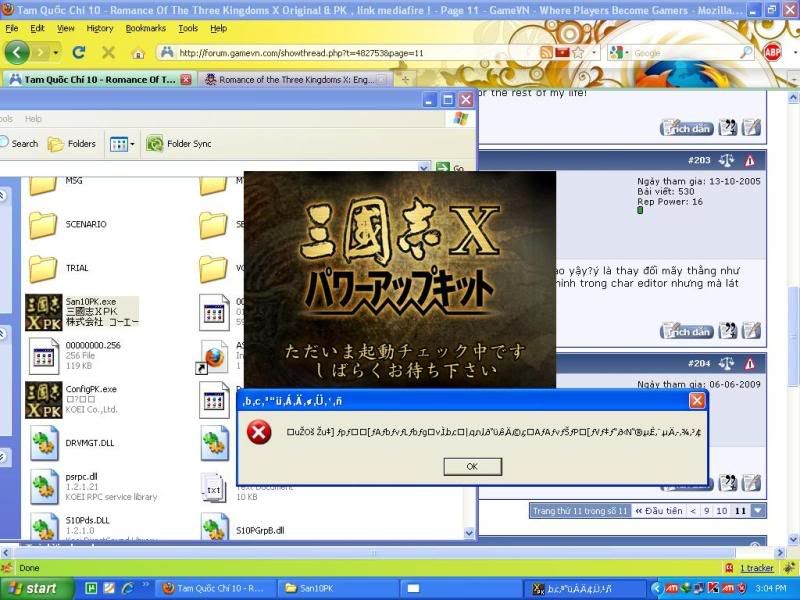
Mình cài ngon , không gặp vấn đề gì , san10 đã chạy được nhưng thằng san10pk này thì ko chịu chạy. Đây là lỗi gì vậy?
Đọc đến trang 8 cũng có bác bị giống mình : http://forum.gamevn.com/showpost.php?p=8909573&postcount=142
Mình cài ngon , không gặp vấn đề gì , san10 đã chạy được nhưng thằng san10pk này thì ko chịu chạy. Đây là lỗi gì vậy?
Đọc đến trang 8 cũng có bác bị giống mình : http://forum.gamevn.com/showpost.php?p=8909573&postcount=142
alisia0468
Mr & Ms Pac-Man
- 25/11/09
- 166
- 0
Lỗi bản Eng nghe nói không sửa được. Đánh được thành nào thì save lại luôn.
Bản PUK thì mình ko biết.
Bản PUK thì mình ko biết.

tungbach1002
Youtube Master Race
- 17/9/06
- 1
- 0
ace cho em hỏi giùm là em dùng win vista 64bit thì liệu chơi đc trò này không ạ? em cài vào theo hướng dẫn, cài patch E vào rồi chạy game. Thì màn hình hiện một cái Hình chữ nhật màu ghi và còn lại bên ngoài màu đen. Em di chuột vào Hcn đó thì ra chuột bình thường còn nếu di vào vùng đen là chuột biến thành hình giống như trong game. Mọi ng` giúp em vs nhé.Sắp đến tết rồi và em rất muốn tết cầy trò này. Độ phân giải màn hình em là 1920*1080
ace cho em hỏi giùm là em dùng win vista 64bit thì liệu chơi đc trò này không ạ? em cài vào theo hướng dẫn, cài patch E vào rồi chạy game. Thì màn hình hiện một cái Hình chữ nhật màu ghi và còn lại bên ngoài màu đen. Em di chuột vào Hcn đó thì ra chuột bình thường còn nếu di vào vùng đen là chuột biến thành hình giống như trong game. Mọi ng` giúp em vs nhé.Sắp đến tết rồi và em rất muốn tết cầy trò này. Độ phân giải màn hình em là 1920*1080
Cái này bạn chỉ cần chỉnh độ phân giải màn hình về 1280*768 trở xuống là nó bình thường, game ko hỗ trợ độ phân giải màn hình từ 1400 pixel trở lên, mình bị rồi, cài lại mới phát hiện ra

.
___________Auto Merge________________
.
Cậu onelow4you cho mình hỏi đây là lỗi gì với :
Mình cài ngon , không gặp vấn đề gì , san10 đã chạy được nhưng thằng san10pk này thì ko chịu chạy. Đây là lỗi gì vậy?
Đọc đến trang 8 cũng có bác bị giống mình : http://forum.gamevn.com/showpost.php?p=8909573&postcount=142
Bạn coi thử xem là bạn đang mount bản 10 hay bản PK, nếu chơi PK thì phải mount cái bản iso San10PK mới chơi đc :)
.
___________Auto Merge________________
.
cho em hỏi nếu em hok6 dùng deamon tool,ai có link down về rồi giải nén cái zô hay chơi lun hôk mà hôk dùng deamon tool?
Nếu thế bạn nhờ ai ghi đĩa mấy cái iso đó ra là chơi đc :)

- 2/7/05
- 1,852
- 62
http://i69.photobucket.com/albums/i75/clawsvn/errorSan10pk.jpg
Lỗi này là do chưa crack, hiện h thấy vẫn chưa có crack fix exe mà chỉ là fix image.
Cách giải quyết là kiếm cái iso rtk X mount lên ổ ảo để chạy.
P/s: có cách này trên sanguo, xem thử được ko nhé.
Bản tiếng Trung
[SPOIL]三国10PK版简单免CD方法和黑屏解决方法正解 (转自游侠,作者 柳宿)
Windows Registry Editor Version 5.00
[HKEY_CURRENT_USER\Software\KOEI\San10 Tc]
[HKEY_CURRENT_USER\Software\KOEI\San10 Tc\Configs]
"MessageSpeed"=dword:00000000
"GameReport"=dword:00000000
"BattleActiveTurn"=dword:00000001
"PlayBGM"=dword:00000001
"PlaySound"=dword:00000001
"PlayMovie"=dword:00000001
"PlayBGMVolume"=dword:00000064
"PlaySoundVolume"=dword:00000064
"PlayTutorial"=dword:00000000
"ScreenMode"=dword:00000001
"SvLdNumber"=dword:00000000
"EnableBGM"=dword:00000001
"EnableSound"=dword:00000001
"EnableMovie"=dword:00000001
[HKEY_CURRENT_USER\Software\KOEI\San10 Tc\Install]
"InstallInfo"="C:\\Program Files\\Koei\\San10 Tc\\"
[HKEY_CURRENT_USER\Software\KOEI\San10 Tc\Login]
"UseProxy"=dword:00000001
"ProxyServer"=""
先去运行那里输入regedit
然后点左上角的文件------导出---------选择你导出的文件保存路径------保存以后就可以进行编辑-------然后加入上述所有的注册表信息--------保存后双击导入。。第一步就OK了
注意InstallInfo这里一定要改成你原有的三国志十繁体版的所在目录
第二步把你在游侠下载的280MB的CLONE升级包用DAEMON Tools3。47或者其他虚拟光驱载入------(-注意这里不要直接安装如果你这里直接安装了进入游戏的时候就会提示要放入CD或者黑屏)------这里你载入镜象后直接用右键打开把PROGFILE这个文件夹里的san10pk里的文件全部复制去你原来的三国志10的所在文件夹。。。第二步OK
第三步就是有的朋友进去以后就黑屏。。。问题就在这里了。。。我们必须把configpk.exe和config.exe里的欣赏BGM-------播放影片--这二个选项的勾去掉就全部OK了。。。
实在不会的加我QQ12472969我把我自己设置的注册表信息发给大家因为这里不可以上传注册表文件
大家只要改一下你的三国10的所在目录然后按照第二步和第三步的方法搞就肯定能玩绝对不需要CD补丁直接载入游侠下的280MB那个升级包就可以玩[/SPOIL]
Bản tiếng Anh - dịch bằng google translate =).
[SPOIL]Three 10PK free CD version of a simple method and black solution is a solution (switched from Ranger, by Liu Su)
Windows Registry Editor Version 5.00
[HKEY_CURRENT_USER \ Software \ KOEI \ San10 Tc]
[HKEY_CURRENT_USER \ Software \ KOEI \ San10 Tc \ Configs]
"MessageSpeed" = dword: 00000000
"GameReport" = dword: 00000000
"BattleActiveTurn" = dword: 00000001
"PlayBGM" = dword: 00000001
"PlaySound" = dword: 00000001
"PlayMovie" = dword: 00000001
"PlayBGMVolume" = dword: 00000064
"PlaySoundVolume" = dword: 00000064
"PlayTutorial" = dword: 00000000
"ScreenMode" = dword: 00000001
"SvLdNumber" = dword: 00000000
"EnableBGM" = dword: 00000001
"EnableSound" = dword: 00000001
"EnableMovie" = dword: 00000001
[HKEY_CURRENT_USER \ Software \ KOEI \ San10 Tc \ Install]
"InstallInfo" = "C: \ \ Program Files \ \ Koei \ \ San10 Tc \ \"
[HKEY_CURRENT_USER \ Software \ KOEI \ San10 Tc \ Login]
"UseProxy" = dword: 00000001
"ProxyServer" = ""
First go to run type regedit, where
The top left corner of the document and then export the ------ --------- select your exported file to save the path to save the future ------ ------- Then you can edit it by adding -------- All of the above information is saved in the registry double-click to import. . The first step on the OK of the
Note InstallInfo Here you must change the original version of the Three Kingdoms 10 Traditional directory
The second step in the Ranger download your CLONE upgrade package with 280MB of DAEMON Tools3. 47 or any other virtual drive loading ------(- Note that if you are here not to be mounted directly installed directly into the game when it will prompted to add CD or a black )------ mirror here directly after you have loaded, right to open the PROGFILE inside san10pk this folder all the documents inside your original copy to the location of the Three Kingdoms 10 folders. . . The second step OK
The third step is that some friends went after the black screen. . . The problem be here. . . We must appreciate the configpk.exe and config.exe inside BGM ------- Play video - these two options on the hook to remove all OK. . .
Plus I really do not QQ12472969 I put my own settings, registry information to the people because there can not upload the registry file
We only need to change about the location of your three 10 directory and then follow the second and third step of the way would certainly be able to engage in play is absolutely no CD patch directly under the loaded Ranger 280MB upgrade package that you can play[/SPOIL]
http://www.sanguogame.com.cn/download/readme/game/san10-game-d.html
Lỗi này là do chưa crack, hiện h thấy vẫn chưa có crack fix exe mà chỉ là fix image.
Cách giải quyết là kiếm cái iso rtk X mount lên ổ ảo để chạy.
P/s: có cách này trên sanguo, xem thử được ko nhé.
Bản tiếng Trung
[SPOIL]三国10PK版简单免CD方法和黑屏解决方法正解 (转自游侠,作者 柳宿)
Windows Registry Editor Version 5.00
[HKEY_CURRENT_USER\Software\KOEI\San10 Tc]
[HKEY_CURRENT_USER\Software\KOEI\San10 Tc\Configs]
"MessageSpeed"=dword:00000000
"GameReport"=dword:00000000
"BattleActiveTurn"=dword:00000001
"PlayBGM"=dword:00000001
"PlaySound"=dword:00000001
"PlayMovie"=dword:00000001
"PlayBGMVolume"=dword:00000064
"PlaySoundVolume"=dword:00000064
"PlayTutorial"=dword:00000000
"ScreenMode"=dword:00000001
"SvLdNumber"=dword:00000000
"EnableBGM"=dword:00000001
"EnableSound"=dword:00000001
"EnableMovie"=dword:00000001
[HKEY_CURRENT_USER\Software\KOEI\San10 Tc\Install]
"InstallInfo"="C:\\Program Files\\Koei\\San10 Tc\\"
[HKEY_CURRENT_USER\Software\KOEI\San10 Tc\Login]
"UseProxy"=dword:00000001
"ProxyServer"=""
先去运行那里输入regedit
然后点左上角的文件------导出---------选择你导出的文件保存路径------保存以后就可以进行编辑-------然后加入上述所有的注册表信息--------保存后双击导入。。第一步就OK了
注意InstallInfo这里一定要改成你原有的三国志十繁体版的所在目录
第二步把你在游侠下载的280MB的CLONE升级包用DAEMON Tools3。47或者其他虚拟光驱载入------(-注意这里不要直接安装如果你这里直接安装了进入游戏的时候就会提示要放入CD或者黑屏)------这里你载入镜象后直接用右键打开把PROGFILE这个文件夹里的san10pk里的文件全部复制去你原来的三国志10的所在文件夹。。。第二步OK
第三步就是有的朋友进去以后就黑屏。。。问题就在这里了。。。我们必须把configpk.exe和config.exe里的欣赏BGM-------播放影片--这二个选项的勾去掉就全部OK了。。。
实在不会的加我QQ12472969我把我自己设置的注册表信息发给大家因为这里不可以上传注册表文件
大家只要改一下你的三国10的所在目录然后按照第二步和第三步的方法搞就肯定能玩绝对不需要CD补丁直接载入游侠下的280MB那个升级包就可以玩[/SPOIL]
Bản tiếng Anh - dịch bằng google translate =).
[SPOIL]Three 10PK free CD version of a simple method and black solution is a solution (switched from Ranger, by Liu Su)
Windows Registry Editor Version 5.00
[HKEY_CURRENT_USER \ Software \ KOEI \ San10 Tc]
[HKEY_CURRENT_USER \ Software \ KOEI \ San10 Tc \ Configs]
"MessageSpeed" = dword: 00000000
"GameReport" = dword: 00000000
"BattleActiveTurn" = dword: 00000001
"PlayBGM" = dword: 00000001
"PlaySound" = dword: 00000001
"PlayMovie" = dword: 00000001
"PlayBGMVolume" = dword: 00000064
"PlaySoundVolume" = dword: 00000064
"PlayTutorial" = dword: 00000000
"ScreenMode" = dword: 00000001
"SvLdNumber" = dword: 00000000
"EnableBGM" = dword: 00000001
"EnableSound" = dword: 00000001
"EnableMovie" = dword: 00000001
[HKEY_CURRENT_USER \ Software \ KOEI \ San10 Tc \ Install]
"InstallInfo" = "C: \ \ Program Files \ \ Koei \ \ San10 Tc \ \"
[HKEY_CURRENT_USER \ Software \ KOEI \ San10 Tc \ Login]
"UseProxy" = dword: 00000001
"ProxyServer" = ""
First go to run type regedit, where
The top left corner of the document and then export the ------ --------- select your exported file to save the path to save the future ------ ------- Then you can edit it by adding -------- All of the above information is saved in the registry double-click to import. . The first step on the OK of the
Note InstallInfo Here you must change the original version of the Three Kingdoms 10 Traditional directory
The second step in the Ranger download your CLONE upgrade package with 280MB of DAEMON Tools3. 47 or any other virtual drive loading ------(- Note that if you are here not to be mounted directly installed directly into the game when it will prompted to add CD or a black )------ mirror here directly after you have loaded, right to open the PROGFILE inside san10pk this folder all the documents inside your original copy to the location of the Three Kingdoms 10 folders. . . The second step OK
The third step is that some friends went after the black screen. . . The problem be here. . . We must appreciate the configpk.exe and config.exe inside BGM ------- Play video - these two options on the hook to remove all OK. . .
Plus I really do not QQ12472969 I put my own settings, registry information to the people because there can not upload the registry file
We only need to change about the location of your three 10 directory and then follow the second and third step of the way would certainly be able to engage in play is absolutely no CD patch directly under the loaded Ranger 280MB upgrade package that you can play[/SPOIL]
http://www.sanguogame.com.cn/download/readme/game/san10-game-d.html
Chỉnh sửa cuối:


Tửu kiếm tiên
Legend of Zelda
- 29/1/10
- 1,076
- 77
bác nào cho em hỏi tại sao em đánh tiếng hoa hoặc tiếng nhật trong RTK thì nó đều biến thành dấu ? vậy
ai biết chỉ em với nào
chọn start menu-> control panel -> regional and language option ,hiện len một cái bảng-> chọn mục Advaneced. Trong ô "select a language match the language véion ò non-Unicode propram you want to use", chọn đung ngôn ngữ muốn dùng rồi reset máy. Hoặc cách đon giản hờn là vô đây:

http://forum.gamevn.com/showthread.php?t=649363
XxTaLinhxX
Youtube Master Race
- 31/1/08
- 34
- 0
tôi cài xong không hề báo lỗi vào game bình thường làm tới bước patch E giải nén ra báo lỗi D:\RTK 10 & PK Fullversion\Patch Tieng Anh danh cho RTK 11 PK.rar bạn có patch khác hok cho xjn gấp
- 13/3/08
- 15
- 0
tôi cài xong không hề báo lỗi vào game bình thường làm tới bước patch E giải nén ra báo lỗi D:\RTK 10 & PK Fullversion\Patch Tieng Anh danh cho RTK 11 PK.rar bạn có patch khác hok cho xjn gấp
Tui cũng bị y như pa này, ai biết đó là lỗi gì ko? cứ extract file nén patch English thì nó bảo cần cái SAN 11PK, ai đó làm ơn giải đáp giùm đi

blackeagle202
Youtube Master Race
- 21/2/07
- 90
- 0
Mình mount cả 3 file SU,GM vs Pk thế mà vẫn vô hok dc
Nó hok báo lỗi nữa nhưng vô nháy màn hình 1 lần ròy xong ko lên j nữa cả :(
Nó hok báo lỗi nữa nhưng vô nháy màn hình 1 lần ròy xong ko lên j nữa cả :(


z_boy1412
Mr & Ms Pac-Man
- 12/4/05
- 162
- 9
Mì Ăn Liền khỏi giải nén , khỏi join jiet gì hết

CD 1 : http://www.megaupload.com/?d=NB7MTQO1
CD 2 : http://www.megaupload.com/?d=OXD2NZVO
Puck : http://www.megaupload.com/?d=YHIKGG9S
CD 1 : http://www.megaupload.com/?d=NB7MTQO1
CD 2 : http://www.megaupload.com/?d=OXD2NZVO
Puck : http://www.megaupload.com/?d=YHIKGG9S

- 7/6/10
- 942
- 7
E cũng bị y hệt mấy bác trên kia. Lần đầu vào chơi ngon lành. Xong tự nhiên hôm sau bật máy lên nó bị như thế. Ko biết nó lỗi do gì nhỉ

- Status
- Không mở trả lời sau này.
Similar threads
- Trả lời
- 3
- Đọc
- 596