Alo..1..2..3..!
Mr & Ms Pac-Man
- 10/7/10
- 169
- 1
thử delete nó đi  [
[ ]
]
rồi mún start thì cài lại
[]rồi mún start thì cài lại


Follow along with the video below to see how to install our site as a web app on your home screen.
Note: This feature may not be available in some browsers.
[]

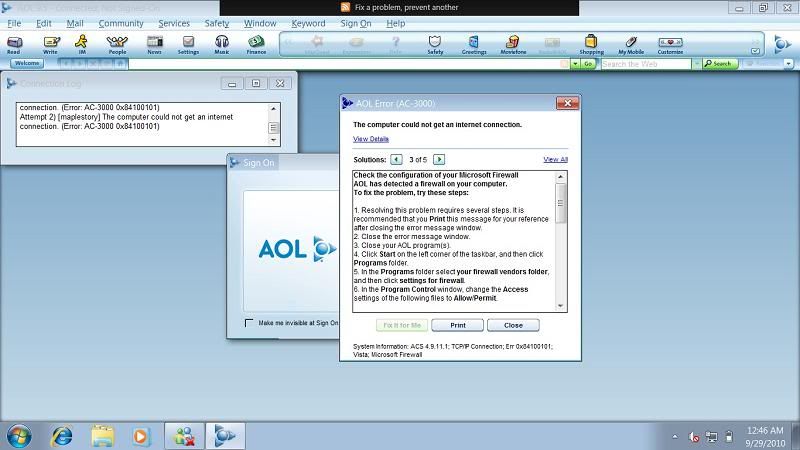
The computer could not get an internet connection within a reasonable amount of time. There may be a networking problem.
To fix the problem, try one or all of the following:
(You may wish to print or save a copy of these instructions as this page may not remain visible as you go through the suggested steps.)
1. Restart your computer
Shut down your PC in the usual way, eg by clicking Start, then Shut Down.
Wait 30 seconds.
Turn your PC back on and try to connect to AOL again.
2. Use the AOL Auto Fix
When you receive this error message, click the Fix It For Me button to have AOL automatically run through some troubleshooting steps to correct the problem.
3. Check your firewall software
Some personal firewall software configurations can restrict access to AOL. If you find that you are having persistent difficulties in connecting to AOL Broadband, it may be due to the presence of firewall software. In the event of this happening, disable your firewall software and retry AOL.
If you can connect when your firewall software is disabled, try changing the security settings on the software and signing on again to see if the problem is resolved. If you have lowered your security settings and still can't get online, please contact your firewall software vendor for further advice.
Further Information: AOL Keyword: Firewall Software
4. Repair the AOL Connectivity Services
The AOL Connectivity Service may have become damaged or corrupt. Follow the steps below to repair it:
- Click on Start, Settings and Control Panel.
Windows XP users: Click Start and Control Panel.- Double-Click on Add/Remove Programs.
- Highlight AOL Uninstaller and click Change/Remove or Add/Remove
- Select AOL Connectivity Service 4.6 and click Uninstall.
- Click Yes.
- When prompted, click Restart to restart your PC. If you select Restart Later the One-Click Fix will complete the next time you restart your PC.
- After restarting the PC, open AOL and follow the on-screen instructions to set up a new connection location.

Cho em hỏi với là với destop thì em fake và chơi được ngon r ><''
mà con lap của em chả hiểu sao cái AOL dùng được 1 lần rồi restart nó die luôn TT''
http://i1016.photobucket.com/albums/af284/ebinhox_2010/error.jpg[IMG] nó bị thế nè nè ai bít fix thế nào chỉ em zới chứ mỗi lần ra ngoài rảnh chả có maple để chơi ~~[/QUOTE]
Cậu login = profile Broadband của nó trước rồi close,sau đó login lại = profile của cậu thì sẽ được.

Híc bây giờ thì TT'' em log in được cái AoL mà cái maple chạy game laucher ấn start game xong nó hiện lên hack shield xong không hiện lên gì nữa TT'' ai bít như thế nào hem chỉ em zới TT''