

Navigation
Install the app
How to install the app on iOS
Follow along with the video below to see how to install our site as a web app on your home screen.
Note: This feature may not be available in some browsers.
Thêm tùy chọn
Style variation
You are using an out of date browser. It may not display this or other websites correctly.
You should upgrade or use an alternative browser.
You should upgrade or use an alternative browser.
Hỏi & đáp lập trình
- Thread starter canh en buon
- Ngày gửi

Arquy
C O N T R A
- 30/5/05
- 1,531
- 7
xem thử có start SQL server service chưa....
trong phần run--> services.msc ấy
Có phải cái SQL Server (SQLEXPRESS) hok huynh ? cái đó đệ thấy started rồi
Lỗi nhìu lắm huynh ơi ...Windows 7 có cái ngộ là phải run as administrator thì mới log vô sql được cậu thử lại xem, ý tui nói là right click rồi chọn Run as Administrator
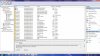
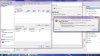
Khi cậu bĩ lỗi như vầy thì hãy vô Manage trong windows để xem log chi tiết
Right Click My Computer chọn manage, chọn tiếp Event Viewer, chọn windows log, sau đó tìm trong security hoặc Application để xem lỗi cụ thể là gì. Nếu không biết cách giải quyết cậu post lên cho tui xem cái log với
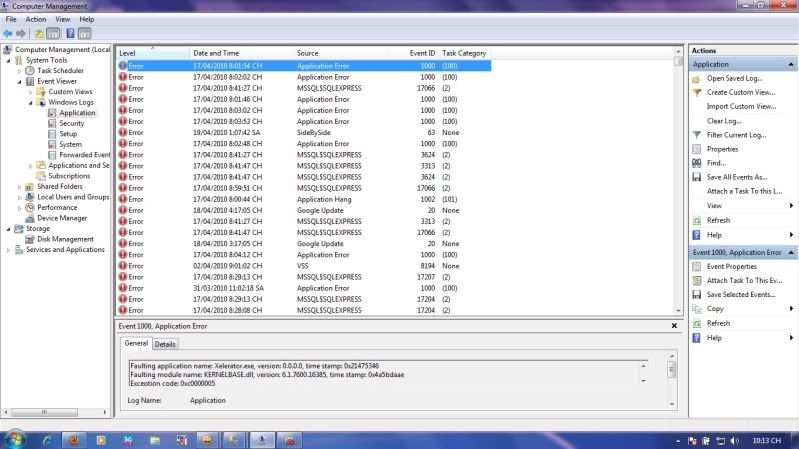
Attachments

- 4/7/06
- 3,078
- 117

CTKhuyen
<b><i><font color="Blue">♠</font> <font color="Red
- 11/11/05
- 2,542
- 1
Bạn xem thử
http://vi.wikipedia.org/wiki/Duyệt_...1.BB.A9_t.E1.BB.B1_c.C3.A2y_con_g.E1.BB.91c_A
cái này giống như thứ tự duyệt ,vd bạn có gốc A,2 con là B trái và C phải,nếu duyệt LRN thì B-->A-->C,nếu NLR là A--->B--->C...
http://vi.wikipedia.org/wiki/Duyệt_...1.BB.A9_t.E1.BB.B1_c.C3.A2y_con_g.E1.BB.91c_A
cái này giống như thứ tự duyệt ,vd bạn có gốc A,2 con là B trái và C phải,nếu duyệt LRN thì B-->A-->C,nếu NLR là A--->B--->C...

CTKhuyen
<b><i><font color="Blue">♠</font> <font color="Red
- 11/11/05
- 2,542
- 1
Ta bị lờ rồi
......................
chịu,ko biết được lỗi gì :(
thôi thì đành chấp nhận xóa sạch sẽ,rồi cài đặt lại xem


HieuNM
Mayor of SimCity
- 3/3/07
- 4,078
- 45
C#:
Mình thiết kế 1 cái nút trên 1 form (form A), bấm vào cái nút trên form A đấy thì nó sẽ hiện ra 1 form mới (form B). Vậy mình set thuộc tính cho cái form B như thế nào để nó luôn ở trên cùng, muốn thao tác được trên form A thì phải đóng cửa sổ form B. Giống như cái MessageBox ý
Cái MessageBox hiển thị được ít thông tin quá nên mới phải dùng form
Mình thiết kế 1 cái nút trên 1 form (form A), bấm vào cái nút trên form A đấy thì nó sẽ hiện ra 1 form mới (form B). Vậy mình set thuộc tính cho cái form B như thế nào để nó luôn ở trên cùng, muốn thao tác được trên form A thì phải đóng cửa sổ form B. Giống như cái MessageBox ý
Cái MessageBox hiển thị được ít thông tin quá nên mới phải dùng form
CTKhuyen
<b><i><font color="Blue">♠</font> <font color="Red
- 11/11/05
- 2,542
- 1
C#:
Mình thiết kế 1 cái nút trên 1 form (form A), bấm vào cái nút trên form A đấy thì nó sẽ hiện ra 1 form mới (form B). Vậy mình set thuộc tính cho cái form B như thế nào để nó luôn ở trên cùng, muốn thao tác được trên form A thì phải đóng cửa sổ form B. Giống như cái MessageBox ý
Cái MessageBox hiển thị được ít thông tin quá nên mới phải dùng form
tạo 2 FormA,FormB,cài đặt sự kiện cho button bên FormA sẽ gọi tới FormB.show(),thuộc tính Top(top gì đó)bên A để false,bên B true là đc.Chưa test thử

HieuNM
Mayor of SimCity
- 3/3/07
- 4,078
- 45
có phải điền cái đoạn trên vào sau đoạn xử lý sự kiện bấm vào cái nút trên form A không 
Mã:
        private void button2_Click(object sender, EventArgs e)
        {
            Form form2 = new Information();
            form2.Show();
            //this.Deactivate += new System.EventHandler(Form_Deactivate);
        }
chimcanhcuthuydiet
Dragon Quest
- 23/7/03
- 1,450
- 18
Mấy ngày hôm nay lo tám bên box khác nên quên hahahahha,
Nè nhiều lổu thế này thì trước tiên cậu vào trong Event log clear hết mấy cáu log đó đi, bao gồm System và Application Log, sau đó, ra ngoài tạo lại cái lỗi mà cậu bị. sau đó vào lại event log thì sẽ có thấy lỗi liện , post lên đây cho tui xem cái lỗi xem nó nói gì
Nè nhiều lổu thế này thì trước tiên cậu vào trong Event log clear hết mấy cáu log đó đi, bao gồm System và Application Log, sau đó, ra ngoài tạo lại cái lỗi mà cậu bị. sau đó vào lại event log thì sẽ có thấy lỗi liện , post lên đây cho tui xem cái lỗi xem nó nói gì

Bối Bối
C O N T R A
- 20/2/06
- 1,859
- 31
Code hoàn chỉnh cho HieuNM đây ::)
Mã:
using System;

using System.Windows.Forms;

using System.Drawing;

class MyWinApp

{

   static void Main()

   {

   // (1) Create form and invoke it

   Form mainForm = new FormA();

   Application.Run(mainForm);

   }

}

// User Form derived from base class Form

class FormA:Form

{

   private Button button1;
   Form frmB=new FormB();

   public FormA() {

      this.Text = "Hand Made Form";

      button1 = new Button();

      button1.Location = new Point(96,112);

      button1.Size = new Size(72,24);

      button1.Text= "Status";

      this.Controls.Add(button1);

      button1.Click += new EventHandler(button1_Click);

      this.Activated  += new System.EventHandler(Form_Activate);
   }

   void button1_Click(object sender, EventArgs e) {

      frmB.Show();
   }

   void Form_Activate(object sender, EventArgs e)
   {
		if(frmB.CanFocus){
   			frmB.Activate();
		}
   }

}

class FormB:Form
{
	public FormB()
	{
		this.Text="Form B";
		this.Deactivate += new System.EventHandler(Form_Deactivate);
	}
	void Form_Deactivate(object sender, EventArgs e)
	{
   		this.Activate();
	}
}Cho mình hỏi chút về VB. Mình thiết kế 1 cái nút, muốn thực thi 1 hành động khi click vào cái nút đó là chạy 1 file trên 1 đường dẫn cho trước. sau đó close cái cửa sổ đó lại. vậy câu lệnh thế nào?
Cho mình hỏi thêm là 1 chương trình được viết bằng VB thì có khi compile ra exe, copy sang máy khác để chạy thì máy đó có cần Dotnet gì không?
Tks trước
Cho mình hỏi thêm là 1 chương trình được viết bằng VB thì có khi compile ra exe, copy sang máy khác để chạy thì máy đó có cần Dotnet gì không?
Tks trước

Bối Bối
C O N T R A
- 20/2/06
- 1,859
- 31
Cho mình hỏi chút về VB. Mình thiết kế 1 cái nút, muốn thực thi 1 hành động khi click vào cái nút đó là chạy 1 file trên 1 đường dẫn cho trước. sau đó close cái cửa sổ đó lại. vậy câu lệnh thế nào?
Cho mình hỏi thêm là 1 chương trình được viết bằng VB thì có khi compile ra exe, copy sang máy khác để chạy thì máy đó có cần Dotnet gì không?
Tks trước
viết bằng VB6 thì ko cần cài dotnet. viết bằng VB.Net thì sẽ phải cài nếu sử dụng thư viện netframework.
code:
Mã:
imports Microsoft.VisualBasic
imports System
imports System.Collections.Generic
imports System.Windows.Forms
imports System.IO
public module MyModule
    Sub RunSnippet()


		Dim OpenFileDialog1 as OpenFileDialog = new OpenFileDialog()
		OpenFileDialog1.Multiselect = False
		OpenFileDialog1.InitialDirectory = "C:\Program Files"

		Dim result As DialogResult = OpenFileDialog1.ShowDialog()
		If result = DialogResult.OK Then
			System.Diagnostics.Process.Start(OpenFileDialog1.FileName)
		End If
		OpenFileDialog1.Dispose()

    End Sub


	#region "Helper methods"

    Sub Main()
        Try
            RunSnippet()
        Catch e As Exception
            Dim err As String = String.Format("---{0}The following error occurred while executing the snippet:{0}{1}{0}---", vbCrLf, e.ToString())
            Console.WriteLine(err)
        Finally
			Application.Exit()
        End Try
    End Sub

	sub WL(text as object)
		Console.WriteLine(text)
	end sub

	sub WL(text as object, paramarray args as object())
		Console.WriteLine(text.ToString(), args)
	end sub

	sub RL()
		Console.ReadLine()
	end sub

	sub Break()
		System.Diagnostics.Debugger.Break()
	end sub

    #end region

end module
chỉ cần quan tâm đến đoạn này vì mình lười viết Form (cửa sổ, window form)
Mã:
		Dim OpenFileDialog1 as OpenFileDialog = new OpenFileDialog()
		OpenFileDialog1.Multiselect = False
		OpenFileDialog1.InitialDirectory = "C:\Program Files"

		Dim result As DialogResult = OpenFileDialog1.ShowDialog()
		If result = DialogResult.OK Then
			System.Diagnostics.Process.Start(OpenFileDialog1.FileName)
		End If
		OpenFileDialog1.Dispose()
file exe đã build: attach bên dưới
Attachments
Chỉnh sửa cuối:
Ý mình là cái form nó như thế này
Bấm vào nút Action 1 thì nó chạy 1 file được mình chỉ định trước (VD "C:\Program Files\Windows Media Player\wmplayer.exe")
Nút Action 2 cũng thế.
Mà thôi, mò được rồi
Cám ơn các bạn đã quan tâm
Chỉnh sửa cuối:
C#:
Mình thiết kế 1 cái nút trên 1 form (form A), bấm vào cái nút trên form A đấy thì nó sẽ hiện ra 1 form mới (form B). Vậy mình set thuộc tính cho cái form B như thế nào để nó luôn ở trên cùng, muốn thao tác được trên form A thì phải đóng cửa sổ form B. Giống như cái MessageBox ý
Cái MessageBox hiển thị được ít thông tin quá nên mới phải dùng form
Nếu làm cái này theo mình chỉ cần gọi frmB như sau:
frmB frm = new frmB();
frm.ShowDialog();
Thế là xong. Đâu cần làm gì nhiều cho cực
Similar threads

- Trả lời
- 0
- Đọc
- 584

- Trả lời
- 0
- Đọc
- 97
- Trả lời
- 0
- Đọc
- 151
- Trả lời
- 2
- Đọc
- 425
- Trả lời
- 0
- Đọc
- 119