PSP's Hombrews

  • Thread starter Thread starter Atachi
  • Ngày gửi Ngày gửi
Status
Không mở trả lời sau này.
CWCHEAT 0.2.2 REV.D Released: http://www.psp-hacks.com/download.php?id=1050
PSP Hardware Alarm Suite v2.7 bld 1730: http://www.psp-hacks.com/download.php?id=1536
3f6312d732.jpg

NervOS 2.2: http://www.psp-hacks.com/download.php?id=1425
c6314134c4.jpg

PSP Filer 5.6 Released: http://www.psp-hacks.com/download.php?id=1075
64c780122b.jpg

AFKIM v3.3.6: PSP Instant Messenger Client
58d845bbb8.jpg

+ AFKIM 3.3.6 w/ IR Keyboard Support (fw 1.50): http://www.psp-hacks.com/download.php?id=1175
+ AFKIM 3.3.6 w/ IR Keyboard Support (cfw 3.xx/4.xx): http://www.psp-hacks.com/download.php?id=1438
+ AFKIM 3.3.6 Source: http://www.psp-hacks.com/download.php?id=1179
PSPXTI v1.2.4: TI-92 Calculator Emulator:
6007d0aee3.jpg

+ PSPXTI v1.2.4 (fw 1.50): http://www.psp-hacks.com/download.php?id=1153
+ Download TI-92 ROM: http://www.psp-hacks.com/downloads/ti92.rom.zip
+ PSPXTI v1.2.4 (cfw 3.xx/4.xx): http://www.psp-hacks.com/download.php?id=1299
+ PSPXTI v1.2.4 source code: http://www.psp-hacks.com/download.php?id=1300
Mấy cái này đơn giản chắc chả cần phải hướng dẫn nữa
 
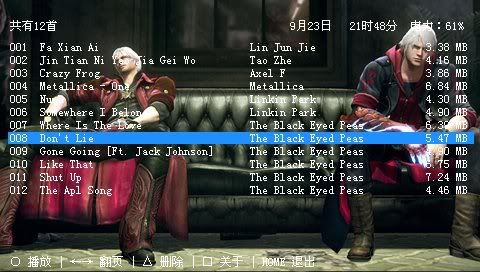
Mp3Player 0.97
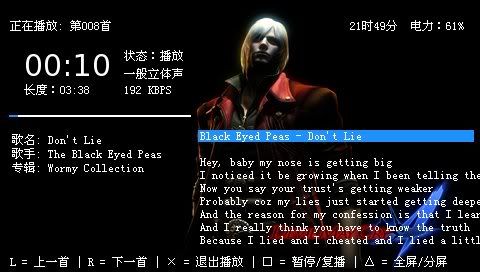
Homebrew nghe nhạc hỗ trợ hiển thị lyrics :D
theme Devil 5 Cry dèfault thôi, vào folder của homebrew mà đổi background
homebrew made in china: http://down.cngba.com/psp/pspsoft/mediaplayer/2008090450098.shtml

chưa có giao diện tiếng Anh
Menu chính hiển thị : tổng số bài hát [ms0:/music] ,ngày tháng ,giờ ,lượng pin
O = play. D-pad trái phải = next page . /\ = delete . [] = about . Home = exit
snap000.jpg


Giao diện playing : L = Previous . R = next . X = back . [] = play/pause . /\ = fullscreen .
snap001.jpg


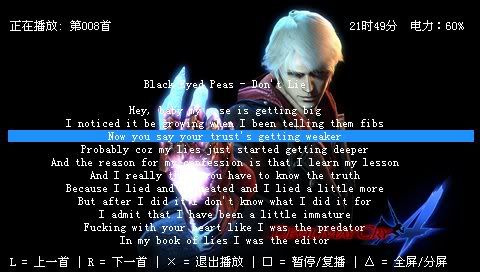
Fullscreen
snap002.jpg


download giải nén copy vào ms0:/PSP/GAME :whew:
quan trọng là để file lời *.lrc cùng tên file mp3 nhá :D , ném tất vào ms0:/MUSIC
bên qj.net có cũng có 1 HB hiển thị lời bài hát của bọn Nhật , có ai dùng đc ko vậy ? sao máy mình giờ ko xài đc mấy cái HB đc viết = LUA nữa òi ::(
 

Attachments

RemotejoyLite.016 (bản mới nhất) nghe nhạc, xem phim, chơi game PSP trên màn hình máy tính.
Đã kiểm tra với SLIM 4.01M33-2

1. copy file seplugins vào gốc thẻ nhớ, ngắt kết nối PSP với PC
2. cài PSP type B driver, vào Recovery mode enable 2 cái plugins mới có.
3. kết nối PSP với PC > hiện ra bảng chọn, đầu tiên chọn cái dưới cùng (No,..) tiếp đó chọn cái đầu tiên (có chữ recommend ở cuối), chờ tí
4. chạy cái remotejoyLite v0.16.exe
 
Xem nhiều định dạng nhạc, film, ảnh trên PSP .^^
1.1 Features

* Based on FFMPEG nearly latest source(svn rev. 14728).
* avi/mov(mp4) containers supported. No container specific limitation.
* Video codec : Mpeg4 video(xvid etc), Mpeg4/AVC(h264) supported. (HW accel only)
* Audio codec : AC3, MP3, AAC supported. (MP3/AAC are HW accelerated.)
* Subtitles are supported. (smi, etc. through mplayer subreader.c and custom rendering of subtitles.)
* Supports B-frames in H264.
* audio 8-48kHz sampling rate supported. (linear resamling to 44kHz used in PSPlayerMT)
* Real-time volume boosting(1-20x). Apart from system volume. (Can be used for Replay Gain. Of course by hand not automatically.)
* Super high quality custom YUV rendering using PSP video acclerator. Precise color conversion. Deblocking in chroma channels. (from PSPlayerMT)
* Fast avi loading by optimizing index loading.
* Max video resolution. 480x272. (PSP HW codec library does not support higher resolution. maybe)
* No restriction in framerate.
* Buffering mechanism used in PSPlayerMT. (but extreamly reduced buffer size.)
* FF/Rew supported.
* Using internal bookmark mechanism, resuming supported.
* Async reading of video files. Less memstick access.
* usbhostfs, nethostfs supported. (first should be enabled using irshell. etc.)

1.2 Video player control

¡ç¡æ : FF/REW (to next keyframe)
¡è¡é : FF/REW (to 30sec keyframe)
L1/R1 : FF/REW (to 5min keyframe)
¡â : change zoom mode
¥¹ : Stop playing
¡à : Show player debug info
START : Pause/Play toggle
Analog Up/Down : Boost volume 1x-20x (in SW)

1.3 Additional notes on video player

* Most of software codecs are removed to reduce pbp filesize. (except AC3)
* Sometimes H264 decoder fails.
* After decoding of Mpeg4 video(xvid), H264 decoder crashes occasionally. (in sceMpeg library)
* Recommended encoding software. (regardless of codec)
- to avi files. Badak. always my favoriate. (http://www.kipple.pe.kr)
- to mp4 files. XviD4PSP 5.x. Good for mp4 files. (http://www.winnydows.com, avi not working)
- no special conversion setting is required for H264. (just select file, setup codec and convert.)
- HW xvid decoder does not support b-vop(b frame), gmc, qpel. When encoding with xvid, disable unsupported options. (With mencoder, add -xvidencopts max_bframes=0:nogmc:noqpel)
* Have an option for RGB rendering of Mpeg4 video.
* First audio track only. No multi-track audio.
* developed and tested on 3.90 M33-5(1.5 addon, fatmsmod patch) and tested on 3.71 M33-4(?, 1.5 addon) and OFW 1.5 on DAX's time machine. (not a slim psp)
* Full compatible list of container and codec combination. (tested.)
- AVI - opendivx/xvid/h264 - ac3/mp3
- MP4 - xvid/h264/opendivx(?) - mp3/aac
- any combination of video/audio codec is supported. (ex. avi h264/ac3 ok)
* avi files takes additional 10MHz CPU clock.
* ac3 is not recommended. for compatibility only. It takes additional 50MHz CPU clock.

2. PSPlayer other features

* started from simple mp3 player using libmad.
* text viewer. Up to 2M lines. Fast loading. Simple bookmark.
* mp3/aac/m4a/ogg player. with playlist support.(m3u)
* bmp/jpg/png/gif support. but primitive.
* Additional features and how to use is in PSPlayer.txt and readme.old. (but in korean, sorry)


Download
 
Kiểm tra PSP của bạn có thể soft mod "Pandora" battery hay ko

1.jpg


2.jpg


Motherboard is thấp hơn TA 86 v3 có thể soft mord
 
Nhắc lại, ko post bài hỏi han trong này nữa. Post tiếp sẽ nhận cảnh cáo mức cao nhất!
 
remotejoylite 0.17
Bản mới nhất, thích hợp với firmware 4.01 m33-2. Chụp screen và thu video
Cài đặt: copy remotejoylite.prx vào selplugins, thêm ms0:/seplugins/remotejoylite.prx vào vsh. enable trong recovery.
cắm dây usb, bật remotejoylite.exe ở pc, và enjoy ^^.
sử dụng driver của mấy bản trước. Ai không cài được driver, luc cắm vào không hiện psp type b ma chỉ hiện usb device thì có thể bị lỗi key41 (fix thì tự search, làm biếng ^^)
video capture: bật remotejoylite.exe, nhấn esc, vào tap capture check avi, chọn tốc độ (fps) và codec rồi nhấn cái nút bên dưới góc phải

* ALT + ENTER: full-screen / window mode change
* ESC: set mode.
* F1: FPS, color display mode.
* F3: screen transfer ON / OFF switch
* F4: window display ON / OFF
* F11: screen capture
* F12: video capture
link download http://dl.qj.net/dl.php?fid=24162
 
CXMB 3.3 with 5.00 support

Sau bao ngày mong đợi CXMB support FW 5.00m33 đã xuất hiện. đã test dùng ngon lành :D


cxmb33.gif


Cài đặt :

Link dowload : CXMB 3.3

Link dowload 1: THEME CTF 5.0m33


- Dow load CXMB về giải nén ra có 3 folder copy thẳng vào thẻ nhớ

- Dowload THEME CTF for 5.00m33 về unrar có file abc.ctf cop vào /PSP/THEME/ abc.ctf

- Tắt hẳn PSP rồi vào recovery mode anable chức năng cxmb.prx


nguồn http://www.consolespot.net/
 
CXMB 3.3 with 5.00 support

Sau bao ngày mong đợi CXMB support FW 5.00m33 đã xuất hiện. đã test dùng ngon lành :D


cxmb33.gif


Cài đặt :

Link dowload : CXMB 3.3

Link dowload 1: THEME CTF 5.0m33


- Dow load CXMB về giải nén ra có 3 folder copy thẳng vào thẻ nhớ

- Dowload THEME CTF for 5.00m33 về unrar có file abc.ctf cop vào /PSP/THEME/ abc.ctf

- Tắt hẳn PSP rồi vào recovery mode anable chức năng cxmb.prx


nguồn http://www.consolespot.net/

anh có thể chỉ cho em rõ hơn dc ko em làm đi làm lại mà ko dc ::( thanks nhìu
 
iR Shell v4.7 w/ 5.00 M33

Download: http://www.psp-hacks.com/file/1292
Cách cài:
Down về, giải nén, cóp 3 thư mục bên trong vô thẳng thẻ nhớ (MS0:\)
Chạy IRShell, vào MS0:\IRSHELL\PATCH, chọn fw mà mình đang sử dụng, chạy file btcnfpatch.prx (ko chạy cái này thì sẽ ko chơi được game)

Skin pack: http://www.psp-hacks.com/file/1293
Cách cài: down về, giải nén, cóp các thư mục bên trong vào thư mục IRSHELL\SKINS trên thẻ. Chạy IRShell, vào config, kéo xuống phần chỉnh skin, chọn skin xong save lại.

(lấy từ pài viết của pác lonton_16 pên playstation
 
"Xin đừng trừ điểm mình::(, vì bí quá, o biết hỏi ai?"
XIn chỉ giúp mình cách cài đặt và sử dụng CWcheat đi, mình down về thấy quá troi file, o biết chép vào chỗ nào, mở ra sao nữa
À, cái homebrew xem dung luong pin còn đó, hay quá, mà link die rồi, o down về ddc, bạn nào up len dùm mình cái
Thansssssssssssssssssssssssssssssssssssssssssssss:hug:
 
iR Shell v4.7 w/ 5.00 M33

Download: http://www.psp-hacks.com/file/1292
Cách cài:
Down về, giải nén, cóp 3 thư mục bên trong vô thẳng thẻ nhớ (MS0:\)
Chạy IRShell, vào MS0:\IRSHELL\PATCH, chọn fw mà mình đang sử dụng, chạy file btcnfpatch.prx (ko chạy cái này thì sẽ ko chơi được game)

Skin pack: http://www.psp-hacks.com/file/1293
Cách cài: down về, giải nén, cóp các thư mục bên trong vào thư mục IRSHELL\SKINS trên thẻ. Chạy IRShell, vào config, kéo xuống phần chỉnh skin, chọn skin xong save lại.

(lấy từ pài viết của pác lonton_16 pên playstation

3.90m33 có dùng được không bạn ơi ?
 
CWcheat for FW5.00
http://ifile.it/5nqgoit
pass:hako
1.Down về xong rùi bỏ hết vào thư mục seplugins(nếu chỉ chơi iso bình thường thì ko cần copy cái thư mục popsloader vào thêm làm gì. Nếu ko thích chụp ảnh màn hình thì cũng ko cần copy cái file screenshotbmp.prx)
2.Tắt máy, vào recovery mode (giữ cần gạt mở máy đồng thời giữ nút chặn R)
3.Vào recovery mode rùi thì chọn tiếp Plugins-> sau đó enabled cái dòng cwcheat.prx[VSH] và cwcheat.prx[GAME]***nếu copy cả cái popsloader vào thì enabled nốt cả cái cwcheatpops.prx[POPS] nữa cho nó đủ
4.Chọn back và Exit khỏi recovery mode
5.Vào games cần cần chơi. lúc muốn chọn cheat thì giữ nút select tầm trên dưới 3s. nó sẽ hiện lên bảng cheat.
6.Di chuyển cái mũi tên ">" vào mục select cheats, sau đấy là chọn cheat. ấn tam giác để chọn hoặc bỏ hết tất cả cheat, chọn xong ấn O để quay lại bảng chính, di chuyển ">" vào cái mục [N] Enable cheats và ấn X để enable các cheat đã chọn...
7.Xong, thưởng thức thôi ... Phew...
 
iR Shell v4.7 w/ 5.00 M33

Download: http://www.psp-hacks.com/file/1292
Cách cài:
Down về, giải nén, cóp 3 thư mục bên trong vô thẳng thẻ nhớ (MS0:\)
Chạy IRShell, vào MS0:\IRSHELL\PATCH, chọn fw mà mình đang sử dụng, chạy file btcnfpatch.prx (ko chạy cái này thì sẽ ko chơi được game)

Skin pack: http://www.psp-hacks.com/file/1293
Cách cài: down về, giải nén, cóp các thư mục bên trong vào thư mục IRSHELL\SKINS trên thẻ. Chạy IRShell, vào config, kéo xuống phần chỉnh skin, chọn skin xong save lại.

(lấy từ pài viết của pác lonton_16 pên playstation
cái này nghe a lon_ton bên playstationvn nói là 3.90 trở lên thì ko chơi được game cho dù chạy btcnfpatch.prx. phải ko?
luc mình vô game nó cứ nói là No Disc Ínerted.vậy có cách nào chơi ko?hay là phai có dĩa mồi mới chơi game dc?
 
Status
Không mở trả lời sau này.
Back
Top