Hướng dẫn MOD Yuri & RA2

add thêm trụ phòng thủ phát hiện tàng hình vào chả đc nhỉ :(

lính nó phải ở gần mối thấy, định làm giống trong tibersun mà ko xong

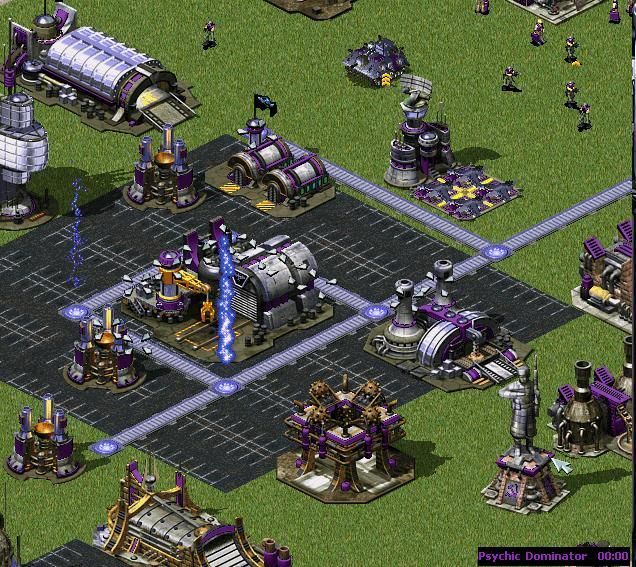
lightning storm đây
Mã:
The next step is creating the section for the new SuperWeapon.
Go to the place where the other SuperWeapons are defined (you don't have to, just to keep it well ordered) and add the following section: 

[NewLSSpecial]
;Basic Stuffs
UIName=Name:NewLightningStorm
Name=Lightning Storm Clone
IsPowered=true
RechargeTime=10
Type=LightningStorm    ;LightningStorm  is the type for Lightning Storm  clones
Action=NewLS           ;check out the Adding custom Actions page to find out more about this
SidebarImage=NEWLSICON
ShowTimer=yes
DisableableFromShell=yes
Range=7
LineMultiplier=2
AIDefendAgainst=yes
;New Tags
Warhead=IonWH    	 ;Warhead used by lightning storm strike
LStormPrintText=yes
LStormText=TXT_LIGHTNING_STORM 
LStormText2=TXT_LIGHTNING_STORM_APPROACHING
LStormDeferment=250      ;Number of frames between announcement of strike and its commencement
LStormDamage=250         ;Damage done by lightning strike
LStormDuration=180       ;Default lightning storm duration in frames
LStormHitDelay=10        ;How often the direct target gets hit in frames
LStormScatterDelay=5     ;Frame delay between random bolts (decreasing this might hit the performance
LStormCellSpread=10      ;How far away can random bolts go (n by n square)
LStormSeparation=3       ;Distance in cells between clouds/bolts
LStormSound=WeatherIntro                ;Sound when weather controller storm starts.
LStormSounds=WeatherStrike              ;Sounds for various lightning bolts.
LStormClouds=WCCLOUD1,WCCLOUD2,WCCLOUD3	;The clouds used to show
LStormBolts=WCLBOLT1,WCLBOLT2,WCLBOLT3	;The lightning bolts used to show
LStormBoltExplosion=EXPLOLB		;Bolt explosion
;*********************
LStormDisableUnits=yes ; ONLY FOR TESTING !!!
;*********************
;Light stuff
LightRed=100 ;amount of red
LightGreen=100 ;amount of green
LightBlue=100 ;amount of blue
LightAmbient=100
LightGround=0 
LightLevel=3
Lighting=yes 
I recommend to change Msg:LightningStormActive string also, because you can have only ONE LightningStorm SW active at the same time.
You can change this string to "Activate error happened. Wait please" for example.Or use another SW type, like Fire or EMPulse.

nukeSpecial
Mã:
[NewNukeSpecial]
;Basic Stuff
UIName=Name:NewNuke
Name=Nuke Test
IsPowered=true
RechargeTime=10
Type=MultiMissile 
Action=NewNM          ;check out the Adding custom Actions page to find out more about this
WeaponType=NukeCarrier
SidebarImage=NEWNUKEICON
ShowTimer=no
DisableableFromShell=yes
Range=7
LineMultiplier=2
;New Tags
ActivateSound=NukeSiren            ;Activating sound
Warhead=NUKE          		   ;Damaging warhead
NukeTakeOff=NUKETO                 ;Taking off anim
NukeDamage=1000                    ;Damage points when nuclear bomb explodes (regardless of source) )
NukeFirstAnim=NUKEBALL             ;The anim played before the explosion itself
NukePayload=NukePayload            ;Damaging weapon
NukePsiWarning=PSIWARN             ;PsiWarn animation
 
Chỉnh sửa cuối:
Titan, Code mouse cursor của Action NuclearStorm là gì, sửa cái NuclaerStorm thành NuclearStorm là dc, nhưng trong mouse cursor k có nên X_X (secret nuclear missile silo, nukespecial1, nightmare 2)
 
MouseCursors thì coppy mấy số sau dấu bằng vào tên mới là đc thôi à :D
NuclearStorm=78,9,4,516,-1,12345,12345
 
Tối qua mình cũng làm thử cái cột phát hiện tàng hình thì k được, thế mới chán chứ :(
Lighting storm đó trông code thấy hơi rối nhỉ?

Mà titan biết làm Ion Storm không?
Như cái ion storm trong này nè[video=youtube;OQ-674Nmma0]http://www.youtube.com/watch?v=OQ-674Nmma0[/video]
 
Chỉnh sửa cuối:
Co ai biet may dong code nay co y nghja gj ko? Gjup mjnh voj!!
RadarInvisible=no
Carryall=yes
Landable=yes
MoveToshroud=no
PitchSpeed=1.1
PitchAngle=0
JumpjetSpeed=30
JumpjetClimb=35
JumpjetCrash=35
JumpjetAccel=10
JumpjetTurnRate=5
JumpjetHeigth=800
JumpjetWobbles=.01
JumpjetDeviation=1
JumpjetNoWobbles=yes
Crashable=yes
Soylent=1400
 
=)) Đã tạo được ParaDrop Tank trong Ares rồi !!!

Cách tạo TankDropSpecial trong Ares (thả tank theo side , chưa theo country vì chưa có ARES 0.2 )

Mở Rulesmd.ini lên:


_Trong phần : [SuperWeaponTypes]
....
XX=TankDropSpecial

_Trong phần [Nod] hoặc [GDI] (Muốn cho side nào thả dù thì thêm các dòng sau vào side đó)

...
ParaDrop.Types=...(Danh sách từ khóa của loại tank cần thả)
ParaDrop.Num=...(Danh sách số lượng mỗi loại tương ứng)


_Thêm SuperWeapon=TankDropSpecial vào công trình điều kiện

_Bước cuối cùng , tạo SuperWeapon:

[TankDropSpecial]
UIName=NOSTR:Tank Drop
Name=Reinforcements Tank Drop

IsPowered=true
RechargeTime=...(Tùy ý , nên cho =7)
Type=ParaDrop
Action=Custom
SidebarImage=...(icon Cameo của SW)
ShowTimer=no
DisableableFromShell=no
ParaDrop.Aircraft=PDPLANE
ParaDrop.Count=1
Cursor.Frame=259
Cursor.Count=10
Cursor.Interval=5
Cursor.MiniFrame=516
Cursor.MiniCount=1
Cursor.MiniInterval=12
Cursor.HotSpot=Center,Middle
NoCursor.Frame=384
NoCursor.Count=1
NoCursor.Interval=12
NoCursor.MiniFrame=52
NoCursor.MiniCount=1
NoCursor.MiniInterval=12
NoCursor.HotSpot=Center,Middle

_1 Phần quan trọng nữa là làm cho AI biết cách sử dụng SW này qua câu lệnh SW.AITargetting=... nhưng trong bản ARES 0.1 , chức năng này chưa có hiệu lực.

Mình sẽ cố gắng tìm hiểu cách nào để Drop tank theo country và sẽ post hướng dẫn sớm nhất có thể :D
 
Ion storm trong clip giống như lightning storm vậy thôi, nó chỉ thay hình ảnh hiển thị thôi. Thay vì là tia sét , nó thay bằng Ion
thay mấy cái này:
LStormClouds=WCCLOUD1,WCCLOUD2,WCCLOUD3 ;The clouds used to show
LStormBolts=WCLBOLT1,WCLBOLT2,WCLBOLT3 ;The lightning bolts used to show
LStormBoltExplosion=EXPLOLB ;Bolt explosion

---------- Post added at 19:56 ---------- Previous post was at 18:43 ----------

đây là code tạo Fire Storm đây, vừa test xong \m/ I'm Crazyyyyyyyyyyyyyyyyyyy
Mã:
[GAFIRE]
UIName=Name:GAFIRE
Name=Fire Storm Generator
Strength=800
Armor=heavy
TechLevel=10
Prerequisite=GATECH
Adjacent=2
Sight=5
Owner=British,French,Germans,Americans,Alliance
AIBasePlanningSide=0
Cost=200
Points=30
Power=-200
Crewed=yes
Capturable=true
Explosion=TWLT070,S_BANG48,S_BRNL58,S_CLSN58,S_TUMU60
MaxDebris=9
SuperWeapon=FirestormSpecial
MaxDebris=15
MinDebris=5
DebrisAnims=DBRIS1LG,DBRIS1SM,DBRIS4LG,DBRIS4SM,DBRIS5LG,DBRIS5SM
DamageParticleSystems=SmallGreySSys,BigGreySmokeSys
DamageSmokeOffset=410, 100, 165

[GAFSDF]
UIName=Name:GAFSDF
Name=Firestorm Wall Section
BuildCat=Combat
Strength=300
Prerequisite=GAFIRE
Armor=concrete
TechLevel=10
Repairable=false
Sight=2
Capturable=false
Cost=50
Points=5
;Wall=yes
Power=-2
Selectable=no
Crewed=no
Explosion=TWLT070,S_BANG48,S_BRNL58,S_CLSN58,S_TUMU60
ThreatPosed=20	; This value MUST be 0 for all building addons
DamageParticleSystems=SparkSys,LGSparkSys
IsBase=no
BaseNormal=no
TogglePower=no
Insignificant=yes
Owner=British,French,Germans,Americans,Alliance,Russians,Confederation,Africans,Arabs,YuriCo

untry
AIBasePlanningSide=0 ;gs 0 for Good, 1 for Evil
GuardRange=5
Firestorm.Wall=yes

Artmd.ini
Mã:
;Fire Storm Wall
[GAFSDF]
Image=GAFSDF
Remapable=yes
Foundation=1x1
NormalZAdjust=-10
Cameo=FSPICON
ToOverlay=GAFSDF
DamageLevels=3
NewTheater=yes

[GAFSDF_A]
Image=GAFSDF_A
;Remapable=yes
NewTheater=yes
LoopStart=0
LoopEnd=4
LoopCount=-1
Rate=250

[FSIDLE]
Image=FSIDLE
LoopStart=0
LoopEnd=20
Rate=800
ShouldUseCellDrawer=false
Report=FIRSTRM1

[FSAIR]
Image=FSAIR
LoopStart=0
LoopEnd=20
Rate=800
Report=FIRSTRM1

[FSGRND]
Image=FSGRND
LoopStart=0
LoopEnd=20
Rate=800
Report=FIRSTRM1
YDrawOffset=-20

[GAFIRE]
Cameo=GAFIREICON
Remapable=yes
Foundation=3x2
Buildup=GAFIREMK
DemandLoadBuildup=true
FreeBuildup=true
ActiveAnim=GAFIRE_C
ActiveAnimZAdjust=-100
ActiveAnimTwo=GAFIRE_B
ActiveAnimTwoZAdjust=-100
Height=3
NewTheater=no
CanHideThings=True
CanBeHidden=False
OccupyHeight=3
AddOccupy1=-2,-1
DamageFireOffset0=25,37
DamageFireOffset1=-26,25

[GAFIRE_B]
Image=GAFIRE_B
Normalized=yes
LoopStart=0
LoopEnd=15
LoopCount=-1
Rate=500
Surface=yes
DetailLevel=2

[GAFIRE_C]
Image=GAFIRE_C
Normalized=yes
LoopStart=0
LoopEnd=5
LoopCount=-1
Rate=220
Surface=yes

[GAFIREMK]
Normalized=yes
Surface=yes
Rate=220
NewTheater=no
Super Weapon
Mã:
[FirestormSpecial]
UIName=FRST:FireStorm
Name=Firestorm Defense
IsPowered=true
RechargeVoice=00-I162
ChargingVoice=
ImpatientVoice=
SuspendVoice=
RechargeTime=3
Type=Firestorm
SidebarImage=FSTDICON
UseChargeDrain=true

nhớ khai báo đầy đủ trên trong [Animations]
xxx=GAFSDF_A
xxx=GAFIRE_A
xxx=GAFIRE_B
xxx=GAFIRE_C
xxx=FSIDLE
xxx=FSAIR
xxx=FSGRND
và [BuildingTypes]

xxx=GAFSDF
xxx=GAFIRE

Link down: http://www.mediafire.com/?2knpk091f7drjbh

FireStorm.jpg


[video=youtube_share;sTo7OU2KuV0]http://youtu.be/sTo7OU2KuV0[/video]


P/S: có 1 vấn đề là ko bán đc Fire Storm wall :(
 
Chỉnh sửa cuối:
Không bán được do thiếu Buildup phải không anh ? :D . Em có cách này : đó là anh copy nguyên cái file .shp của building nào không có buildup rồi đặt lại tên cho nó thành cái bất kì , sau đó trong artmd.ini , anh cho thêm cái dòng Buildup=...(Cái tên file .shp mới tạo đó) là được. Em đã làm cho rất nhiều thứ có thể bản được , kể cả các công trình dân sự. :)) Có điều cách này là bất đắc dĩ vì khi bán , nó sẽ mất ngay chứ không diễn ra từ từ (Vì vốn dĩ nó đâu có file buildup :P)
 
Trong TS thì Firestorm wall section k bán dc, mà Titan giỏi quá, mình thì laser fence post còn làm k dc mới nói :((

@maikhoamkv:
Landable là dùng cho máy bay, nếu yes là có thể đáp xuống
Carryall là dùng cho máy bay, nếu yes thì nó có thể mang 1 chiếc tank trên người và bạn cho nó đi đâu thì tuỳ
RadarInvisible thì mình k biết chắc ^^ hình như là radar k phát hiện ra mình (cái này titan nói ở trang đầu)
Còn lại thì... mình... pó tay
 
Em có cái này dành cho anh maikhoamkv :X:X:X , Em đã tạo lại cái loading screen của Nhật Bản và Bắc Triều Tiên cho anh rồi đó , tình yêu ạ :X:X:X
 

Attachments

@earthman: cái đấy là hiệu ứng của đạn do con kirov airship MK2 nó bắn đấy

Titan, k cần phải thêm xxxx=GAFSDF_A trong [Animation] nữa vì 209=GAFSDF_A (có sẳn)

Hic, cái firestorm wall sao mình thêm dòng GuardRange=5 mà vẫn phải xây từng cái nhỉ, đã thế khi firestorm defense active thì cái firestorm wall section k có tác dụng :((
Titan xem lại mấy code đó giúp mình, Firestorm wall là một thứ tuyệt vời
 
Chỉnh sửa cuối:
@earthman: hình hiệu ứng là ICERING1, tìm trong bản mod
@apoc: coi cái wall=yes thì xóa đi, mà cái đó xài trên Ares nha ;))
 
@Natit & Apoc. Thanks all ^^

@Natit : Anh còn nhớ cách tạo nhà sản sinh vàng giống trong bản M.O 2.0 không ? Ý em là làm thế nào để nó hoạt động theo cách của cái Drilling Platform trong MO chứ không phải là tạo cho nó một vũ khí như hướng dẫn ở Page 1. Thanks anh nhiều nhé. :x

---------- Post added at 18:12 ---------- Previous post was at 18:01 ----------

(Ý quên : Em muốn có cái nhà đào vàng hoạt động theo cách đó trong ARES)
 
đã làm đc cái code của grinder :> Yuri giờ sao chép công nghệ thoải mái :> mà chắc cái tạo vàng đó ko hoạt động đc trong Ares :(
 
Chỉnh sửa cuối:
wall=yes để sau dấu ; rồi mà
Ngán ơi là ngán, dùng XCC Mixer định dạng ảnh k dc, tìm hoài k thấy chương trình photoshop gốc để down, chỉ toàn là cái gì đâu không à
 
@apoc...:) sao , muốn định dạng cái gì nào? cần photoshop để làm gì ? Chị giúp cho :)
 
Em mới add 2 quốc gia mới và chưa có hình quốc kỳ. Hình load thì em làm dc rồi nhưng quốc kỳ thì cho vào file *.mix (định dạng hình là *.png) rồi xài XCC mixer mở lên rồi chọn copy as PCX thì nó đứng luôn chương trình :(

Còn nữa, Titan chỉ mình cách xài HVA Builder, vxlse_III đi, lâu lâu muốn tạo cho mình cái hình tank mới mà... :(
Còn làm sao để tạo một file căn nhà vậy? Biết là phải định dạng *.shp nhưng làm sao để tạo những file đó???
 
Chỉnh sửa cuối:
Em ngốc lắm ...hihi . Chị bảo , cái Xcc đấy nó chỉ đứng 1 lúc là nó tạo được ngay. Em cứ chọn Copy as PCX rồi mở trò Yuri lên chơi , được 15s thì out ra là nó chuyển xong. Mà em thích quốc kì nào ,chị cho cái ấy :x
 
dùng PTS định dạng pcx là đc. dùng XCC hay lỗi lắm

tính lập topic dịch tài liệu Ares :">
 
Chỉnh sửa cuối:
Back
Top