Hey
Long story short: I made small app to upload .psspac packages on vita and run them without PSSStudio. (.psspac are made when you hit Build option in PSSStudio)
Long story: While browsing PSSStudio folders I found two unmanaged .dlls (pss_device32.dll,pss_device64.dll).
Quick peak into MonoDevelop.Pss.dll with .net reflector provided me example code, how to use this two files to upload packages,run them etc...
I've extracted some code and put together this small tool. Maybe someone will make better use from this.
App and source code is in the attachment. Tool is very simple so anyone knowing C# can easily add more stuff.
How use this:
- Connect Vita to PC
- Run PS Suite Dev on Vita
- Run my app
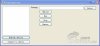
- Press "Refresh Devices" - select your Vita from list and click Connect to Device.
- Now select package you want upload to vita (example package is in "sample" folder)
- Now you can upload it to console, run it (this is crashing for now right after app starts on Vita ), and remove it from console, stop not working right now.
After uploads complete your new app will not be visible in the list on console(dunno why - if you restart PS Suite Dev it will be there)
.





 . Không video, không nhạc , chỉ có game mua trên PSN lol.