

Navigation
Install the app
How to install the app on iOS
Follow along with the video below to see how to install our site as a web app on your home screen.
Note: This feature may not be available in some browsers.
Thêm tùy chọn
Style variation
You are using an out of date browser. It may not display this or other websites correctly.
You should upgrade or use an alternative browser.
You should upgrade or use an alternative browser.
[-V-] Victory - Clan Việt tại SEA server
- Thread starter kien76
- Ngày gửi
- Status
- Không mở trả lời sau này.

datngo
Fire in the hole!
- 10/1/11
- 2,920
- 3
xuống ăn tối giờ lên chơi lại nhưng không vào đc game, cứ ở phần sync equipment hoài, để 10 phút vẫn chưa vào đc, reset mạng, pc, remove các mods vẫn thế, không hiểu cái gì đang xảy ra nữa.
Ko cần cài lại, làm như sau vào dc:
Vào xóa hoặc Cut 3 cái fila trong thu mục custom_data di la ok
\\AppData\Roaming\wargaming.net\WorldOfTanks\custom_data


 . SEA ban IP VN rồiiiiiiiiiiiiiiiiiiiiiiiiiiiiiiiiii

CAAV
T.E.T.Я.I.S
- 27/3/11
- 659
- 3
qui định mới cho ae ..
onl từ8h tối trở đi là phải vào RC
Vào RC thì dễ nhưng nghe chừng vào game hơi khó hic hic...
CAAV
T.E.T.Я.I.S
- 27/3/11
- 659
- 3
đọc lại các bài bên trên đi ae vô bt rồi
Đến bài cuối cùng vẫn là tin ko vui hic hic
(Hế hế trêu anh tí em đang Root lại con Kindle Fire HD, nãy vào không được lại lôi máy ra phá
 )
)
- 9/11/08
- 764
- 13
^ y chang bác luôn, thôi đợi mai vậy 

 ko vào đc

The Iron Eagle
Sam Fisher, Third Echelon Agent
- 4/8/06
- 15,245
- 331
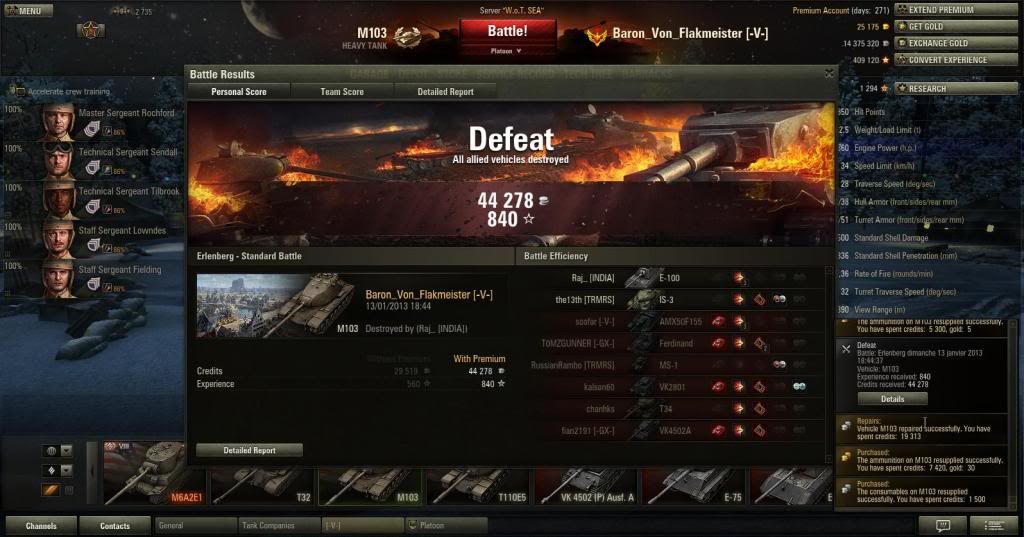
thụt két lão Kiên tiếp nào, cuối tuần nhé 

datngo
Fire in the hole!
- 10/1/11
- 2,920
- 3
thụt két lão Kiên tiếp nào, cuối tuần nhé
[spoil][/spoil]
Chú him sắt nhà mình vẫn mua đạn pre = gold kìa


fasteiner
C O N T R A
- 12/10/09
- 1,579
- 8
Sign đỏ choe choét vì ARL V39. Ông kien bảo bắn con đấy hay lắm, hơn 50 trận là quahóa ra hắn ko chịu dc khổ xài free exp, nhẹ nhàng cứ phải >100 trận
Nhưng mà trừ những trận team quá thọt hay bị TK thì bắn củ khoai cắm tăm đấy cũng dc
Con ARL hay thật mà anh.
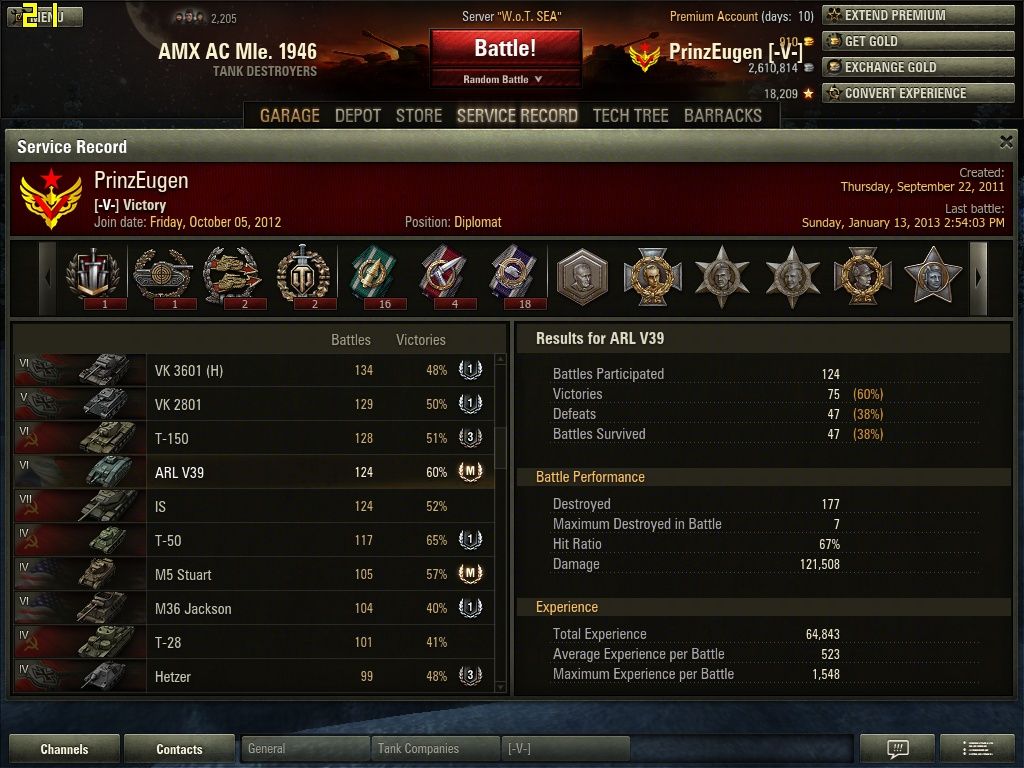
Em no pre gần nửa số trận, k equip tăng tải để cầm súng 105 từ con S-35CA.
Chỉnh sửa cuối:


Jota
Dragon Quest
- 21/3/12
- 1,435
- 9
Các bạn bị lỗi sync equipment liên hệ và cung cấp thông tin thêm cho support nha
8/1 cũng bị, hỏi support nó nhờ cung cấp 1 số thông tin để tìm nguyên nhân chính xác (hiện tại chỉ restart sever để giải quyết tạm thời)- chưa kịp làm gì thì vô lại đc
Ai còn bị thì làm theo các bước sau, rồi gửi cho nó.
Trích phần support gửi mình:
Lelouch Britain 10 January 2013 07:38
Dear Commander,
Thank you for your concerns. We would like to apologize for the inconveniences occurred.
We would like to request for your full cooperation to assist us in resolving the issue at hand by providing us the test result from your side which is the PingPlotter and pathping results. Please make sure to run the PingPlotter result for 30 minutes or more and save it in a .pp2 file format and zip it into rar file and attach to us.
Please allow us to show your the following steps for pingplotter:
1. Close all the applications, including torrents, DC-clients, Skype, ICQ, Browser (IE, Mozilla Firefox, Opera), Mail client and etc. It can easily damage the results and handicap issue resolving.
2. Please install the following program on your computer: http://www.pingplotter.com/downloads/pngplt_std.exe
3. Launch the program, and maximize the dialog window.
4. Type login.worldoftanks-sea.com in the field "Address to Trace" (upper left corner).
5. Set 1 second in the field "Trace Interval".
6. Press the "Trace" button (lower left corner) or the "Enter" button.
7. Now click the right mouse on each figure one by one in the upper window (green or yellow background) and select "Show this Timeline Graph" (If there is no tick opposite it - v !).
8. As the result, there is a black band under each figure in the column and the number of diagrams should be equal to the highest number in the column.
9. To set up the time scale on the diagrams (in the lower part of the window) it's required to click the right mouse and in the opened menu select the time scale you need.
10. Run the program at lease 30 minutes and save the results in the pp2-file. (In File, "Save Sample Set") and attach it to your reply.
And please, follow the instructions to get pathping result:
- click "Start"
- select and press "Run"
- type "cmd" and press "OK"
- type "pathping login.worldoftanks-sea.com" and press "Enter"
- after you have performed all these actions, please, wait until the tracking is over
- click right mouse button and choose "Select all"
- copy this information to .txt file and attach it to your letter
Note, that it usually takes 10 to 15 minutes to run the test. Please, notify us of the outcome.
Best Regards,
Lelouch
Wargaming Support Service
---------------------------------
Nhìn hơi dài, nhưng mọi người cố gắng làm, để nó giải quyết triệt để, ko vài ngày lại bị. (ko chơi đc thì chắc rảnh, làm đi nha )
)
8/1 cũng bị, hỏi support nó nhờ cung cấp 1 số thông tin để tìm nguyên nhân chính xác (hiện tại chỉ restart sever để giải quyết tạm thời)- chưa kịp làm gì thì vô lại đc
Ai còn bị thì làm theo các bước sau, rồi gửi cho nó.
Trích phần support gửi mình:
Lelouch Britain 10 January 2013 07:38
Dear Commander,
Thank you for your concerns. We would like to apologize for the inconveniences occurred.
We would like to request for your full cooperation to assist us in resolving the issue at hand by providing us the test result from your side which is the PingPlotter and pathping results. Please make sure to run the PingPlotter result for 30 minutes or more and save it in a .pp2 file format and zip it into rar file and attach to us.
Please allow us to show your the following steps for pingplotter:
1. Close all the applications, including torrents, DC-clients, Skype, ICQ, Browser (IE, Mozilla Firefox, Opera), Mail client and etc. It can easily damage the results and handicap issue resolving.
2. Please install the following program on your computer: http://www.pingplotter.com/downloads/pngplt_std.exe
3. Launch the program, and maximize the dialog window.
4. Type login.worldoftanks-sea.com in the field "Address to Trace" (upper left corner).
5. Set 1 second in the field "Trace Interval".
6. Press the "Trace" button (lower left corner) or the "Enter" button.
7. Now click the right mouse on each figure one by one in the upper window (green or yellow background) and select "Show this Timeline Graph" (If there is no tick opposite it - v !).
8. As the result, there is a black band under each figure in the column and the number of diagrams should be equal to the highest number in the column.
9. To set up the time scale on the diagrams (in the lower part of the window) it's required to click the right mouse and in the opened menu select the time scale you need.
10. Run the program at lease 30 minutes and save the results in the pp2-file. (In File, "Save Sample Set") and attach it to your reply.
And please, follow the instructions to get pathping result:
- click "Start"
- select and press "Run"
- type "cmd" and press "OK"
- type "pathping login.worldoftanks-sea.com" and press "Enter"
- after you have performed all these actions, please, wait until the tracking is over
- click right mouse button and choose "Select all"
- copy this information to .txt file and attach it to your letter
Note, that it usually takes 10 to 15 minutes to run the test. Please, notify us of the outcome.
Best Regards,
Lelouch
Wargaming Support Service
---------------------------------
Nhìn hơi dài, nhưng mọi người cố gắng làm, để nó giải quyết triệt để, ko vài ngày lại bị. (ko chơi đc thì chắc rảnh, làm đi nha
)
Chỉnh sửa cuối:
- Status
- Không mở trả lời sau này.
Similar threads
- Trả lời
- 0
- Đọc
- 265

- Trả lời
- 0
- Đọc
- 263
- Trả lời
- 0
- Đọc
- 269

- Trả lời
- 0
- Đọc
- 983